
Rhagymadrodd
The Festool Cordless VECTURO Oscillating Multi-Tool is designed for versatile cutting, sanding, and scraping applications. This manual provides essential information for the safe and efficient operation, maintenance, and care of your tool.
The VECTURO OSC 18 HPC 4,0 EI-Set features a StarlockMax® holding system for quick blade changes, a brushless EC-TEC motor for durability, and vibration isolation for user comfort. It operates on an 18V lithium-ion battery system.
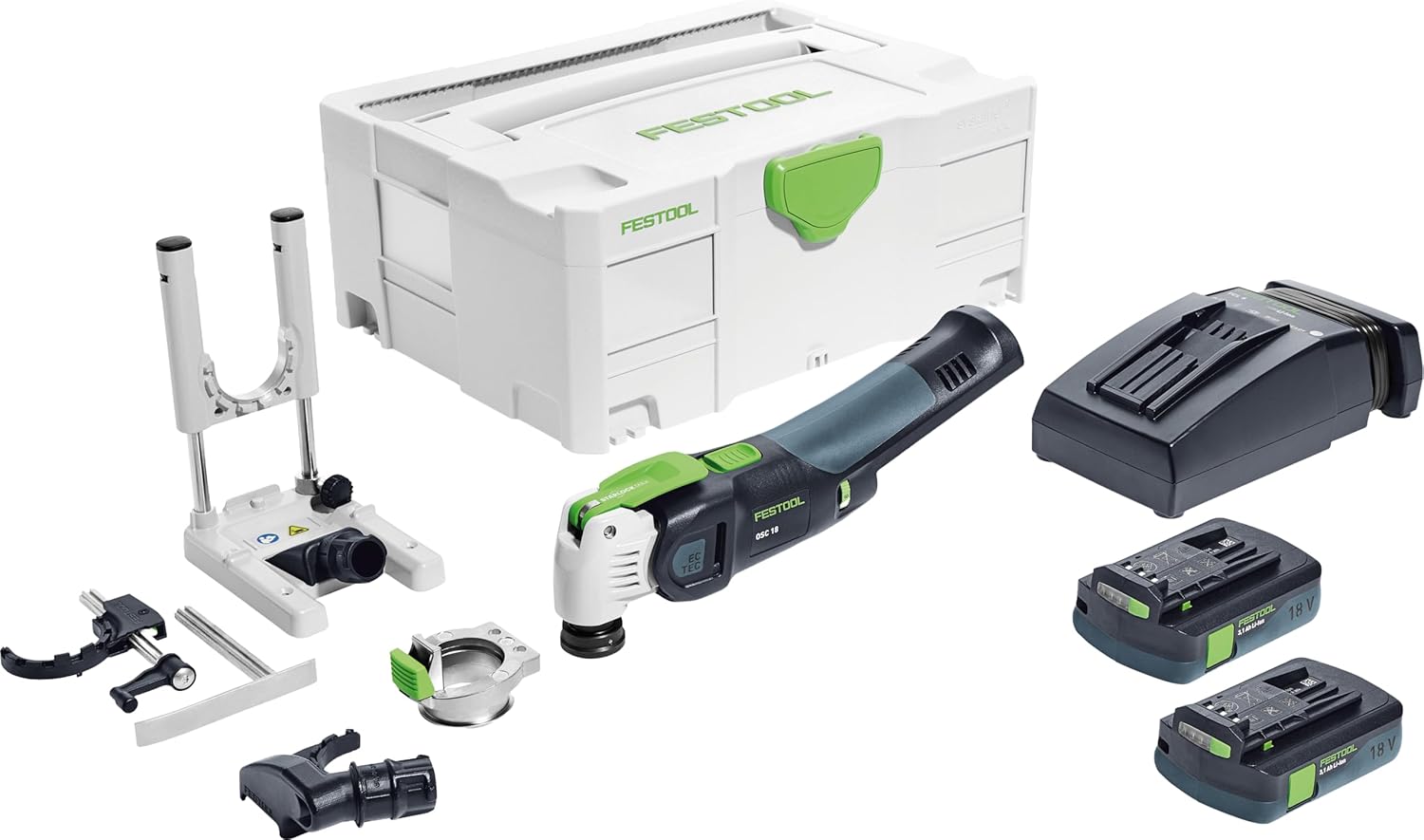
Ffigur 1: The Festool VECTURO OSC 18 HPC 4,0 EI-Set, including the multi-tool, two 18V battery packs, a rapid charger, various accessories, and a Systainer SYS3 M 187 for storage and transport.
Gwybodaeth Diogelwch
Always observe general power tool safety guidelines. Read all safety warnings, instructions, illustrations, and specifications provided with this power tool. Failure to follow all instructions listed below may result in electric shock, fire, and/or serious injury.
- Gwisgwch offer amddiffynnol personol (PPE) priodol fel sbectol ddiogelwch, amddiffyniad clyw a menig.
- Ensure the workpiece is securely fastened before operation.
- Keep hands and body parts away from the oscillating blade during operation.
- Datgysylltwch y pecyn batri cyn gwneud unrhyw addasiadau, newid ategolion, neu storio'r offeryn.
- Use only Festool-approved accessories and replacement parts.
Cydrannau wedi'u Cynnwys
The Festool VECTURO OSC 18 HPC 4,0 EI-Set includes the following items:
- Vecturo Multi-Tool
- Two BP 18 Li 4.0 Ah HPC-ASI Battery Packs
- TCL 6 Rapid Charger
- OSC-A Adapter
- OSC-AH Position Aid
- OSC-AV Dust Extraction Device
- OSC-TA Depth Stop
- USB 78/32/Bi/OSC Universal Saw Blade
- USB 50/35/Bi/OSC Universal Saw Blade
- HSB 100/Bi/OSC Wood Saw Blade
- Systainer SYS3 M 187
Gosod
1. Gwefru a Gosod Batri
- Insert the battery pack into the TCL 6 Rapid Charger. The charger's indicator light will show the charging status.
- Ar ôl ei wefru'n llawn, tynnwch y batri o'r gwefrydd.
- Align the charged battery pack with the battery slot on the VECTURO Multi-Tool and slide it in until it clicks securely into place.
2. Blade Installation (StarlockMax System)
The VECTURO features a keyless StarlockMax® quick-change system for fast and easy blade replacement.
- Gwnewch yn siŵr bod y batri wedi'i dynnu o'r offeryn.
- Press the green lever on the tool head to release the blade holder.
- Align the desired StarlockMax blade with the holder and press it firmly until it clicks into place.
- Verify the blade is securely attached before use.
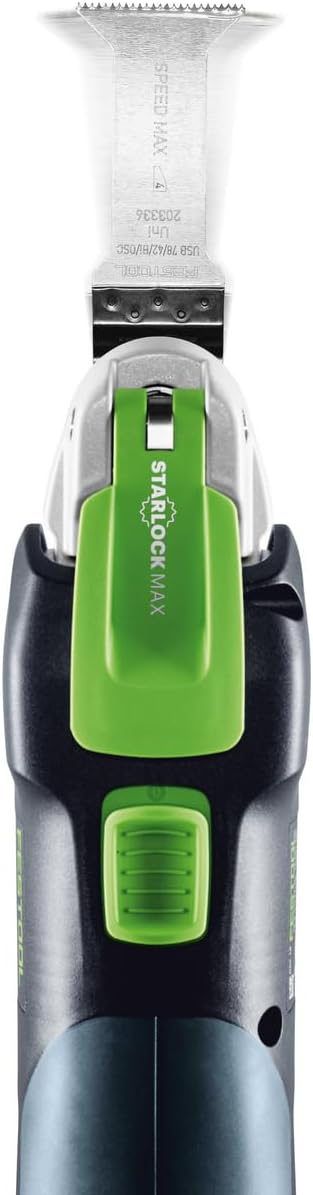
Ffigur 2: Brig view of the tool demonstrating the StarlockMax blade attachment mechanism.
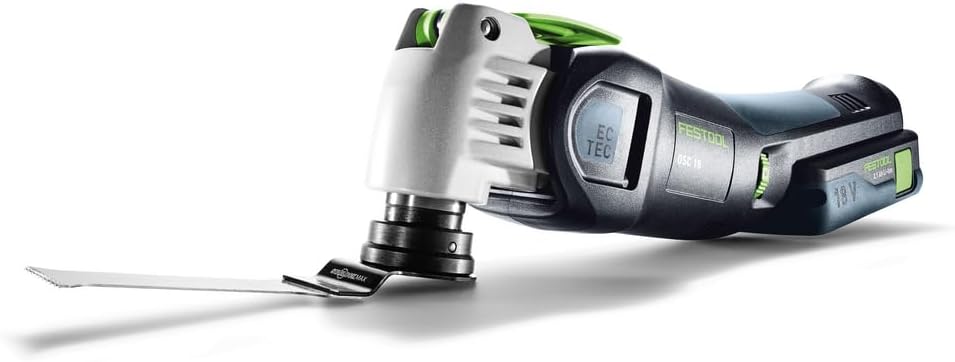
Ffigur 3: The VECTURO Multi-Tool with a saw blade securely installed.
3. Accessory Attachment (Dust Extraction, Depth Stop, Position Aid)
Attach optional accessories as needed for specific applications.
- OSC-AV Dust Extraction Device: Slide the dust extraction device onto the tool head until it locks into place. Connect a compatible dust extractor hose for dust-free operation.
- OSC-TA Depth Stop: Attach the depth stop for controlled plunge cuts. Adjust the depth setting according to your requirements.
- OSC-AH Position Aid: Use the position aid for precise guidance during cuts, especially for delicate or intricate work.
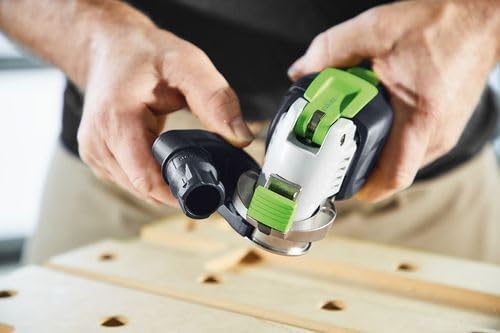
Ffigur 4: Attaching the OSC-AV Dust Extraction Device to the VECTURO Multi-Tool.
Cyfarwyddiadau Gweithredu
1. Troi ymlaen/diffodd a Rheoli Cyflymder
- To turn the tool on, press the power switch.
- To turn the tool off, release the power switch.
- The brushless EC-TEC motor features variable speed control. Adjust the speed dial to match the material and application for optimal results.
2. Gwneud Toriadau
Always ensure the workpiece is stable and secured. Apply gentle, consistent pressure. The tool's vibration isolation system enhances comfort during extended use.
- Toriadau Plymio: For precise plunge cuts, use the OSC-TA Depth Stop. Position the blade over the desired cutting area and slowly lower the tool into the material.
- Torri Cyffredinol: Guide the tool along the cutting line, allowing the blade to do the work. Avoid forcing the tool, which can lead to overheating or damage.

Ffigur 5: Demonstrating a controlled plunge cut with the VECTURO Multi-Tool.

Ffigur 6: The VECTURO Multi-Tool performing a cut with the OSC-TA Depth Stop attached for accuracy.
Cynnal a chadw
1. Glanhau
- After each use, disconnect the battery and clean the tool with a dry cloth.
- Remove any dust or debris from the ventilation openings to prevent overheating.
- Periodically clean the blade holder mechanism to ensure smooth operation.
2. Amnewid Llafn
Replace blades when they become dull or damaged to maintain cutting efficiency and safety. Refer to the "Blade Installation" section for detailed steps.
3. Gofal Batri
- Storiwch becynnau batri mewn lle oer, sych i ffwrdd o olau haul uniongyrchol a thymheredd eithafol.
- Do not allow battery packs to fully discharge for extended periods. Recharge them regularly.
- If a battery pack is damaged, discontinue use and replace it with an authorized Festool battery.
Datrys problemau
This section addresses common issues you might encounter with your Festool VECTURO Multi-Tool.
| Problem | Achos Posibl | Ateb |
|---|---|---|
| Nid yw'r offeryn yn dechrau | Batri heb ei wefru neu wedi'i osod yn amhriodol. | Gwnewch yn siŵr bod y batri wedi'i wefru'n llawn ac wedi'i fewnosod yn ddiogel. |
| Perfformiad torri gwael | Dull or incorrect blade. Incorrect speed setting. | Replace blade. Select appropriate speed for the material. |
| Dirgryniad neu sŵn gormodol | Blade not properly secured. Damaged blade. | Gwiriwch osod y llafn. Amnewidiwch y llafn sydd wedi'i difrodi. |
| Offer yn gorboethi | Blocked ventilation. Overloading the tool. | Clean ventilation openings. Reduce pressure and allow tool to cool. |
If you encounter issues not listed here or if solutions do not resolve the problem, contact Festool customer support.
Manylebau
| Nodwedd | Manylyn |
|---|---|
| Brand | Ffestol |
| Rhif Model | 576590 |
| Ffynhonnell Pwer | Wedi'i Bweru â Batri |
| Cyftage | 18 folt |
| Math Batri | Ion Lithiwm (2 wedi'i gynnwys) |
| Math Modur | Brushless EC-TEC |
| Blade Holder System | StarlockMax® |
| Pwysau Eitem | 13.58 pounds (with packaging) |
| Dimensiynau Cynnyrch | 15.59 x 11.65 x 7.36 modfedd |
| Trin Deunydd | Thermoplastic Elastomers or Plastic |
| Argymhelliad Arwyneb | Wood (compatible with various materials depending on blade) |
| Lliw | Dark Gray Or Black |
Gwarant a Chefnogaeth
Gwybodaeth Gwarant
All Festool power tools, including the VECTURO OSC 18 HPC 4,0 EI-Set, come with a comprehensive 3-year wear-and-tear warranty. This warranty also includes a 2-day standard repair time ac a Gwarant boddhad 1 fis.
For detailed warranty terms and conditions, please refer to the official Festool websafle neu cysylltwch â chymorth cwsmeriaid.
Cefnogaeth i Gwsmeriaid
For technical assistance, service, or warranty claims, please contact Festool customer support through their official channels. Visit the Festool Store on Amazon neu eu swyddog websafle ar gyfer gwybodaeth cyswllt.