
1. Cynnyrch Drosview
The emotal Dual-Mic AI Noise Cancelling Bluetooth Headset is designed for clear communication and extended use, ideal for cell phone calls, driving, and business environments. It features advanced AI noise-cancelling technology, dual HD microphones, and a lightweight, ergonomic design for comfort.
Mae nodweddion allweddol yn cynnwys:
- Canslo Sŵn AI: Isolates your voice from background noise for crystal-clear conversations.
- Amser Siarad Estynedig: Up to 30 hours of HD talk time and 240 hours of standby on a 1.5-hour charge. Includes a quick charge feature for 3 hours of playtime with a 10-minute charge.
- Ultralight & Ergonomic: Weighing only 0.5oz, designed for comfortable, secure fit during long periods of use.
- Dal dŵr IPX6: Provides protection against splashes and sweat.
- System Batri Deuol: Comes with an extra battery for continuous use.

Image: The emotal Dual-Mic AI Noise Cancelling Bluetooth Headset, showcasing its sleek black design and over-ear hook.
2. Cynnwys Pecyn
Sicrhewch fod yr holl eitemau yn bresennol yn y pecyn:
- 1x emotal Bluetooth Headset
- Cebl Codi Tâl 1x USB-C
- 6x Eartips (one pair pre-installed)
- Llawlyfr Defnyddiwr 1x
- 1x Batri Ychwanegol
3. Canllaw Gosod
3.1 Codi Tâl Cychwynnol
Before first use, fully charge the headset. The headset needs to be detached from the ear hook for charging.
- Detach the main headset unit from the ear hook.
- Connect the USB-C cable to the charging port on the headset unit.
- Cysylltwch ben arall y cebl USB-C â ffynhonnell pŵer USB gydnaws (e.e., addasydd wal, porthladd USB cyfrifiadur).
- The indicator light will show charging status (refer to LED indicator section for details). A full charge takes approximately 1.5 hours.
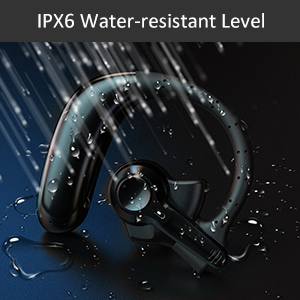
Image: Correct USB-C charging method for the headset, showing the detachable unit being charged.
3.2 Eartip Selection
For optimal sound quality and comfort, select the eartip size that best fits your ear canal. Three sizes are provided.

Image: Illustration of different eartip sizes and how to achieve a secure and comfortable fit in the ear.
3.3 Gwisgo'r Clustffon
The headset is designed for use in either the left or right ear. The main unit can be rotated and the microphone adjusted for optimal positioning.
- Rhowch y bachyn clust dros eich clust.
- Insert the eartip into your ear canal.
- Adjust the main unit by rotating it 180 degrees to switch between left and right ear wear.
- Adjust the microphone boom to point towards your mouth for clear voice pickup.
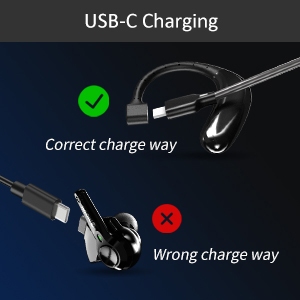
Image: Step-by-step guide on how to switch the headset for left or right ear use by rotating the main unit and adjusting the microphone.
3.4 Pâr Bluetooth
To connect your headset to a device:
- Gwnewch yn siŵr bod y clustffon wedi'i wefru a'i ddiffodd.
- Press and hold the multi-function button on the headset for 3-5 seconds until the indicator light flashes blue and red, indicating pairing mode.
- Ar eich dyfais (ffôn clyfar, tabled, gliniadur), galluogwch Bluetooth.
- Chwiliwch am "emotal UFO4-01" (or similar name) in the list of available Bluetooth devices.
- Select the headset to connect. Once connected, the indicator light will turn solid blue or flash slowly.
Nodyn: The headset cannot connect with two devices simultaneously.
4. Cyfarwyddiadau Gweithredu
4.1 Rheolaeth Sylfaenol
The headset features a single multi-function button for various operations:
- Pŵer ymlaen / i ffwrdd: Long touch for 3 seconds to power on, 5 seconds to power off.
- Cân Nesaf: Double touch the button.
- Ateb/Holi Galwad: Double touch the button.
- Cyfrol i Fyny: Long touch the button. (Note: There is no dedicated volume down or mute button on the headset itself. Volume down must be controlled via the connected device.)
- Galluogi Cynorthwyydd Llais (Siri/Cynorthwyydd Google): Triple touch the button.

Image: Visual representation of the single button controls for power, music playback, call management, volume, and voice assistant activation.
4.2 Rheoli Galwadau
The dual-mic AI noise-cancelling technology ensures clear conversations even in noisy environments.

Image: Diagram illustrating how dual-mic and AI noise cancelling technology reduce background noise for clearer calls, showing "Before" and "After" sound wave comparisons.
For business professionals and truckers, the headset provides a hands-free solution for reliable communication on the go.
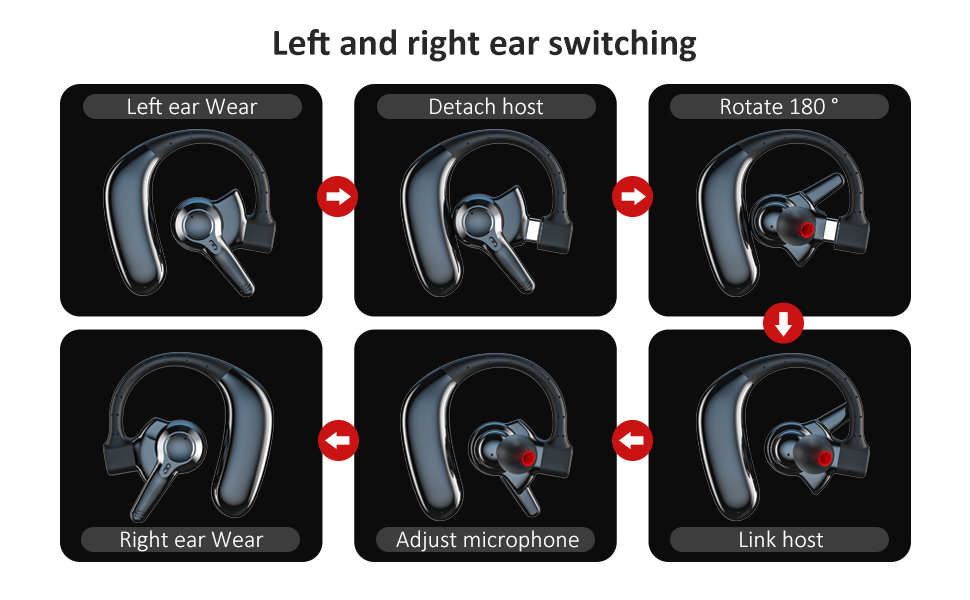
Image: A man driving a car while wearing the headset, emphasizing its hands-free functionality for calls on the road.
4.3 Rheoli Batri
The headset offers significant battery life and comes with an extra battery for extended use.

Image: Visual representation of the headset's battery life, highlighting 30 hours of HD talk time and 240 hours of standby time.
To swap batteries:
- Gently detach the current battery unit from the headset.
- Attach the fully charged spare battery to the headset.
- Charge the depleted battery using the USB-C cable for future use.
5. Cynnal a Chadw a Gofal
To ensure the longevity and optimal performance of your emotal Bluetooth Headset, follow these care instructions:
- Glanhau: Wipe the headset with a soft, dry cloth. Do not use abrasive cleaners or solvents.
- Gwrthiant Dŵr: The headset is IPX6 waterproof, meaning it is protected against powerful water jets. It can withstand sweat and light rain, but it is not designed for submersion in water.
- Storio: Storiwch y clustffon mewn lle oer, sych i ffwrdd o dymheredd eithafol a golau haul uniongyrchol.
- Gofal Batri: Avoid fully depleting the battery frequently. Charge it regularly to maintain battery health.
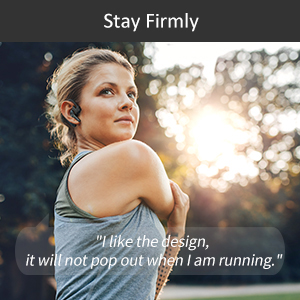
Image: Visual depicting the headset's IPX6 water resistance, showing water splashing on the device.
6. Datrys Problemau
Os byddwch chi'n cael problemau gyda'ch clustffon, rhowch gynnig ar yr atebion canlynol:
| Problem | Ateb Posibl |
|---|---|
| Headset won't power on. | Ensure the headset is fully charged. Press and hold the multi-function button for 3 seconds. |
| Methu paru â dyfais. | Ensure Bluetooth is enabled on your device and the headset is in pairing mode (flashing blue/red light). Make sure the headset is not already connected to another device. Restart both devices and try again. |
| Ansawdd sain gwael yn ystod galwadau. | Ensure the microphone is adjusted to point towards your mouth. Check for obstructions. Move closer to your connected device to avoid interference. |
| Volume is too low/high. | Adjust volume using the long touch on the multi-function button (volume up only) or directly from your connected device. |
| Mae'r clustffon yn datgysylltu'n aml. | Ensure you are within the Bluetooth range (approx. 33 feet/10 meters). Avoid strong electromagnetic interference. Re-pair the headset if necessary. |
7. manylebau
| Nodwedd | Manylyn |
|---|---|
| Enw Model | UFO4-01 |
| Technoleg Cysylltedd | Di-wifr (Bluetooth 5.0) |
| Rheoli Sŵn | Active Noise Cancellation (AI Noise Cancelling) |
| Amser Siarad | Up to 30 Hours HD Talk Time |
| Amser Wrth Gefn | Hyd at 240 awr |
| Amser Codi Tâl | Tua. 1.5 Awr |
| Lefel Gwrthsefyll Dŵr | IPX6 dal dŵr |
| Pwysau Eitem | 0.48 owns (tua 0.03 pwys) |
| Dimensiynau Cynnyrch | 2.36 x 1.96 x 1.1 modfedd |
| Dyfeisiau Cydnaws | Cellphones (iOS/Android), Windows |
| Math o Reoli | Voice Control (Siri, Google Assistant) |
| Siâp clustffon | Circle (In Ear with Over-Ear Hook) |
| Deunydd | Cyfansawdd |
| UPC | 850040753158 |
8. Gwarant a Chefnogaeth
emotal offers comprehensive customer support for your headset:
- Gwarant: Replacement within 18 months of purchase.
- Gwasanaeth Cwsmer: 24-hour customer service is available for any concerns or inquiries. Please contact us via message through your purchase platform.
- Adnoddau Ychwanegol: For further details, you may refer to the official User Guide and Safety Information PDFs available online.
For the most up-to-date support information, please visit the official emotal store or contact customer service directly.