
Rhagymadrodd
The Skullcandy Indy Evo XT are true wireless in-ear earbuds designed for a seamless audio experience. They offer extended battery life, touch controls for various functions, and integrated Tile technology for easy tracking. This manual provides essential information for setting up, operating, and maintaining your earbuds.

Image: Skullcandy Indy Evo XT earbuds shown with their charging case.
Beth Sydd yn y Bocs
Your Skullcandy Indy Evo XT package includes the following items:
- Clustffonau Di-wifr Gwir
- Achos Codi Tâl
- Ear Gels (S, M, L sizes)
- Cebl Codi Tâl USB-C
- Llawlyfr Defnyddiwr (y ddogfen hon)

Image: All components included in the Skullcandy Indy Evo XT retail package.
Gosod
1. Gwefru Eich Clustffonau
Before first use, fully charge your Indy Evo XT earbuds and charging case. The earbuds provide up to 6 hours of playback, and the charging case provides an additional 24 hours, totaling 30 hours of battery life. A rapid charge feature allows for 2 hours of play from only 10 minutes of charging.
- Rhowch y clustffonau yn y cas gwefru.
- Cysylltwch y cebl gwefru USB-C â'r cas gwefru a ffynhonnell bŵer.
- Bydd y dangosyddion LED ar y cas yn dangos statws gwefru.

Image: Earbuds placed inside the charging case, illustrating the charging process.
2. Paru gyda Dyfais Bluetooth
To connect your Indy Evo XT earbuds to your smartphone or other Bluetooth-enabled device:
- Ensure the earbuds are charged and removed from the charging case. They should automatically enter pairing mode.
- Ar eich dyfais, ewch i osodiadau Bluetooth a throwch Bluetooth ymlaen.
- Select "Indy Evo XT" from the list of available devices.
- Once connected, you will hear an audio prompt, and the earbuds' LED indicators may change.
Nodyn: If you experience issues with Bluetooth connectivity, turn off your device's Bluetooth function for a few minutes, then turn it back on and attempt to pair again.
Gweithredu Eich Clustffonau
Rheolaethau Cyffwrdd
The Indy Evo XT earbuds feature touch controls for managing audio playback, calls, and other functions. Specific actions include:
- Chwarae/Seibiant: Tap sengl ar y naill glust neu'r llall.
- Tracio Ymlaen: Tapiwch y earbud dde ddwywaith.
- Trac yn Ôl: Tapiwch y earbud chwith ddwywaith.
- Cyfrol i Fyny: Pwyswch a daliwch y glustffon dde.
- Cyfrol i Lawr: Pwyswch a daliwch y glustffon chwith.
- Ateb / Diwedd Galwad: Tap sengl ar y naill glust neu'r llall.
- Ysgogi Cynorthwyydd Llais: Tapiwch driphlyg ar y naill glustffon neu'r llall.
Moddau EQ
The earbuds offer multiple EQ modes to optimize sound for different content types. These modes can be switched directly from the earbuds:
- Modd Cerddorol
- Modd Podlediad
- Modd Ffilm
Refer to the full user manual (digital or included in box) for specific touch sequences to cycle through EQ modes.
Modd Amgylchynol
Ambient Mode allows you to hear your surroundings without removing your earbuds. This feature is useful for situational awareness.
Refer to the full user manual for instructions on how to activate and deactivate Ambient Mode.
Tile Technology
Your Indy Evo XT earbuds are equipped with Tile technology, making them easy to locate if misplaced. To use this feature:
- Download the Tile app on your smartphone.
- Follow the in-app instructions to activate and register your earbuds with Tile.
- You can then use the Tile app to track the location of your earbuds.
Cynnal a chadw
Mae cynnal a chadw priodol yn sicrhau hirhoedledd a pherfformiad gorau posibl eich clustffonau.
- Glanhau: Regularly clean the ear gels and earbud surfaces with a soft, dry cloth. Avoid using harsh chemicals or abrasive materials.
- Ear Gel Fit: Ensure the earbud tips fit snugly in your ear canals for optimal sound quality and comfort. The package includes S, M, and L ear gels to help achieve the best fit.
- Storio: Pan nad ydynt yn cael eu defnyddio, storiwch y clustffonau yn eu cas gwefru i'w hamddiffyn a'u cadw'n wefredig.
- Gwrthiant Dŵr: The earbuds are water, sweat, and dust resistant (IP55 rating). However, they are not designed for submersion in water. Avoid exposing them to excessive moisture.
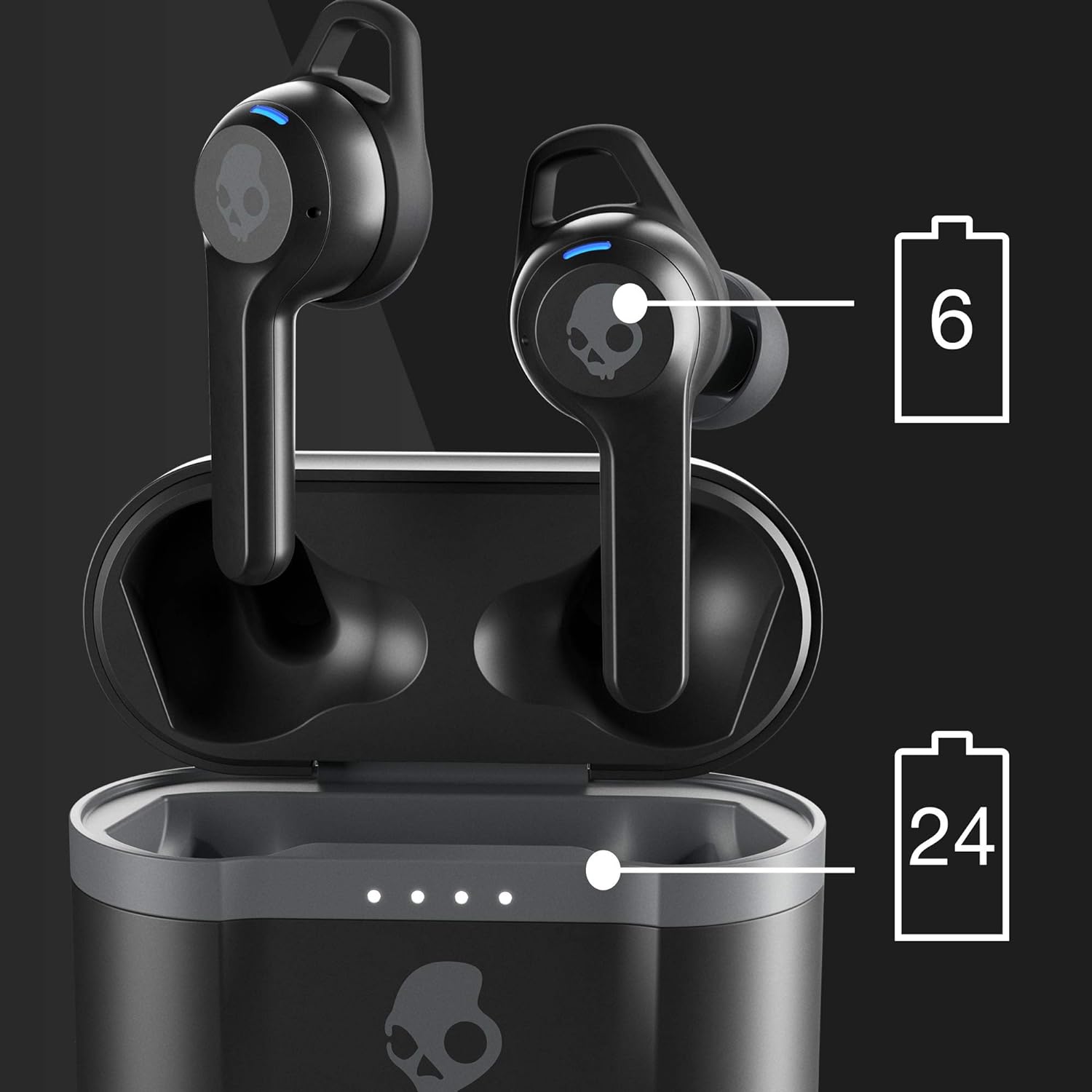
Image: Earbuds correctly positioned in an ear, highlighting the secure fit.
Datrys problemau
If you encounter issues with your Indy Evo XT earbuds, try the following solutions:
- Dim Sain neu Ansawdd Sain Gwael:
- Gwnewch yn siŵr bod y clustffonau wedi'u paru'n iawn â'ch dyfais.
- Check the earbud tip size. If the tips do not match your ear canals or the headset is not worn properly, sound quality may be affected. Try different sized ear gels for a more snug fit.
- Verify the volume level on both your device and the earbuds.
- Materion Cysylltedd:
- Diffoddwch Bluetooth eich dyfais am ychydig funudau, yna trowch ef yn ôl ymlaen a cheisiwch ailgysylltu.
- Gwnewch yn siŵr bod y clustffonau o fewn ystod Bluetooth eich dyfais.
- Os yw problemau'n parhau, ceisiwch ailosod y clustffonau (cyfeiriwch at y llawlyfr defnyddiwr llawn am gyfarwyddiadau ailosod penodol).
- Clustffonau Ddim yn Codi Tâl:
- Gwnewch yn siŵr bod y cebl gwefru wedi'i gysylltu'n ddiogel â'r cas a'r ffynhonnell bŵer.
- Gwiriwch fod y clustffonau wedi'u gosod yn gywir yn y cas gwefru.
- Verify that the charging case itself has power.
- Tile Tracking Not Working:
- Ensure the Tile app is installed and your earbuds are registered.
- Check that your phone's location services are enabled for the Tile app.
Manylebau
| Enw Model | Indy Evo XT |
| Rhif Model | S2IVW-N903 |
| Technoleg Cysylltedd | Bluetooth 5 |
| Technoleg Cyfathrebu Di-wifr | Bluetooth |
| Bywyd Batri (Clustffonau) | Hyd at 6 awr |
| Bywyd Batri (gyda Chas Gwefru) | Hyd at 30 awr i gyd |
| Tâl Cyflym | 10 minutes charge = 2 hours play |
| Lefel Gwrthsefyll Dŵr | IP55 (Water, Sweat, and Dust Resistant) |
| Rheoli Sŵn | Unigedd Sain |
| Nodweddion Arbennig | Tile Tracking, Ambient Mode, EQ Modes, Microphone, Touch Control |
| Amrediad Amrediad | 20 Hz - 20,000 Hz |
| rhwystriant | 32 Ohm |
| Pwysau Eitem | 1.8 owns |
| UPC | 810015589335 |
Gwarant a Chefnogaeth
For warranty information and customer support, please refer to the official Skullcandy websafle neu'r cerdyn gwarant sydd wedi'i gynnwys gyda'ch cynnyrch. Gallwch hefyd ymweld â'r Siop Skullcandy ar Amazon am adnoddau ychwanegol.
For further assistance, contact Skullcandy customer service directly.