
1. Rhagymadrodd
This manual provides essential information for the safe and efficient use of your Aligator A675 Senior Double SIM 2G Mobile Phone. Please read it carefully before using the device and keep it for future reference. The Aligator A675 is designed for ease of use, featuring large buttons and a clear display, making it ideal for senior users.
2. Cynnwys Pecyn
Sicrhewch fod yr holl eitemau yn bresennol yn y pecyn:
- Aligator A675 Mobile Phone
- Batri
- Gwefrydd
- Llawlyfr Defnyddiwr (y ddogfen hon)
Os oes unrhyw eitemau ar goll neu wedi'u difrodi, cysylltwch â'ch manwerthwr.
3. Dyfais Drosoddview
Familiarize yourself with the key components of your Aligator A675 phone.

Delwedd 3.1: Blaen ac yn ôl view of the Aligator A675 mobile phone. The front shows the display, keypad, and navigation buttons. The back features the speaker and camera module.
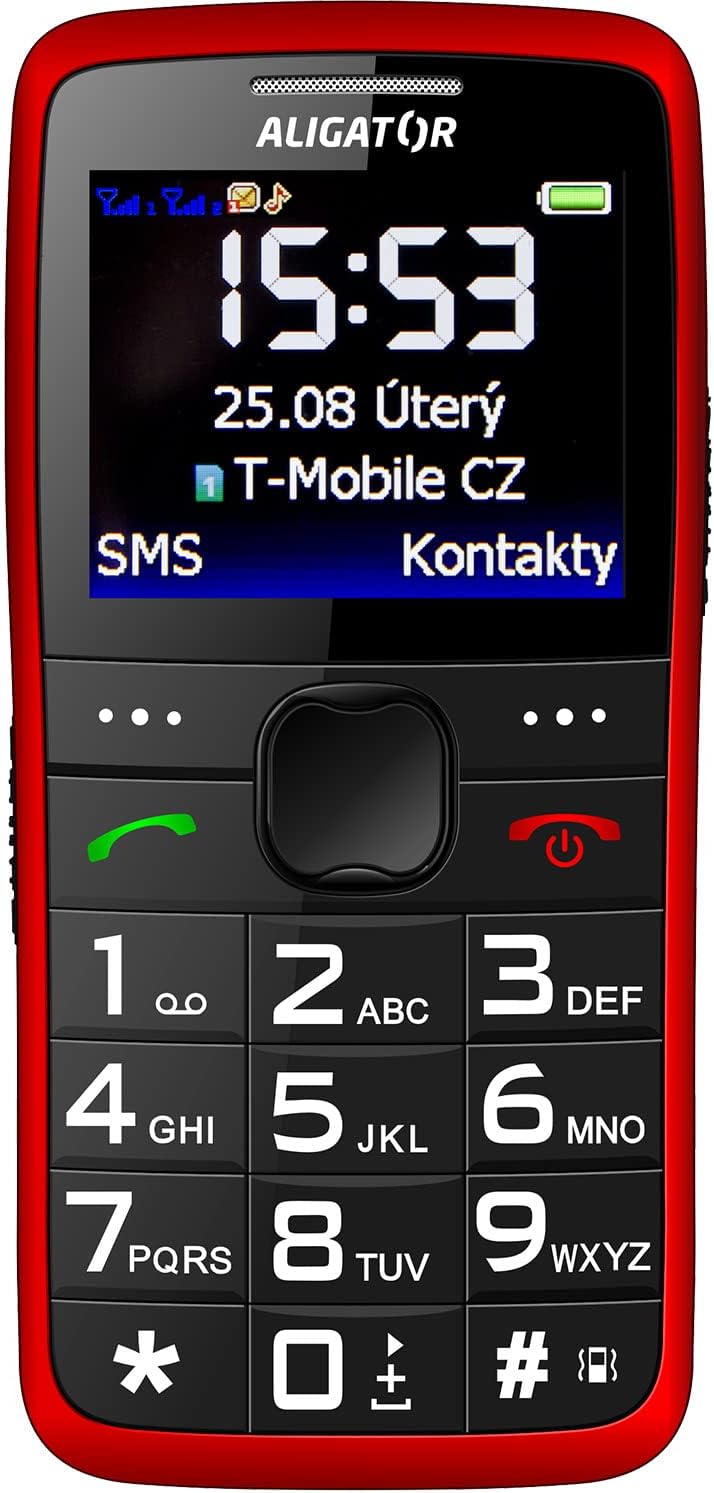
Delwedd 3.2: Blaen manwl view of the Aligator A675 mobile phone, highlighting the large display, clear numeric keypad, and dedicated call/end buttons.
3.1 Blaen View
- Arddangos: Shows time, date, network status, battery level, and menu options.
- Allwedd Llywio: Fe'i defnyddir i sgrolio trwy ddewislenni ac opsiynau.
- Botwm Galwad (Gwyrdd): Yn cychwyn galwadau ac yn ateb galwadau sy'n dod i mewn.
- Botwm Gorffen/Pŵer (Coch): Yn dod â galwadau i ben, yn dychwelyd i'r sgrin gartref, ac yn troi'r ffôn ymlaen/i ffwrdd.
- Allweddell: Numeric keys (0-9), asterisk (*), and hash (#) for dialing and text input.
3.2 Yn ôl View
- Uchelseinydd: For ringtones and hands-free calls.
- Camera: For basic photo capture.
- Botwm SOS: A dedicated button for emergency calls/SMS (refer to section 5.4 for setup).
4. Gosod
Dilynwch y camau hyn i baratoi eich ffôn ar gyfer y defnydd cyntaf.
4.1 Mewnosod Cardiau SIM
- Tynnwch glawr cefn y ffôn trwy ei agor yn ysgafn o'r hollt.
- Os yw'r batri wedi'i fewnosod, tynnwch ef allan.
- Locate the SIM card slots. The Aligator A675 supports two SIM cards (Dual SIM).
- Carefully insert your 2G GSM SIM card(s) into the designated slot(s) with the gold contacts facing down, ensuring they are correctly oriented.
- Ensure the SIM cards are securely in place.
4.2 Mewnosod y Batri
- Aliniwch gysylltiadau'r batri â'r cysylltiadau yn adran batri'r ffôn.
- Gently press the battery into place until it fits snugly.
- Replace the back cover, ensuring it clicks into position.
4.3 Gwefru'r Ffôn
- Connect the charger cable to the charging port on the phone (usually located at the bottom).
- Plygiwch y gwefrydd i mewn i allfa bŵer.
- Bydd eicon y batri ar yr arddangosfa yn dangos statws y gwefru.
- Allow the phone to charge completely before first use. This typically takes a few hours.
5. Gweithredu'r Ffôn
Basic functions and features of your Aligator A675.
5.1 Pweru Ymlaen/Diffodd
- I Bweru Ymlaen: Pwyswch a dal y End/Power Button (red button) until the screen lights up.
- I Bweru i ffwrdd: Pwyswch a dal y End/Power Button until the power-off options appear, then confirm.
5.2 Gwneud a Derbyn Galwadau
- I Wneud Galwad: Rhowch y rhif ffôn gan ddefnyddio'r bysellbad a gwasgwch y Botwm Ffoniwch (botwm gwyrdd).
- I Ateb Galwad: Gwasgwch y Botwm Ffoniwch pan fydd y ffôn yn canu.
- I Derfynu Galwad: Gwasgwch y End/Power Button.
5.3 Anfon a Derbyn Negeseuon SMS
- Navigate to the 'Messages' menu using the navigation key.
- Select 'Write Message' to compose a new SMS.
- Rhowch rif y derbynnydd neu dewiswch o blith cysylltiadau.
- Teipiwch eich neges gan ddefnyddio'r bysellbad. Pwyswch yr allwedd briodol sawl gwaith ar gyfer llythrennau gwahanol (e.e., '2' ar gyfer A, B, C).
- Dewiswch 'Anfon'.
- Incoming messages will be displayed on the screen and stored in the 'Inbox'.
5.4 Swyddogaeth SOS
The SOS function allows you to quickly contact pre-set emergency numbers.
- Gosod Rhifau SOS: Go to 'Settings' > 'SOS Settings'. Add up to 5 emergency contact numbers.
- Actifadu SOS: Pwyswch a dal y Botwm SOS on the back of the phone for a few seconds.
- The phone will automatically send an emergency SMS to the pre-set numbers and then start dialing them one by one until a call is answered.
5.5 Cysylltiadau
- Ychwanegu Cyswllt: Go to 'Contacts' > 'Add New'. Enter the name and phone number, then save.
- Chwilio am Gyswllt: Go to 'Contacts' and use the navigation key to scroll or type the first letters of the name.
6. Cynnal a Chadw a Gofal
Proper care ensures the longevity of your Aligator A675 phone.
- Glanhau: Defnyddiwch frethyn meddal, sych i lanhau wyneb y ffôn. Osgowch lanhawyr hylif neu ddeunyddiau sgraffiniol.
- Gofal Batri: Do not expose the battery to extreme temperatures. Avoid fully discharging the battery frequently.
- Storio: Storiwch y ffôn mewn lle oer, sych i ffwrdd o olau haul uniongyrchol a lleithder.
- Gwrthiant Dŵr: This phone is not water-resistant. Avoid contact with liquids.
7. Datrys Problemau
Problemau cyffredin a'u datrysiadau.
| Problem | Achos Posibl | Ateb |
|---|---|---|
| Nid yw'r ffôn yn troi ymlaen | Batri isel; Batri heb ei fewnosod yn gywir | Gwefrwch y batri; Ail-osodwch y batri yn gywir |
| Methu gwneud/derbyn galwadau | No network signal; SIM card not inserted; SIM card not activated | Move to an area with better signal; Reinsert SIM card; Contact your network provider |
| Dim sain yn ystod galwadau | Volume too low; Speaker blocked | Increase call volume; Check if speaker is obstructed |
| SOS function not working | SOS numbers not set; No network signal | Set up SOS numbers in settings; Ensure network coverage |
Os yw'r broblem yn parhau, cysylltwch â chymorth cwsmeriaid.
8. manylebau
Key technical details of the Aligator A675.
- Brand: ALIGATOR
- Model: A675
- Cludwr Di-wifr: Wedi'i ddatgloi
- Technoleg Rhwydwaith Di-wifr: GSM (2G)
- Maint y sgrin: 3 modfedd
- Mewnbwn Rhyngwyneb Dynol: Bysellbad
- Cymorth SIM: SIM deuol
9. Gwarant a Chefnogaeth
Your Aligator A675 phone is covered by a standard manufacturer's warranty. Please refer to the warranty card included in your package for specific terms and conditions, including the warranty period and coverage details.
For technical support, service, or warranty claims, please contact your retailer or the official Aligator customer service. Contact information can typically be found on the manufacturer's weby safle neu ar y pecynnu.
Cadwch eich prawf prynu (derbynneb neu anfoneb) gan y bydd ei angen ar gyfer unrhyw wasanaeth gwarant.