
BLAUX 30888
BLX Earbuds - Wireless Bluetooth 5.1 Earbuds User Manual
Model: 30888 | Brand: BLAUX
1. Rhagymadrodd
Thank you for choosing BLX Earbuds. These True Wireless Stereo (TWS) earbuds are designed to provide a seamless and high-quality audio experience with the convenience of Bluetooth 5.1 technology. This manual will guide you through the setup, operation, and maintenance of your new earbuds to ensure optimal performance and longevity.
2. Beth sydd yn y Bocs
Gwiriwch gynnwys y pecyn i sicrhau bod yr holl eitemau yn bresennol:
- BLX Wireless Earbuds (Left and Right)
- Achos Codi Tâl Di-wifr
- Cebl Codi Tâl Micro USB
- Silicone Ear Tips (Small, Medium, Large)
- Llawlyfr Defnyddiwr
3. Cynnyrch Drosview
The BLX Earbuds offer a compact and ergonomic design for comfortable, all-day wear. The included charging case provides extended battery life and convenient storage.
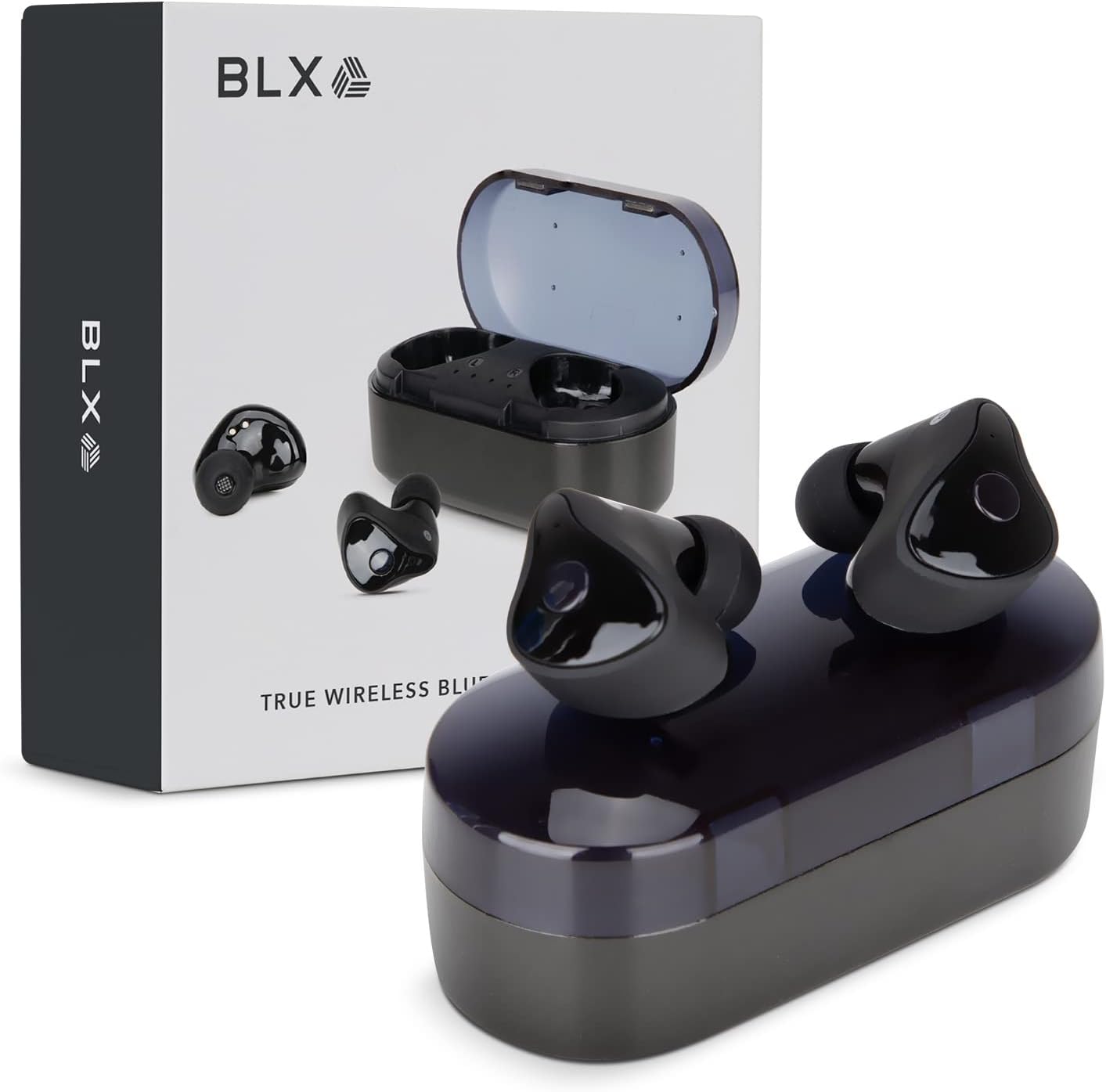
Image: BLX Earbuds, charging case, and product packaging.
3.1 Nodweddion Allweddol
- Gwir Stereo Di-wifr (TWS): Enjoy a completely wireless audio experience with independent earbuds.
- Technoleg Bluetooth 5.1: Provides a stable and efficient wireless connection with a range of up to 10 meters.
- Paru Cyflym: Earbuds automatically connect to your device once removed from the charging case.
- Rheolaethau Cyffwrdd sythweledol: Manage music playback, calls, and voice assistants with simple taps.
- Gwrthiant Dŵr IPX4: Designed to withstand sweat and splashes, making them suitable for workouts and outdoor activities.
- Meicroffon adeiledig: Yn galluogi galwadau di-dwylo a rhyngweithio â chynorthwyydd llais.

Image: BLX Earbuds demonstrating true wireless freedom with Bluetooth 5.1, fast pairing, and a 10-meter range.

Delwedd: Manwl view of a BLX Earbud highlighting its smart touch control capabilities for various functions.

Image: A person running while wearing BLX Earbuds, emphasizing their IPX4 water resistance for sweat and splashes, and the portability of the compact charging case.

Image: A woman wearing a BLX Earbud, with an illustration of the three included silicone ear tip sizes (11mm, 12mm, 13mm) to help users find their perfect fit.

Image: A woman enjoying music with BLX Earbuds, illustrating the battery performance: 4.5 hours of listening time, up to 18 hours with the charging case, and a 1-hour full charge time for the case.

Image: A close-up of a BLX Earbud, emphasizing its clear immersive audio quality with a frequency response range of 20Hz to 20KHz.

Image: BLX Earbuds depicted with icons for Google Assistant and Siri, along with a built-in microphone icon, indicating hands-free voice assistant capabilities.
4. Gosod
4.1 Gwefru'r Clustffonau a'r Cas
Before first use, fully charge the BLX Earbuds and their charging case.
- Rhowch y clustffonau yn y cas gwefru. Gwnewch yn siŵr eu bod wedi'u gosod yn gywir yn eu slotiau priodol (Ch am chwith, D am dde).
- Connect the Micro USB charging cable to the charging port on the case and the other end to a USB power source (e.g., computer, wall adapter).
- The indicator lights on the charging case will illuminate to show charging status. A full charge for the case takes approximately 1 hour.
- Ar ôl iddynt gael eu gwefru'n llawn, datgysylltwch y cebl gwefru. Bydd y clustffonau'n gwefru'n awtomatig pan gânt eu rhoi yn y cas â phŵer.
4.2 Paru â'ch Dyfais
BLX Earbuds feature auto-pairing technology for quick and easy connection.
- Gwnewch yn siŵr bod y cas gwefru wedi'i wefru a bod Bluetooth eich dyfais wedi'i alluogi.
- Agorwch y cas gwefru. Bydd y clustffonau'n troi ymlaen yn awtomatig ac yn mynd i mewn i'r modd paru.
- On your device (smartphone, tablet, laptop), go to the Bluetooth settings and search for available devices.
- Select "BLX Earbuds" from the list of found devices.
- Once connected, your device will confirm the pairing, and the earbuds will be ready for use.
- Ar gyfer defnyddiau dilynol, bydd y clustffonau'n cysylltu'n awtomatig â'r ddyfais a barwyd ddiwethaf pan gânt eu tynnu o'r cas.
4.3 Finding the Perfect Fit
A proper fit is crucial for sound quality and comfort. Experiment with the included silicone ear tips (Small, Medium, Large) to find the size that best seals your ear canal.
- Rhowch y earbud i mewn i gamlas eich clust yn ysgafn.
- Twist slightly to secure it in place. The earbud should feel snug and comfortable without causing pressure.
- Os yw ansawdd y sain yn wael neu os yw'r clustffonau'n teimlo'n rhydd, rhowch gynnig ar domen glust o faint gwahanol.
5. Operating Your BLX Earbuds
The BLX Earbuds utilize touch controls for easy management of audio and calls.
5.1 Pŵer Ymlaen/Diffodd
- Pŵer Ymlaen: Agorwch y cas codi tâl, a bydd y earbuds yn pweru ymlaen yn awtomatig.
- Pwer i ffwrdd: Rhowch y clustffonau yn ôl yn y cas gwefru a chau'r caead. Byddant yn diffodd yn awtomatig ac yn dechrau gwefru.
5.2 Chwarae Cerdd
| Gweithred | Rheolaeth |
|---|---|
| Chwarae/Saib | Tap sengl ar y naill glust neu'r llall |
| Trac Nesaf | Tapiwch ddwywaith ar y glustffon dde |
| Trac Blaenorol | Tapiwch ddwywaith ar y glustffon chwith |
5.3 Rheoli Galwadau
| Gweithred | Rheolaeth |
|---|---|
| Ateb/Diwedd Galwad | Tap sengl ar y naill glust neu'r llall |
| Gwrthod Galwad | Pwyswch a daliwch y naill glust neu'r llall am 2 eiliad |
5.4 Cynorthwyydd Llais
| Gweithred | Rheolaeth |
|---|---|
| Galluogi Cynorthwyydd Llais (Siri, Cynorthwyydd Google, ac ati) | Tapiwch driphlyg ar y naill glustffon neu'r llall |
5.5 Rheoli Cyfaint
Volume control is managed directly through your connected device (phone, tablet, laptop).
6. cynnal
Proper care and maintenance will extend the life of your BLX Earbuds.
6.1 Glanhau
- Defnyddiwch frethyn meddal, sych, heb lint i lanhau'r clustffonau a'r cas gwefru.
- Ar gyfer awgrymiadau clust, tynnwch nhw o'r clustffonau a glanhewch gyda thoddiant sebon ysgafn os oes angen, yna rinsiwch yn drylwyr a sychwch yn llwyr cyn eu hailgysylltu.
- Peidiwch â defnyddio glanhawyr sgraffiniol, alcohol na thoddyddion cemegol.
- Gwnewch yn siŵr bod y cysylltiadau gwefru ar y ddau glustffon a'r cas yn lân ac yn rhydd o falurion.
6.2 Storio
Pan nad ydynt yn cael eu defnyddio, storiwch y clustffonau yn eu cas gwefru bob amser i'w hamddiffyn rhag llwch, difrod, ac i'w cadw'n wefredig.
6.3 Gwrthiant Dŵr (IPX4)
Your BLX Earbuds are rated IPX4, meaning they are resistant to splashing water from any direction. This makes them suitable for:
- Sweaty workouts
- Light rain or splashes
Nodyn Pwysig:
- IPX4 rating does NOT mean the earbuds are waterproof. Do not submerge them in water.
- Do not wear them while swimming, showering, or in heavy rain.
- If the earbuds get wet, wipe them dry immediately before placing them back in the charging case.
7. Datrys Problemau
If you encounter issues with your BLX Earbuds, try the following solutions:
7.1 Clustffonau Ddim yn Paru na Chysylltu
- Sicrhewch fod y ddau glustffon wedi'u gwefru.
- Sicrhewch fod Bluetooth wedi'i alluogi ar eich dyfais.
- Place the earbuds back in the case, close the lid, wait a few seconds, then open the lid again to re-enter pairing mode.
- Forget/delete "BLX Earbuds" from your device's Bluetooth list and try pairing again.
- Move the earbuds closer to your device (within 10 meters).
7.2 Dim Sŵn neu Gyfaint Isel
- Gwiriwch lefel y gyfrol ar eich dyfais gysylltiedig.
- Gwnewch yn siŵr bod y clustffonau wedi'u cysylltu'n iawn â'ch dyfais.
- Glanhewch unrhyw falurion o rwyll siaradwr y clustffonau.
- Rhowch gynnig ar chwarae sain o raglen neu ffynhonnell wahanol.
7.3 Un Clustffon Ddim yn Gweithio
- Rhowch y ddau glustffon yn ôl yn y cas gwefru, caewch y caead, ac yna ei agor eto.
- Sicrhewch fod y ddau glustffon wedi'u gwefru.
- Rhowch gynnig ar ailosod y clustffonau (cyfeiriwch at gyfarwyddiadau'r gwneuthurwr) website or support for specific reset instructions if needed).
7.4 Charging Case Not Charging
- Gwnewch yn siŵr bod y cebl gwefru wedi'i gysylltu'n ddiogel â'r cas a'r ffynhonnell bŵer.
- Rhowch gynnig ar borthladd USB neu addasydd wal gwahanol.
- Gwnewch yn siŵr nad yw'r cebl gwefru wedi'i ddifrodi.
8. manylebau
| Nodwedd | Manylyn |
|---|---|
| Enw Model | 30888 |
| Technoleg Cysylltedd | Di-wifr (Bluetooth 5.1) |
| Di-wifr Range | Hyd at 10 metr |
| Ymateb Amlder | 20 Hz - 20,000 Hz |
| Bywyd Batri (Clustffonau) | Approx. 4.5 Hours (listening time) |
| Bywyd Batri (gyda Chas Gwefru) | Approx. 18 Hours total |
| Amser Codi Tâl (Achos) | Tua. 1 Awr |
| Lefel Gwrthsefyll Dŵr | IPX4 (gwrth-ddŵr) |
| Meicroffon | Built-In, Bidirectional |
| Math o Reoli | Rheoli Cyffwrdd |
| Dyfeisiau Cydnaws | Cellphones, Tablets, Laptops (iOS, Android, PC) |
| Deunydd | Plastig |
| Pwysau Eitem | 44 gram |
| Dimensiynau Cynnyrch | 9.9 x 9.9 x 3.8 cm |
9. Gwarant a Chefnogaeth
BLAUX products are manufactured to high standards and undergo rigorous testing. For information regarding warranty coverage, technical support, or service inquiries, please visit the official BLAUX websafle neu cysylltwch â'u gwasanaeth cwsmeriaid yn uniongyrchol.
Gallwch ddod o hyd i ragor o wybodaeth a chefnogaeth yn y BLAUX Store on Amazon.
Ask a question about this manual
Ask about setup, troubleshooting, compatibility, parts, safety, or missing instructions. Manuals+ will review the question and use this page’s manual context to help answer it.