
Pigtronix GDR
Pigtronix Gamma Drive Overdrive Pedal
Llawlyfr Defnyddiwr
Rhagymadrodd
The Pigtronix Gamma Drive is a versatile overdrive pedal designed to deliver a wide range of tones, from subtle boosts to aggressive, all-out grind. Its intuitive controls allow musicians to sculpt their sound with precision, making it an essential tool for any guitarist seeking dynamic and expressive overdrive.

Ffigur 1: Blaen view of the Pigtronix Gamma Drive Overdrive Pedal. This image displays the pedal's blue casing, the four control knobs (Volume, Gain, Treble, Bass), the footswitch, and the DC 9V power input label.
Nodweddion Allweddol
- Overdrive Pedal with Treble Bass Controls
- Wide range of gain from subtle boost to heavy distortion
- Dyluniad cryno a gwydn
- True bypass switching for signal integrity
Cynnwys Pecyn
Wrth agor y pecyn, gwnewch yn siŵr bod yr holl eitemau canlynol yn bresennol:
- Pigtronix Gamma Drive Overdrive Pedal
- Llawlyfr defnyddiwr (y ddogfen hon)
- Cebl Cysylltiad
Canllaw Gosod
Follow these steps to properly set up your Pigtronix Gamma Drive pedal:
1. Cysylltiad Pwer
Connect a standard 9V DC power supply (not included) to the "DC 9V" input jack on the top of the pedal. Ensure the power supply is center-negative and provides at least 10mA of current.
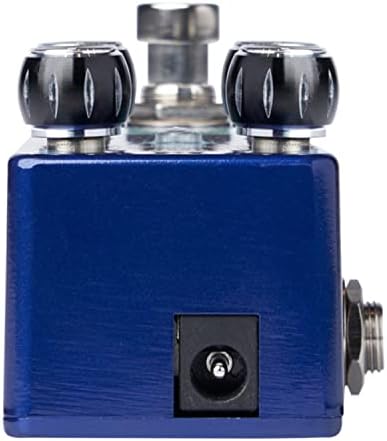
Figure 2: Close-up of the DC 9V power input jack located on the top side of the pedal.
2. Cysylltiad Offeryn
Connect your instrument (e.g., guitar) to the INPUT jack on the right side of the pedal using a standard 1/4-inch instrument cable.
3. AmpCysylltiad lifier
Cysylltwch y jack OUTPUT ar ochr chwith y pedal i'ch amplifier's input using another standard 1/4-inch instrument cable.
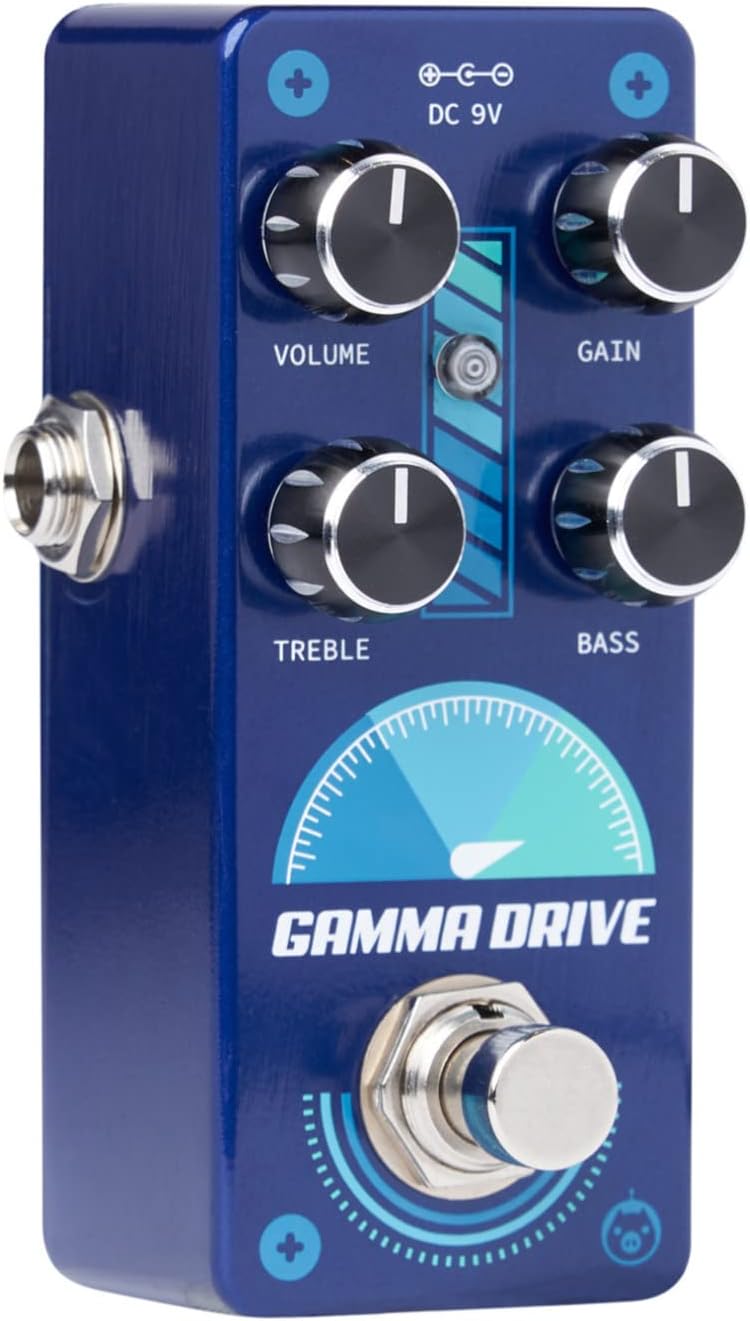
Ffigur 3: Ongl view illustrating the input jack (right side) and output jack (left side) for instrument and ampcysylltiadau lififier.
Gweithrediad
The Pigtronix Gamma Drive features four primary control knobs and a footswitch for intuitive sound shaping.
Rheolaethau Drosview
Ffigur 4: Blaen view of the pedal showing the layout of the control knobs.
- CYFROL: Controls the overall output level of the pedal. Turn clockwise to increase the volume.
- ENILL: Adjusts the amount of overdrive and distortion. Higher settings produce more saturated and aggressive tones.
- TREBLE: Shapes the high-frequency content of your tone. Turn clockwise for brighter sounds, counter-clockwise for warmer tones.
- BASS: Controls the low-frequency content. Turn clockwise to add more bass, counter-clockwise to reduce it.
Defnyddio'r Footswitch
The large footswitch at the bottom of the pedal engages or bypasses the effect. When the effect is active, the LED indicator above the footswitch will illuminate. When bypassed, your signal passes through the pedal unaffected (true bypass).
Cynnal a Chadw a Gofal
- Glanhau: Defnyddiwch frethyn meddal, sych i lanhau wyneb y pedal. Osgowch lanhawyr neu doddyddion sgraffiniol.
- Storio: Storiwch y pedal mewn lle oer, sych i ffwrdd o olau haul uniongyrchol a thymheredd eithafol.
- Pwer: Always use a regulated 9V DC power supply with the correct polarity (center-negative) to prevent damage.
- Cysylltiadau: Ensure all cables are securely connected before use. Disconnect cables when not in use to prevent accidental damage.
Datrys problemau
| Problem | Achos Posibl | Ateb |
|---|---|---|
| Dim sŵn pan fydd y pedal wedi'i ddefnyddio. | Incorrect cable connections; Power supply issue; Pedal not engaged. | Check all input/output cables; Ensure 9V DC power supply is connected and functional; Press footswitch to engage pedal (LED should light up). |
| Sain wan neu ystumiedig. | Low power; Incorrect gain/volume settings. | Gwirio cyflenwad pŵer cyftage and current; Adjust GAIN and VOLUME knobs to desired levels. |
| Sŵn neu hum diangen. | Ground loop; Faulty cables; Interference from other electronics. | Use isolated power supply; Try different cables; Move pedal away from power transformers or fluorescent lights. |
Manylebau Technegol
| Manyleb | Gwerth |
|---|---|
| Pwysau Eitem | 9 owns |
| Dimensiynau Cynnyrch | 8.4 x 6.3 x 4.7 modfedd |
| Rhif Model | GDR |
| Lliw | Light Blue, Black |
| Rhyngwyneb Caledwedd | HP-HSC |
| Fformat Arwydd | Analog |
| Ffynhonnell Pwer | Battery Powered (Note: Typically refers to ability to use battery, but 9V DC adapter is standard for pedals) |
| Cyftage | 9 folt DC |
| Ampdileu | 10 Miliamps (minimum required) |
Gwarant a Chefnogaeth
For detailed warranty information, product registration, and technical support, please visit the official Pigtronix websafle neu cysylltwch â'u hadran gwasanaeth cwsmeriaid. Cadwch eich prawf prynu ar gyfer hawliadau gwarant.
Swyddogol Websafle: www.pigtronix.com
Ask a question about this manual
Ask about setup, troubleshooting, compatibility, parts, safety, or missing instructions. Manuals+ will review the question and use this page’s manual context to help answer it.