
1. Cynnyrch Drosview
The Laxre Fingerprint Smart Door Lock offers multiple secure entry methods for your home, office, or hotel. This digital lever lock provides convenience and enhanced security through fingerprint recognition, smart codes, and traditional mechanical keys. It is designed for easy installation and broad compatibility with standard door types.

Image 1.1: The Laxre Fingerprint Smart Door Lock, showcasing its sleek design and the mechanical key slot.
Nodweddion Allweddol:
- Dulliau Datgloi Lluosog: Fingerprint, Smart Code, and Mechanical Key.
- Fast Fingerprint Recognition: Identifies fingerprints in less than 0.3 seconds, optimized for various conditions.
- Cydnawsedd Drws Eang: Fits both left and right-handed doors with a thickness range of 1.38 to 2 inches.
- Pwer Brys: USB Type-C interface for emergency power supply.
- Cloi awtomatig: Ensures the door is secured after entry.

Delwedd 1.2: Drosoddview of the smart lock's multiple unlocking methods and USB charging capability.
2. Canllaw Gosod
This section provides instructions for installing your Laxre Fingerprint Smart Door Lock. A screwdriver is the primary tool required for installation.
2.1 Door Compatibility
- The lock is compatible with both left-handed and right-handed doors.
- Suitable for door thicknesses ranging from 1.38 inches (35mm) to 2 inches (50mm).

Image 2.1: Illustration of the lock's compatibility with both left and right-opening doors, along with the supported door thickness.
2.2 Camau Gosod
Follow these general steps for installation. Refer to the detailed diagrams for specific measurements and component placement.
- Paratowch y Drws: Ensure your door meets the thickness requirements and that existing holes are properly aligned.
- Gosod y Latch: Mewnosodwch y mecanwaith clicied i ymyl y drws a'i sicrhau gyda sgriwiau.
- Install the Exterior Handle: Place the exterior handle assembly, ensuring the spindle passes through the latch.
- Install the Interior Handle: Connect the interior handle assembly to the exterior handle, aligning the necessary components and securing with screws.
- Ceblau Cyswllt: If applicable, connect any internal cables between the handle units.
- Gweithrediad Prawf: After installation, test the mechanical operation of the handle and latch before inserting batteries.
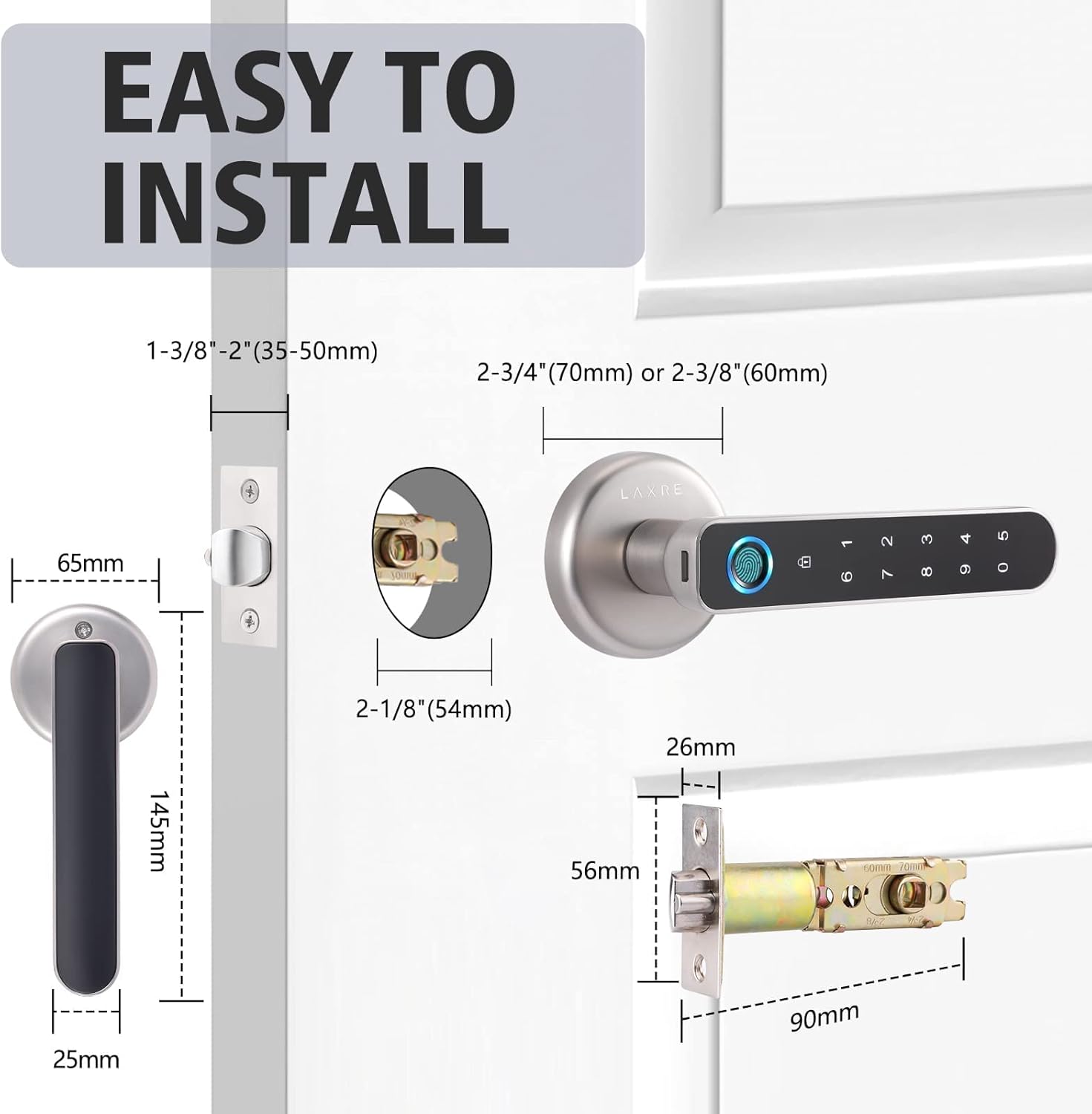
Image 2.2: Detailed installation diagram with measurements for various components of the lock.
2.3 Gosod Batri
The lock requires 4 AA batteries for operation. These are typically installed in the interior handle unit.
- Locate the battery compartment on the interior side of the lock.
- Tynnwch y clawr batri.
- Mewnosodwch 4 batris AA, gan sicrhau polaredd cywir (+/-).
- Amnewid y clawr batri.

Image 2.3: Illustration indicating the battery housing location on the lock's interior side.
3. Cyfarwyddiadau Gweithredu
The Laxre Smart Door Lock offers three primary methods for unlocking.
3.1 Datgloi ag Olion Bysedd
The integrated fingerprint sensor allows for quick and secure access.
- Rhowch eich bys cofrestredig yn gadarn ar y synhwyrydd olion bysedd.
- The lock will recognize your fingerprint in less than 0.3 seconds.
- Once recognized, the lock will disengage, allowing you to open the door.

Image 3.1: A finger interacting with the fingerprint sensor for unlocking.
3.2 Unlocking with Smart Code
Use a programmed numerical code for keyless entry.
- Press the keypad to activate it.
- Enter your programmed smart code.
- Press the '#' or 'Enter' key (if applicable) to confirm.
- The lock will disengage, allowing you to open the door.

Image 3.2: The lock's keypad for entering smart codes.
3.3 Unlocking with Mechanical Key
In case of emergency or battery depletion, a traditional mechanical key can be used.
- Insert the mechanical key into the keyhole located on the exterior handle.
- Trowch yr allwedd i ddatgloi'r drws.

Image 3.3: The mechanical key slot for emergency access.
3.4 Cloi Awtomatig
The Laxre Smart Door Lock is designed to automatically lock after a short period once the door is closed, providing peace of mind that your door is always secured.

Image 3.4: The lock's automatic locking function, ensuring security after entry.
3.5 Programming Fingerprints and Codes
Detailed instructions for adding or deleting fingerprints and user codes are typically found in the full product manual. Generally, this involves entering a master code or using a dedicated programming button, followed by scanning fingerprints or entering new codes.
4. cynnal
Mae cynnal a chadw priodol yn sicrhau hirhoedledd a pherfformiad gorau posibl eich clo drws clyfar.
4.1 Batri Newydd
The lock provides long battery life, supporting up to 10,000 accesses. When batteries are low, the lock may provide an audible or visual alert. Replace all 4 AA batteries simultaneously to ensure consistent power.

Image 4.1: The lock's long battery life, powered by 4 AA batteries.
4.2 Glanhau
To clean the lock, use a soft, dry cloth. Avoid abrasive cleaners, solvents, or harsh chemicals, as these can damage the finish and electronic components. Gently wipe the fingerprint sensor and keypad to remove dust or smudges.
5. Datrys Problemau
If you encounter issues with your Laxre Smart Door Lock, refer to the following common problems and solutions.
- Ôl bysedd heb ei adnabod:
Ensure your finger is clean and dry. Try repositioning your finger on the sensor. If the issue persists, re-register your fingerprint or try another registered finger. - Cod Ddim yn Gweithio:
Verify that you are entering the correct code. Ensure the keypad is active before entering the code. Check if the batteries are low. - Lock Not Responding (No Power):
Replace the batteries. If the batteries are completely depleted, use the USB Type-C emergency power supply port on the exterior handle to temporarily power the lock with a 5V power bank. - Allwedd Fecanyddol Ddim yn Gweithio:
Ensure the key is fully inserted and turned correctly. If the lock is jammed, do not force the key. - Door Handle Feels Loose:
Check the mounting screws on both the interior and exterior handles and tighten them if necessary.
5.1 o Gyflenwad Pŵer Argyfwng
In situations where the batteries are completely drained, the lock can be temporarily powered using a standard 5V Type-C USB power source (e.g., a power bank). Connect the USB cable to the Type-C port on the exterior handle to provide temporary power for unlocking.
Image 5.1: The USB Type-C port for emergency power supply.
6. manylebau
| Nodwedd | Manyleb |
|---|---|
| Brand | Laxre |
| Model | B09DCMSW6Q |
| Math Clo | Biometrig |
| Nodwedd Arbennig | Olion bysedd |
| Defnyddiau a Argymhellir | Diogelwch |
| Arddull | Modern |
| Lliw | Arian |
| Nifer Darnau | 1 |
| Math Gorffen | Gorchuddio Powdwr |
| Math o Reolwr | Hand Control, Mechanical knob |
| Dull Rheoli | Cyffwrdd |
| Pwysau Eitem | 16 owns (1 pwys) |
| Dimensiynau Pecyn | 10.12 x 7.36 x 3.11 modfedd |
| Ystod Trwch Drws | 1.38 modfedd i 2 modfedd |
| Ffynhonnell Pwer | 4 x AA Batteries (not included in package, but required for operation) |
| Pŵer Argyfwng | USB Math-C (5V) |
| UPC | 762169873740 |
7. Gwarant a Chefnogaeth
For technical assistance, warranty inquiries, or any questions regarding your Laxre Fingerprint Smart Door Lock, please contact customer support.
E-bost Cymorth i Gwsmeriaid: laxre-tech@outlook.com
Please have your product model number (B09DCMSW6Q) and purchase information ready when contacting support.
