
1. Rhagymadrodd
This manual provides essential information for the safe and efficient use of your OnePlus Nord N100 LTE smartphone. Please read this guide thoroughly before operating your device to ensure optimal performance and longevity. Keep this manual for future reference.
2. Cynnyrch Drosview
The OnePlus Nord N100 LTE (Model BE2012) is a feature-rich smartphone designed for daily communication and entertainment. Key features include a 13MP Triple Camera System, an 8MP Front Camera, a large 90Hz display for immersive viewing, 4GB RAM, and 64GB of internal storage. It operates on Android 10 and is factory unlocked for major GSM carriers like T-Mobile, Sprint, and AT&T.

Image 2.1: Front and Rear View of the OnePlus Nord N100 LTE Smartphone. The device features a punch-hole display on the front and a triple camera setup with a fingerprint sensor on the back.

Image 2.2: Diagram highlighting key features of the OnePlus Nord N100, including the 6.52" HD+ LCD Display, Triple Camera System, 64 GB built-in storage, 18W Fast Charging, and Large 5000mAh battery.
3. Gosod
3.1 Mewnosod y Cerdyn SIM a SD
- Lleolwch y hambwrdd SIM ar ochr eich dyfais.
- Use the SIM ejector tool (not included in renewed package) to open the tray.
- Rhowch eich cerdyn(iau) Nano-SIM a/neu gerdyn microSD yn y hambwrdd, gan sicrhau bod y cyfeiriadedd cywir.
- Gwthiwch yr hambwrdd yn ôl i'r ddyfais yn ysgafn nes ei fod yn clicio i'w le.
3.2 Pŵer Cychwynnol Ymlaen
- Press and hold the Power button (located on the side) until the OnePlus logo appears.
- Dilynwch y cyfarwyddiadau ar y sgrin i gwblhau'r gosodiad cychwynnol, gan gynnwys dewis iaith, cysylltiad Wi-Fi, a gosod cyfrif Google.
4. Gweithredu Eich Dyfais
4.1 Mordwyo Sylfaenol
- Sgrin gyffwrdd: Tapiwch i ddewis, swipeiwch i sgrolio, pinsiwch i chwyddo.
- Botwm Pŵer: Press to lock/unlock the screen. Press and hold for power options.
- Botymau Cyfrol: Adjust media volume, ringtone volume, and alarm volume.
- Synhwyrydd Olion Bysedd: Wedi'i leoli ar gefn y ddyfais ar gyfer datgloi diogel.
4.2 Nodweddion Arddangos
The OnePlus Nord N100 features a 6.52-inch HD+ LCD display with a 90Hz refresh rate, providing a smooth visual experience for scrolling and gaming. The display resolution is 1920 x 1080 pixels.
5. Nodweddion y Camera
Capture your moments with the versatile camera system.
5.1 System Camera Cefn
- Prif gamera: 13MP sensor for clear and detailed photos.
- Macro Lens: 2MP dedicated lens for close-up shots.
- Synhwyrydd Dyfnder: 2MP sensor for enhanced portrait mode with background blur.
Camera Blaen 5.2
The 8MP front camera is ideal for selfies and video calls.

Image 5.1: Diagram illustrating the triple camera system of the OnePlus Nord N100, detailing the 13MP Main Camera, Macro Lens, and Specialized Camera (Depth Sensor).
6. Rheoli Batri
Mae'r ddyfais wedi'i chyfarparu â 5000 Milliamp Hours (mAh) Lithium Polymer battery, providing long-lasting power for extended use. Charging is facilitated via the USB-C port.
6.1 Codi
- Connect the provided USB Cable and Adapter to your device and a power outlet.
- Ensure you use the original or certified compatible charging accessories for optimal performance and safety.
7. Cysylltedd
- Cludwr Di-wifr: Unlocked for all major GSM carriers (T-Mobile, Sprint, AT&T). Not compatible with Cricket, Xfinity, Visible, or other CDMA networks. Verify carrier frequency compatibility.
- Technolegau Cysylltedd: USB (Type-C).
- Technolegau Cyfathrebu Di-wifr: Cellular, Wi-Fi, Bluetooth.
- GPS: Integrated GPS functionality for location services.
- Jack Sain: No traditional headphone jack. Audio output is via USB-C or Bluetooth.
8. manylebau
| Nodwedd | Manylyn |
|---|---|
| Enw Model | BE2012 |
| Brand | OnePlus |
| System Weithredu | Android 10.0 |
| HWRDD | 4 GB |
| Cynhwysedd Storio Cof | 64 GB |
| Maint Sgrin | 6.52 modfedd |
| Datrysiad | 1920 x 1080 |
| Cyfradd Adnewyddu | 90 hertz |
| Model CPU | Snapdragon |
| Gallu Batri | 5000 Miliamp Oriau |
| Pwysau Eitem | 11.3 owns |
| Lliw | Midnight Frost |
9. cynnal
9.1 Diweddariadau Meddalwedd
Your device runs on Android 10.0. Periodically check for software updates in the device settings to ensure optimal performance, security, and access to new features. Available storage may be less due to device software updates and app usage.
9.2 Glanhau a Gofal
- Defnyddiwch frethyn meddal, di-lint i lanhau sgrin a chorff y ddyfais.
- Ceisiwch osgoi defnyddio cemegau llym neu ddeunyddiau sgraffiniol a allai niweidio'r gorffeniad.
- Protect your device from extreme temperatures and direct sunlight.
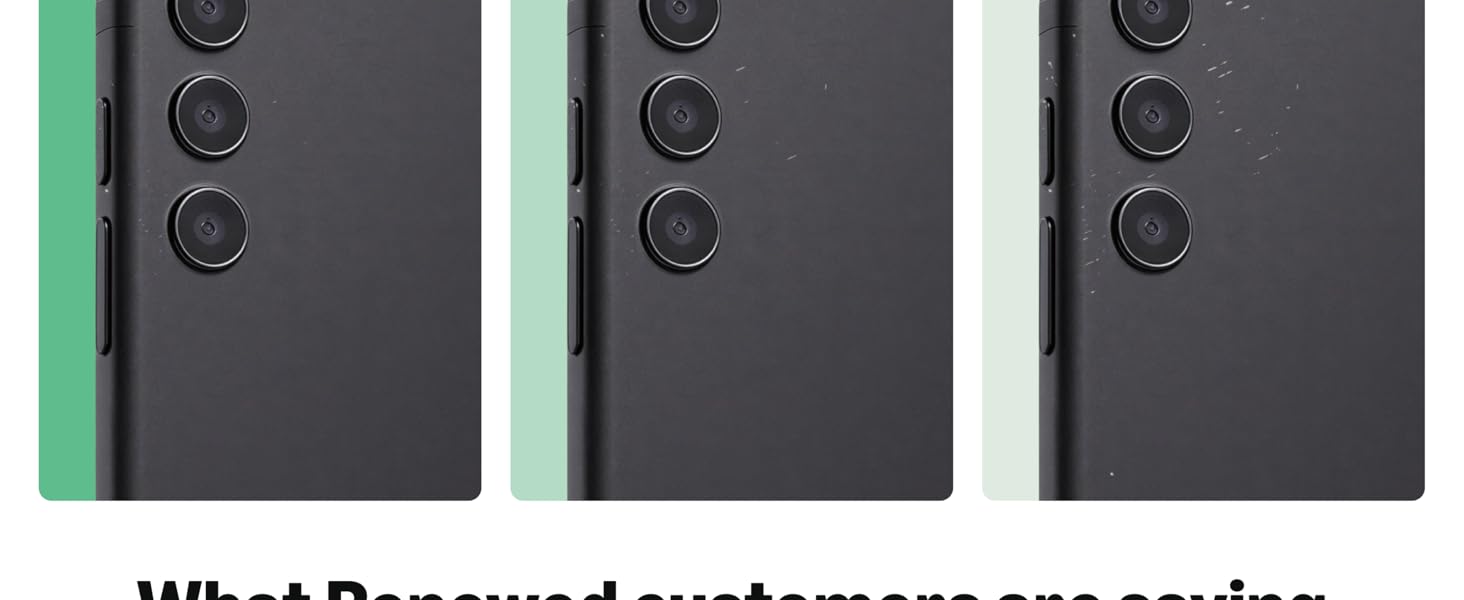
Image 9.1: Guidelines for Amazon Renewed product conditions, detailing criteria for 'Excellent', 'Good', and 'Acceptable' states regarding cosmetic damage, screen condition, and battery life.
10. Datrys Problemau
10.1 Materion Cyffredin
- Dyfais ddim yn ymateb: Press and hold the Power button for 10-15 seconds to force restart.
- Problemau cysylltedd rhwydwaith: Check SIM card insertion, toggle Airplane Mode, or restart the device.
- Batri yn draenio'n gyflym: Close unused apps, reduce screen brightness, or check for rogue apps in battery settings.
10.2 Ailosod Ffatri
Os ydych chi'n profi problemau parhaus, gallai ailosodiad ffatri eu datrys. Rhybudd: Bydd hyn yn dileu'r holl ddata ar eich dyfais. Gwnewch gopi wrth gefn o wybodaeth bwysig cyn bwrw ymlaen.
- Ewch i Gosodiadau > System > Ailosod opsiynau.
- Dewiswch 'Dileu'r holl ddata (ailosod ffatri)'.
- Confirm your choice and follow the on-screen prompts.
11. Gwarant a Chefnogaeth
This Amazon Renewed device comes with a 90-day store limited warranty. For support or warranty claims, please contact the seller directly.
11.1 Beth sydd yn y Bocs
- OnePlus Nord N100 LTE Smartphone (Renewed)
- Premium aftermarket charger
- Cebl USB
Please note that renewed products may have minor scuffs or scratches and ship in non-retail packaging.