
1. Rhagymadrodd
1.1 Drosview
This manual provides detailed instructions for the safe and effective use of the Uni-T UT50A Digital Multimeter. The UT50A is a portable, battery-powered instrument designed for measuring DC/AC voltage, DC/AC current, resistance, capacitance, frequency, diode, and continuity. It features a large LCD display with backlight for easy reading.
1.2 Gwybodaeth Ddiogelwch
To ensure safe operation, please read and understand all instructions and warnings before using the multimeter. Failure to observe safety precautions may result in electric shock, fire, or damage to the meter. Always adhere to local and national safety codes.
- Peidiwch â gwneud cais cyftage neu gerrynt sy'n fwy na'r terfynau uchaf penodedig ar gyfer y mesurydd.
- Byddwch yn ofalus wrth weithio gyda chyftaguwchlaw 30V AC RMS, 42V brig, neu 60V DC. Mae'r cyfrolau hyntages yn peri perygl sioc.
- Ensure the test leads are in good condition, without any damaged insulation.
- Datgysylltwch y pŵer i'r gylched bob amser a rhyddhewch yr holl foltedd ucheltage capacitors before making resistance, continuity, or diode measurements.
- Peidiwch â gweithredu'r mesurydd os yw'n ymddangos ei fod wedi'i ddifrodi neu os nad yw clawr y batri wedi'i gau'n iawn.
- Amnewidiwch y batri cyn gynted ag y bydd y dangosydd batri isel yn ymddangos i sicrhau darlleniadau cywir.
2. Nodweddion Cynnyrch
The Uni-T UT50A Digital Multimeter offers a range of features for various electrical measurements:
- Large LCD display with backlight for clear visibility.
- Auto-ranging and manual ranging capabilities.
- Data Hold function to freeze displayed readings.
- Overload protection on all ranges.
- Arwydd batri isel.
- Integrated kickstand for hands-free operation.
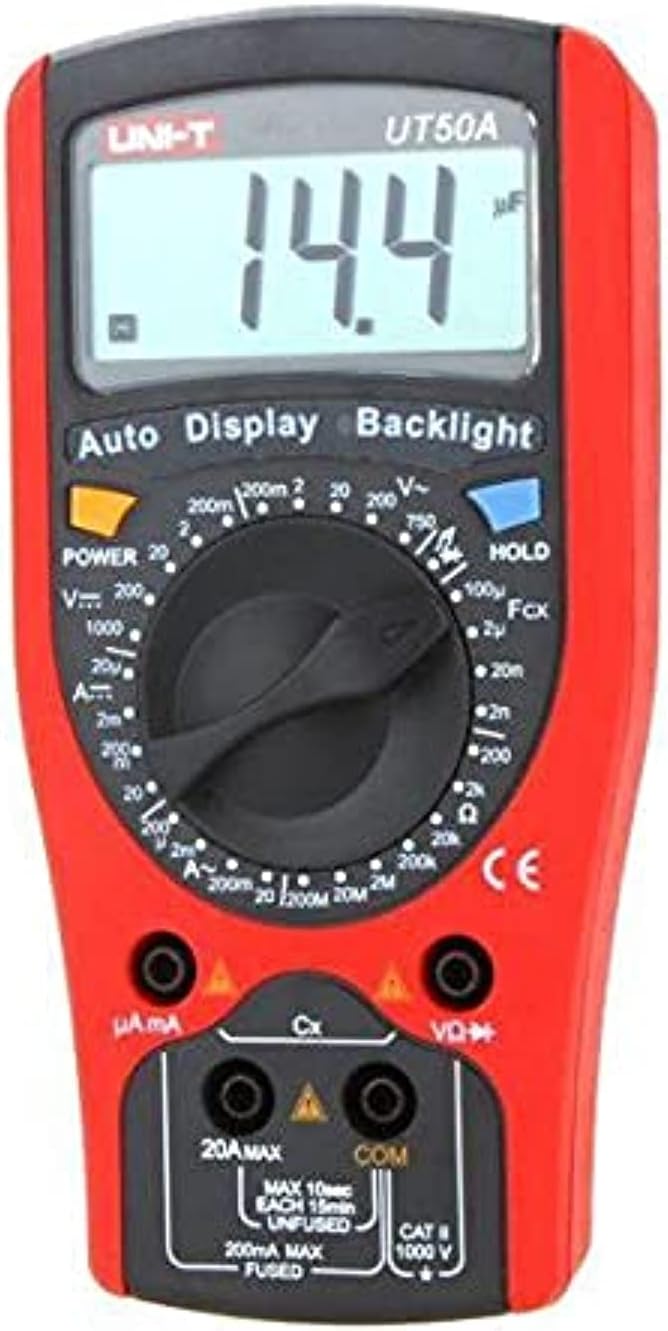
Delwedd 2.1: Blaen view of the Uni-T UT50A Digital Multimeter, showing the LCD display, rotary switch, and input jacks.
3. Gosod
3.1 Gosod Batri
The UT50A requires a 9V battery for operation. To install or replace the battery:
- Gwnewch yn siŵr bod y multimedr wedi'i ddiffodd a bod yr holl wifrau prawf wedi'u datgysylltu.
- Lleolwch yr adran batri ar gefn y mesurydd.
- Dadsgriwiwch y sgriw(iau) cadw a thynnwch glawr y batri.
- Mewnosodwch fatri 9V newydd, gan arsylwi'r polaredd cywir (+ a -).
- Rhowch glawr y batri yn ôl a'i sicrhau gyda'r sgriw(iau).
3.2 Cysylltiad y Gwbl Prawf
Mae cysylltu gwifrau prawf yn iawn yn hanfodol ar gyfer mesuriadau cywir a diogel.
- Connect the black test lead to the 'COM' (Common) input jack.
- Ar gyfer cyftage, resistance, capacitance, frequency, diode, and continuity measurements, connect the red test lead to the 'VΩK+' input jack.
- For current measurements (mA/μA), connect the red test lead to the 'μA mA' input jack.
- For high current measurements (up to 20A), connect the red test lead to the '20A MAX' input jack.

Image 3.1: Uni-T UT50A Digital Multimeter showing the input jacks and connected test leads.
4. Cyfarwyddiadau Gweithredu
The rotary switch is used to select the desired measurement function. Ensure the test leads are connected to the correct input jacks for the selected function.

Delwedd 4.1: Llun agos view of the Uni-T UT50A rotary function switch.
4.1 Dewis Swyddogaeth
Turn the rotary switch to the desired measurement function. The display will show the appropriate unit or symbol.
4.2 DC Cyfroltage Measurement (VK)
- Connect the black lead to 'COM' and the red lead to 'VΩK+'.
- Turn the rotary switch to the 'VK' range. Select an appropriate range if not in auto-ranging mode.
- Cysylltwch y gwifrau prawf yn gyfochrog â'r gylched neu'r gydran sy'n cael ei phrofi.
- Darllenwch y cyftage werth ar yr LCD.
4.3 AC CyftagMesuriad e (V∼)
- Connect the black lead to 'COM' and the red lead to 'VΩK+'.
- Turn the rotary switch to the 'V∼' range. Select an appropriate range if not in auto-ranging mode.
- Cysylltwch y gwifrau prawf yn gyfochrog â'r gylched neu'r gydran AC.
- Darllenwch y cyftage werth ar yr LCD.
4.4 DC Current Measurement (AK)
- Pwysig: Datgysylltwch y pŵer i'r gylched cyn cysylltu'r mesurydd mewn cyfres.
- For mA/μA measurements, connect the red lead to 'μA mA'. For 20A measurements, connect the red lead to '20A MAX'. Black lead to 'COM'.
- Turn the rotary switch to the appropriate 'AK' range (e.g., 200mA, 20A).
- Cysylltwch y mesurydd mewn cyfres â'r gylched.
- Rhowch bŵer i'r gylched a darllenwch y gwerth cerrynt.
4.5 Mesur Cerrynt AC (A∼)
- Pwysig: Datgysylltwch y pŵer i'r gylched cyn cysylltu'r mesurydd mewn cyfres.
- For mA/μA measurements, connect the red lead to 'μA mA'. For 20A measurements, connect the red lead to '20A MAX'. Black lead to 'COM'.
- Turn the rotary switch to the appropriate 'A∼' range (e.g., 200mA, 20A).
- Cysylltwch y mesurydd mewn cyfres â'r gylched.
- Rhowch bŵer i'r gylched a darllenwch y gwerth cerrynt.
4.6 Mesur Gwrthiant (Ω)
- Sicrhewch fod y gylched wedi'i dad-egnïo a bod yr holl gynwysyddion wedi'u rhyddhau.
- Connect the black lead to 'COM' and the red lead to 'VΩK+'.
- Turn the rotary switch to the 'Ω' range.
- Cysylltwch y gwifrau prawf ar draws y gydran i'w mesur.
- Darllenwch y gwerth gwrthiant ar yr LCD.
4.7 Mesuriad Cynhwysedd (F)
- Gwnewch yn siŵr bod y cynhwysydd wedi'i ryddhau'n llwyr cyn mesur.
- Connect the black lead to 'COM' and the red lead to 'VΩK+'.
- Turn the rotary switch to the 'F' (Capacitance) range.
- Cysylltwch y gwifrau prawf ar draws y cynhwysydd.
- Darllenwch y gwerth cynhwysedd ar yr LCD.
4.8 Diode Test (→|)
- Gwnewch yn siŵr bod y gylched wedi'i dad-egni.
- Connect the black lead to 'COM' and the red lead to 'VΩK+'.
- Turn the rotary switch to the '→|' (Diode) range.
- Connect the red lead to the anode and the black lead to the cathode of the diode.
- Bydd yr arddangosfa'n dangos y gyfrol ymlaentage drop. Reverse the leads; the display should show 'OL' (Open Loop) for a good diode.
4.9 Prawf Parhad (♫)
- Gwnewch yn siŵr bod y gylched wedi'i dad-egni.
- Connect the black lead to 'COM' and the red lead to 'VΩK+'.
- Turn the rotary switch to the '♫' (Continuity) range.
- Cysylltwch y gwifrau prawf ar draws y gydran neu'r wifren.
- Os yw'r gwrthiant yn is na thua 50Ω, bydd y swnyn yn swnio, gan nodi parhad.
4.10 Mesur Amledd (Hz)
- Connect the black lead to 'COM' and the red lead to 'VΩK+'.
- Turn the rotary switch to the 'Hz' (Frequency) range.
- Cysylltwch y gwifrau prawf yn gyfochrog â'r ffynhonnell signal.
- Darllenwch y gwerth amledd ar yr LCD.
4.11 Swyddogaeth Dal Data
Pwyswch y botwm 'HOLD' i rewi'r darlleniad cyfredol ar yr arddangosfa. Pwyswch ef eto i ryddhau'r swyddogaeth dal.
4.12 Swyddogaeth Goleuo Cefn
Press the 'Backlight' button to turn on the display backlight for better visibility in low-light conditions. Press it again to turn off the backlight.
5. cynnal
5.1 Glanhau
Sychwch y mesurydd casing gyda hysbysebamp cloth and a mild detergent. Do not use abrasives or solvents. Ensure the meter is dry before use.
5.2 Batri Newydd
Refer to Section 3.1 for detailed instructions on battery replacement. Replace the 9V battery when the low battery indicator appears on the display.
5.3 Amnewid Ffiws
If the current measurement function fails, the fuse may need replacement. This procedure should only be performed by qualified personnel.
- Gwnewch yn siŵr bod y multimedr wedi'i ddiffodd a bod yr holl wifrau prawf wedi'u datgysylltu.
- Agorwch yr adran batri fel y disgrifir yn Adran 3.1.
- Carefully remove the old fuse.
- Replace with a fuse of the exact same type and rating (e.g., F 200mA/250V for mA/μA range, F 20A/250V for 20A range). Refer to the meter's specifications for correct fuse ratings.
- Securely close the battery/fuse compartment.
6. Datrys Problemau
- Dim arddangosfa neu arddangosfa wan: Check battery charge. Replace the 9V battery if low.
- Darlleniadau anghywir: Ensure test leads are correctly connected to the appropriate input jacks and the rotary switch is set to the correct function and range. Check battery charge.
- Mesur cerrynt ddim yn gweithio: Check the fuse. Refer to Section 5.3 for fuse replacement.
- 'OL' (Gorlwytho) wedi'i arddangos: The measured value exceeds the selected range. Select a higher range or ensure the circuit is within the meter's capabilities.
7. manylebau
| Manyleb | Manylyn |
|---|---|
| Gwneuthurwr | Uni-T |
| Model | UT50A |
| Math Mesur | Amlfesurydd Digidol |
| Math Ffynhonnell Pŵer | Wedi'i Bweru â Batri |
| Batris Angenrheidiol | Ie (9V) |
| Pwysau Eitem | 11 g |
| Dimensiynau Pecyn | 7 x 6 x 5 cm |
| Lliw | Aml |
| Arddull | Digidol |
8. Gwarant a Chefnogaeth
For warranty information and technical support, please refer to the documentation included with your purchase or contact Uni-T customer service directly. Keep your purchase receipt as proof of purchase for warranty claims.