
1. Cynnyrch Drosview
The HeimVision CA01 is a 1080P (2.0MP) wireless IP security camera designed for outdoor surveillance. It features 65ft night vision, an IP66 waterproof rating, and motion alert capabilities, making it suitable for integration with the HeimVision 8CH WiFi Surveillance System. This camera provides clear video monitoring and enhances security for your property.

Ffigur 1: Drosoddview of a typical wireless security camera system setup, illustrating how multiple cameras connect wirelessly to a central recording unit (NVR) to cover various areas of a property.
2. Gosod
2.1 Beth sydd yn y Bocs
- HeimVision CA01 Wireless Security Camera
- Power Adapter for Camera
- Sgriwiau Mowntio a Phlygiau Wal
- Llawlyfr Defnyddiwr (y ddogfen hon)
2.2 Gosod
- Dewiswch leoliad: Dewiswch leoliad awyr agored sy'n darparu'r hyn a ddymunir viewing angle and is within range of your HeimVision NVR's Wi-Fi signal. Ensure the camera is positioned to avoid direct sunlight into the lens for optimal image quality.
- Gosod y Camera: Use the provided mounting screws and wall plugs to securely attach the camera to a wall or suitable surface. Ensure the camera is firmly fixed to prevent movement.
- Pwer Cysylltu: Connect the camera to the power adapter and plug it into a power outlet. The camera will power on and begin its startup sequence.
- Pâr Awtomatig: The CA01 camera is designed for automatic pairing with your HeimVision 8CH WiFi Surveillance System (NVR). Once powered on, it should automatically connect to the NVR if it's within range and the NVR is also powered on. Refer to your NVR's manual for specific pairing instructions if automatic connection does not occur.
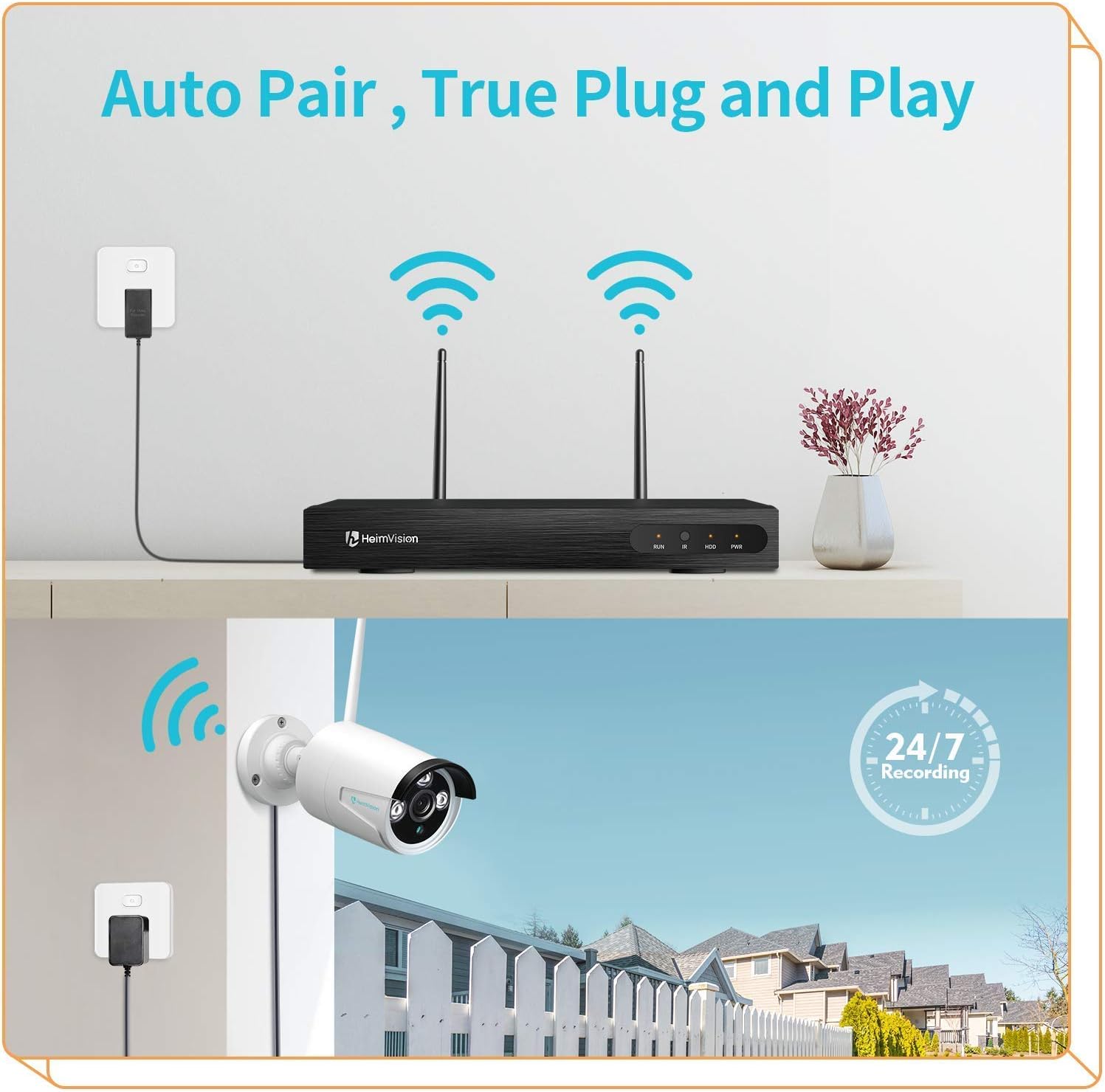
Ffigur 2: The 'Auto Pair, True Plug and Play' functionality, demonstrating the simple wireless connection between the camera and the NVR.

Ffigur 3: The camera's IP66 waterproof design, ensuring reliable operation in various outdoor weather conditions.
3. Cyfarwyddiadau Gweithredu
3.1 Accessing Live View a Recordiadau
Once the camera is successfully paired with your HeimVision NVR, you can access the live video feed and recorded footage through the NVR's interface, a dedicated mobile application, or PC software.
- Monitro NVR: Connect a monitor to your NVR to view all camera feeds directly.
- Ap Symudol: Download the official HeimVision mobile application from your device's app store. Follow the in-app instructions to add your NVR system and view camerâu o bell.
- Meddalwedd PC: Install the HeimVision client software on your computer. Use the software to manage your NVR and view camera feeds.

Ffigur 4: Mae'r system yn cefnogi viewing on PC and mobile devices, allowing flexible access to your surveillance feeds.
3.2 Canfod Symudiad a Rhybuddion
The CA01 camera features intelligent motion detection. When motion is detected within the camera's field of view, the system can trigger various alerts.
- Recordio: The NVR will automatically begin recording footage.
- Rhybuddion E-bost: Configure email notifications in the NVR settings to receive alerts with snapshots when motion is detected.
- Hysbysiadau Ap: Receive push notifications on your mobile device through the HeimVision app.
To customize motion detection zones and sensitivity, access the NVR's settings or the mobile application's camera settings.

Ffigur 5: Motion detection capabilities, showing an alert notification on a smartphone when suspicious activity is detected.
3.3 Gweledigaeth Nos
The camera is equipped with infrared (IR) LEDs to provide clear surveillance even in low-light or complete darkness, with a night vision range of up to 65 feet.
- Day Vision: During daylight hours, the camera captures full-color video.
- Gweledigaeth Nos: In low light conditions, the camera automatically switches to infrared night vision, providing clear black and white images.

Ffigur 6: Comparison of colorful day vision and clear night vision, demonstrating the camera's ability to provide surveillance around the clock.
3.4 Continuous Recording
The HeimVision system supports 24/7 continuous recording, ensuring that all activity is captured. Storage capacity depends on the hard drive installed in your NVR. The system will typically overwrite the oldest footage once the storage is full.
4. cynnal
- Glanhau'r Lens: Periodically clean the camera lens with a soft, dry cloth to ensure clear image quality. Avoid using harsh chemicals that could damage the lens coating.
- Cysylltiad Pwer: Regularly check the power adapter and cable for any signs of damage or wear. Ensure the connection remains secure.
- Diweddariadau Cadarnwedd: Check the HeimVision official website or mobile app for any available firmware updates for your NVR and cameras. Keeping your system updated ensures optimal performance and security.
- Gwiriad Amgylcheddol: Gwnewch yn siŵr nad oes unrhyw rwystrau yn rhwystro'r camera view and that the mounting remains secure, especially after severe weather conditions.
5. Datrys Problemau
| Problem | Achos Posibl | Ateb |
|---|---|---|
| Camera ddim yn pweru ymlaen | No power to the adapter or faulty adapter/cable. | Check power outlet, ensure adapter is securely connected, and inspect cable for damage. Try a different power outlet. |
| No video feed from camera | Camera not paired with NVR, out of Wi-Fi range, or signal interference. | Ensure camera is powered on. Check NVR settings for camera status. Move camera closer to NVR or reduce interference. Re-pair the camera if necessary (refer to NVR manual). |
| Ansawdd delwedd wael | Dirty lens, low light conditions, or poor Wi-Fi signal. | Clean the camera lens. Ensure adequate lighting for color vision or verify night vision is active. Improve Wi-Fi signal strength. |
| Nid yw canfod cynnig yn gweithio | Motion detection settings incorrect, sensitivity too low, or area not covered. | Check motion detection settings in NVR or app. Adjust sensitivity. Ensure camera covers the desired area. |
6. manylebau
| Nodwedd | Manyleb |
|---|---|
| Model | CA01 |
| Datrysiad Dal Fideo | 1080p (2.0MP) |
| Technoleg Cysylltedd | Diwifr (Wi-Fi) |
| Defnydd Dan Do / Awyr Agored | Awyr Agored |
| Graddfa dal dwr | IP66 |
| Gweledigaeth y Nos | Up to 65ft, Night Color (IR) |
| Nodweddion Arbennig | Synhwyrydd Symudiad, Gweledigaeth Nos |
| Math Rhybudd | Cynnig yn Unig |
| Dyfeisiau Cydnaws | Smartphone (via app), NVR |
| Math Mount | Wal Mount |
| Ffactor Ffurf | Bwled |
7. Gwarant a Chefnogaeth
Cynigir y cynnyrch hwn fel eitem Amazon Renewed. Mae cynhyrchion Amazon Renewed yn cael eu harchwilio a'u profi'n broffesiynol i weithio ac edrych fel newydd. Os nad ydych chi'n fodlon â'ch pryniant, mae cynhyrchion wedi'u hadnewyddu yn gymwys i gael eu disodli neu i gael ad-daliad o dan y Gwarant Adnewyddedig Amazon.
For further technical assistance or support, please refer to the official HeimVision support channels or the Amazon Renewed customer service.