
1. Rhagymadrodd
This manual provides detailed instructions for the setup, operation, and maintenance of your WISE TIGER LED Digital Alarm Clock (Model CK-LED1302). Please read this manual thoroughly before use to ensure proper functionality and to maximize your product experience.

Image 1.1: WISE TIGER LED Digital Alarm Clock and its remote control.
2. Cynnwys Pecyn
Gwiriwch fod yr holl eitemau yn bresennol yn eich pecyn:
- WISE TIGER LED Digital Alarm Clock (Model CK-LED1302)
- Rheolaeth Anghysbell
- Cebl Pwer USB
- Llawlyfr Defnyddiwr (y ddogfen hon)
- Fixed Bracket (for desk placement)
3. Cynnyrch Drosview
The WISE TIGER LED Digital Alarm Clock features a modern 3D design, offering clear time display and multiple functions for various environments.
3.1 Nodweddion Allweddol
- Arddangosfa Amser: 12-hour or 24-hour format.
- Arddangosfa Calendr: Shows date.
- Cloc Larwm: With snooze function.
- Arddangos Tymheredd: Shows ambient temperature.
- Disgleirdeb Addasadwy: Automatic brightness sensor and manual adjustment via remote control.
- Swyddogaeth Golau Nos: Provides soft illumination.
- Swyddogaeth Cof: Built-in battery retains time settings for 4-8 hours during power disconnection.
- Lleoliad Amlbwrpas: Suitable for desk or wall mounting.

Image 3.1: Visual representation of the clock's main functions.
3.2 Cydrannau
Cyfeiriwch at y diagram isod am drosolwgview of the clock's components and connection points.
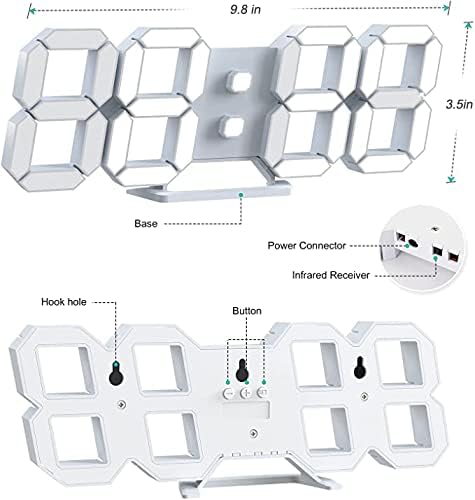
Delwedd 3.2: Cefn view and dimensions of the clock, highlighting the power connector, infrared receiver, and mounting options.
- Arddangos: Large 3D LED digits for time, date, and temperature.
- Sylfaen: Removable stand for desk placement.
- Power Connector: USB port for power input.
- Derbynnydd isgoch: Ar gyfer signalau rheoli o bell.
- Hook Holes: Ar gyfer gosod wal.
- Botymau Rheoli: Located on the back for basic settings (Power, Up, Down, Set).
4. Gosod
4.1 Cysylltiad Pwer
- Connect the provided USB power cable to the power connector on the back of the clock.
- Plygiwch ben arall y cebl USB i mewn i addasydd pŵer USB safonol (heb ei gynnwys) neu borthladd USB cyfrifiadur.
- The clock will power on and display the time.
The clock is powered by the USB cable only. A built-in battery serves to record time settings when power is disconnected, ensuring settings are retained for 4-8 hours.

Image 4.1: Explanation of the clock's power and memory function.
4.2 Dewisiadau Lleoli
The clock can be used as a desk clock or a wall clock.
- Lleoliad Desg: Attach the fixed bracket to the bottom of the clock. The angle of the bracket can be adjusted for optimal viewing.
- Mowntio Wal: Remove the fixed bracket if attached. Use the installation slots (hook holes) on the back of the clock to hang it securely on a wall using appropriate fasteners (not included).

Image 4.2: The clock configured for wall mounting and desk placement.
5. Cyfarwyddiadau Gweithredu
The clock's functions are primarily controlled using the included remote control. Basic settings can also be adjusted via the buttons on the back of the clock.
5.1 Pennu Amser a Dyddiad
- Gwasgwch y AMSER button on the remote control to enter time setting mode.
- Defnyddiwch y UP a I LAWR saethau i addasu'r awr.
- Gwasgwch AMSER again to move to minute setting, then use UP a I LAWR i addasu.
- Parhewch i bwyso AMSER i gylchu trwy osodiadau blwyddyn, mis a diwrnod, gan addasu pob un gyda UP a I LAWR.
- Gwasgwch AMSER un tro olaf neu aros ychydig eiliadau i'r gosodiadau arbed yn awtomatig.
5.2 Fformat 12/24 Awr
To switch between 12-hour and 24-hour time formats, press the 12/24H botwm ar y teclyn rheoli o bell.

Delwedd 5.1: Enghraifftample of 12-hour and 24-hour time display.
5.3 Gosod y Larwm
- Gwasgwch y ALARM button on the remote control to enter alarm setting mode.
- Defnyddiwch y UP a I LAWR arrows to set the desired alarm hour.
- Gwasgwch ALARM again to move to minute setting, then use UP a I LAWR i addasu.
- Gwasgwch ALARM un tro olaf neu aros i'r gosodiadau arbed.
- I actifadu/dadactifadu'r larwm, pwyswch y ALARM button briefly outside of setting mode. An alarm icon will appear/disappear on the display.
5.4 Swyddogaeth Snooze
Pan fydd y larwm yn swnio, pwyswch y SNOOZE button on the remote control to temporarily silence the alarm. The alarm will sound again after a set interval (typically 5-10 minutes).

Image 5.2: The snooze alarm function in use.
5.5 Addasiad Disgleirdeb
The clock features both automatic and manual brightness control.
- Disgleirdeb Awtomatig: The built-in sensor automatically adjusts the display brightness based on ambient light conditions.
- Disgleirdeb â llaw: Gwasgwch y LLAWR button on the remote control to cycle through different brightness levels (e.g., high, medium, low).

Image 5.3: Automatic brightness adjustment based on ambient light.

Image 5.4: Manual adjustment through three brightness levels.
5.6 Arddangosfa Tymheredd
The clock automatically displays the ambient temperature. No manual adjustment is typically required for this function.
6. cynnal
To ensure the longevity and optimal performance of your WISE TIGER LED Digital Alarm Clock, follow these maintenance guidelines:
- Glanhau: Use a soft, dry cloth to wipe the display and casing. Avoid abrasive cleaners, solvents, or spray cleaners directly on the clock.
- Pwer: Always use the provided USB cable for power. Ensure the power source is stable.
- Amgylchedd: Cadwch y cloc i ffwrdd o dymheredd eithafol, golau haul uniongyrchol, a lleithder uchel.
- Rheolaeth Anghysbell: Store the remote control in a safe place to prevent loss or damage. Ensure batteries are replaced when needed (typically 2 Lithium Ion batteries, included).
7. Datrys Problemau
Os byddwch chi'n dod ar draws problemau gyda'ch cloc, cyfeiriwch at y problemau a'r atebion cyffredin canlynol:
| Problem | Achos Posibl | Ateb |
|---|---|---|
| Nid yw'r cloc yn troi ymlaen | Dim pŵer neu gysylltiad rhydd | Ensure USB cable is securely connected and power source is active. Try a different USB port or adapter. |
| Rheolaeth bell ddim yn gweithio | Remote batteries are dead or remote is out of range/blocked | Replace remote control batteries. Ensure remote is pointed at the clock's infrared receiver (refer to Image 3.2) and within 8 meters. Remove any obstructions. |
| Mae amser yn anghywir | Time was not set precisely | Reset the time carefully, ensuring you set it at the exact second of the desired time. |
| Display is too dim or too bright | Brightness setting needs adjustment | Gwasgwch y LLAWR button on the remote to cycle through manual brightness levels. Check if automatic brightness is functioning correctly in different light conditions. |
| Nid yw'r larwm yn swnio | Alarm is not activated or set incorrectly | Ensure the alarm is set and activated (alarm icon visible). Verify the alarm time is correct. |
8. manylebau
| Nodwedd | Manylyn |
|---|---|
| Brand | TIGER WISE |
| Rhif Model | CK-LED1302 |
| Math Arddangos | Digidol |
| Lliw | Gwyn |
| Dimensiynau Cynnyrch | 9.7"L x 3.5"U |
| Ffynhonnell Pwer | Trydan Cordio (USB) |
| Batri Cof | 2 Lithium Ion batteries (included), retains settings for 4-8 hours |
| Math Mowntio | Wall Mount, Desk Mount |
| Nodweddion Arbennig | Adjustable Brightness, Alarm Clock, Temperature Display, Date Display, 12/24 Hour Format |
| Deunydd | Biwtadïen Acrylonitrile Styrene |
| Pwysau Eitem | 0.317 owns (tua 9 gram) |
| UPC | 728990655931 |
9. Gwarant a Chefnogaeth
For warranty information or technical support, please refer to the product packaging or contact the retailer where the product was purchased. Keep your purchase receipt as proof of purchase.