
1. Rhagymadrodd
The Doepfer Dark Link is a USB/MIDI-to-CV/Gate interface designed to control analog synthesizers via MIDI or USB. It converts MIDI data into analog control voltages (CV) and gate signals, enabling seamless integration of your analog gear with modern MIDI setups.
The Dark Link provides four analog control voltages (CV1-4) and one gate signal. These outputs are controlled by various MIDI commands, offering flexible control over your modular or analog synthesizers.
2. Nodweddion Allweddol
- USB/MIDI-to-CV/Gate conversion for analog synthesizers.
- One USB port for computer connection.
- One MIDI input for MIDI device connection.
- Four CV outputs (CV1, CV2, CV3, CV4) for various control parameters.
- One Gate output for note on/off signals.
- Learn button for easy MIDI controller assignment.
- Glide control for portamento effects.
3. Canllaw Gosod
3.1 Dadbacio ac Archwilio
Carefully remove the Dark Link interface from its packaging. Inspect the unit for any signs of damage that may have occurred during shipping. Ensure all components, including the power supply, are present.
3.2 Cysylltiad
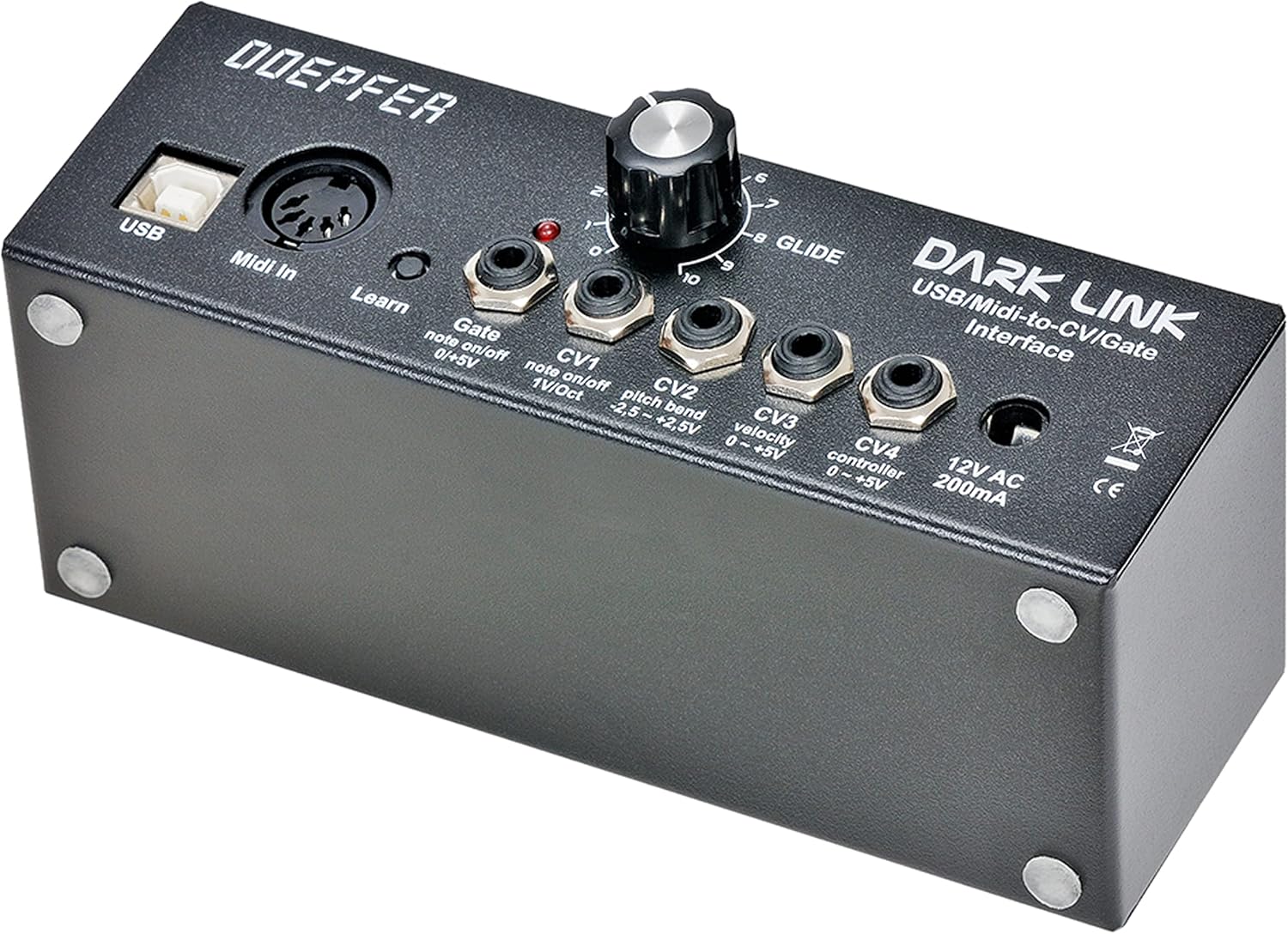
Refer to the image below for an overview of the connections on the Dark Link interface.

- Porth USB: Connect a standard USB cable from this port to your computer. This provides both power and MIDI data communication.
- MIDI yn: Connect a standard MIDI cable from your MIDI controller or interface to this input.
- 12V AC 200mA: Connect the provided 12V AC power adapter to this input. Ensure you use only the specified power adapter.
- Gate Output (0/+5V): Connect this output to the Gate input of your analog synthesizer or modular system. This signal controls note on/off.
- CV1 Output (1V/Oct): Connect this output to the pitch CV input of your analog synthesizer. This output is controlled by MIDI note commands.
- CV2 Output (-2.5V - +2.5V): Connect this output to a modulation input on your analog synthesizer. This output is controlled by MIDI pitch bend data.
- CV3 Output (0 - +5V): Connect this output to a modulation input on your analog synthesizer. This output is controlled by MIDI velocity data.
- CV4 Output (0 - +5V): Connect this output to a modulation input on your analog synthesizer. This output is controlled by a freely selectable MIDI control change message.
4. Cyfarwyddiadau Gweithredu
4.1 Gweithrediad Sylfaenol
Once all connections are made, power on your analog synthesizer and the Dark Link. The Dark Link will automatically detect MIDI input from either the USB or MIDI In port. MIDI note messages will be converted to CV1 (pitch) and Gate (note on/off) signals.
4.2 CV Outputs
- CV1 (1V/Octave): This output generates a control voltage corresponding to MIDI note messages. It follows the standard 1 Volt per Octave scaling, suitable for controlling the pitch of most analog oscillators.
- CV2 (Pitch Bend): This output generates a control voltage based on incoming MIDI pitch bend messages. The voltage range is -2.5V to +2.5V, allowing for expressive pitch modulation.
- CV3 (Velocity): This output generates a control voltage based on the velocity of incoming MIDI note messages. The voltage range is 0V to +5V, useful for controlling parameters like filter cutoff or amplifier gain based on playing dynamics.
- CV4 (MIDI Control Change): This output generates a control voltage (0V to +5V) based on a specific MIDI Control Change (CC) message. The CC number can be freely selected using the Learn function.
4.3 Gate Output
The Gate output provides a 0V/+5V signal. It goes high (+5V) when a MIDI note-on message is received and low (0V) when a MIDI note-off message is received. This is used to trigger envelopes or other gate-controlled functions on your analog synthesizer.
4.4 Botwm Dysgu
The "Learn" button simplifies the assignment of a MIDI Control Change (CC) message to CV4. To assign a CC:
- Press and hold the "Learn" button.
- While holding, move the desired knob or fader on your MIDI controller that sends the CC message you wish to assign.
- Release the "Learn" button. The Dark Link will now associate that specific CC message with the CV4 output.
4.5 Glide Control
The "Glide" knob controls the portamento (glide) time for the CV1 output. Turning the knob clockwise increases the time it takes for the pitch to smoothly transition between notes. Turning it counter-clockwise reduces the glide time, resulting in more immediate pitch changes.
5. cynnal
The Doepfer Dark Link is designed for reliable operation and requires minimal maintenance. Keep the unit clean and free from dust. Use a soft, dry cloth for cleaning. Avoid using liquid cleaners or solvents, as these can damage the finish or internal components. Ensure the unit is always used in a dry environment and protected from extreme temperatures.
6. Datrys Problemau
- Dim pŵer: Ensure the 12V AC power adapter is correctly connected to the unit and a working power outlet. If using USB power, ensure the USB cable is securely connected to a powered USB port on your computer.
- No CV/Gate Output:
- Verify that your MIDI controller or software is sending MIDI messages to the Dark Link (check MIDI activity indicators if available).
- Ensure the correct MIDI channel is selected on your controller and that the Dark Link is configured to receive on that channel (if applicable, though Dark Link typically responds to all channels by default for basic functions).
- Check all cable connections between the Dark Link and your analog synthesizer.
- Incorrect Pitch (CV1): Ensure your analog synthesizer's oscillator is calibrated to 1V/Octave. Some synthesizers may require fine-tuning.
- CV4 Not Responding to Controller: Re-perform the "Learn" procedure (Section 4.4) to ensure the correct MIDI Control Change message is assigned to CV4.
7. Manylebau Technegol
| Manyleb | Gwerth |
|---|---|
| Brand | Doepfer |
| Model | Dark Link |
| Rhif Rhan Gwneuthurwr | Syn0003911-000 |
| Technoleg Cysylltedd | MIDI, USB, USB/MIDI-to-CV/Gate |
| Dyfeisiau Cydnaws | PC (and other MIDI-compatible devices) |
| Mewnbwn Sain | USB |
| Nifer y Sianeli | 21 (This likely refers to MIDI channels or internal processing, not physical audio channels) |
| Pwysau Eitem | 1.02 Cilogram |
| Gwlad Tarddiad | Almaen |
| ASIN | B097RTZ5QC |
8. Gwybodaeth Gwarant
The Doepfer Dark Link is covered by a manufacturer's warranty against defects in materials and workmanship. Please refer to the warranty card included with your product or visit the official Doepfer websafle am delerau ac amodau gwarant manwl. Cadwch eich prawf prynu ar gyfer hawliadau gwarant.
9. Cefnogaeth
For technical assistance, troubleshooting beyond this manual, or service inquiries, please contact Doepfer customer support. You can find contact information on the official Doepfer websafle. Wrth gysylltu â chymorth, cofiwch gael model a rhif cyfresol eich cynnyrch wrth law.
Official Doepfer Websafle: www.doepfer.de


