
Rhagymadrodd
Thank you for choosing the PHEANOO D6 Sound Bar System. This 2.1 channel soundbar with a dedicated wired subwoofer is designed to enhance your audio experience, providing clear dialogue, powerful bass, and immersive sound for your home entertainment. This manual provides detailed instructions for setup, operation, maintenance, and troubleshooting to ensure optimal performance and longevity of your device.
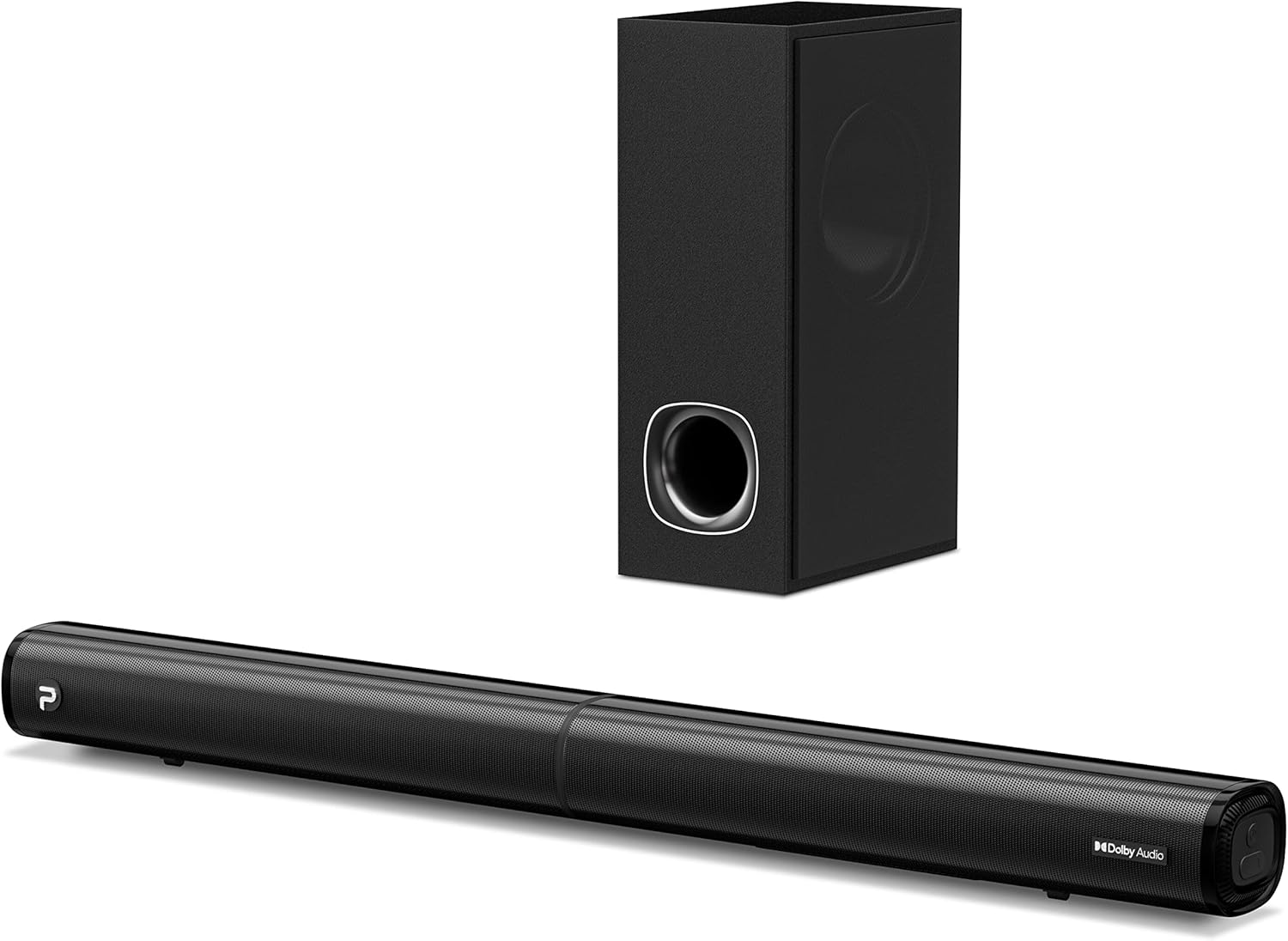
Image: The PHEANOO D6 Sound Bar and its accompanying wired subwoofer, showcasing eu dyluniad du cain.
Beth Sydd yn y Bocs
Gwiriwch gynnwys y pecyn yn ofalus. Os oes unrhyw eitemau ar goll neu wedi'u difrodi, cysylltwch â chymorth cwsmeriaid.
- Soundbar and Wired Subwoofer
- Cebl HDMI
- Cebl sain RCA
- Wall Mount Kit (screws and anchors)
- Rheolaeth Anghysbell (batris heb eu cynnwys)
- Addasydd Pŵer

Image: All components included in the PHEANOO D6 Sound Bar package, laid out for clear identification, including the soundbar, subwoofer, cables, remote, and wall mount kit.
Gosod
1. Assembling the Soundbar (Detachable Design)
The PHEANOO D6 soundbar features a unique detachable design for flexible placement. Follow these steps to assemble it:
- Align the audio connector from one half of the soundbar with the corresponding port on the other half.
- Gently push the two halves together until they click into place.
- Twist the two halves to secure the connection, ensuring the soundbar is firmly assembled.

Image: A three-step visual guide demonstrating how to connect the two halves of the detachable soundbar, ensuring proper alignment and secure locking.
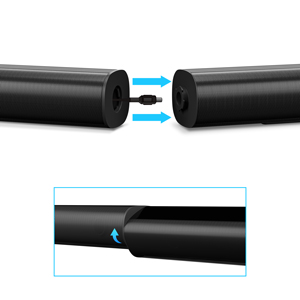
Delwedd: Llun agos view of the soundbar's detachable connection point, showing the male and female connectors.
2. Cysylltu'r Subwoofer
Cysylltwch y subwoofer gwifredig â'r bar sain gan ddefnyddio'r cebl subwoofer pwrpasol. Gwnewch yn siŵr bod y cysylltiad yn ddiogel.
3. Dewisiadau Lleoli
You can place the soundbar on a tabletop or mount it on a wall.
- Lleoliad Pen bwrdd: Place the soundbar directly in front of your TV, ensuring it does not obstruct the TV's remote sensor.
- Mowntio Wal: Use the included wall mount kit. It is recommended to measure and mark the drilling points accurately, rather than relying solely on the paper stencil, to ensure a level installation.
4. Cysylltiadau Sain
The PHEANOO D6 offers multiple connectivity options. Choose the best one for your device:
- HDMI (ARC): For the best audio quality and control, connect an HDMI cable from the soundbar's HDMI (ARC) port to your TV's HDMI (ARC) port. This allows your TV remote to control the soundbar's volume.
- Optegol: Connect an optical cable from the soundbar's Optical port to your TV's Optical Digital Audio Out port.
- AUX: Use the 3.5mm AUX cable to connect to devices with a 3.5mm audio output.
- Bluetooth 5.0: For wireless connection, pair your device via Bluetooth.

Image: The rear panel of the PHEANOO D6 Sound Bar, highlighting the HDMI (ARC), Bluetooth, Optical, and AUX input ports with corresponding icons.

Delwedd: Manwl view of the soundbar's input panel, showing the AUX, Optical, and HDMI (ARC) ports clearly labeled.
5. Cysylltiad Pwer
Connect the power adapter to the soundbar and then plug it into a wall outlet.
Cyfarwyddiadau Gweithredu
Rheolaeth Anghysbell
The included remote control allows you to manage all functions of the soundbar. Insert two AAA batteries (not included) into the remote before use.

Image: The remote control for the PHEANOO D6 Sound Bar, showing its buttons and an indicator light.
Pŵer Ymlaen / Diffodd
Press the power button on the remote or the soundbar to turn the unit on or off.
Dewis Mewnbwn
Press the "Input" button on the remote to cycle through available input sources: HDMI (ARC), Optical, AUX, and Bluetooth.
Pâr Bluetooth
I baru dyfais Bluetooth:
- Select Bluetooth input on the soundbar. The indicator light will flash.
- Enable Bluetooth on your device (smartphone, tablet, etc.) and search for "PHEANOO D6".
- Select the soundbar from the list to pair. Once connected, the indicator light will be solid.

Image: A smartphone displaying a music app, wirelessly connected to the PHEANOO D6 Sound Bar via Bluetooth, indicated by a Wi-Fi like symbol.
Moddau Sain
Mae'r bar sain yn cynnig amrywiol ddulliau sain i wneud y gorau o'ch profiad gwrando:
- Modd Deialog: Enhances vocal clarity, making speech easier to understand.
- Modd Cerddoriaeth: Optimized for music playback, providing balanced audio.
- Modd Ffilm: Delivers an immersive cinematic experience with enhanced effects.
- Modd 3D: Creates a wider, more enveloping soundstage.

Image: Icons representing different sound modes: Dialogue, Music, Movie, and 3D, indicating the soundbar's versatility.
Addasiad Bas
Use the dedicated bass control buttons on the remote to increase or decrease the subwoofer's output level to your preference.

Image: A close-up of the subwoofer, with a visual effect suggesting powerful bass emanating from it.
Dolby Digital Support
The PHEANOO D6 Sound Bar supports Dolby Digital decoding, providing a rich and dynamic audio experience for compatible content.

Image: A living room setup with the soundbar and TV, overlaid with a grid pattern indicating premium 3D surround sound powered by Dolby Audio.

Image: The Dolby Audio logo accompanied by visual representations of sound waves, emphasizing the enhanced audio quality.
Roku TV Yn barod
This soundbar is certified to work seamlessly with your Roku TV. Enjoy smooth setup, easy access to sound settings, and compatibility with any Roku TV remote.

Image: A television screen displaying the "Roku TV Ready" setup interface, with the PHEANOO Soundbar and subwoofer positioned below it, illustrating seamless integration.
Cynnal a chadw
- Glanhau: Defnyddiwch frethyn meddal, sych i lanhau arwynebau'r bar sain a'r is-woofer. Peidiwch â defnyddio glanhawyr hylif na aerosolau.
- Awyru: Sicrhewch awyru digonol o amgylch y bar sain a'r is-woofer i atal gorboethi. Peidiwch â rhwystro unrhyw agoriadau awyru.
- Storio: Os ydych chi'n storio'r uned am gyfnod hir, datgysylltwch hi o'r pŵer a'i storio mewn lle oer, sych.
Datrys problemau
| Problem | Achos Posibl | Ateb |
|---|---|---|
| Dim pŵer | Cebl pŵer heb ei gysylltu; Allfa bŵer ddim yn gweithio. | Gwnewch yn siŵr bod y cebl pŵer wedi'i gysylltu'n ddiogel. Rhowch gynnig ar soced pŵer gwahanol. |
| Dim sain | Mewnbwn anghywir wedi'i ddewis; Cyfaint yn rhy isel; Ceblau heb eu cysylltu'n iawn. | Select the correct input source. Increase volume. Check all audio cable connections. |
| Methodd paru Bluetooth | Nid yw'r bar sain yn y modd paru; Mae'r ddyfais yn rhy bell; Ymyrraeth. | Ensure soundbar is in Bluetooth input and indicator is flashing. Move device closer. Turn off other Bluetooth devices. |
| Ansawdd sain gwael | Incorrect sound mode; Source audio quality is low. | Try different sound modes (Music, Movie, Dialogue). Ensure the audio source is high quality. |
| Rheolaeth bell ddim yn gweithio | Batteries dead or incorrectly inserted; Obstruction between remote and soundbar. | Replace batteries, ensuring correct polarity. Remove any obstructions. |
For more detailed troubleshooting, refer to the official Troubleshooting Guide PDF available on the product page or contact PHEANOO customer support.
Manylebau
| Nodwedd | Manylyn |
|---|---|
| Model | D6 |
| Brand | PHEANOO |
| Math o Siaradwr | Bar sain gyda Wired Subwoofer |
| Ffurfweddiad Sianel | 2.1 CH |
| Technoleg Cysylltedd | HDMI (ARC), Bluetooth 5.0, Optical, AUX |
| Amrediad Bluetooth | Up to 100 Meters (approx. 328 feet) |
| Llefarydd Uchafswm Pŵer Allbwn | 240 Wat |
| Dimensiynau'r Cynnyrch (Bar Sain) | 29.5"L x 2.4"U x 2.8"D |
| Pwysau Eitem | 11.57 Bunt |
| Math o Reolwr | Rheolaeth Anghysbell |
| Nodweddion Arbennig | Dolby Digital Decoding, Dialogue Enhancement, Bass Adjustable, Detachable Design, Roku TV Ready |
Gwarant a Chefnogaeth
The PHEANOO D6 Sound Bar System comes with a Gwarant CyfyngedigCyfeiriwch at y cerdyn gwarant sydd wedi'i gynnwys yn eich pecyn am delerau ac amodau penodol.
For technical support, warranty claims, or further assistance, please visit the official PHEANOO website or contact their customer service department. You can also find additional resources like the Canllaw Defnyddiwr (PDF) a Canllaw Datrys Problemau (PDF) ar-lein.