
1. Rhagymadrodd
Diolch am brynuasing the Technical Pro SPARK8GNEON Portable Bluetooth Speaker. This manual provides essential information for the safe and efficient operation of your device. Please read it thoroughly before use and retain it for future reference.
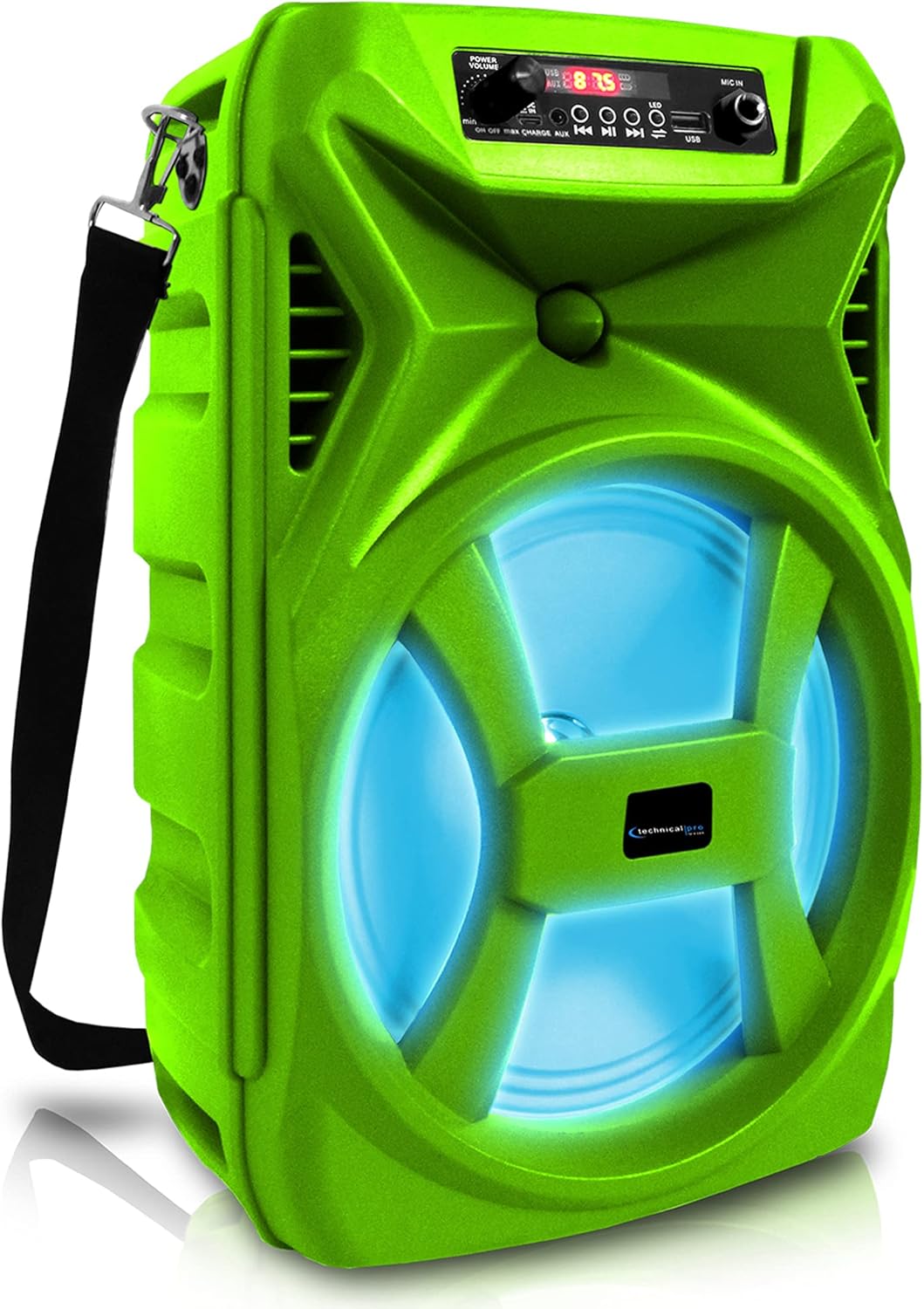
Blaen view of the Technical Pro SPARK8GNEON portable Bluetooth speaker, showcasing its vibrant green casing, illuminated woofer, and the top-mounted control panel.
2. Gwybodaeth Diogelwch
- Peidiwch ag amlygu'r siaradwr i dymheredd eithafol, lleithder, na golau haul uniongyrchol.
- Osgoi gollwng neu orfodi'r siaradwr i effeithiau cryf.
- Peidiwch â cheisio dadosod na newid y siaradwr. Bydd hyn yn gwneud y warant yn ddi-rym.
- Cadwch y siaradwr i ffwrdd o ddŵr a hylifau eraill.
- Defnyddiwch y cebl gwefru a ddarperir neu gyfwerth ardystiedig yn unig.
- Sicrhewch awyru digonol wrth weithredu'r siaradwr.
3. Cynnwys Pecyn
Gwiriwch fod yr holl eitemau yn bresennol yn y pecyn:
- Technical Pro SPARK8GNEON Portable Bluetooth Speaker
- Cebl Codi Tâl USB
- Strap Ysgwydd
- Llawlyfr Defnyddiwr (y ddogfen hon)
4. Cynnyrch Drosview
Ymgyfarwyddwch â chydrannau a rheolyddion y siaradwr.

An infographic detailing the main features of the Technical Pro SPARK8GNEON speaker, such as its built-in rechargeable battery, True Wireless Stereo (TWS) capability, Bluetooth compatibility, USB and card inputs, durable ABS plastic construction, and support for A2DP & AVRCP stereo Bluetooth devices.
Control Panel (Top View)
- Botwm Pŵer: Pwyswch a daliwch i droi'r siaradwr YMLAEN/DIFFODD.
- Botwm Modd: Short press to switch between Bluetooth, USB, TF Card, and AUX modes.
- Botwm Chwarae/Seibiant: Pwyswch i chwarae neu oedi sain.
- Previous/Volume Down Button: Pwyswch yn fyr am y trac blaenorol, pwyswch yn hir i ostwng y gyfrol.
- Next/Volume Up Button: Pwyswch yn fyr am y trac nesaf, pwyswch yn hir i gynyddu'r gyfrol.
- Botwm Ysgafn LED: Press to cycle through LED light modes or turn them off.
- Porth USB: Ar gyfer chwarae gyriant fflach USB.
- Slot Cerdyn TF: Ar gyfer chwarae cerdyn TF (MicroSD).
- Mewnbwn AUX: Jac 3.5mm ar gyfer dyfeisiau sain allanol.
- Porth Codi Tâl: Ar gyfer cysylltu'r cebl gwefru USB.
5. Gosod
5.1 Codi Tâl Cychwynnol
- Before first use, fully charge the speaker for 8-10 hours.
- Connect the USB charging cable to the speaker's charging port and the other end to a USB power adapter (not included) or a computer's USB port.
- Bydd y golau dangosydd gwefru yn goleuo yn ystod gwefru ac yn diffodd pan fydd wedi'i wefru'n llawn.
5.2 Pweru Ymlaen/Diffodd
- To power ON, press and hold the Power Button until the display illuminates.
- To power OFF, press and hold the Power Button again until the display turns off.
6. Cyfarwyddiadau Gweithredu
6.1 Pâr Bluetooth
- Trowch y siaradwr ymlaen. Bydd yn mynd i mewn i'r modd paru Bluetooth yn awtomatig, a nodir gan eicon Bluetooth sy'n fflachio ar yr arddangosfa.
- Ar eich dyfais symudol (ffôn clyfar, tabled, ac ati), galluogwch Bluetooth a chwiliwch am ddyfeisiau sydd ar gael.
- Select "SPARK8GNEON" from the list of devices.
- Once paired, the speaker will emit a confirmation tone, and the Bluetooth icon will stop flashing.
- Gallwch nawr chwarae sain o'ch dyfais drwy'r siaradwr.
Chwarae Cerdyn USB/TF 6.2
- Insert a USB flash drive or TF (MicroSD) card into the respective port.
- Bydd y siaradwr yn newid yn awtomatig i fodd USB neu Gerdyn TF ac yn dechrau chwarae sain files. If not, press the Mode Button to select the correct mode.
- Defnyddiwch y botymau Chwarae/Saib, Blaenorol, a Nesaf i reoli'r chwarae.
6.3 AUX Mewnbwn
- Cysylltwch un pen cebl sain 3.5mm (heb ei gynnwys) â phorthladd mewnbwn AUX y siaradwr.
- Connect the other end to the audio output jack of your external device (e.g., MP3 player, laptop).
- Press the Mode Button to select AUX mode.
- Rheoli chwarae a chyfaint o'ch dyfais allanol.
Paru Stereo Di-wifr Gwirioneddol 6.4 (TWS)
The TWS function allows you to connect two SPARK8GNEON speakers wirelessly for a stereo sound experience.

Illustration demonstrating the True Wireless Stereo (TWS) feature, showing two Technical Pro SPARK8GNEON speakers wirelessly connected to a single smartphone for synchronized audio playback.
- Ensure both SPARK8GNEON speakers are powered on and in Bluetooth mode, but not yet paired with any device.
- On one of the speakers (this will be the primary speaker), press and hold the TWS button (if available, or a specific button designated for TWS pairing, otherwise assume it's initiated by a long press of the Mode button or a dedicated TWS button not explicitly listed but implied by feature).
- The speakers will attempt to connect to each other. A confirmation tone will sound once connected.
- Now, connect your mobile device to the primary speaker via Bluetooth as described in section 6.1.
- Bydd sain nawr yn chwarae mewn stereo ar draws y ddau siaradwr.
6.5 Goleuadau LED
Press the LED Light Button on the control panel to cycle through various light modes or to turn the LED lights off.
7. cynnal
- Glanhau: Defnyddiwch frethyn meddal, sych i lanhau tu allan y siaradwr. Peidiwch â defnyddio glanhawyr sgraffiniol na thoddyddion.
- Storio: Pan nad yw'n cael ei ddefnyddio am gyfnodau hir, storiwch y siaradwr mewn lle oer, sych i ffwrdd o olau haul uniongyrchol.
- Gofal Batri: To prolong battery life, fully charge the speaker before storing it for long periods and recharge it every 3-6 months.
8. Datrys Problemau
| Problem | Achos Posibl | Ateb |
|---|---|---|
| Nid yw'r siaradwr yn troi ymlaen. | Mae batri wedi'i ddisbyddu. | Gwefrwch y siaradwr yn llawn. |
| Dim sain. | Mae'r gyfrol yn rhy isel; y modd anghywir wedi'i ddewis; y ddyfais heb ei chysylltu. | Increase volume on speaker and connected device; press Mode button to select correct input; ensure Bluetooth/AUX connection is established. |
| Ni all dyfais Bluetooth baru. | Nid yw'r siaradwr yn y modd paru; mae'r ddyfais yn rhy bell; ymyrraeth. | Ensure speaker is in Bluetooth pairing mode (flashing icon); move device closer to speaker; turn off other Bluetooth devices nearby. |
| Mae paru TWS yn methu. | Speakers are too far apart; one speaker already paired to a device. | Ensure speakers are within close proximity; disconnect any Bluetooth devices from both speakers before initiating TWS pairing. |
9. manylebau
- Model: SPARK8GNEON
- Allbwn Pwer: 500 Wat (Uchaf)
- Maint Siaradwr: 8 Inch Woofer & Tweeter
- Cysylltedd: Bluetooth, USB, TF Card, AUX (3.5mm)
- Fersiwn Bluetooth: (Not specified, assuming standard)
- Batri: 1 batri Ion Lithiwm (wedi'i gynnwys)
- Bywyd batri: (Not specified, varies with usage)
- Amser Codi Tâl: 8-10 hours (initial charge)
- Dimensiynau Cynnyrch (L x W x H): 8.86 x 7.48 x 14.17 modfedd
- Pwysau Eitem: 4 pwys
- rhwystriant: 3 Ohm
- UPC: 817802016296

Diagram illustrating the physical dimensions of the Technical Pro SPARK8GNEON speaker, measuring 14.17 inches in height, 8.86 inches in width, and 7.48 inches in depth.
10. Gwarant a Chefnogaeth
For warranty information or technical support, please refer to the warranty card included with your product or visit the official Technical Pro website. You may also contact Technical Pro customer service directly for assistance.
Websafle: Technical Pro Store on Amazon