
Sharp 4T-C65DL6EX
Sharp 65-inch 4K Ultra HD LED Smart Android TV User Manual
Model: 4T-C65DL6EX
1. Rhagymadrodd
This manual provides essential information for the safe and efficient operation of your Sharp 65-inch 4K Ultra HD LED Smart Android TV, Model 4T-C65DL6EX. Please read these instructions thoroughly before using your television and retain them for future reference. Your new television features a 65-inch 4K Ultra HD display, runs on Android 10.0, and includes a built-in receiver and remote control.
2. Cyfarwyddiadau Diogelwch Pwysig
Dilynwch y rhagofalon diogelwch canlynol i atal tân, sioc drydanol neu anaf:
- Peidiwch â gwneud y cyfarpar hwn yn agored i law neu leithder.
- Peidiwch â rhwystro unrhyw agoriadau awyru. Gosodwch yn unol â chyfarwyddiadau'r gwneuthurwr.
- Peidiwch â gosod yn agos at unrhyw ffynonellau gwres fel rheiddiaduron, cofrestrau gwres, stofiau, neu gyfarpar arall (gan gynnwys amplifyddion) sy'n cynhyrchu gwres.
- Amddiffynnwch y llinyn pŵer rhag cael ei gerdded ymlaen neu ei binsio, yn enwedig wrth blygiau, cynwysyddion cyfleustra, a'r pwynt lle maent yn gadael y cyfarpar.
- Defnyddiwch atodiadau/ategolion a nodir gan y gwneuthurwr yn unig.
- Tynnwch y plwg o'r cyfarpar hwn yn ystod stormydd mellt neu pan na chaiff ei ddefnyddio am gyfnodau hir o amser.
- Cyfeirio pob gwasanaeth i bersonél gwasanaeth cymwys.
3. Beth sydd wedi'i gynnwys
Upon unpacking your Sharp 65-inch Smart Android TV, please ensure all the following items are present:
- Sharp 65-inch 4K Ultra HD LED Smart Android TV
- Rheolaeth Anghysbell
- Cebl Pŵer
- Stand Teledu (2 ddarn) a Sgriwiau
- Llawlyfr Defnyddiwr (y ddogfen hon)
4. Gosod
4.1 Cysylltu'r Stand Teledu
To attach the stand to your television:
- Rhowch y teledu wyneb i lawr yn ofalus ar arwyneb meddal, gwastad i atal difrod i'r sgrin.
- Aliniwch bob darn stondin â'r slotiau cyfatebol ar waelod y teledu.
- Secure each stand piece using the provided screws. Ensure they are tightened firmly.
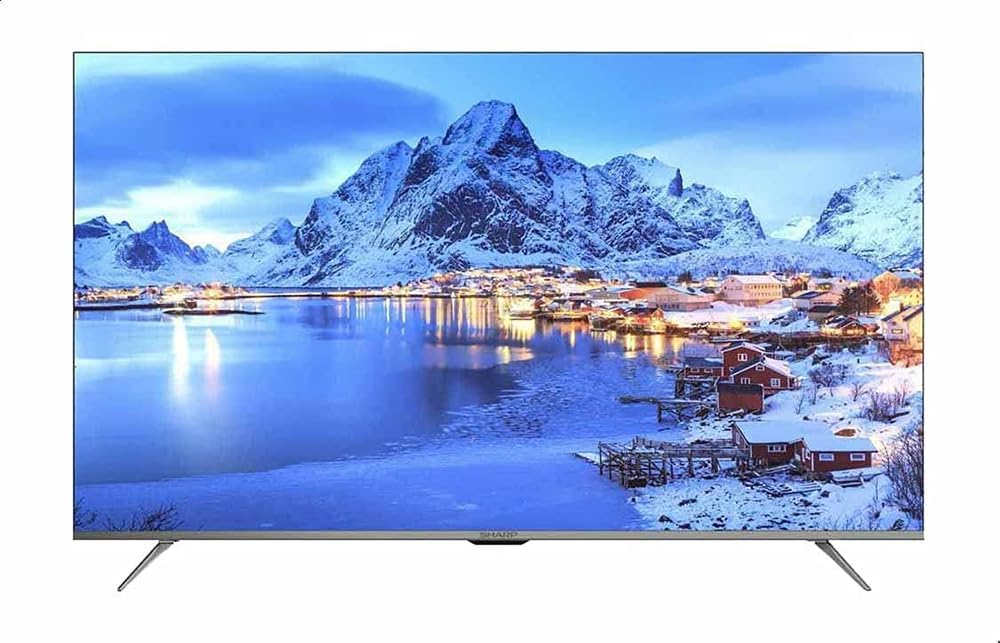
Ffigur 4.1: Blaen view of the Sharp 65-inch Smart Android TV with its stand attached, displaying a vibrant landscape image.

Ffigur 4.2: Blaen onglog view of the Sharp 65-inch Smart Android TV, showcasing the slim bezel and stand design.
4.2 Cysylltu Dyfeisiau Allanol
Your TV offers various ports for connecting external devices. Refer to the diagram below for port locations.

Ffigur 4.3: Ochr profile of the Sharp 65-inch Smart Android TV, highlighting the various input ports available for connectivity.
- Porthladdoedd HDMI: Connect Blu-ray players, game consoles, cable/satellite boxes, etc.
- Porthladdoedd USB: Cysylltwch ddyfeisiau storio USB ar gyfer chwarae cyfryngau.
- Mewnbwn Antena/Cebl: Connect your antenna or cable for broadcast TV.
- Porthladd Ethernet: Ar gyfer cysylltiad rhyngrwyd gwifrau.
4.3 Troi Ymlaen am y Tro Cyntaf
Ar ôl cysylltu'r holl geblau angenrheidiol:
- Plygiwch y cebl pŵer i'r teledu ac yna i mewn i soced wal.
- Pwyswch y botwm Pŵer ar y teclyn rheoli o bell neu ar y teledu ei hun.
- Follow the on-screen instructions to complete the initial setup, including language selection, network connection (Wi-Fi or Ethernet), and Google account sign-in for Android TV features.

Ffigur 4.4: Agos view of the power and control buttons located on the television unit.
5. Gweithredu Eich Teledu
5.1 Rheolaeth o Bell Drosview
The included remote control allows you to navigate your TV's features. Familiarize yourself with its buttons:
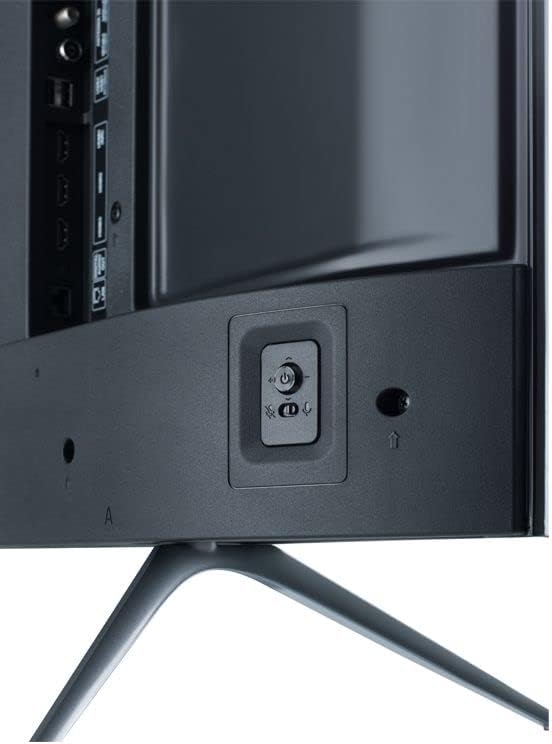
Figure 5.1: The Sharp Smart TV remote control, featuring dedicated buttons for popular streaming services and voice control.
- Pwer: Yn troi'r teledu ymlaen neu i ffwrdd.
- Botymau Rhif: Dewiswch sianeli yn uniongyrchol.
- Pad Llywio (I Fyny/I Lawr/Chwith/Dde/Iawn): Llywio bwydlenni a dewis opsiynau.
- Yn ôl: Yn dychwelyd i'r sgrin flaenorol.
- Cartref: Yn cyrchu sgrin gartref Android TV.
- Cyfrol +/-: Yn addasu lefel y sain.
- Sianel +/-: Yn newid sianeli teledu.
- Ffynhonnell: Yn dewis ffynonellau mewnbwn (HDMI, AV, Teledu).
- Botymau Netflix/YouTube/Prime Video: Direct access to these applications.
- Botwm Cynorthwyydd Google: Yn actifadu rheolaeth llais.
5.2 Rhyngwyneb Teledu Android
Your TV runs on Android 10.0, providing access to a wide range of apps and services. The home screen displays your favorite apps, recommended content, and settings.

Ffigur 5.2: Sgrin gartref Android TV, yn dangos amrywiol gymwysiadau ac argymhellion cynnwys.
- Apiau: Access installed applications from the 'Apps' row.
- Google Play Store: Download new apps, games, and content.
- Gosodiadau: Customize TV settings, network connections, and user preferences.
- Cynorthwyydd Google: Defnyddiwch orchmynion llais i chwilio am gynnwys, rheoli dyfeisiau cartref clyfar, a chael gwybodaeth.
5.3 Switching Input Sources
To switch between connected devices (e.g., a game console on HDMI 1, a Blu-ray player on HDMI 2, or the built-in receiver):
- Gwasgwch y Ffynhonnell botwm ar eich teclyn rheoli o bell.
- Use the navigation buttons to highlight the desired input source.
- Gwasgwch OK i'w ddewis.
6. cynnal
6.1 Glanhau Sgrin y Teledu
I lanhau'r sgrin, sychwch hi'n ysgafn gyda lliain meddal, di-flwff. Ar gyfer marciau ystyfnig, sychwch hi'n ysgafnampgolchwch y lliain gyda dŵr neu lanhawr sgrin arbenigol. Peidiwch byth â chwistrellu glanhawr yn uniongyrchol ar y sgrin.
6.2 Glanhau'r Teledu Casing
Sychwch y teledu casing with a soft, dry cloth. Avoid using abrasive cleaners or solvents, as they may damage the finish.
7. Datrys Problemau
Os byddwch chi'n dod ar draws problemau gyda'ch teledu, cyfeiriwch at y problemau a'r atebion cyffredin canlynol:
| Problem | Ateb Posibl |
|---|---|
| Dim pŵer | Ensure the power cable is securely plugged into both the TV and the wall outlet. Check if the outlet is working. |
| Dim llun, ond mae sain yn bresennol | Check the input source selection. Ensure external devices are powered on and connected correctly. |
| Dim sain, ond mae llun yn bresennol | Check the volume level and ensure the TV is not muted. Verify audio cables for external devices. |
| Rheolaeth bell ddim yn gweithio | Amnewidiwch y batris yn y teclyn rheoli o bell. Gwnewch yn siŵr nad oes unrhyw rwystrau rhwng y teclyn rheoli o bell a synhwyrydd IR y teledu. |
| Smart TV features are slow or unresponsive | Check your internet connection. Restart the TV by unplugging it for a few minutes and plugging it back in. Clear app caches if necessary. |
8. manylebau
Key technical specifications for the Sharp 65-inch 4K Ultra HD LED Smart Android TV (Model 4T-C65DL6EX):
- Maint y sgrin: 65 modfedd
- Technoleg Arddangos: LED
- Penderfyniad: 4K Ultra HD
- Cyfradd Adnewyddu: 60 Hz
- System Weithredu: Android 10.0
- Technoleg Cysylltedd: Wi-Fi
- Cymhareb Agwedd: 16:9
- Rhif Model yr Eitem: 4T-C65DL6EX
- Gwneuthurwr: miniog
- Dimensiynau Eitem (D x W x H): 29D x 144.8W x 89.9H centimetr
- Dimensiynau Pecyn: 50 x 50 x 18 cm; 21 kg

Figure 8.1: Dimensional diagram of the Sharp 65-inch Smart Android TV, indicating height, width, and depth.
9. Gwarant a Chefnogaeth
For warranty information and technical support, please refer to the documentation provided with your purchase or contact your local Sharp authorized service center. In some regions, support may be provided by Al-Araby Group.
Ask a question about this manual
Ask about setup, troubleshooting, compatibility, parts, safety, or missing instructions. Manuals+ will review the question and use this page’s manual context to help answer it.