
Rhagymadrodd
Welcome to the user manual for your AWOW Funtab 701 Kids Tablet. This guide provides essential information on setting up, operating, maintaining, and troubleshooting your device to ensure a safe and enjoyable experience for your child. Please read this manual thoroughly before using the tablet.
Cynnwys Pecyn
Gwiriwch fod yr holl eitemau a restrir isod wedi'u cynnwys yn eich pecyn:
- AWOW Funtab 701 Kids Tablet (7 inch)
- Exclusive Kid-Proof Case
- Pen Actif
- Llawlyfr Defnyddiwr (y ddogfen hon)
- Addasydd Pŵer
Cynnyrch Drosview
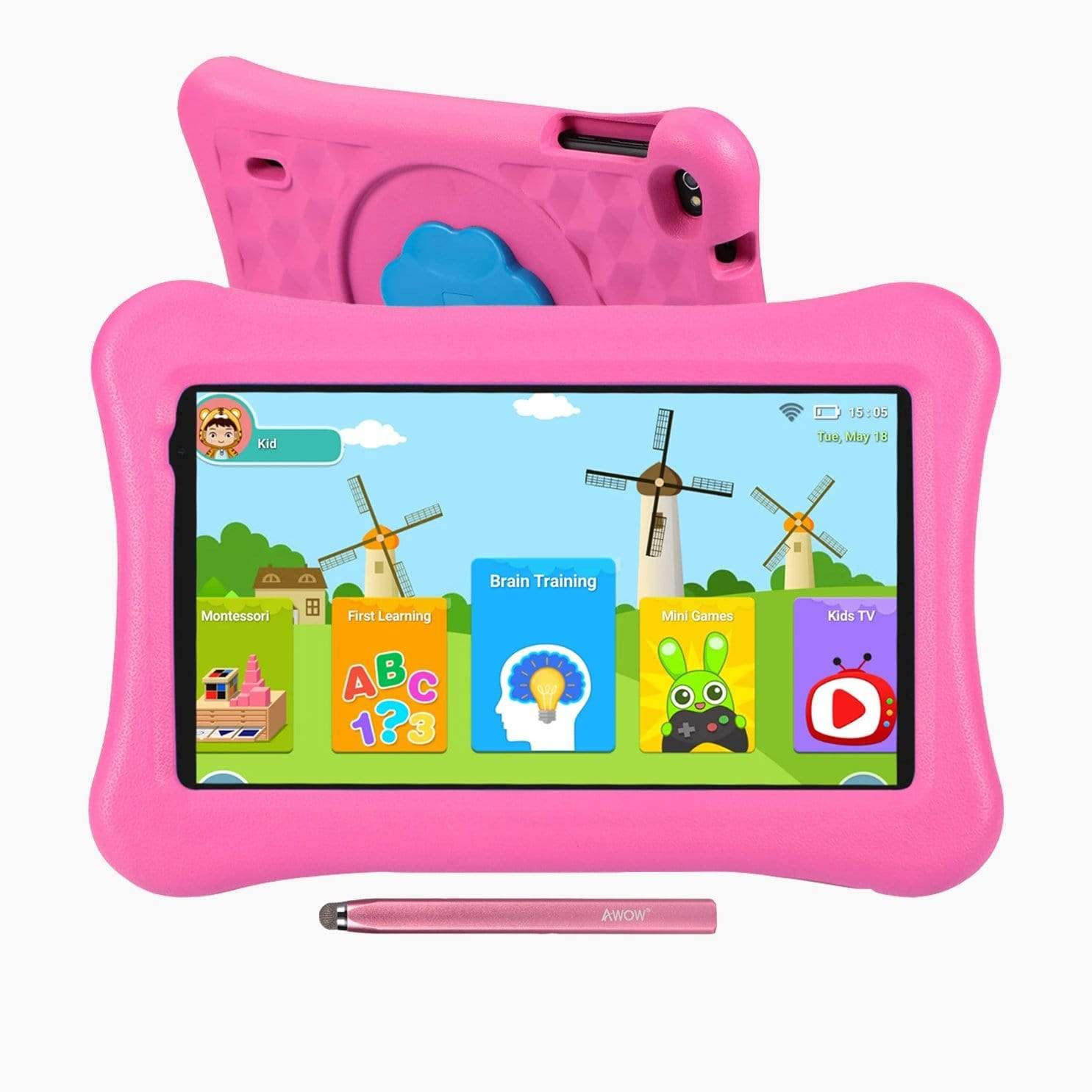
Image: The AWOW Funtab 701 Kids Tablet, shown with its protective pink kid-proof case and the accompanying active pen. The tablet features a 7-inch display.
The AWOW Funtab 701 is a 7-inch kids tablet designed for educational and entertainment purposes. It runs on Android 10 Go, powered by a 1.5GHz Quad-core processor, with 2GB RAM and 16GB ROM. It features a 1024x600 IPS HD display and supports 2.4G Wi-Fi connectivity. The tablet comes with a durable kid-proof case and an active pen for interactive learning and creativity.
Gosod
1. Codi Tâl y Dabled
Before first use, fully charge the tablet. Connect the provided power adapter to the tablet's charging port and plug it into a wall outlet. The charging indicator will typically light up. A full charge may take several hours.
2. Pweru Ymlaen / I ffwrdd
- I Bweru Ymlaen: Press and hold the Power button (usually located on the side or top edge) until the screen lights up.
- I Bweru i ffwrdd: Press and hold the Power button until a power-off menu appears on the screen. Select 'Power off' and confirm.
3. Gosodiad Cychwynnol
Ar ôl ei droi ymlaen am y tro cyntaf, bydd y dabled yn eich tywys trwy'r broses sefydlu gychwynnol:
- Dewis Iaith: Dewiswch eich dewis iaith.
- Cysylltiad Wi-Fi: Select your 2.4G Wi-Fi network from the list and enter the password.
- Cyfrif Google: Mewngofnodwch gyda chyfrif Google presennol neu crëwch un newydd. Mae hyn yn angenrheidiol i gael mynediad i'r Google Play Store a gwasanaethau Google eraill.
- Dyddiad ac Amser: Gosodwch y dyddiad a'r amser cywir, neu gadewch i'r rhwydwaith ei osod yn awtomatig.
4. iWawa App and Parental Controls
The AWOW Funtab 701 comes with the iWawa app pre-installed, offering a safe environment for children and robust parental controls.
- Creu Profiles: Open the iWawa app to create individual profiles ar gyfer pob plentyn.
- Rheoli Cynnwys: Within the parental control mode, you can hand-pick specific apps, games, videos, and websites that your child can access.
- Screen Time Control: Set daily time limits for tablet usage and specific play periods.
- Pori'n Ddiogel: Ensure children browse only safe and approved websafleoedd.
- Addasu Gosodiadau: Parental control settings can be adjusted as your child grows to tailor content to their age and development.
Gweithredu'r Dabled
1. Mordwyo Sylfaenol
The tablet uses a touchscreen interface. Common gestures include:
- Tap: I ddewis eitem neu agor ap.
- Swipe: I sgrolio drwy dudalennau neu ddewislenni.
- Pinsiad: I chwyddo i mewn neu allan ar ddelweddau a web tudalennau.
- Gwasg Hir: I gael mynediad at ddewislenni cyd-destunol neu symud eiconau apiau.
2. Using the Active Pen
The included active pen allows for more precise interaction, drawing, and writing. Simply touch the pen to the screen as you would with your finger. No pairing is typically required for basic functionality.
3. Managing Applications
- Lawrlwytho Apiau: Access the Google Play Store to download new applications. Ensure parental controls are set to manage app downloads for children.
- Dadosod Apiau: Long-press an app icon on the home screen or in the app drawer, then drag it to the 'Uninstall' option that appears. Alternatively, go to Settings > Apps & notifications > See all apps, select the app, and tap 'Uninstall'.
4. Cysylltu â Wi-Fi
To connect or reconnect to a Wi-Fi network:
- Ewch i Gosodiadau > Rhwydwaith a rhyngrwyd > Wi-Fi.
- Ensure Wi-Fi is turned On.
- Select your desired 2.4G network from the list of available networks.
- Rhowch gyfrinair y rhwydwaith os gofynnir amdano, yna tapiwch Cyswllt.
Cynnal a chadw
1. Glanhau
I lanhau sgrin y dabled, defnyddiwch frethyn meddal, di-flwff. Ar gyfer staeniau ystyfnig, sychwch ychydigampen the cloth with water or a screen-specific cleaning solution. Avoid harsh chemicals or abrasive materials. The kid-proof case can be cleaned with mild soap and water.
2. Gofal Batri
I ymestyn oes y batri:
- Osgowch amlygu'r dabled i dymheredd eithafol (poeth neu oer).
- Peidiwch â gadael i'r batri ollwng ei ollwng yn aml.
- Defnyddiwch yr addasydd pŵer a ddarperir yn unig ar gyfer gwefru.
- Reduce screen brightness and close unused apps to conserve power.
3. Storio
When not in use for extended periods, store the tablet in a cool, dry place away from direct sunlight. Ensure the battery has at least a 50% charge before storing.
Datrys problemau
If you encounter issues with your AWOW Funtab 701, refer to the solutions below:
- Nid yw'r tabled yn troi ymlaen: Ensure the tablet is fully charged. Connect it to the power adapter and wait a few minutes before attempting to power it on again. If it still doesn't turn on, try holding the power button for 10-15 seconds.
- Problemau cysylltiad Wi-Fi: Check if your Wi-Fi router is working correctly. Restart both the tablet and the router. Ensure you are connecting to a 2.4G network and have entered the correct password.
- Mae apiau'n araf neu'n chwalu: Close unused applications. Clear the cache of problematic apps (Settings > Apps & notifications > App info > Storage & cache > Clear cache). If the issue persists, consider uninstalling and reinstalling the app.
- Mae'r batri'n draenio'n gyflym: The average battery life is approximately 4 hours. To optimize, reduce screen brightness, disable Wi-Fi when not needed, and close background apps. Avoid running multiple demanding applications simultaneously.
- Mae'r sgrin yn anymatebol: Try restarting the tablet. If the issue persists, ensure the screen is clean and free of debris.
Manylebau
| Nodwedd | Manylyn |
|---|---|
| Brand | AWOW |
| Enw Model | Funtab 701 |
| System Weithredu | Android 10 Ewch |
| Maint Sgrin | 7 modfedd |
| Cydraniad Arddangos | 1024 x 600 picsel |
| Prosesydd | 1.5 GHz Quad-core (Qualcomm) |
| HWRDD | 2 GB |
| Storio Mewnol | 16 GB |
| Storfa Ehangadwy | Micro SD slot (up to 512GB) |
| Camera Cefn | 2.0 AS |
| Camera blaen | 2.0 AS |
| Cysylltedd Di-wifr | 2.4G Wi-Fi (802.11b) |
| Bywyd Batri Cyfartalog | 4 Awr |
| Dimensiynau Cynnyrch | 18.5 x 10.5 x 1 cm |
| Pwysau Eitem | 453.59 g |
Gwarant a Chefnogaeth
For warranty information, please refer to the documentation provided at the time of purchase. This typically includes details on coverage duration and terms. For technical assistance or further inquiries, please contact AWOW customer service through their official support channels.