
Cynnyrch Drosview
The ANJANK AC190-DE is a versatile digital radio alarm clock designed to enhance your daily routine. It features a 10W fast wireless charger, a convenient USB charging port, and a clear, dimmable LED display. Enjoy your favorite stations with its integrated FM radio, complete with a programmable sleep timer. For private listening, a 3.5mm audio jack is included. The device operates on mains power and includes a battery backup system to retain settings during power interruptions.

The ANJANK AC190-DE Digital Radio Alarm Clock, showcasing its wooden finish and clear LED display.

This infographic highlights the three primary functions of the device: an alarm clock, an FM radio, and a wireless charger.
Cyfarwyddiadau Gosod
- Cysylltiad Pwer: Connect the provided DC 9V power adapter to the "DC9V" port on the back of the unit. Plug the adapter into a standard wall outlet.
- Gwneud copi wrth gefn o'r batri: For retaining time and alarm settings during power outages, insert two AAA batteries (not included) into the battery compartment located on the bottom of the unit.
- Antena FM: For optimal FM radio reception, fully extend the integrated FM antenna.
Gweithredu'r Dyfais
Rheolaethau Drosview
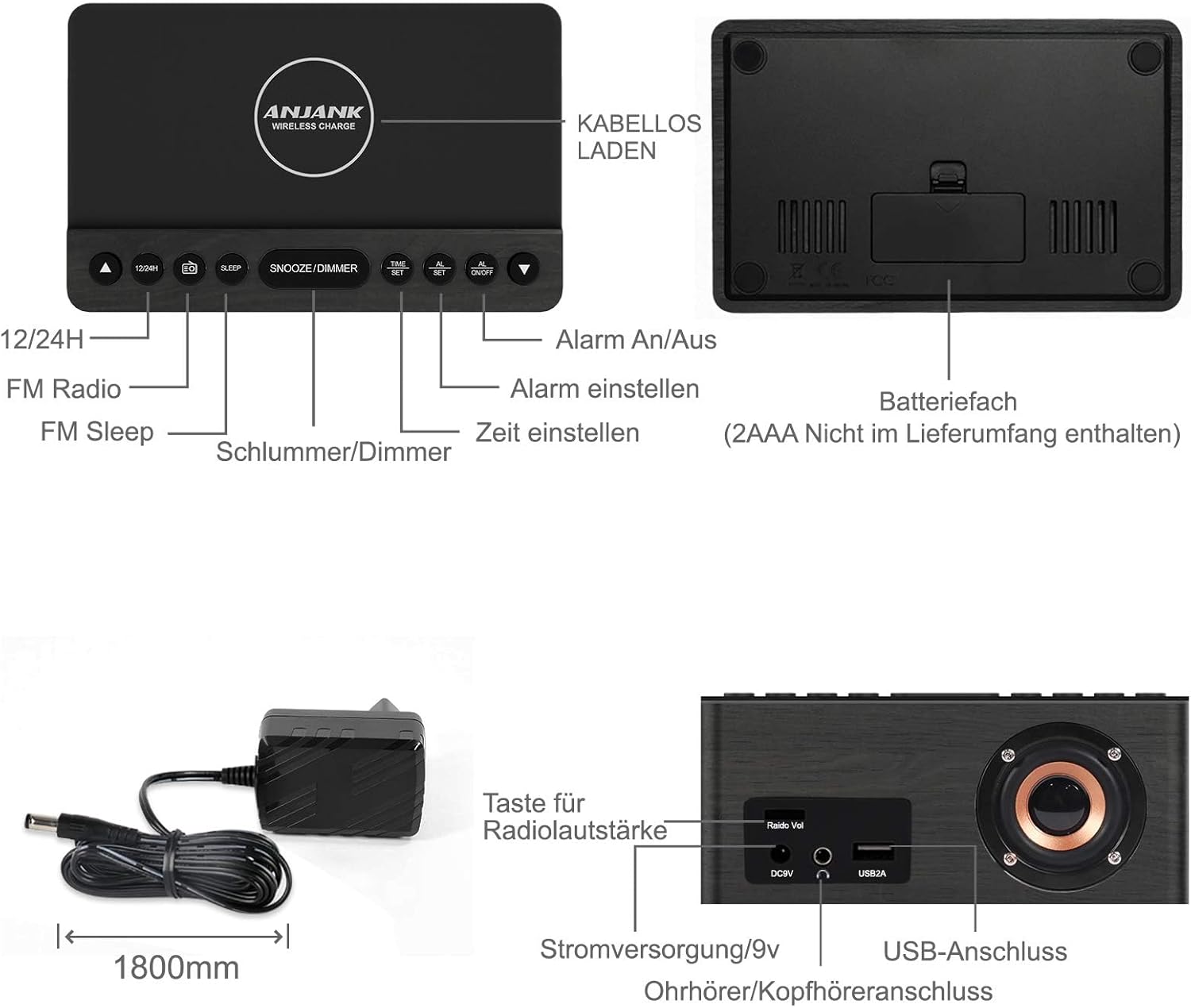
This diagram illustrates the location and function of the control buttons on the top panel and the ports on the rear of the ANJANK AC190-DE Digital Radio Alarm Clock. Key controls include 12/24H, FM Radio, Sleep, Snooze/Dimmer, Alarm On/Off, Time Set, and Alarm Set. Rear ports include DC9V power input, 3.5mm headphone jack, and USB 2A charging port.
Gosod yr Amser
- Pwyswch a dal y SET AMSER botwm. Bydd y digidau awr yn dechrau fflachio.
- Defnyddiwch y UP or I LAWR botymau i addasu'r awr.
- Gwasgwch SET AMSER again to confirm the hour and proceed to minute adjustment.
- Defnyddiwch y UP or I LAWR botymau i addasu'r cofnodion.
- Gwasgwch SET AMSER to save the current time.
- I newid rhwng fformat 12 awr a 24 awr, pwyswch y 12/24H button. In 12-hour format, "AM" or "PM" indicators will be displayed.
Gosod Larymau
The device supports two independent alarms (AL1 and AL2).
- Pwyswch a dal y SET ALARM button. "AL1" will flash, and the hour digits will begin to flash.
- Defnyddiwch y UP or I LAWR buttons to set the desired alarm hour for Alarm 1.
- Gwasgwch SET ALARM to confirm the hour and move to minute adjustment.
- Defnyddiwch y UP or I LAWR buttons to set the desired alarm minutes for Alarm 1.
- Gwasgwch SET ALARM to select the alarm source: Buzzer or FM Radio. Use UP or I LAWR i ddewis.
- Gwasgwch SET ALARM to set the alarm volume (for FM Radio alarm). Use UP or I LAWR i addasu.
- Gwasgwch SET ALARM to save Alarm 1 settings.
- Repeat steps 1-7 for Alarm 2 by pressing SET ALARM until "AL2" flashes.
- To activate or deactivate an alarm, press the ALARM ON / OFF button repeatedly until the desired alarm indicator (AL1 or AL2) appears or disappears on the display.
- Swyddogaeth Snooze: Pan fydd larwm yn seinio, pwyswch y SNOOZE / DIMMER button to temporarily silence it for 9 minutes. The alarm will sound again after 9 minutes.
- Atal Larwm: To stop an alarm completely, press any button other than SNOOZE / DIMMERBydd y larwm yn ailosod ar gyfer y diwrnod nesaf.
Gweithrediad Radio FM

This image highlights the FM radio capabilities of the ANJANK AC190-DE, including its frequency range of 87.5-108 MHz, adjustable volume, sleep timer (10-120 minutes), and support for headphones.
- Troi ymlaen / i ffwrdd: Gwasgwch y Radio FM botwm i droi'r radio ymlaen neu i ffwrdd.
- Sgan Auto: Pwyswch a dal y Radio FM button to automatically scan and save available FM stations. The device can store up to 30 stations.
- Tiwnio â Llaw: Defnyddiwch y UP or I LAWR buttons to manually tune to a specific frequency.
- Rheoli cyfaint: Defnyddiwch y Radio Vol knob on the back of the unit to adjust the radio volume.
- Amserydd Cwsg: Tra bod y radio yn chwarae, pwyswch y CYSGU button repeatedly to set a sleep timer (10-120 minutes). The radio will automatically turn off after the selected duration.
- Defnydd clustffon: Connect 3.5mm headphones to the headphone jack on the back for private listening.
Codi Tâl Di-wifr
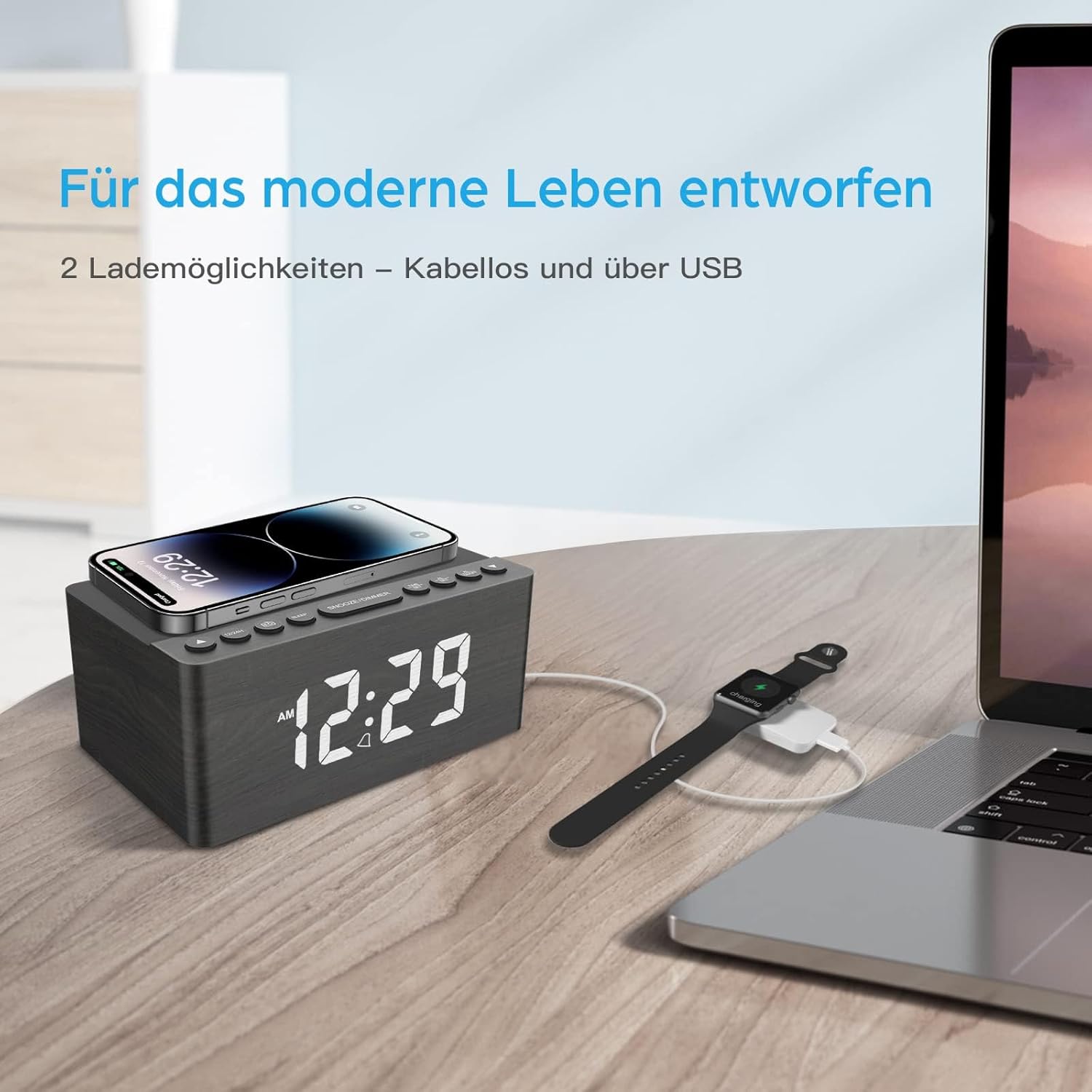
This image demonstrates the dual charging capabilities of the ANJANK AC190-DE, showing a smartphone being wirelessly charged on the top pad and a smartwatch connected to a laptop via USB, illustrating the convenience of charging multiple devices.
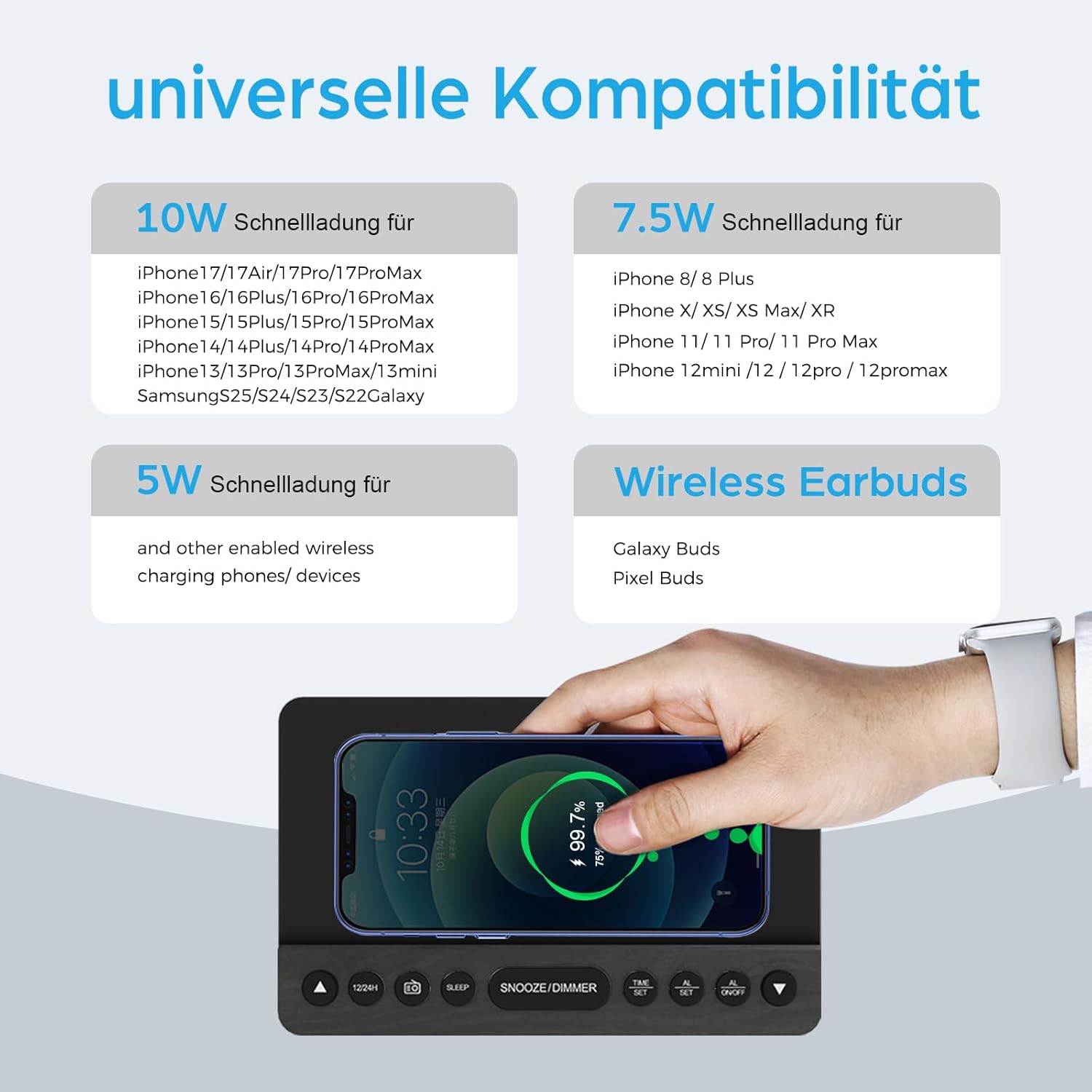
This infographic provides details on the universal compatibility of the wireless charging feature, specifying 10W fast charging for newer iPhone and Samsung models, 7.5W for other iPhone models, and 5W for other wireless charging phones and devices, including wireless earbuds.
- Place your Qi-compatible smartphone or device on the wireless charging pad located on the top surface of the clock.
- Gwnewch yn siŵr bod y ddyfais wedi'i chanoli ar y pad gwefru i gael y gwefru gorau posibl.
- The charging indicator on the clock (if available) or on your device will confirm charging status.
- The charger supports 5W, 7.5W, and 10W adaptive charging.
Codi Tâl USB
- Connect your device's USB charging cable to the USB2A port on the back of the clock.
- This port provides 2A output for charging other electronic devices like a second phone, power bank, or smartwatch.
Arddangos Dimmer

This image demonstrates the 5-level dimmer function of the ANJANK AC190-DE, allowing users to adjust the LED display brightness from maximum to completely off, ensuring comfort in various lighting conditions.
- Gwasgwch y SNOOZE / DIMMER button (when no alarm is sounding) to cycle through the 5 brightness levels of the LED display.
- Select the brightness level that is most comfortable for your environment.
Cynnal a chadw
- Glanhau: Sychwch yr uned gyda lliain meddal, sych. Peidiwch â defnyddio glanhawyr hylif na deunyddiau sgraffiniol.
- Lleoliad: Avoid placing the unit in direct sunlight, near heat sources, or in areas with high humidity.
- Pwer: Datgysylltwch yr addasydd pŵer os na fydd yr uned yn cael ei defnyddio am gyfnod hir.
Datrys problemau
- Dim Pŵer/Dangosfa i Ffwrdd:
- Gwnewch yn siŵr bod yr addasydd pŵer wedi'i gysylltu'n ddiogel â'r uned ac â soced pŵer sy'n gweithio.
- Check if the display dimmer is set to the lowest (off) level. Press SNOOZE / DIMMER i gynyddu disgleirdeb.
- Verify battery backup if applicable.
- Nid yw Codi Tâl Di-wifr yn Gweithio:
- Ensure your device is Qi-compatible and properly centered on the charging pad.
- Remove any thick phone cases or metallic objects between the phone and the charging pad.
- Check if the clock is powered on.
- Poor FM Radio Reception:
- Fully extend and reposition the FM antenna.
- Try moving the unit to a different location to improve signal.
- Perform an auto-scan again to find stronger stations.
- Larwm Ddim yn seinio:
- Ensure the alarm is activated (AL1 or AL2 indicator visible on the display).
- Check if the alarm volume is set appropriately (for radio alarm).
- Verify the time and alarm settings are correct.
Manylebau
| Nodwedd | Manylyn |
|---|---|
| Brand | ANJANK |
| Rhif Model | AC190-DE |
| Lliw | Grey + FM |
| Dimensiynau Cynnyrch | 12.3 x 3.81 x 10.2 cm |
| Pwysau Eitem | 720 gram |
| Pŵer/Wattage | 10 wat |
| Deunydd | Pren |
| Nodweddion Arbennig | Adjustable Brightness, Adjustable Volume, Alarm, Charging Port, Charging Station, Programmable, Radio, Snooze, Timers |
| Ffynhonnell Pwer | Wired |
| Siâp yr Eitem | hirsgwar |
| Thema | Cerddoriaeth |
| Deunydd Ffrâm | Pren |
| Batris wedi'u Cynnwys | No (Requires 2x AAA for backup) |

This image provides the physical dimensions of the ANJANK AC190-DE Digital Radio Alarm Clock.
Gwybodaeth Gwarant
ANJANK offers a 30-day return policy for this product. Please refer to your purchase documentation or retailer's policy for specific terms and conditions regarding returns and warranty claims.
Cefnogaeth i Gwsmeriaid
For any inquiries or assistance, ANJANK provides 24-hour customer service. Please refer to the product packaging or the official ANJANK websafle am fanylion cyswllt ac adnoddau cymorth pellach.