
Rhagymadrodd
The Aiphone IX-DVF is an IP-addressable, flush-mount, weather-resistant color video door station designed for secure and reliable communication. This device integrates seamlessly into network-based security systems, offering two-way audio and video capabilities for enhanced property monitoring and access control. This manual provides essential information for the proper installation, configuration, operation, and maintenance of your IX-DVF unit.
Beth Sydd yn y Bocs
Carefully unpack the contents and ensure all items are present. If any items are missing or damaged, contact your supplier immediately.
- IX-DVF IP Video Door Station Unit
- Blwch Cefn
- Sgriwiau Mowntio
- Canllaw Gosod (y ddogfen hon)
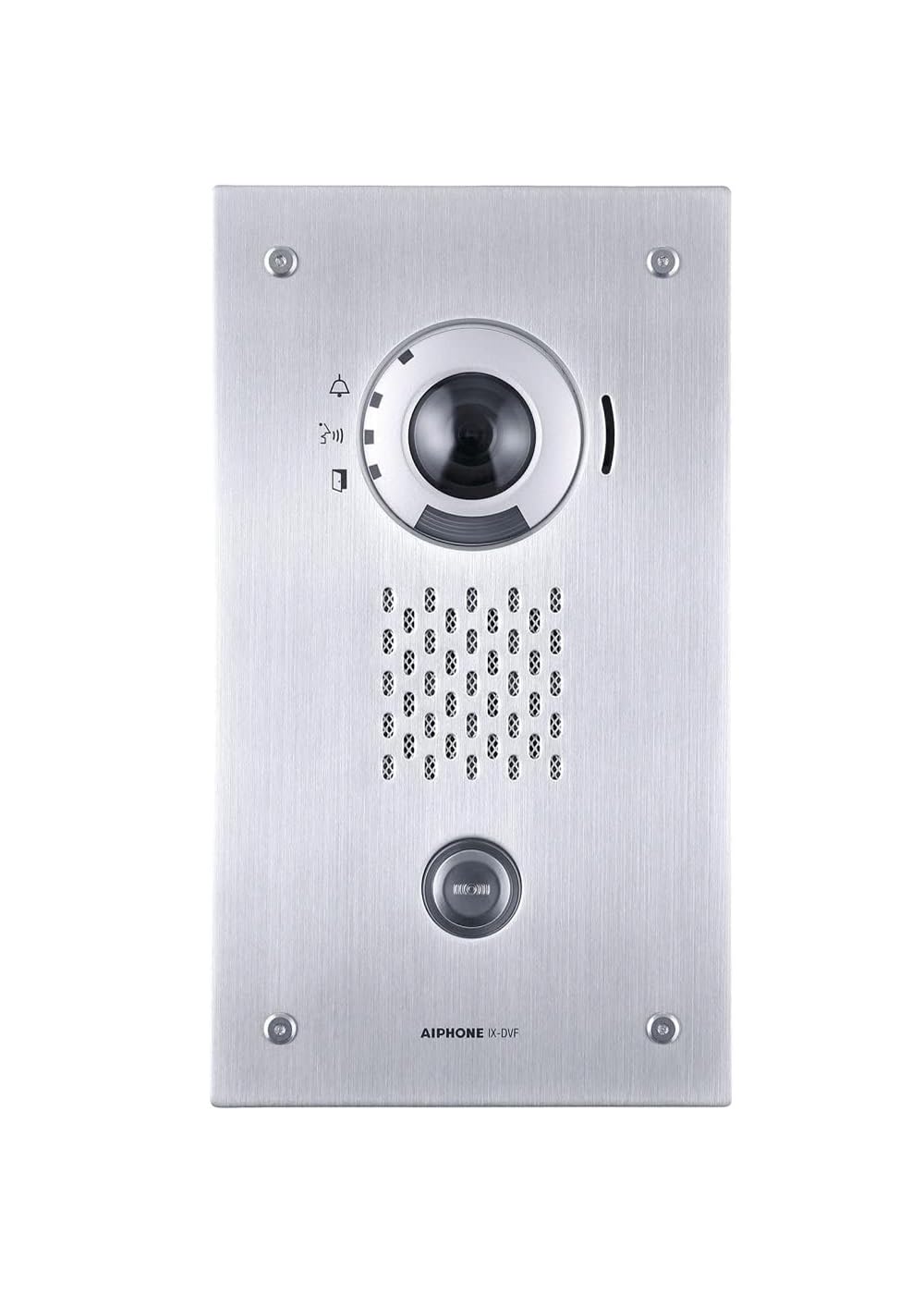
Image: The Aiphone IX-DVF IP Flush Mount Video Door Station, showing its stainless steel finish and camera lens. This is the main unit you will be installing.
Gosod
1. Paratoi Safle
Before installation, ensure the chosen location is suitable for a flush-mount outdoor device. The area should be protected from direct heavy impact and have adequate space for the back box and wiring. Verify network connectivity (Ethernet) and power (PoE or external power supply) are available at the installation site.
2. Mounting the Back Box
- Cut an opening in the wall according to the dimensions specified in the detailed installation template (not included in this general manual, refer to product-specific template).
- Insert the provided back box into the opening.
- Secure the back box using the mounting screws, ensuring it is flush with the wall surface.
3. Gwifrau Cysylltiadau
Connect the Ethernet cable to the RJ45 port on the back of the IX-DVF unit. If not using Power over Ethernet (PoE), connect a suitable 24V DC power supply to the designated power terminals. Ensure all connections are secure and properly insulated to maintain weather resistance.
4. Ffurfweddiad Rhwydwaith
The IX-DVF unit requires network configuration for proper operation. This typically involves assigning an IP address, subnet mask, and gateway. Refer to your network administrator or the Aiphone IX Series programming manual for detailed instructions on configuring network settings via a web porwr neu feddalwedd pwrpasol.
5. Final Installation
Once wiring and initial network configuration are complete, carefully attach the IX-DVF front panel to the back box, securing it with the provided screws. Ensure a tight seal to maintain the unit's IP65 weather resistance rating.
Cyfarwyddiadau Gweithredu
Gwneud Galwad
To initiate a call from the IX-DVF door station, a visitor presses the call button. The unit will then attempt to connect to a pre-programmed master station or IP phone within the system.
Derbyn Galwad
When a visitor presses the call button, the designated master station(s) or IP phone(s) will receive an incoming call notification, often accompanied by live video from the door station's camera.
Cyfathrebu Sain Dwy Ffordd
Upon answering a call, two-way audio communication is established, allowing the user at the master station to speak with the visitor at the door station. The IX-DVF features clear audio transmission and reception.
Monitro Fideo
The integrated color video camera provides real-time visual monitoring of the area outside the door. This video feed can be viewed on compatible master stations or network devices.
Door Release (Optional)
If connected to an access control system, the master station can initiate a door release command to unlock the connected door, allowing entry to the visitor.
Cynnal a chadw
Glanhau
Regularly clean the front panel and camera lens with a soft, damp cloth. Avoid abrasive cleaners or solvents that could damage the stainless steel finish or the lens. Ensure no water enters the unit during cleaning.
Diweddariadau Cadarnwedd
Periodically check the Aiphone website for firmware updates. Keeping the firmware up-to-date ensures optimal performance, security, and access to new features. Follow the manufacturer's instructions carefully when performing firmware updates.
Gwiriadau Rheolaidd
Inspect the unit periodically for any signs of physical damage, loose connections, or wear. Ensure the mounting screws remain tight and the weather seal is intact.
Datrys problemau
- No Power/Unit Not Responding: Check the power supply connection (PoE or external adapter). Verify the network cable is securely connected and the network switch port is active.
- Dim Ffrwd Fideo: Ensure the network connection is stable. Verify the camera lens is clean and unobstructed. Check the network configuration for correct IP settings and firewall rules.
- No Audio (Two-Way): Check microphone and speaker openings for obstructions. Verify audio settings in the system configuration. Ensure network bandwidth is sufficient for audio transmission.
- Cannot Connect to Master Station: Verify the IP address and network settings of both the IX-DVF and the master station. Ensure they are on the same network or properly routed. Check for any firewall restrictions.
- Call Button Not Working: Inspect the call button for physical damage. If the button is stuck, gently clean around it. If the issue persists, it may require professional service.
For persistent issues, consult the comprehensive Aiphone IX Series troubleshooting guide or contact Aiphone technical support.
Manylebau
| Nodwedd | Manylyn |
|---|---|
| Brand | Aiphone |
| Rhif Model | IX-DVF.M |
| Defnyddiau a Argymhellir ar gyfer Cynnyrch | Diogelwch Awyr Agored |
| Technoleg Cysylltedd | Wired (Ethernet) |
| Nodwedd Arbennig | Sain 2 Ffordd |
| Defnydd Dan Do / Awyr Agored | Awyr Agored |
| Math Mount | Fflysio |
| Graddfa dal dwr | IP65 |
| Technoleg Di-wifr | Wi-Fi (for connectivity, not primary communication) |
| Fformat Dal Fideo | MPEG-4 |
| Dimensiynau Eitem | 10.76 x 5.7 x 10.76 modfedd |
| Cyfryngau Adeiledig | Blwch Cefn |
Gwybodaeth Gwarant
The Aiphone IX-DVF IP Flush Mount Video Door Station comes with a manufacturer warranty. Please refer to the specific warranty documentation provided with your purchase for full details. As per the product listing, there is a 30 Amazon Return policy. For any warranty claims or service, please retain your proof of purchase.
Cefnogaeth
For technical assistance, troubleshooting beyond this manual, or warranty inquiries, please contact Aiphone customer support directly. You can find their contact information on the official Aiphone websafle neu drwy eich deliwr awdurdodedig.


