
Sharp OZJONG
SHARP Digital Alarm Clock with AccuSet
Model: OZJONG
Rhagymadrodd
The SHARP Digital Alarm Clock with AccuSet is designed for effortless timekeeping. Featuring automatic time setting, a clear LED display, and user-friendly controls, this clock is ideal for any bedroom. Its AccuSet technology ensures the time is always accurate, eliminating the need for manual adjustments, making it perfect for seniors, children, or anyone seeking a hassle-free alarm clock solution.

Ffigur 1: Blaen view of the SHARP Digital Alarm Clock with green LED display.
Nodweddion Allweddol
- AccuSet Automatic Time Set: The clock is pre-programmed to automatically set the correct time, removing the need for manual adjustments. Simply select your time zone.
- Quick Daylight Savings Time (DST) Adjustment: A convenient switch allows for easy adjustment for Daylight Savings Time (+1 hour) or Standard Time (-1 hour).
- High/Low Dimmer Control: Adjust the brightness of the LED display to your preference, ensuring comfortable viewing ddydd neu nos.
- Gwneud copi wrth gefn o'r batri: A pre-installed CR2032 button cell battery provides backup for time settings during power outages, ensuring continuous accuracy.
- Dewis Parth Amser: Easily select your local time zone from the options provided at the bottom of the clock.

Figure 2: Diagram illustrating the key features and functionalities of the alarm clock.
Canllaw Gosod
- Dadbacio: Carefully remove the alarm clock from its packaging.
- Battery Installation (Pre-installed): The CR2032 button cell battery for backup is pre-installed in a screw-secured cabinet at the bottom of the clock. This battery is designed to last for several years. No immediate action is required for initial setup.
- Dewis Parth Amser: Before plugging in the clock, locate the time zone selection switch at the bottom of the unit. Select your correct time zone (e.g., EST, CST, MST, PST). The default time zone is Eastern Standard Time.
- Cysylltiad Pwer: Plug the clock into an approved electrical source. The AccuSet feature will automatically program the correct time based on your selected time zone.
- Daylight Savings Time (DST) Adjustment: If applicable, slide the DST switch at the bottom of the clock to "ON" to add one hour (+1 hr) for Daylight Savings Time. For Standard Time, slide the switch to "OFF" to subtract one hour (-1 hr).

Figure 3: Top panel controls for setting time, alarm, and adjusting display.
Cyfarwyddiadau Gweithredu
Gosod y Larwm
- Gwasgwch y ALARM button once. The alarm time will appear on the display.
- Tra bod yr amser larwm yn cael ei arddangos, pwyswch y AWR botwm i addasu'r awr larwm.
- Gwasgwch y COFNOD botwm i addasu'r munud larwm.
- I actifadu neu ddadactifadu'r larwm, pwyswch y ALARM ON / OFF button. An alarm indicator light (usually a small LED) will illuminate when the alarm is active.
- To return to the current time display, press the AMSER button or wait a few seconds for it to revert automatically.
Defnyddio'r Swyddogaeth Snooze
Pan fydd y larwm yn canu, pwyswch y botwm mawr SNOOZE button located on the top of the clock. This will temporarily silence the alarm for a set period (typically 9 minutes), allowing for extra rest. The alarm will sound again after the snooze period ends.
Adjusting Display Brightness (Dimmer Control)
The clock features a High/Low dimmer control to adjust the display brightness. Locate the DIMMER HI/LO button on the top panel. Press this button to toggle between high and low brightness settings to suit your environment and preference.

Figure 4: Illustration of the High & Low Display Dimmer Control.
Cynnal a chadw
- Glanhau: To clean the clock, use a soft, dry cloth. Do not use abrasive cleaners or solvents, as they may damage the finish.
- Amnewid Batri: The CR2032 backup battery is designed for long-term use. If the clock loses time during a power outage after several years, it may be time to replace the battery. This is located in a screw-secured compartment at the bottom of the clock.
- Lleoliad: Place the clock on a stable, flat surface. Avoid placing it in direct sunlight, near heat sources, or in areas with high humidity.
Datrys problemau
| Problem | Achos Posibl | Ateb |
|---|---|---|
| Clock does not display time after plugging in. | Not connected to power, or power outlet is not active. | Gwnewch yn siŵr bod y llinyn pŵer wedi'i blygio'n ddiogel i mewn i soced drydanol sy'n gweithio. |
| Mae'r amser yn anghywir. | Incorrect time zone selected, or DST switch is set incorrectly. | Verify the time zone switch at the bottom of the clock is set to your local zone. Check the DST switch position. |
| Nid yw'r larwm yn canu. | Alarm is not activated, or alarm volume is too low (if adjustable). | Ensure the alarm is turned ON using the ALARM ON/OFF button. Check for an alarm indicator light. |
| Mae'r arddangosfa'n rhy llachar neu'n rhy dywyll. | Mae angen addasu'r gosodiad pylu. | Press the DIMMER HI/LO button to cycle through brightness settings. |
| Mae'r cloc yn colli amser yn ystod y toriad pŵer.tage. | Backup battery is depleted. | Replace the CR2032 backup battery located in the compartment at the bottom of the clock. |
Manylebau
| Nodwedd | Manylyn |
|---|---|
| Brand | miniog |
| Rhif Model | OZJONG |
| Lliw | Black - Green Led |
| Math Arddangos | Digidol |
| Nodweddion Arbennig | Alarm, Daylight Saving, Auto Dimmable |
| Dimensiynau Cynnyrch | 5.5"L x 2.6"U |
| Ffynhonnell Pwer | Trydan Corded, Wedi'i Bweru â Batri |
| Batri wrth gefn | CR2032 (pre-installed) |
| Deunydd | Plastig |
| Pwysau Eitem | 9.9 owns |
| Math Mowntio | Pen bwrdd |
| UPC | 049353006079 |
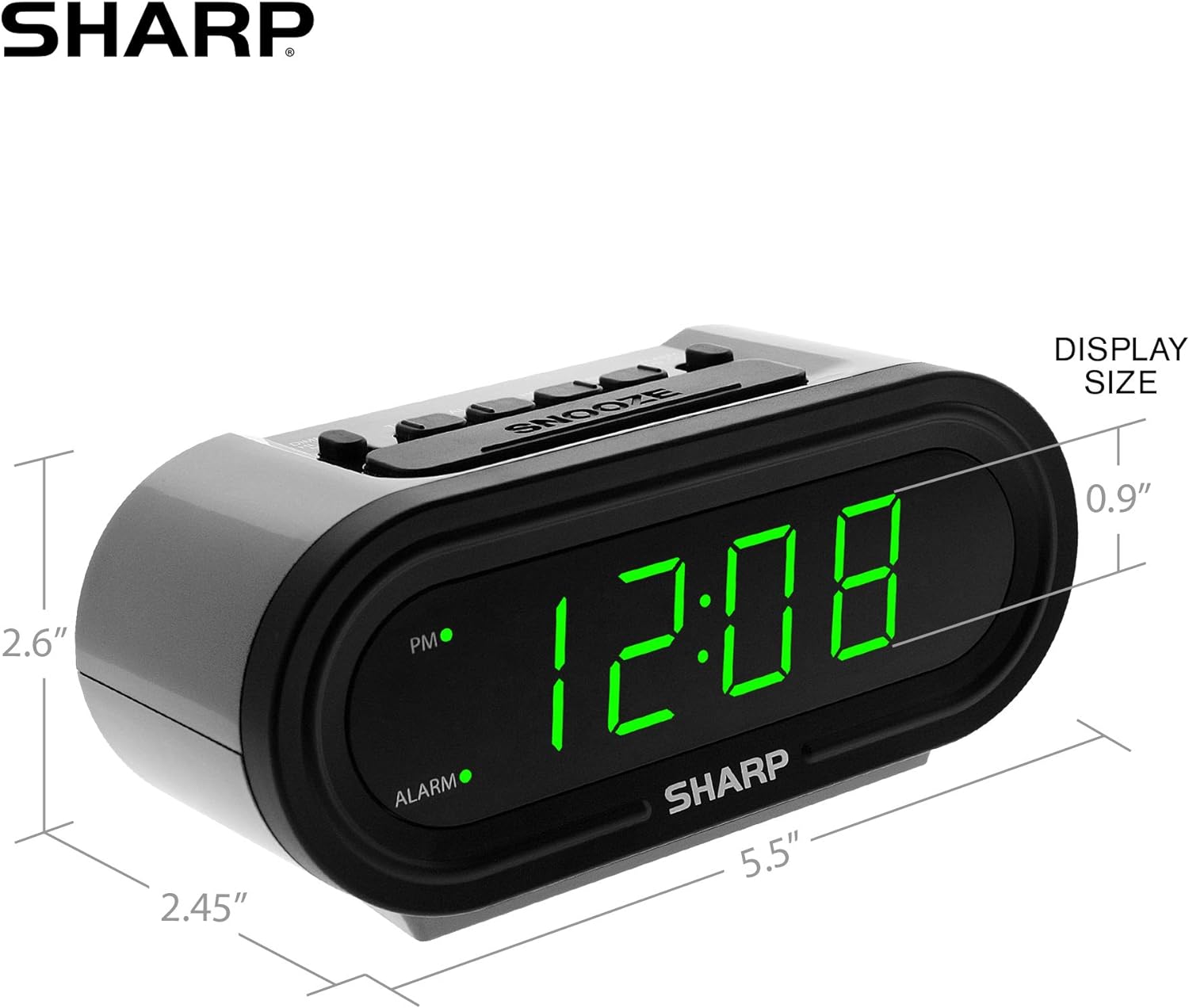
Figure 5: Product dimensions for easy reference.
Gwarant a Chefnogaeth
For warranty information or technical support, please refer to the contact details provided in your product packaging or visit the official Sharp websafle. Cadwch eich derbynneb prynu ar gyfer hawliadau gwarant.
Ask a question about this manual
Ask about setup, troubleshooting, compatibility, parts, safety, or missing instructions. Manuals+ will review the question and use this page’s manual context to help answer it.