
Rhagymadrodd
Welcome to the instruction manual for your new lecover Touch Two C5 Wireless Earbuds. This guide provides detailed information on how to set up, operate, maintain, and troubleshoot your earbuds to ensure optimal performance and longevity. Please read this manual thoroughly before using the product.
Beth Sydd yn y Bocs
Carefully unpack your lecover Wireless Earbuds and ensure all items are present:
- 2 x Touch Two C5 Wireless Earbuds
- 1 x Achos Codi Tâl
- 1 x Cebl USB
- 3 x Soft Silicone Earplugs (S/M/L)
- 1 x Llawlyfr Defnyddiwr

Image: All components included in the lecover Wireless Earbuds package.
Cynnyrch Drosview
The lecover Touch Two C5 Wireless Earbuds are designed for a superior audio experience with convenience and durability. They feature advanced Bluetooth 5.0 technology, IP8 waterproof rating, and intuitive touch controls.

Image: The lecover Touch Two C5 Wireless Earbuds with their charging case.
Canllaw Gosod
1. Codi tâl
Before first use, fully charge both the earbuds and the charging case. The earbuds provide 5-6 hours of music time on a single charge, and the portable charging case can recharge them up to 30 times, offering a total playtime of up to 150 hours.
- Rhowch y clustffonau yn y cas gwefru. Gwnewch yn siŵr eu bod wedi'u gosod yn gywir.
- Connect the USB cable to the charging case and a power source (e.g., computer USB port, wall adapter).
- Bydd y goleuadau dangosydd ar y cas a'r clustffonau yn dangos statws gwefru. Ar ôl iddynt gael eu gwefru'n llawn, bydd y goleuadau'n newid neu'n diffodd.
2. Paru
The earbuds feature one-step pairing for quick and easy connection.
- Gwnewch yn siŵr bod Bluetooth wedi'i alluogi ar eich dyfais (ffôn clyfar, tabled, ac ati).
- Tynnwch y ddau glustffon allan o'r cas gwefru. Byddant yn troi ymlaen yn awtomatig ac yn mynd i mewn i'r modd paru.
- On your device's Bluetooth settings, search for "Touch Two C5" (or similar name) and select it to connect.
- Once connected, you will hear a confirmation prompt, and the earbud indicator lights will stop flashing.

Image: Automatic pairing technology for seamless connection.
3. Gwisgo'r Clustffonau
For optimal sound quality and comfort, choose the correct size earplugs and ensure a secure fit.
- Select the earplug size (S, M, L) that best fits your ear canal. A snug fit enhances bass and noise isolation.
- Gently insert the earbud into your ear, twisting slightly until it feels secure and comfortable.
- The ergonomic design ensures the earbuds stay securely in place, even during sports or active use.
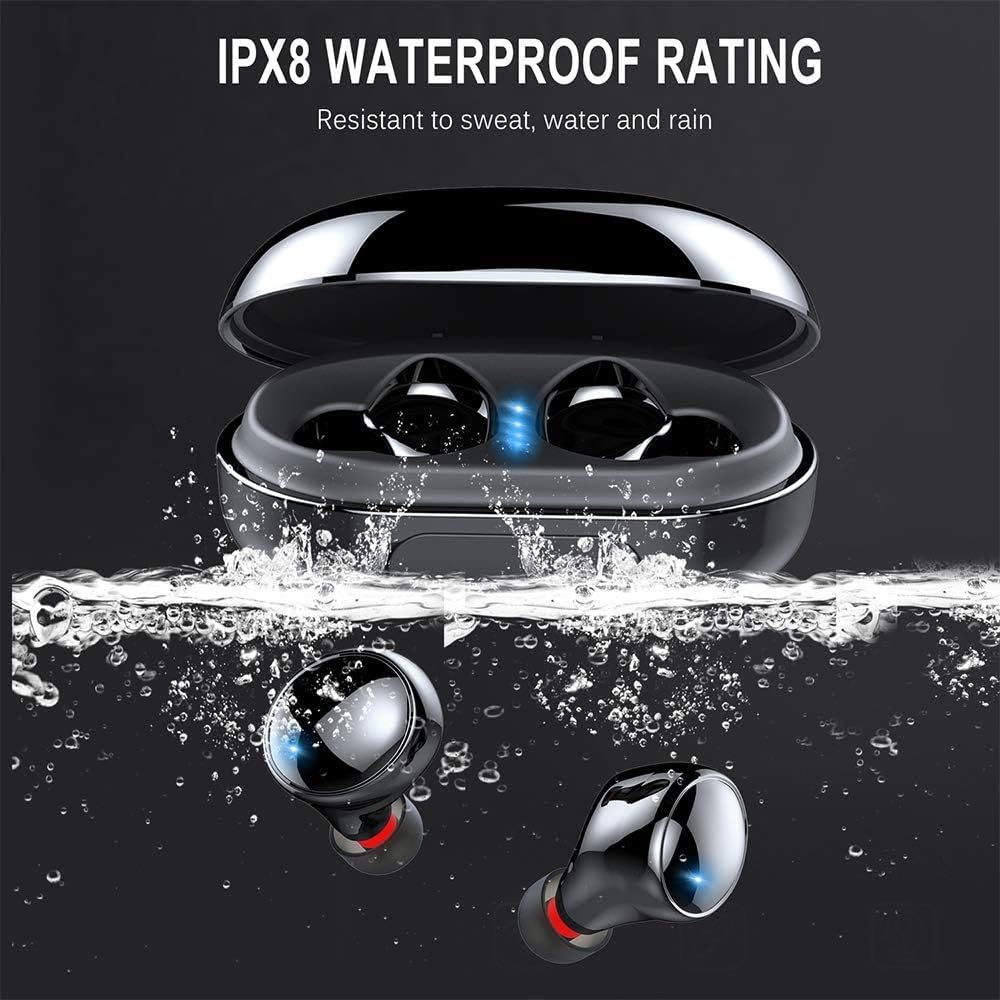
Image: Proper placement of the earbud for a comfortable and secure fit.
Cyfarwyddiadau Gweithredu
Rheolaethau Cyffwrdd
The lecover earbuds feature intuitive touch controls on each earbud. Lightly touch the earbud surface to perform various functions:
| Gweithred | Swyddogaeth |
|---|---|
| Tap Sengl (Chwith/Dde) | Chwarae/Saib Cerddoriaeth, Ateb/Diweddu Galwad |
| Tap Dwbl (Dde) | Trac Nesaf |
| Tap Dwbl (Chwith) | Trac Blaenorol |
| Tap Triphlyg (Dde) | Cyfrol i Fyny |
| Tap Triphlyg (Chwith) | Cyfrol Lawr |
| Long Press (2 eiliad) | Activate Voice Assistant (Siri, Google Assistant), Reject Call |

Image: Demonstrating the touch control functionality of the earbuds.
Pŵer Ymlaen / Diffodd
- Pŵer Ymlaen: Mae clustffonau'n troi ymlaen yn awtomatig pan gânt eu tynnu o'r cas gwefru.
- Pwer i ffwrdd: Earbuds automatically power off when placed back into the charging case.
Gofal a Chynnal a Chadw
Glanhau
Mae glanhau rheolaidd yn helpu i gynnal ansawdd sain a hylendid.
- Defnyddiwch frethyn meddal, sych, heb lint i sychu'r clustffonau a'r cas gwefru.
- Tynnwch flaenau'r clustiau a'u glanhau gyda sebon ysgafn a dŵr. Gwnewch yn siŵr eu bod yn hollol sych cyn eu hailgysylltu.
- Gently clean any earwax or debris from the earbud mesh using a small, soft brush or cotton swab.
Gwrthiant Dŵr (IP8)
Your lecover earbuds are IP8 waterproof, meaning they are protected against the effects of continuous immersion in water. This makes them ideal for sports and use in rainy conditions.
- While waterproof, avoid prolonged exposure to saltwater or chemicals.
- Ensure earbuds are dry before placing them back into the charging case to prevent damage to the charging contacts.

Image: The earbuds demonstrating their IPX8 waterproof capability.
Storio
Pan nad ydynt yn cael eu defnyddio, storiwch y clustffonau yn eu cas gwefru i'w hamddiffyn a'u cadw'n wefredig.
- Storiwch mewn lle oer, sych i ffwrdd o dymheredd eithafol.
- Osgowch ollwng neu roi'r clustffonau a'r cas i effeithiau cryf.
Datrys problemau
Os byddwch chi'n dod ar draws problemau gyda'ch clustffonau, cyfeiriwch at y problemau a'r atebion cyffredin canlynol:
| Problem | Ateb Posibl |
|---|---|
| Clustffonau ddim yn paru | Ensure earbuds are fully charged. Turn off and on Bluetooth on your device. Forget the device in Bluetooth settings and re-pair. |
| Dim ond un earbud yn gweithio | Rhowch y ddau glustffon yn ôl yn y cas gwefru, caewch y caead, arhoswch ychydig eiliadau, yna tynnwch nhw allan eto. Gwnewch yn siŵr bod y ddau wedi'u gwefru. |
| Dim sain na chyfaint isel | Check volume levels on both earbuds and your connected device. Ensure earbuds are properly seated in your ears. |
| Materion codi tâl | Ensure the charging cable is securely connected. Clean the charging contacts on both earbuds and the case. Try a different USB port or charger. |
| Ansawdd galwad gwael | Ensure the microphone is not obstructed. Move closer to your connected device. Avoid noisy environments. |
Manylebau Cynnyrch
Detailed technical specifications for the lecover Touch Two C5 Wireless Earbuds:
| Nodwedd | Manyleb |
|---|---|
| Enw Model | Cyffwrdd Dau C5 |
| Technoleg Cysylltedd | Di-wifr (Bluetooth 5.0) |
| Amrediad Bluetooth | 10 o Fesurau |
| Lefel Gwrthsefyll Dŵr | IP8 dal dŵr |
| Playtime (Total with Case) | Hyd at 150 awr |
| Math o Reoli | Rheoli Cyffwrdd |
| Rheoli Sŵn | Active Noise Cancellation (CVC8.0) |
| Math Gyrrwr Sain | Gyrrwr Dynamig |
| Amrediad Amrediad | 20 Hz - 20,000 Hz |
| Pwysau Eitem | 0.141 owns (y clustffon) |
| Dimensiynau Cynnyrch | 1.18 x 1.18 x 0.79 modfedd |
| Batris | 2 batris Lithiwm Polymer (wedi'u cynnwys) |
Gwarant a Chefnogaeth
For warranty information or technical support, please refer to the contact details provided on the product packaging or visit the official lecover websafle. Cadwch eich derbynneb prynu fel prawf o brynu ar gyfer unrhyw hawliadau gwarant.