
Cynnyrch Drosview
The Hoco ES41 TWS (True Wireless Stereo) Bluetooth Headset provides a wireless audio experience with clear sound. This manual will guide you through the setup, operation, and maintenance of your ES41 headset.
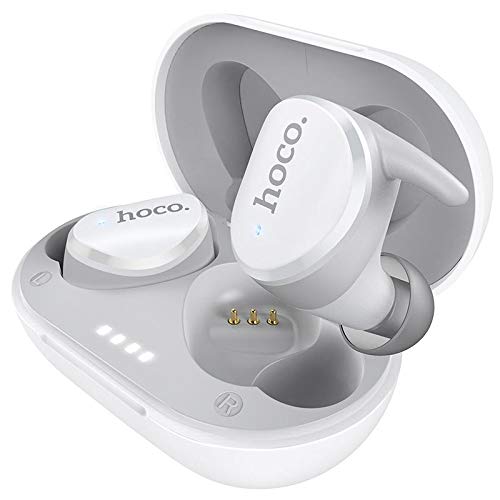
Image: The Hoco ES41 TWS Bluetooth Wireless Headset, showing both earbuds and the charging case in white.
Cynnwys Pecyn
Gwiriwch y pecyn am yr eitemau canlynol:
- Hoco ES41 TWS Wireless Earbuds (Left and Right)
- Achos Codi Tâl Di-wifr
- Cebl Gwefru USB (Micro USB)
- Llawlyfr Defnyddiwr

Delwedd: Blaen a chefn view of the Hoco ES41 retail packaging, displaying the product and key features.
Gosod
1. Gwefru'r Clustffon a'r Cas
Cyn ei ddefnyddio gyntaf, gwefrwch y cas gwefru a'r clustffonau'n llawn.
- Cysylltwch y cebl gwefru USB a ddarperir â'r porthladd gwefru ar y cas ac â ffynhonnell pŵer USB.
- The indicator lights on the charging case will illuminate to show charging status.
- Place the earbuds into the charging case. Ensure they are correctly seated; the earbuds will begin charging automatically.
- Charging time for the headset is approximately 1 hour. The charging case takes approximately 2.5 hours to fully charge.

Image: The Hoco ES41 earbuds placed inside the open charging case, showing the LED indicator lights for battery status.
2. Paru gyda Dyfais Bluetooth
The ES41 headset uses Bluetooth 5.0 for a stable connection.
- Paru Cychwynnol:
- Agorwch y cas gwefru. Bydd y clustffonau'n troi ymlaen yn awtomatig ac yn mynd i mewn i'r modd paru.
- Ar eich dyfais (ffôn clyfar, tabled, ac ati), galluogwch Bluetooth.
- Chwiliwch am Bluetooth devices and select "Hoco ES41" from the list.
- Ar ôl cysylltu, byddwch yn clywed tôn cadarnhau, a bydd goleuadau dangosydd y clustffonau yn newid.
- Ailgysylltu:
- After initial pairing, the earbuds will automatically connect to the last paired device when removed from the charging case and Bluetooth is enabled on the device.
Cyfarwyddiadau Gweithredu
Pŵer Ymlaen / Diffodd
- Pŵer Ymlaen: Open the charging case, or long-press the touch area on both earbuds for approximately 3 seconds.
- Pwer i ffwrdd: Place the earbuds back into the charging case and close the lid, or long-press the touch area on both earbuds for approximately 5 seconds.
Chwarae Cerdd
- Chwarae/Seibiant: Tapiwch yr ardal gyffwrdd ar y naill glustffon neu'r llall unwaith.
- Trac Nesaf: Tapiwch ddwywaith yr ardal gyffwrdd ar y glustffon dde.
- Trac Blaenorol: Tapiwch ddwywaith yr ardal gyffwrdd ar y glustffon chwith.
Rheoli Galwadau
- Ateb / Diwedd Galwad: Tapiwch yr ardal gyffwrdd ar y naill glustffon neu'r llall unwaith.
- Gwrthod Galwad: Long-press the touch area on either earbud for 2 seconds.
Cynorthwyydd Llais
- Ysgogi Cynorthwyydd Llais: Tapiwch dair gwaith ar yr ardal gyffwrdd ar y naill glustffon neu'r llall.
Cynnal a chadw
- Glanhau: Defnyddiwch frethyn meddal, sych i lanhau'r clustffonau a'r cas gwefru. Peidiwch â defnyddio cemegau llym na deunyddiau sgraffiniol.
- Storio: Pan nad ydynt yn cael eu defnyddio, storiwch y clustffonau yn eu cas gwefru i'w hamddiffyn a'u cadw'n wefredig. Storiwch mewn lle oer, sych i ffwrdd o olau haul uniongyrchol a thymheredd eithafol.
- Gwrthiant Dŵr: Nid yw'r clustffonau'n dal dŵr. Osgowch ddod i gysylltiad â dŵr, chwys, neu leithder uchel.
Datrys problemau
- Clustffonau ddim yn paru â'i gilydd:
Place both earbuds back into the charging case, close the lid, then open it again. This should reset their connection.
- Clustffonau ddim yn cysylltu â'r ddyfais:
Ensure Bluetooth is enabled on your device. Forget "Hoco ES41" from your device's Bluetooth settings and attempt to pair again.
- Dim sain o un clustffon:
Check if both earbuds are charged. Try placing them back in the case and taking them out again. If the issue persists, try resetting the earbuds (refer to the full manual if available for specific reset instructions).
- Materion codi tâl:
Ensure the charging cable is securely connected and the power source is active. Clean the charging contacts on both the earbuds and the case with a dry cotton swab.
Manylebau
| Nodwedd | Manyleb |
|---|---|
| Enw Model | ES41 |
| Fersiwn Bluetooth | 5.0 |
| Sglodion Bluetooth | JL6936D |
| Capasiti Batri Achos Codi Tâl | 400mAh |
| Single Headset Battery Capacity | 40mAh |
| Amser Sgwrs/Cerddoriaeth | 5 awr |
| Amser Wrth Gefn | 200 awr |
| Amser Codi Tâl Clustffonau | 1 awr |
| Amser Codi Tâl Achos | 2.5 awr |
| Cyfanswm Pwysau | 37g |
| Single Headset Weight | 4g |
| Dull Rheoli | Cyffwrdd |
| Technoleg Cysylltedd | Di-wifr |
| Ffactor Ffurf Clustffonau | Mewn Clust |
| Deunydd | Plastig |
| Dyfeisiau Cydnaws | Ffonau symudol |
Gwarant a Chefnogaeth
For warranty information and technical support, please refer to the documentation provided with your purchase or contact HOCO customer service. Keep your proof of purchase for warranty claims.