
1. Rhagymadrodd
This manual provides detailed instructions for the safe and efficient use of your Hoco HC3 Bounce Sports Wireless Speaker. Please read this manual thoroughly before operating the device and retain it for future reference. The Hoco HC3 is a versatile portable speaker supporting Bluetooth, FM radio, TF card, USB, AUX, and TWS modes.

Figure 1: Hoco HC3 Bounce Sports Wireless Speaker. This image displays the speaker in a vertical orientation, showcasing its black mesh grille, the 'hoco' logo at the bottom right, and a braided carrying strap attached to the top left side. The control buttons are visible on the side panel.
2. Cynnwys Pecyn
Gwnewch yn siŵr bod yr holl eitemau yn bresennol wrth ddadbocsio:
- Hoco HC3 Bounce Sports Wireless Speaker
- Cebl Codi Tâl USB
- Llawlyfr Defnyddiwr (y ddogfen hon)
- AUX Audio Cable (if included with your model)
3. Cynnyrch Drosview
3.1 Cydrannau Siaradwr

Figure 2: Rear panel of the Hoco HC3 speaker. This image highlights the various input ports and control buttons located on the back of the speaker. Visible elements include the power switch, USB port, TF card slot, AUX input, and LED indicator.
Ymgyfarwyddwch â rheolyddion a phorthladdoedd y siaradwr:
- Botwm Pŵer: Long press to power on/off. Short press to switch modes.
- Botwm Chwarae/Seibiant: Play or pause audio. Answer/end calls.
- Botwm Cyfaint i Fyny / Trac Nesaf: Pwyswch yn fyr am y trac nesaf, pwyswch yn hir i gynyddu'r gyfrol.
- Botwm Cyfaint i Lawr / Trac Blaenorol: Pwyswch yn fyr am y trac blaenorol, pwyswch yn hir i ostwng y gyfrol.
- Botwm Modd (M): Short press to cycle through Bluetooth, FM, TF card, USB, and AUX modes.
- Porth USB: Ar gyfer chwarae gyriant USB.
- Slot Cerdyn TF: Ar gyfer chwarae cerdyn TF (MicroSD).
- Mewnbwn AUX: 3.5mm jack for wired audio connection.
- Porth Codi Tâl: Porthladd micro USB ar gyfer gwefru'r siaradwr.
- Dangosydd LED: Displays charging status and operating mode.
3.2 Nodweddion Allweddol
- Bluetooth V5.0: Yn darparu cysylltedd diwifr sefydlog ac effeithlon.
- Dulliau Chwarae Lluosog: Supports Bluetooth, FM radio, TF card, USB drive, and AUX input.
- Gwir Stereo Di-wifr (TWS): Allows two HC3 speakers to connect wirelessly for a stereo sound experience.
- Bywyd batri hir: 2400mAh battery capacity offers up to 5 hours of music playback.
- Siaradwyr Deuol: Equipped with two 45mm speaker units, each with 5W power output.
- Compact a Chludadwy: Dimensions of 202*60*60mm and weight of 561g for easy transport.
4. Gosod
4.1 Gwefru'r Siaradwr
- Cysylltwch y cebl gwefru USB a ddarperir â phorthladd gwefru'r siaradwr.
- Connect the other end of the USB cable to a 5V USB power adapter (not included) or a computer's USB port.
- The LED indicator will illuminate to show charging status. It typically takes about 3 hours for a full charge.
- Once fully charged, the LED indicator will change or turn off (refer to specific LED behavior in the troubleshooting section if unsure).
Nodyn: I gael bywyd batri gorau posibl, gwefrwch y siaradwr yn llawn cyn ei ddefnyddio gyntaf.
4.2 Pweru Ymlaen/Diffodd
- I Bweru Ymlaen: Long press the Power button until you hear an audible prompt and the LED indicator lights up.
- I Bweru i ffwrdd: Long press the Power button again until you hear an audible prompt and the LED indicator turns off.
5. Cyfarwyddiadau Gweithredu
5.1 Pâr Bluetooth
- Ensure the speaker is powered on and in Bluetooth mode (the LED indicator will typically flash blue, indicating it's ready for pairing). If not, short press the Mode (M) button to switch to Bluetooth mode.
- Galluogwch Bluetooth ar eich dyfais symudol (ffôn clyfar, tabled, cyfrifiadur).
- Chwiliwch am available Bluetooth devices. You should see "HC3" or "Hoco HC3" in the list.
- Select "HC3" to connect. Once paired, the speaker will emit an audible confirmation, and the LED indicator will stop flashing and remain solid blue.
- Gallwch nawr chwarae sain o'ch dyfais drwy'r siaradwr.
Note: The speaker will automatically attempt to reconnect to the last paired device when powered on, if that device's Bluetooth is active and within range.
Modd Radio 5.2 FM
- Pwer ar y siaradwr.
- Short press the Mode (M) button repeatedly until you enter FM radio mode.
- To auto-scan and save available FM stations, short press the Play/Pause button. The speaker will scan and store stations.
- Use the Volume Up / Next Track and Volume Down / Previous Track buttons to navigate between saved stations.
5.3 TF Card / USB Playback
- Pwer ar y siaradwr.
- Insert a TF (MicroSD) card into the TF card slot or a USB flash drive into the USB port.
- The speaker should automatically switch to TF card or USB mode and begin playing audio files. If not, short press the Mode (M) button to select the correct mode.
- Use the Play/Pause, Volume Up / Next Track, and Volume Down / Previous Track buttons to control playback.
Note: Ensure your TF card or USB drive contains compatible audio files (e.g., MP3 format).
5.4 Modd AUX
- Pwer ar y siaradwr.
- Connect one end of a 3.5mm audio cable (if included) to the speaker's AUX input port.
- Cysylltwch ben arall y cebl sain â jac allbwn sain eich dyfais allanol (e.e., chwaraewr MP3, cyfrifiadur).
- The speaker should automatically switch to AUX mode. If not, short press the Mode (M) button to select AUX mode.
- Control playback from your external device. Volume can be adjusted on both the speaker and the external device.
5.5 Swyddogaeth TWS (Stereo Di-wifr Gwirioneddol)
The TWS function allows you to pair two Hoco HC3 speakers together for a true stereo sound experience.
- Ensure both HC3 speakers are powered off.
- Power on both speakers simultaneously. They should both enter Bluetooth pairing mode.
- On un of the speakers (this will become the primary speaker), long press the Mode (M) button or a dedicated TWS button (if present, otherwise try the Play/Pause button for 3-5 seconds) until you hear a pairing tone. The speakers will attempt to connect to each other.
- Once successfully paired, you will hear a confirmation tone, and one speaker's LED will indicate it's the primary (e.g., flashing slowly), while the other's LED will be solid.
- Now, connect your mobile device to the cynradd speaker via Bluetooth as described in section 5.1.
- Bydd sain nawr yn chwarae mewn stereo drwy'r ddau siaradwr.
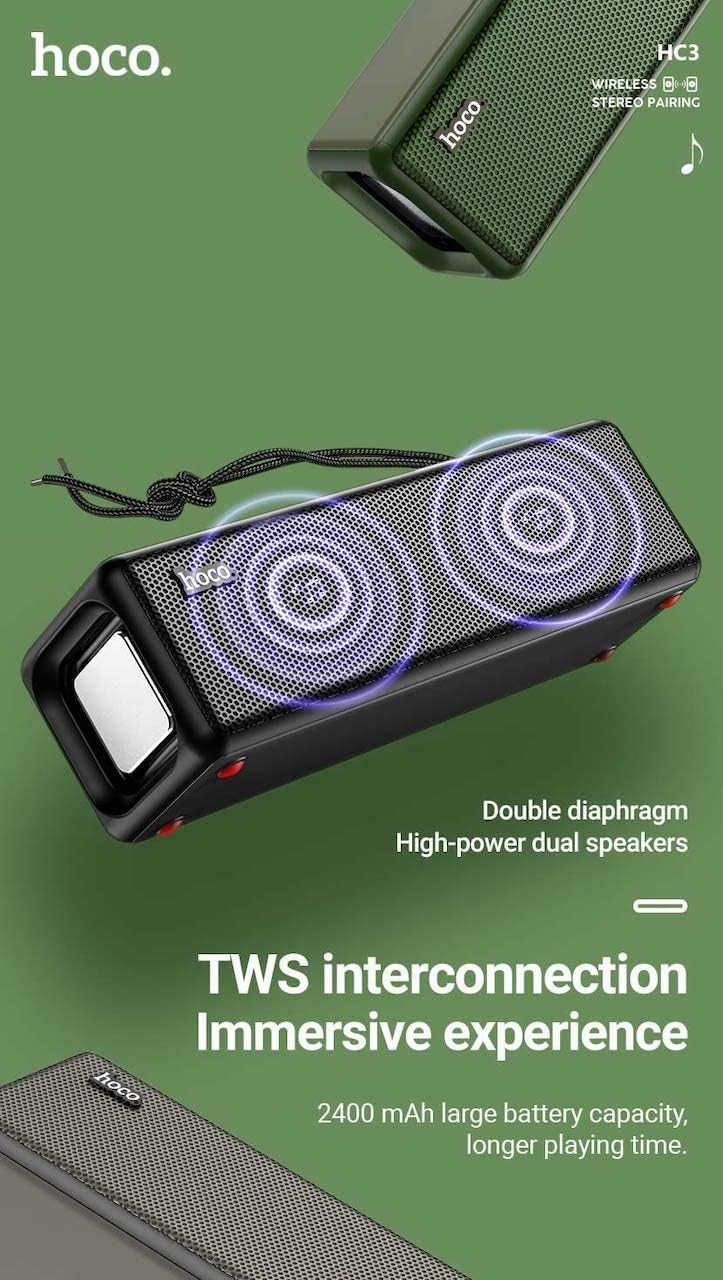
Figure 3: TWS Interconnection. This image illustrates the concept of two Hoco HC3 speakers wirelessly connected to provide a stereo audio experience, highlighting the dual speaker setup and the 2400 mAh battery capacity.
5.6 Trin Galwadau
Pan fyddwch wedi'i gysylltu trwy Bluetooth â ffôn clyfar:
- Ateb Galwad: Pwyswch y botwm Chwarae/Saib yn fyr.
- Galwad Diwedd: Pwyswch y botwm Chwarae/Saib yn fyr yn ystod galwad.
- Gwrthod Galwad: Pwyswch y botwm Chwarae/Saib yn hir pan fydd galwad sy'n dod i mewn yn canu.
- Ail-redeg Rhif Diwethaf: Pwyswch y botwm Chwarae/Seibiant ddwywaith.
6. cynnal
- Glanhau: Use a soft, dry cloth to clean the speaker's surface. Do not use abrasive cleaners, alcohol, or other chemical solvents.
- Storio: Storiwch y siaradwr mewn lle oer, sych i ffwrdd o olau haul uniongyrchol a thymheredd eithafol.
- Gofal Batri: To prolong battery life, charge the speaker regularly, even if not in use for extended periods (e.g., once every 3 months). Avoid fully discharging the battery frequently.
- Gwrthiant Dŵr: While designed for sports, avoid submerging the speaker in water. Refer to product specifications for any IP rating.
- Osgoi Effaith: Protect the speaker from drops and strong impacts.
7. Datrys Problemau
If you encounter issues with your Hoco HC3 speaker, refer to the following table for common problems and solutions:
| Problem | Achos Posibl | Ateb |
|---|---|---|
| Nid yw'r siaradwr yn troi ymlaen. | Batri isel. | Gwefrwch y siaradwr am o leiaf 30 munud. |
| Methu paru drwy Bluetooth. | Bluetooth heb ei alluogi ar y ddyfais; siaradwr heb ei ddefnyddio yn y modd paru; yn rhy bell o'r ddyfais. | Ensure Bluetooth is on, speaker is in pairing mode (flashing blue LED), and devices are within 10 meters. Forget "HC3" on your device and try pairing again. |
| Dim sain. | Volume too low; incorrect mode selected; device not playing audio. | Increase volume on both speaker and connected device. Verify correct mode (Bluetooth, AUX, TF, USB). Ensure audio is playing on the source device. |
| Mae derbyniad radio FM yn wael. | Signal gwan; ymyrraeth amgylcheddol. | Move the speaker to a location with better reception. Re-scan for stations. |
| TF card/USB playback not working. | Card/drive not inserted correctly; incompatible file fformat; llygredig files. | Ensure card/drive is fully inserted. Check file formats (MP3 recommended). Try another card/drive. |
| Mae paru TWS yn methu. | Nid yw'r siaradwyr yn y modd paru TWS; yn rhy bell oddi wrth ei gilydd. | Ensure both speakers are powered on and in TWS pairing mode. Keep them close during pairing. Refer to section 5.5. |
8. manylebau
| Nodwedd | Manylyn |
|---|---|
| Model | HC3 |
| Dimensiynau | 202 x 60 x 60 mm |
| Pwysau | 561 g |
| Fersiwn Bluetooth | V5.0 (Chip: JLAC6928B) |
| Gallu Batri | 2400mAh |
| Amser Codi Tâl | Tua 3 awr |
| Amser Sgwrs/Cerddoriaeth | Hyd at 5 awr |
| Uned Siaradwyr | 45mm*2 |
| Allbwn Pwer Llefarydd | 5W*2 |
| Dulliau Cysylltedd | Bluetooth, FM, TF card, USB, AUX, TWS |
| Modd Allbwn Sain | Amgylchynu |
| Gwneuthurwr | Hoco |
| Gwlad Tarddiad | Tsieina |
9. Gwarant a Chefnogaeth
Hoco products are manufactured to high quality standards. For information regarding warranty coverage, please refer to the warranty card included with your purchase or contact your local Hoco distributor or retailer. Keep your proof of purchase for any warranty claims.
For technical support or further assistance, please visit the official Hoco website or contact their customer service department. Contact details are typically available on the product packaging or the official websafle.


