
Rhagymadrodd
This manual provides comprehensive instructions for the Docooler T-Wolf V11 Wired Gaming Mouse. It covers setup, operation, maintenance, and troubleshooting to ensure optimal performance and longevity of your device. The T-Wolf V11 is designed for both gaming and office use, featuring adjustable DPI, ergonomic design, and customizable RGB lighting.
Nodweddion Cynnyrch
- 8-Button Design: Equipped with 8 programmable buttons suitable for various tasks in gaming and office applications.
- DPI addasadwy: Offers 6 levels of DPI adjustment (1000/1600/2400/3200/4800/6400) for precise cursor control and sensitive operation.
- Ergonomic Arc Design: Engineered for a comfortable grip, fitting closely to your palm to reduce fatigue during extended use.
- Integrated Weights: Features independent weights within the mouse, allowing customization for improved stability and precision to suit individual preferences.
- RGB Colorful Backlight: Provides 6 types of colorful RGB streaming light effects, enhancing the visual experience.
- Adeiladu Gwydn: Includes a lightweight aluminum alloy anti-skid roller for comfortable and reliable use.
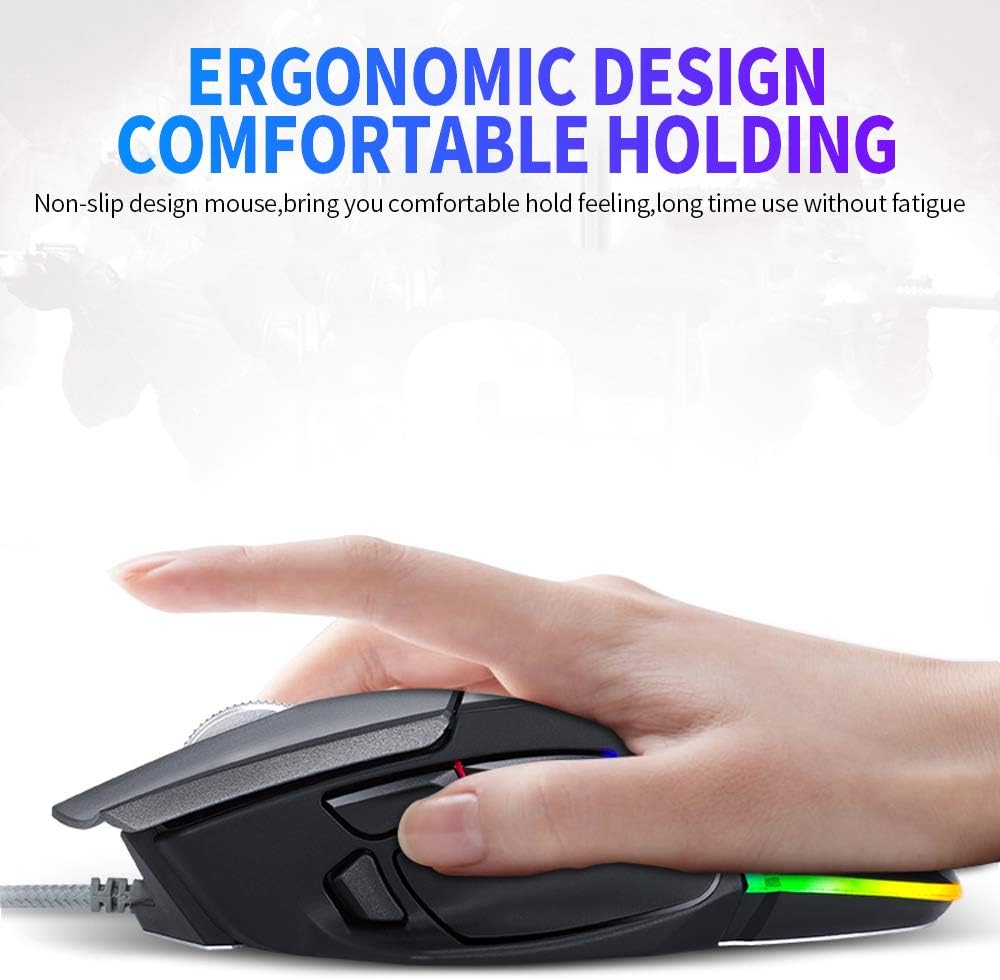
Image: The ergonomic design of the T-Wolf V11 mouse, demonstrating how it comfortably fits the hand to reduce strain during prolonged use.

Image: The T-Wolf V11 mouse illuminated with its dynamic RGB streaming light effects, showcasing the customizable lighting options.
Cyfarwyddiadau Gosod
- Dadbacio'r Llygoden: Carefully remove the T-Wolf V11 mouse from its packaging.
- Cysylltu â Chyfrifiadur: Plug the USB connector of the mouse's cable into an available USB port on your computer (desktop or laptop).
- Gosod Gyrrwr: The mouse is typically plug-and-play. Your operating system (Windows, macOS, Linux) should automatically detect and install the necessary drivers. No additional software installation is usually required for basic functionality.
- Gwirio Ymarferoldeb: Once connected, move the mouse to check cursor movement and click the left and right buttons to ensure they are responsive.

Image: The Docooler T-Wolf V11 gaming mouse connected to a laptop, illustrating a typical setup scenario.
Cyfarwyddiadau Gweithredu
Swyddogaethau Botwm
- Left Click (Button 1): Swyddogaeth clicio sylfaenol safonol.
- Right Click (Button 2): Swyddogaeth clicio eilaidd safonol.
- Scroll Wheel (Button 3): Scrolls content up/down. Can also be pressed for middle-click functionality.
- DPI Cycle Button (Button 4): Located near the scroll wheel, press to cycle through DPI settings (1000/1600/2400/3200/4800/6400).
- Forward/Backward Buttons (Buttons 5 & 6): Typically located on the side, used for navigation in web porwyr neu file fforwyr.
- Additional Programmable Buttons (Buttons 7 & 8): These buttons can often be customized using third-party software or operating system settings for specific functions or macros.
Addasiad DPI
Press the DPI cycle button (usually located behind the scroll wheel) to switch between the available DPI settings. Each press will change the sensitivity, allowing you to adapt to different tasks, from precise aiming in games to fast navigation in desktop environments. The RGB lighting may change color to indicate the current DPI level.
Effeithiau Goleuo RGB
The T-Wolf V11 features 6 types of colorful RGB streaming light effects. These effects are pre-programmed and cycle automatically, providing a dynamic visual experience. There is no specific button to change RGB modes on the mouse itself; the lighting patterns are typically fixed or cycle through automatically.

Delwedd: Manwl view of the T-Wolf V11 mouse, illustrating its DPI adjustment capabilities and RGB streamer marquee lighting.
Cynnal a chadw
- Glanhau: Defnyddiwch frethyn meddal, sych i sychu wyneb y llygoden. Ar gyfer baw ystyfnig, sychwch ychydigampen the cloth with water or a mild, non-abrasive cleaner. Avoid using harsh chemicals or excessive moisture.
- Glanhau Synhwyrydd: Glanhewch y synhwyrydd optegol ar ochr isaf y llygoden o bryd i'w gilydd gyda swab cotwm i sicrhau olrhain cywir.
- Gofal Cebl: Avoid sharply bending or twisting the mouse cable to prevent internal damage. Store the cable neatly when not in use.
- Storio: Pan nad yw'n cael ei ddefnyddio am gyfnodau hir, storiwch y llygoden mewn amgylchedd glân, sych i ffwrdd o olau haul uniongyrchol a thymheredd eithafol.
Datrys problemau
- Llygoden Ddim yn Ymateb:
- Gwnewch yn siŵr bod y cebl USB wedi'i blygio'n ddiogel i borthladd USB sy'n gweithio ar eich cyfrifiadur.
- Rhowch gynnig ar blygio'r llygoden i mewn i borthladd USB gwahanol.
- Ailgychwyn eich cyfrifiadur.
- Mae Symudiad y Cyrchwr yn Anwadal neu'n Neidio:
- Glanhewch y synhwyrydd optegol ar waelod y llygoden.
- Gwnewch yn siŵr eich bod chi'n defnyddio'r llygoden ar arwyneb glân, nad yw'n adlewyrchol, ac unffurf (e.e., pad llygoden).
- DPI Ddim yn Newid:
- Press the DPI cycle button firmly.
- Ensure the mouse is properly connected and recognized by your system.
- Goleuadau RGB Ddim yn Gweithio:
- Gwiriwch y cysylltiad USB.
- The RGB lighting is typically automatic; if it's not illuminating, ensure the mouse is receiving power.
Manylebau
| Brand | Docooler |
| Model | v11 |
| Lliw | Du |
| Technoleg Cysylltedd | Wired |
| Nifer y Botymau | 8 |
| Gosodiadau DPI | 1000/1600/2400/3200/4800/6400 (Adjustable) |
| Math Backlight | RGB Colorful |
| Hyd Cebl | 1.9 metr |
| Maint yr Eitem | 13 x 8.5 x 4.5 cm (5.1 x 3.3 x 1.8 modfedd) |
| Pwysau Eitem | 177 g (6.24 owns) |
| Dyfeisiau Cydnaws | Gliniadur, PC |
| Llwyfan Caledwedd | PC |
| Ffynhonnell Pwer | Cebl Trydan (USB) |
Gwarant a Chefnogaeth
For warranty information and technical support, please refer to the documentation provided with your purchase or contact Docooler customer service directly. Keep your proof of purchase for any warranty claims. Support contact details can typically be found on the manufacturer's official websafle.