
Rhagymadrodd
This manual provides essential information for the safe and efficient use of your Walfront 5V 500mA 2.5W Mini Polycrystalline Solar Panels. These panels are designed for various low-power applications, including DIY projects, experimental setups, and powering small electronic devices. Please read these instructions thoroughly before installation and operation.
Nodweddion Cynnyrch
- Dimensiynau: Approximately 130 x 150 mm (5.1 x 5.9 inches) with a 2 mm (0.08 inches) thickness.
- Hyd cebl: 100 cm (39.4 inches) pre-attached cable.
- Vol Gweithredutage: DC 5V
- Cyfredol Gweithredol: 0.5A (500mA)
- Pwer Uchaf: 2.5W
- Deunydd: Polysilicon
- High conversion efficiency and power output.
- Effective performance in low-light conditions.
- Weather-resistant design, suitable for snow and wind.
- Easy to install for DIY projects.
- Ideal for solar lawn lamps, solar landscape lights, solar mobile phone chargers, solar flashlights, and various small solar toys.
Cynnwys Pecyn
- 2 x Walfront 5V 500mA 2.5W Mini Polycrystalline Solar Panels
Gwybodaeth Diogelwch
- Do not attempt to disassemble or modify the solar panels.
- Avoid direct contact with the electrical terminals when the panel is exposed to light.
- Ensure proper polarity when connecting to devices. Incorrect polarity can damage the connected device or the solar panel.
- Keep the panels away from flammable materials.
- Do not immerse the panels in water. While weather-resistant, they are not designed for submersion.
- Handle with care to avoid physical damage to the panel surface.
Gosod
The Walfront mini solar panels are designed for straightforward integration into various projects.
1. dadbacio
Carefully remove the solar panels from their packaging. Inspect for any visible damage.
2. Lleoliad
For optimal performance, position the solar panel in a location that receives maximum direct sunlight throughout the day. Avoid shaded areas. The panel should be angled towards the sun for best efficiency.

Image: Two Walfront mini solar panels connected to a breadboard and multimeter, demonstrating their use in a garden for experimental power.
3. Cysylltiad Trydanol
Each solar panel comes with a pre-attached cable. The red wire typically indicates the positive (+) terminal, and the black wire indicates the negative (-) terminal.
- Connect the red wire to the positive input of your device or charging circuit.
- Connect the black wire to the negative input of your device or charging circuit.
- Sicrhewch fod pob cysylltiad yn ddiogel ac wedi'i inswleiddio i atal cylchedau byr.

Delwedd: Cefn view of a Walfront mini solar panel, highlighting the attached red (positive) and black (negative) connection wires.
Cyfarwyddiadau Gweithredu
Once properly set up, the solar panels will begin generating electricity when exposed to sunlight.
1. Power Generation
The panels convert sunlight into DC electrical energy. The output voltage and current will vary depending on the intensity of the sunlight and the load connected.
2. Perfformiad Gorau posibl
For maximum power output, ensure the panels are clean and positioned directly facing the sun. Any shading, even partial, can significantly reduce efficiency.
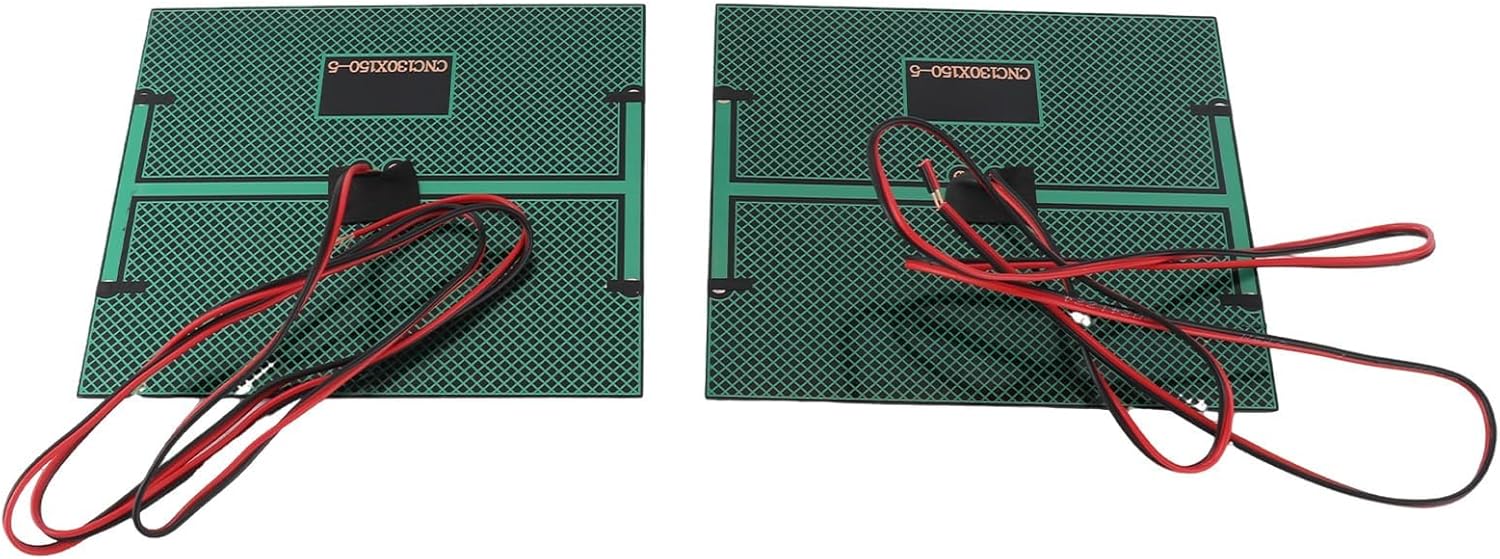
Delwedd: Blaen view of two Walfront mini solar panels, showcasing their polycrystalline solar cells.
3. Ceisiadau
These panels are suitable for:
- Powering small DC motors or fans.
- Charging small batteries (requires a charge controller, not included).
- Educational projects and scientific experiments.
- DIY solar lighting or small electronic devices.
Cynnal a chadw
Minimal maintenance is required for these solar panels.
- Glanhau: Sychwch wyneb y paneli solar yn rheolaidd gyda lliain meddal, damp cloth to remove dust, dirt, or debris. A clean surface ensures maximum light absorption and efficiency. Do not use abrasive cleaners or harsh chemicals.
- Arolygiad: Periodically check the cables and connections for any signs of wear, damage, or corrosion. Ensure connections remain secure.
- Storio: If storing the panels for an extended period, keep them in a dry, cool place away from direct sunlight and extreme temperatures.
Datrys problemau
If your solar panels are not performing as expected, consider the following:
Dim Allbwn Pwer
- Check Sunlight: Ensure the panels are receiving direct, unobstructed sunlight. Even partial shading can drastically reduce output.
- Arwyneb glân: Verify that the panel surface is clean and free of dirt, dust, or obstructions.
- Gwirio Cysylltiadau: Inspect all wiring for loose connections, incorrect polarity, or damage.
- Prawf gyda Multimedr: Defnyddiwch amlfesurydd i fesur y cyftage output of the panel directly under sunlight. A 5V panel should show approximately 5V or slightly higher (open circuit voltage) in good sunlight.
Allbwn Pwer Isel
- Angle and Orientation: Adjust the panel's angle and orientation to face the sun directly.
- Tymheredd: Extreme temperatures can affect solar panel performance.
- Cloud Cover: Overcast conditions will naturally reduce power output.
- Paru Llwyth: Ensure the connected device's power requirements are within the panel's capacity (5V, 500mA, 2.5W).
Manylebau
| Nodwedd | Manylyn |
|---|---|
| Rhif Model | 5V500mA |
| Deunydd | Polysilicon |
| Dimensiynau (L x W x H) | Tua 130 x 150 x 2 mm (5.1 x 5.9 x 0.08 modfedd) |
| Hyd Cebl | 100 cm (39.4 fodfedd) |
| Vol Gweithredutage | DC 5V |
| Cyfredol Gweithredol | 0.5A (500mA) |
| Uchafswm Pwer | 2.5W |
| Effeithlonrwydd | 16-18% |
| Cysylltiad Allbwn | Bare wire leads (Red for positive, Black for negative) |
Gwybodaeth Gwarant
Walfront products typically come with a standard manufacturer's warranty. For specific warranty details, including duration and coverage, please refer to the product packaging or contact Walfront customer support directly. Keep your proof of purchase for warranty claims.
Gwybodaeth Gefnogaeth
For technical assistance, troubleshooting not covered in this manual, or general inquiries, please visit the official Walfront websafle neu cysylltwch â'u hadran gwasanaethau cwsmeriaid.
Websafle: www.walfront.com
E-bost: support@walfront.com