
Rhagymadrodd
This manual provides essential instructions for the safe and efficient operation of your Technical Pro STAGE28 Dual 8" Rechargeable LED Bluetooth Speaker. Please read this manual thoroughly before using the product and retain it for future reference.
Cynnwys Pecyn
Gwiriwch fod yr holl eitemau yn bresennol yn y pecyn:
- Technical Pro STAGE28 Speaker Unit
- Meicroffon Llaw Di-wifr
- Speaker Stand (Tripod)
- Charging Cable (DC5V)
- Llawlyfr Cyfarwyddiadau (y ddogfen hon)
Gosod
1. Codi Tâl ar y Llefarydd
Before initial use, fully charge the speaker's built-in rechargeable battery. Connect the provided charging cable to the DC5V IN port on the rear panel of the speaker and to a suitable power source. The charging status indicator will show when the unit is charging.

Image: Rear control panel detail, highlighting the DC5V IN port.
2. Assembling the Speaker Stand
Unfold the tripod legs of the speaker stand. Adjust the height to your preference and secure it using the locking mechanism. Place the STAGE28 speaker securely onto the top pole of the stand.

Image: The included speaker tripod stand.
3. Microphone Preparation
Ensure the wireless handheld microphone has fresh batteries installed. The microphone can be stored in the dedicated compartment on the rear of the speaker when not in use.
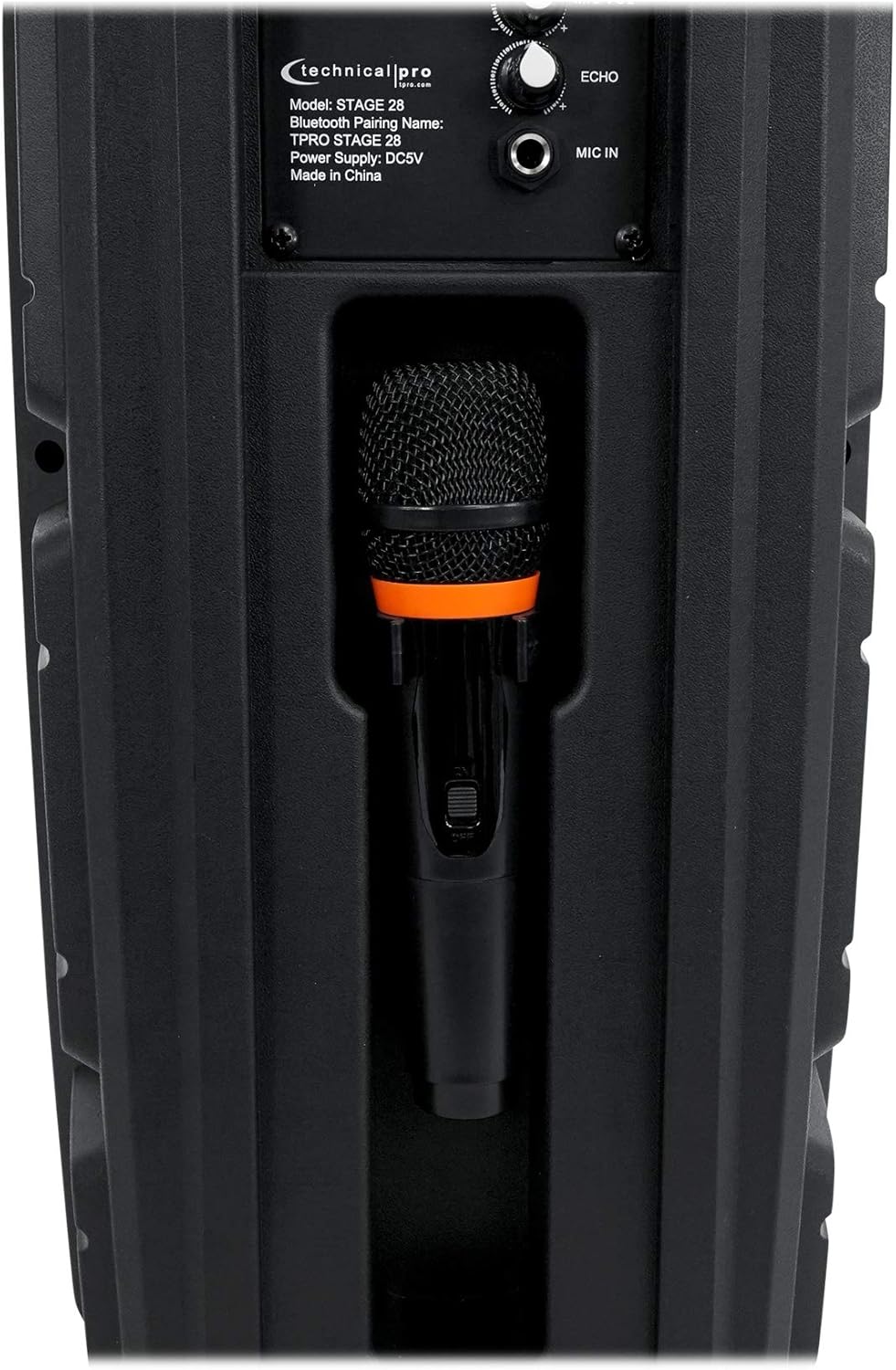
Image: Microphone storage compartment on the speaker's rear.
Cyfarwyddiadau Gweithredu
1. Pŵer Ymlaen/Diffodd a Rheoli Cyfaint
Cylchdroi y PŴER / CYFROL knob clockwise to turn the speaker on and increase the master volume. Rotate counter-clockwise to decrease volume and turn off the speaker.

Image: Full rear panel of the speaker with controls.
2. Pâr Bluetooth
- Turn on the speaker. The display will show "BLUE" indicating Bluetooth mode.
- Galluogwch Bluetooth ar eich dyfais sain (ffôn clyfar, tabled, ac ati).
- Chwiliwch am available devices and select "TPRO STAGE 28" o'r rhestr.
- Once paired, the speaker will emit a confirmation tone.
- The Bluetooth range is approximately 30 feet (9 meters).
3. Swyddogaeth Stereo Di-wifr Gwirioneddol (TWS)
I gysylltu dau STAGE28 speakers for TWS stereo sound:
- Ensure both STAGE28 speakers are powered on and in Bluetooth mode.
- Ar un o'r siaradwyr (dyma'r prif uned), pwyswch a daliwch y TWS button. The speaker will search for another STAGE28 unit.
- Once connected, both speakers will play audio in stereo from a single Bluetooth source.
4. Chwarae Cerdyn USB/TF
Insert a USB flash drive or TF (microSD) card (up to 64GB) containing .mp3 audio files i mewn i'r perthnasol USB or TF port. The speaker will automatically switch to USB/TF mode and begin playback. Use the Blaenorol/Nesaf botymau i lywio traciau.
5. Gweithrediad Radio FM
Gwasgwch y MODD / GOLAU button to cycle through input modes until "FM" appears on the display. Press and hold the Chwarae/Saib button to auto-scan and save available FM stations. Use the Blaenorol/Nesaf botymau i newid rhwng gorsafoedd sydd wedi'u cadw.
6. Mewnbwn Aux
Connect an external audio device using a 1/8" (3.5mm) audio cable to the AUX input port. Press the MODD / GOLAU botwm i ddewis modd AUX.
7. Defnydd Meicroffon
Plug the wireless microphone receiver (if applicable) or a wired microphone into the MIC YN 1/4" input. Adjust the microphone volume using the MIC VOL knob and add echo effect with the ECHO bwlyn.
8. Goleuadau LED
The speaker features LED lights on its woofers. Press the MODD / GOLAU button briefly to toggle the LED lights on or off, or to change light modes.

Delwedd: Blaen view of the speaker with LED lights active.
Cynnal a chadw
- Glanhau: Defnyddiwch frethyn meddal, sych i lanhau tu allan y siaradwr. Peidiwch â defnyddio glanhawyr sgraffiniol na thoddyddion.
- Gofal Batri: To prolong battery life, avoid fully discharging the battery frequently. Recharge the speaker regularly, even if not in use for extended periods. Store in a cool, dry place.
- Storio: When storing the speaker, ensure it is turned off and disconnected from power. Keep it in a dry environment away from extreme temperatures.
Datrys problemau
| Problem | Achos Posibl | Ateb |
|---|---|---|
| Nid yw'r siaradwr yn troi ymlaen. | Battery is discharged. Power/Volume knob is off. | Charge the speaker. Rotate the POWER/VOLUME knob clockwise to turn on. |
| Dim sain o'r siaradwr. | Volume is too low. Incorrect input mode selected. Audio source not playing. | Increase master volume. Ensure correct input mode (Bluetooth, USB, AUX, FM). Check audio source device. |
| Ni all dyfais Bluetooth baru. | Speaker not in Bluetooth mode. Device too far. Previously paired device connected. | Ensure speaker is in Bluetooth mode ("BLUE" on display). Move device closer (within 30 ft). Disconnect from other devices. |
| Meicroffon ddim yn gweithio. | Microphone not connected. MIC VOL knob is low. Microphone batteries are dead. | Ensure microphone is properly connected to MIC IN. Increase MIC VOL. Replace microphone batteries. |
Manylebau
| Model: | STAGE28 |
| Pwer Uchaf: | 1000 Wat |
| Woofers: | Dual 8" LED Woofers |
| Trydarwr: | Piezo Horn Tweeter |
| Batri: | Adeiledig yn Aildrydanadwy |
| Mewnbynnau: | Bluetooth, USB, TF Card, FM Radio, Aux (1/8"), Microphone (1/4") |
| USB/TF Card Max Size: | 64GB |
| Sain â Chefnogaeth Files: | .mp3 |
| Fersiwn Bluetooth: | v2.0 with EDR |
| Ystod Bluetooth: | 30 troedfedd (9 metr) |
| Ymateb Amlder: | 50Hz-20kHz |
| rhwystriant: | 4 Ohms |
| Sensitifrwydd: | 95 ±2dB (1W@1M) |
| Dimensiynau Cynnyrch (H x W x D): | 22" x 9.5" x 7.5" (55.9 cm x 24.1 cm x 19.1 cm) |
| Pwysau Cynnyrch: | 8.5 pwys (3.86 kg) |
| Cyflenwad Pŵer: | DC5V |
Gwarant a Chefnogaeth
For warranty information and technical support, please refer to the documentation provided at the point of purchase or contact the retailer/manufacturer directly. Keep your proof of purchase for warranty claims.