
1. Rhagymadrodd
This manual provides detailed instructions for the installation, operation, and maintenance of the SINOTIMER TM919A-2 LCD Digital Programmable Timer Switch. This device is designed for automatic control of electrical appliances based on programmed time schedules, offering daily and weekly programming options.
2. Nodweddion Cynnyrch
- Weekly 7-day programmable digital time switch.
- Cyfrol lluosogtage options (5V, 12V, 24V, 110V, 220V, 85-265V). This specific model is 220V.
- Detachable battery design for backup power.
- 35mm DIN rail mounting for easy installation.
- LCD display for clear time and program viewing.
- 16 ON/OFF programs per day or week.
- Manual override function.
- High capacity 16A switching contact.
3. Gwybodaeth Diogelwch
WARNING: Risk of electric shock. Installation should only be performed by a qualified electrician or competent person.
- Sicrhewch fod pŵer wedi'i ddatgysylltu cyn gosod neu gynnal a chadw.
- Do not exceed the maximum load capacity of 16A.
- Gwirio cywir cyftage supply for the specific model (220V for TM919A-2).
- Cadwch y ddyfais i ffwrdd o leithder a thymheredd eithafol.
4. Cynnyrch Drosview a Chydrannau
The SINOTIMER TM919A-2 features an LCD display, control buttons, and wiring terminals for power input and load control.

Ffigur 4.1: Blaen view of the SINOTIMER TM919A-2 Digital Timer Switch, showing the LCD display, control buttons (P, D+, H+, M+, RESET, MANUAL), and wiring terminals.

Ffigur 4.2: The timer switch with its transparent protective cover opened, revealing the control buttons for programming and manual operation.
Botymau Rheoli:
- P (Rhaglen): Yn mynd i mewn i'r modd gosod rhaglen.
- D+ (Dydd): Yn addasu diwrnod yr wythnos neu ddiwrnod y rhaglen.
- H+ (Awr): Yn addasu'r awr neu awr y rhaglen.
- M+ (Munud): Yn addasu munud neu funud y rhaglen.
- AIL GYCHWYN: Ailosod pob lleoliad i ddiffygion ffatri.
- LLAWLYFR: Toggles output ON/AUTO/OFF.
5. Gosod a Gosod
5.1 Diagram Gwifro
Refer to the wiring diagram on the side of the device and the illustration below for correct connection. Ensure all connections are secure.

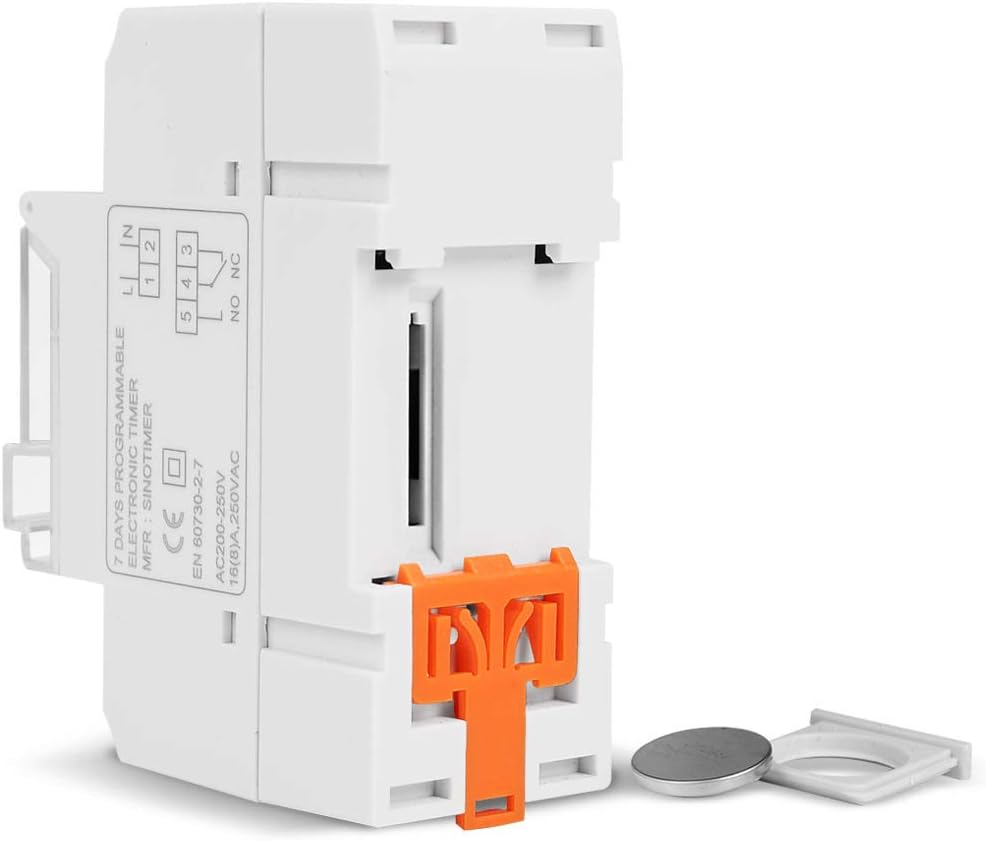
Ffigur 5.1: Ochr view of the timer switch displaying the wiring diagram. Terminals 1 and 2 are for power input (L and N). Terminals 3, 4, and 5 are for the relay output (Common, Normally Open, Normally Closed).
- Terminals 1 & 2 (L, N): Connect to the main power supply (220V AC for this model).
- Terminal 3 (NO - Normally Open): Connects to the load when the timer is ON.
- Terminal 4 (COM - Common): Connects to one side of the load and the power supply.
- Terminal 5 (NC - Normally Closed): Connects to the load when the timer is OFF (less common for typical applications).
5.2 Initial Power-up and Reset
Upon first power-up or after a long period without power, the LCD display may be blank. The internal battery provides backup for settings. If the display is unresponsive or shows garbled characters, press the AILOSOD button using a pointed object (e.g., a pen tip). This will clear all settings and restore the timer to its default state.
5.3 Gosod yr Amser a'r Diwrnod Cyfredol
- Gwasgwch y P button once. The display will show the current time setting.
- Gwasgwch D+ i osod y diwrnod presennol o'r wythnos.
- Gwasgwch H+ i osod yr awr bresennol.
- Gwasgwch M+ i osod y funud gyfredol.
- Gwasgwch y P button again to exit time setting mode and return to normal operation.
6. Cyfarwyddiadau Gweithredu
6.1 Rhaglennu Cylchoedd YMLAEN/DIFFODD
The timer supports up to 16 ON/OFF programs. Each program consists of an ON time and an OFF time.
- Gwasgwch y P button repeatedly until "1 ON" appears on the display. This is the first ON program.
- Gwasgwch D+ to select the day(s) for this program. Options include individual days, weekdays, weekends, or all 7 days.
- Gwasgwch H+ to set the desired hour for the "ON" event.
- Gwasgwch M+ to set the desired minute for the "ON" event.
- Gwasgwch P again. "1 OFF" will appear. This is the first OFF program.
- Repeat steps 2-4 to set the day(s), hour, and minute for the "OFF" event.
- Parhewch i bwyso P to cycle through "2 ON", "2 OFF", up to "16 ON", "16 OFF". If you do not need all 16 programs, simply press P until the display returns to the current time.
- To save and exit programming mode, press the P button until the current time is displayed.
6.2 Diystyru â Llaw
Mae'r LLAWLYFR button allows you to override the programmed settings temporarily or permanently.
- Gwasgwch LLAWLYFR once: Toggles between ON/AUTO/OFF modes.
- AR: Mae'r allbwn YMLAEN yn barhaus, gan anwybyddu rhaglenni.
- I FFWRDD: Mae'r allbwn i ffwrdd yn barhaus, gan anwybyddu rhaglenni.
- CAR: The timer operates according to the programmed ON/OFF cycles. This is the standard operating mode.
7. cynnal
7.1 Batri Newydd
The timer includes a detachable CR2032 lithium battery to maintain time and program settings during power outages. If the display becomes dim or resets frequently, the battery may need replacement.

Ffigur 7.1: The timer switch shown with its battery compartment open and a CR2032 lithium battery, indicating the detachable battery design.
- Disconnect power to the timer before attempting battery replacement.
- Locate the battery compartment, typically on the side or back of the unit.
- Tynnwch yr hen fatri CR2032 yn ofalus.
- Insert a new CR2032 battery, ensuring correct polarity (+ side up).
- Caewch yr adran batri.
- Reconnect power and reset the current time and day if necessary.
8. Datrys Problemau
- Mae'r arddangosfa'n wag:
- Check power supply connections (Terminals 1 & 2).
- Ensure the internal battery is charged or replaced if old.
- Gwasgwch y AILOSOD botwm.
- Programs are not running:
- Gwnewch yn siŵr bod yr amserydd i mewn AWTO mode (check the display for "AUTO"). Press LLAWLYFR i ddulliau beicio.
- Verify that the current time and day are set correctly.
- Check that the ON/OFF programs are correctly entered and enabled for the desired days.
- Confirm wiring to the load (Terminals 3, 4, 5) is correct.
- Mae'r amserydd yn ailosod yn annisgwyl:
- The internal battery may be low or depleted. Replace the CR2032 battery.
- Ensure stable power supply to the unit.
9. manylebau
| Nodwedd | Manyleb |
|---|---|
| Model | TM919A-2 |
| Cyflenwad Pŵer | 220V AC (as per model) |
| Defnydd Pŵer | 4.5 VA (MAX) |
| Amrediad Tymheredd | -20°C i +50°C |
| Arddangos | LCD |
| Switching Contact | 1 switsh newid drosodd |
| Rhaglenni | 16 ON/OFF per day or week |
| Hysteresis | 2 sec/day (at 25°C) |
| Gallu | 16A |
| Amrediad Amserydd | 1 munud i 168 awr |
| Ysbaid Lleiaf | 1 munud |
| Black-out Memory | 60 days (with internal battery) |
| Pwysau Eitem | 0.15 kg (5.3 owns) |
| Mowntio | Rheilffordd DIN 35mm |
| Maint Sgrin | 1.2 modfedd |
Ffigur 9.1: Dimensional drawing of the SINOTIMER TM919A-2, showing measurements in centimeters for height, width, and depth.
10. Gwarant a Chefnogaeth
Specific warranty information for the SINOTIMER TM919A-2 is not provided in the product details. For warranty claims or technical support, please contact your retailer or the manufacturer directly. Keep your purchase receipt as proof of purchase.