
1. Rhagymadrodd
This manual provides essential information for the safe and efficient operation of your Cecotec Ready Warm 800 Thermal Connected 600W Digital Heater. Please read these instructions carefully before using the appliance and retain them for future reference. This heater is designed to provide supplementary heating for indoor spaces and features Wi-Fi connectivity for remote control.
2. Cyfarwyddiadau Diogelwch
RHYBUDD: Gall methu â dilyn y cyfarwyddiadau diogelwch hyn arwain at dân, sioc drydanol, neu anaf.
- Sicrhau y cyftagMae'r cyfaint a nodir ar y label graddio yn cyfateb i'ch cyfaint prif gyflenwadtage cyn cysylltu'r teclyn.
- Do not cover the heater. Overheating can occur if the heater is covered or obstructed.
- Keep flammable materials such as furniture, curtains, and bedding at least 1 meter (3 feet) away from the heater.
- Do not operate the heater with a damaged cord or plug, or after the appliance malfunctions or has been dropped or damaged in any manner.
- Nid yw'r teclyn hwn wedi'i fwriadu i'w ddefnyddio gan bersonau (gan gynnwys plant) sydd â galluoedd corfforol, synhwyraidd neu feddyliol llai, neu ddiffyg profiad a gwybodaeth, oni bai eu bod wedi cael goruchwyliaeth neu gyfarwyddyd ynghylch defnyddio'r offer gan berson sy'n gyfrifol am eu diogelwch.
- Dylid goruchwylio plant i sicrhau nad ydynt yn chwarae gyda'r teclyn.
- Peidiwch â defnyddio'r gwresogydd yn union o amgylch bath, cawod neu bwll nofio.
- Datgysylltwch y gwresogydd bob amser pan nad yw'n cael ei ddefnyddio neu cyn glanhau.
- Do not insert any objects into the ventilation or exhaust openings as this may cause electric shock, fire, or damage to the heater.
3. Cynnyrch Drosview
Familiarize yourself with the components of your Cecotec Ready Warm 800 Digital Heater.

This image shows the Cecotec Ready Warm 800 Digital Heater from a side angle, highlighting its slim profile and the integrated control panel on the right side. The heater is white with black vents at the top and stands on two white feet.

The heater is shown in a home environment, positioned on a wooden floor next to a person seated on a black armchair, illustrating its compact size and how it fits into a living space.
Panel Rheoli ac Arddangos
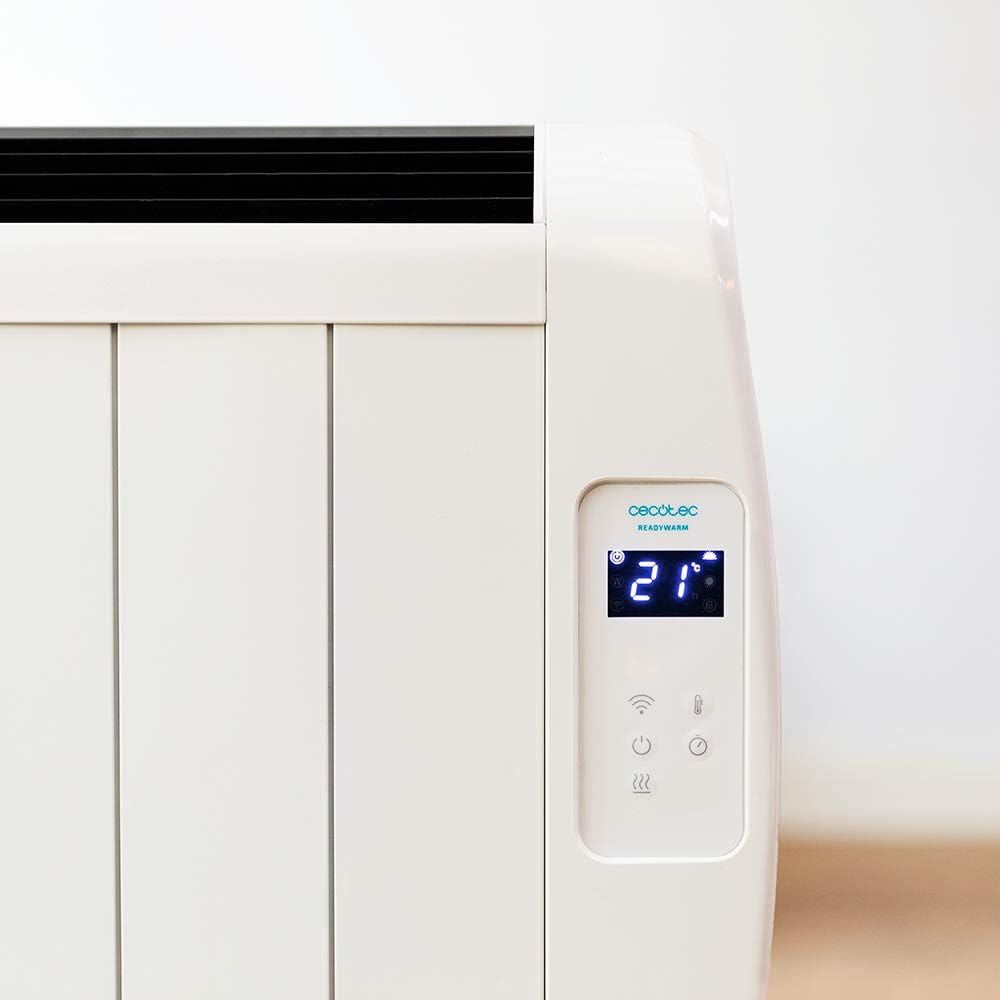
A manwl view of the heater's digital control panel, featuring a clear LCD screen showing '21' degrees Celsius, indicating the current temperature setting. Below the screen are touch-sensitive buttons for power, Wi-Fi, mode selection, and temperature adjustment.

This image focuses on the digital control panel, showing the LCD screen set to a timer function, displaying '04' hours. This indicates the heater is programmed to operate for a specific duration.
The digital display shows the current temperature, timer settings, and Wi-Fi status. The touch-sensitive buttons allow for easy control of the heater's functions.
Switch Power

A close-up shot of the heater's base, revealing the physical on/off power switch. This switch provides a direct way to cut power to the unit.
A physical power switch is located at the base of the unit for complete power disconnection.
4. Gosod
- Dadbacio: Tynnwch y gwresogydd o'i becynnu yn ofalus. Cadwch y pecynnu ar gyfer storio neu gludo.
- Lleoliad: Place the heater on a firm, level surface. Ensure there is at least 1 meter (3 feet) of clear space around the heater from walls, furniture, and other objects. Do not place it directly under a power outlet.
- Cysylltiad Pwer: Plug the power cord into a suitable 230V AC power outlet. Ensure the main power switch at the base of the unit is in the 'OFF' position before plugging in.
- Pŵer Cychwynnol Ar: Flip the main power switch at the base of the unit to the 'ON' position. The digital display on the control panel should illuminate.
Dimensions for Placement

This image provides a clear diagram of the heater's physical dimensions: 63 cm in width, 10.5 cm in depth, and 53.5 cm in height, useful for planning placement.
5. Cyfarwyddiadau Gweithredu
Gweithrediad Sylfaenol
- Pŵer ymlaen / i ffwrdd: Pwyswch y botwm pŵer (U) on the control panel to turn the heater on or off.
- Addasiad Tymheredd: Use the temperature up (+) ac i lawr (-) i osod eich tymheredd ystafell dymunol. Bydd yr arddangosfa yn dangos y tymheredd a osodwyd.
- Dewis Modd: Press the mode button to cycle through available heating modes (e.g., Low, Medium, High, or Eco, depending on the model's specific programming).
- Swyddogaeth Amserydd: Press the timer button to set an operating duration. Use the temperature adjustment buttons to set the desired hours (e.g., 0-24 hours). The heater will automatically turn off after the set time.
Cysylltedd Wi-Fi a Rheoli Apiau
The Cecotec Ready Warm 800 features Wi-Fi connectivity, allowing you to control the heater remotely via a smartphone application.

A hand holding a smartphone with the Cecotec Ready Warm mobile application open. The app interface shows a large dial indicating '33°C' and various control options, demonstrating remote control capabilities.
- Lawrlwythwch yr Ap: Chwiliwch am the 'Cecotec Ready Warm' app in your smartphone's app store (iOS or Android).
- Cofrestru/Mewngofnodi: Crëwch gyfrif neu mewngofnodwch os oes gennych un yn barod.
- Ychwanegu Dyfais: Follow the in-app instructions to add your Ready Warm 800 heater. This typically involves putting the heater into pairing mode (often by pressing and holding the Wi-Fi button on the control panel) and connecting it to your home Wi-Fi network.
- Rheolaeth Anghysbell: Once connected, you can control the heater's power, temperature, modes, and timer functions from your smartphone.
6. cynnal
Mae cynnal a chadw rheolaidd yn sicrhau perfformiad a hirhoedledd gorau posibl eich gwresogydd.
- Glanhau: Datgysylltwch y gwresogydd bob amser a gadewch iddo oeri'n llwyr cyn ei lanhau. Defnyddiwch liain meddal, damp lliain i sychu'r arwynebau allanol. Peidiwch â defnyddio glanhawyr sgraffiniol na thoddyddion.
- Tynnu Llwch: Periodically use a vacuum cleaner with a brush attachment to remove dust from the air intake and exhaust vents.
- Storio: If storing the heater for an extended period, unplug it, clean it thoroughly, and store it in a cool, dry place, preferably in its original packaging.
- Dim Rhannau Defnyddiadwy i Ddefnyddwyr: Peidiwch â cheisio agor na thrwsio'r gwresogydd eich hun. Cyfeiriwch yr holl waith cynnal a chadw at bersonél cymwys.
7. Datrys Problemau
If you encounter issues with your heater, refer to the following table for common problems and solutions.
| Problem | Achos Posibl | Ateb |
|---|---|---|
| Nid yw'r gwresogydd yn troi ymlaen. | No power supply. Main power switch off. | Check if the power cord is securely plugged in. Ensure the main power switch at the base is ON. Check the wall outlet. |
| Dim allbwn gwres. | Temperature setting too low. Overheat protection activated. | Increase the desired temperature setting. Unplug the heater, let it cool for 30 minutes, then plug it back in. Ensure vents are not blocked. |
| Mae'r cysylltiad Wi-Fi yn methu. | Incorrect Wi-Fi password. Heater too far from router. App issues. | Verify Wi-Fi password. Move heater closer to the router. Restart the app and heater. Ensure your router is 2.4GHz compatible. |
| Mae'r gwresogydd yn diffodd yn annisgwyl. | Timer function activated. Overheat protection. | Check if the timer is set. If not, unplug the heater, let it cool, and check for obstructions. |
8. manylebau
| Nodwedd | Manylyn |
|---|---|
| Brand | Cecotec |
| Rhif Model | 05372 |
| Pŵer / Wattage | 600W |
| Cyftage | 230 folt |
| Dimensiynau Cynnyrch | 63 x 10.5 x 53.5 cm |
| Pwysau | 3.4 kg |
| Nodweddion Arbennig | Portable, Wireless (Wi-Fi Control), LCD Screen |
| Dull Gwresogi | Radiant |
| Defnydd Dan Do / Awyr Agored | Dan do |
| Math Mowntio | Wall Mount (optional, accessories not included) / Freestanding |
9. Gwarant a Chefnogaeth
Your Cecotec Ready Warm 800 Digital Heater is covered by a manufacturer's warranty. Please refer to the warranty card included with your purchase for specific terms and conditions, including the warranty period and coverage details.
For technical support, troubleshooting assistance beyond this manual, or warranty claims, please contact Cecotec customer service. Contact information can typically be found on the Cecotec official websafle neu ar becynnu eich cynnyrch.
Wrth gysylltu â chymorth, cofiwch fod rhif model eich cynnyrch (05372) a phrawf o brynu wrth law.