
1. Rhagymadrodd
Thank you for choosing the DuoTen V98 Wireless Earbuds. This manual provides essential information for the proper setup, operation, and maintenance of your new earbuds. Please read it thoroughly before use to ensure optimal performance and longevity of the product.
2. Cynnwys Pecyn
Gwiriwch fod yr holl eitemau yn bresennol yn eich pecyn:
- DuoTen V98 Wireless Earbuds (Left and Right)
- Achos Codi Tâl
- Clustogau Clust (amrywiol feintiau)
- USB Charging Cable (not explicitly listed but implied for charging case)
- Llawlyfr Defnyddiwr
3. Nodweddion Allweddol
- Ansawdd Sain Stereo Hi-Fi: Designed to provide an immersive audio experience with clear sound and deep bass.
- One-Step Pairing & Bluetooth 5.0: Ensures stable and fast connection with compatible Bluetooth devices.
- Ergonomic Fit & IPX7 Waterproof: Secure and lightweight design, resistant to sweat and splashes, suitable for sports.
- Touch Control & LED Display: Intuitive touch controls for music and calls, with an LED display on the charging case to show battery levels.
- Portable Charge Case & Ultra-light Design: Compact charging case for extended battery life and easy portability; earbuds weigh approximately 4g each.
4. Canllaw Gosod
4.1 Codi Tâl Cychwynnol
Before first use, fully charge the earbuds and the charging case. Place the earbuds into the charging case. Connect the charging case to a power source using the provided USB cable. The LED display on the charging case will indicate the charging status and battery level.
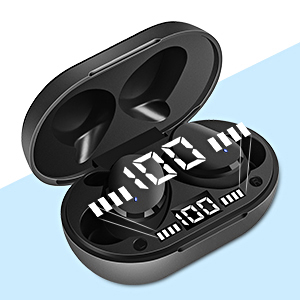
Image: The charging case with earbuds, illustrating the individual LED power display for battery status.
4.2 Paru gyda Dyfais
The DuoTen V98 earbuds feature one-step pairing for convenience.
- Sicrhewch fod y clustffonau wedi'u gwefru.
- Agorwch y cas gwefru. Bydd y clustffonau'n mynd i mewn i'r modd paru yn awtomatig.
- Ar eich ffôn symudol, tabled, neu liniadur, ewch i'r gosodiadau Bluetooth.
- Chwiliwch am dyfeisiau sydd ar gael a dewis "V98" o'r rhestr.
- Once selected, the earbuds will connect automatically. A voice prompt may confirm the connection.

Image: A smartphone screen showing the Bluetooth pairing process, with the DuoTen V98 earbuds ready to connect.
5. Cyfarwyddiadau Gweithredu
5.1 Gwisgo'r Clustffonau
The earbuds are designed for an ergonomic and secure fit. Choose the ear cushions that best fit your ear canal for optimal comfort and sound isolation. Insert the earbuds gently into your ears and rotate slightly until they feel stable.

Image: A person wearing the earbud, demonstrating the comfortable and secure fit during physical activity.
5.2 Rheolaethau Cyffwrdd
The DuoTen V98 earbuds feature touch-sensitive controls on each earbud for easy management of audio playback and calls.
| Gweithred | Swyddogaeth |
|---|---|
| Tap Sengl | Chwarae / Saib cerddoriaeth, Ateb / Diwedd galwad |
| Tap Dwbl (Clust Chwith) | Cyfrol Lawr |
| Tap dwbl (Clust i'r Dde) | Cyfrol i Fyny |
| Tap Triphlyg (Clust Chwith) | Caniad Blaenorol |
| Tap Triphlyg (Clust i'r Dde) | Can nesaf |
| Long Press (2 eiliad) | Reject Call, Activate Voice Assistant (Siri, Google Assistant) |
| Long Press (5 eiliad) | Pŵer Ymlaen / Diffodd |

Image: Visual representation of the advanced touch controls for managing audio and calls.
6. cynnal
6.1 Diddosi (IPX7)
The DuoTen V98 earbuds are rated IPX7 waterproof, meaning they can withstand immersion in water up to 1 meter for 30 minutes. This makes them suitable for use during workouts, in light rain, or when exposed to splashes. However, they are not designed for swimming or prolonged submersion. Ensure the earbuds are dry before placing them back in the charging case to prevent damage.

Image: Illustration of the IPX7 waterproof feature, highlighting its suitability for sports and active lifestyles.
6.2 Glanhau
Regularly clean your earbuds and charging case to maintain hygiene and performance. Use a soft, dry, lint-free cloth to wipe the surfaces. For earwax or debris in the ear tips, gently remove with a small, soft brush or cotton swab. Do not use abrasive materials or harsh chemicals.
7. Datrys Problemau
If you encounter issues with your DuoTen V98 earbuds, refer to the following common solutions:
- Clustffonau ddim yn paru: Ensure both earbuds are charged. Place them back in the charging case, close the lid, then open it again to re-initiate pairing mode. Delete previous Bluetooth connections on your device and try pairing again.
- Dim ond un clustffon sy'n gweithio: Try resetting the earbuds. Place both earbuds in the charging case, then take them out simultaneously. If the issue persists, try re-pairing them with your device.
- Dim sain: Gwiriwch lefel y sain ar eich dyfais a'r clustffonau. Gwnewch yn siŵr bod y clustffonau wedi'u cysylltu'n iawn â'ch dyfais trwy Bluetooth.
- Materion codi tâl: Gwiriwch fod y cebl gwefru wedi'i gysylltu'n ddiogel â'r cas a'r ffynhonnell bŵer. Gwnewch yn siŵr bod y cysylltiadau gwefru ar y clustffonau a thu mewn i'r cas yn lân ac yn rhydd o falurion.
- Ansawdd sain gwael: Ensure the earbuds are properly seated in your ears for a good seal. Try different sized ear cushions. Move closer to your connected device to avoid interference.
8. manylebau
| Nodwedd | Manylyn |
|---|---|
| Rhif Model | v98 |
| Fersiwn Bluetooth | 5.0 |
| Technoleg Cyfathrebu Di-wifr | Bluetooth |
| Lefel Gwrthsefyll Dŵr | IPX7 (Dŵr) |
| Math o Reoli | Rheoli Cyffwrdd |
| Lleoliad Clust | Mewn Clust |
| Ffactor Ffurf | Mewn Clust |
| Rheoli Sŵn | Canslo Sŵn Gweithredol |
| Bywyd Batri | 7 Awr (clustffonau) |
| Amser Codi Tâl | 1 Awr |
| Amrediad Bluetooth | 10 o Fesurau |
| Pwysau'r Eitem (clustffon sengl) | 4 gram (0.141 owns) |
| Dimensiynau Cynnyrch | 2.36 x 1.46 x 1.1 modfedd (cas gwefru) |
| Deunydd | Plastig |
| Dyfeisiau Cydnaws | Ffonau Symudol, Tabledi, Gliniaduron |
| UPC | 715377550941 |
9. Gwarant a Chefnogaeth
For warranty information or technical support, please refer to the contact details provided with your purchase documentation or visit the official DuoTen websafle. Cadwch eich prawf prynu ar gyfer hawliadau gwarant.
