
1. Cynnyrch Drosview
The MTM Walkie Talkies XF-638 are designed for reliable two-way communication, featuring 22 channels, hands-free VOX operation, and a clear LCD display. These radios are suitable for various outdoor activities, family events, and general communication needs.

Image: MTM Walkie Talkies XF-638 4-pack in orange color, ready for use.
Adnabod Cydran
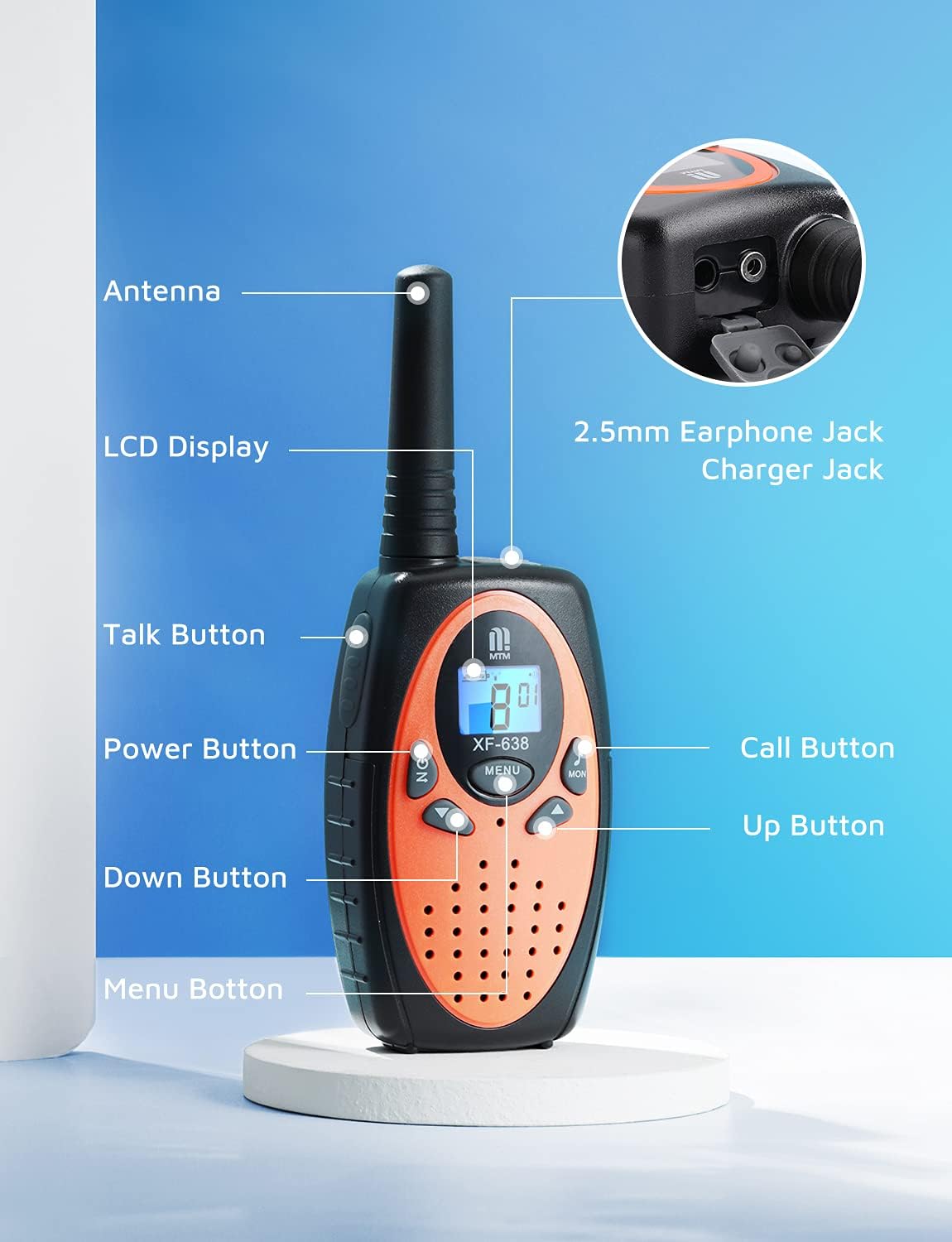
Image: Diagram illustrating the various parts and buttons of the MTM Walkie Talkie XF-638.
- Antena: Ar gyfer trosglwyddo a derbyn signalau.
- Arddangosfa LCD: Shows channel, volume, battery status, and other indicators.
- Botwm Siarad (PTT): Pwyswch a daliwch i drosglwyddo eich llais.
- Botwm Pŵer (YMLAEN/DIFFOD): Long press to turn the unit on or off.
- Botymau Up / Down: Adjust volume, change channels, and navigate menu options.
- Botwm Dewislen: Access and confirm settings.
- Botwm Galwad: Sends a call tone to other radios on the same channel.
- Botwm Dydd Llun: Activates the monitor function to listen for weak signals.
- 2.5mm Earphone Jack/Charger Jack: For connecting an external earphone/microphone or charging (if using rechargeable batteries, not included).
2. Gosod
Gosod Batri
Each MTM Walkie Talkie requires 3 AAA batteries (not included). Ensure correct polarity when inserting batteries.
- Lleolwch glawr adran y batri ar gefn y radio cludadwy.
- Llithrwch neu ddadglipiwch y clawr yn ysgafn i agor yr adran.
- Mewnosodwch 3 batri AAA, gan baru'r terfynellau positif (+) a negatif (-) fel y nodir y tu mewn i'r adran.
- Rhowch glawr adran y batri yn ôl, gan sicrhau ei fod yn clicio'n ddiogel i'w le.

Delwedd: Cefn view of the walkie talkie with the battery compartment open, showing where to insert 3 AAA batteries.
Atodiad Clip Gwregys
Attach the included belt clip for convenient carrying.
- Aliniwch y clip gwregys â'r slotiau dynodedig ar gefn y radio cludadwy.
- Slide the clip downwards until it locks securely into place.

Image: A hiker wearing an MTM Walkie Talkie XF-638 attached to their backpack strap with a belt clip.
3. Gweithrediad Sylfaenol
Pŵer Ymlaen / Diffodd
- I droi ymlaen: Pwyswch a daliwch y YMLAEN / I FFWRDD botwm nes bod y sgrin LCD yn goleuo.
- I ddiffodd: Pwyswch a daliwch y YMLAEN / I FFWRDD botwm nes bod y sgrin LCD yn diffodd.
Dewis Sianel
The MTM Walkie Talkies feature 22 channels. All radios must be on the same channel to communicate.
- Gwasgwch y BWYDLEN button once. The channel number on the LCD will flash.
- Defnyddiwch y UP or I LAWR botymau i ddewis eich sianel ddymunol (1-22).
- Gwasgwch y BWYDLEN botwm eto i gadarnhau eich dewis.

Image: Close-up of the walkie talkie's LCD screen showing the current channel and battery level.
Addasiad Cyfrol
Adjust the listening volume to a comfortable level.
- Gwasgwch y UP botwm i gynyddu'r cyfaint.
- Gwasgwch y I LAWR botwm i ostwng y cyfaint.

Image: Close-up of the walkie talkie's speaker area, indicating adjustable volume levels.
Trosglwyddo a Derbyn
- I drosglwyddo: Pwyswch a daliwch y Talk (PTT) button. Speak clearly into the microphone.
- To receive: Release the Talk (PTT) botwm.
Ffoniwch Tôn
- To send a call tone: Briefly press the Galwch button. This alerts other users on the same channel.
Swyddogaeth Monitro
- I actifadu: Pwyswch y MON button. This allows you to listen for weak signals on the current channel.
- I ddadactifadu: Pwyswch y MON botwm eto.
4. Nodweddion Uwch
VOX (Cyfnewidfa a Weithredir gan Llais)
VOX allows for hands-free communication. When activated, the radio automatically transmits when you speak and stops when you are silent.
- Gwasgwch y BWYDLEN button multiple times until the VOX icon appears on the LCD.
- Defnyddiwch y UP or I LAWR buttons to select a VOX sensitivity level (e.g., 1-3, with 3 being most sensitive) or turn VOX off.
- Gwasgwch y BWYDLEN botwm i gadarnhau.

Image: A mother and child communicating using walkie talkies, demonstrating long-range and potentially hands-free use.
Clo Keypad
The keypad lock prevents accidental changes to your settings.
- I gloi: Pwyswch a daliwch y BWYDLEN button until a key icon appears on the LCD.
- I ddatgloi: Pwyswch a daliwch y BWYDLEN button again until the key icon disappears.
Swyddogaethau Eraill
- Auto Squelch System: Automatically mutes weak signals or background noise for clearer communication.
- Swyddogaeth Cof Awtomatig: Remembers your last used channel and settings.
- Auto Scan Function: Scans all channels for active transmissions.
- Arbed Pwer Auto: Extends battery life by entering a low-power mode during periods of inactivity.
- Rhybudd Batri Isel: An icon on the LCD display indicates when batteries are low and need replacement.
- Headset Option: Compatible with headsets via the 2.5mm earphone jack for private listening and hands-free talking.

Delwedd: Top view of the walkie talkie showing the 2.5mm earphone jack and charger port.
5. Range and Usage
The MTM Walkie Talkies XF-638 offer a communication range of up to 3 miles in open fields. The actual range can vary significantly based on terrain, weather conditions, and obstructions.

Image: Graphic illustrating the long-range capability of the MTM Walkie Talkies.
Factors Affecting Range:
- Tirwedd: Open areas provide maximum range. Hills, dense foliage, and urban environments with buildings can significantly reduce range.
- Rhwystrau: Metal structures, vehicles, and large buildings can block or weaken signals.
- Tywydd: Heavy rain or fog can interfere with signal transmission.
Recommended Usage Scenarios:
- Outdoor adventures like camping, heicio, a physgota.
- Family events and activities where staying connected is important.
- Emergency preparedness.

Children playing outdoors with walkie talkies.

Adults using walkie talkies while kayaking.

Restaurant staff using walkie talkies for coordination.
6. cynnal
- Glanhau: Sychwch y radio gyda meddal, damp brethyn. Peidiwch â defnyddio cemegau llym na glanhawyr sgraffiniol.
- Gofal Batri: Tynnwch y batris os na fydd y radio yn cael ei ddefnyddio am gyfnod hir er mwyn atal gollyngiadau.
- Storio: Storiwch y radio cludadwy mewn lle oer, sych i ffwrdd o olau haul uniongyrchol a thymheredd eithafol.
7. Datrys Problemau
| Problem | Achos Posibl | Ateb |
|---|---|---|
| Dim pŵer | Mae batris wedi marw neu wedi'u gosod yn anghywir. | Amnewidiwch y batris neu gwnewch yn siŵr bod y polaredd yn gywir. |
| Poor reception/short range | Obstructions (buildings, hills), low battery, incorrect channel/privacy code. | Move to an open area, replace batteries, verify channel and privacy code settings. |
| Methu trosglwyddo | Keypad locked, low battery, not on the same channel. | Unlock keypad, replace batteries, ensure both radios are on the same channel. |
| Ymyrraeth | Other radios on the same channel or nearby electronic devices. | Change to a different channel or use privacy codes. Move away from interfering devices. |
8. manylebau
| Nodwedd | Manylyn |
|---|---|
| Brand | MTM |
| Rhif Model | XF-638 |
| Nifer y Sianeli | 22 |
| Amrediad Amrediad | 462 i 467 MHz |
| Ystod Siarad Uchafswm | Up to 3 miles (in open fields) |
| Nodweddion Arbennig | Keypad Lock, Long Range, VOX, Auto Squelch, LCD Display |
| Ffynhonnell Pwer | 3 x batris AAA (heb eu cynnwys) |
| Lefel Gwrthsefyll Dŵr | Waterproof (as per specifications, but general care is advised) |
| ID Cyngor Sir y Fflint | 2AN6WXF-638 |
9. Gwarant a Chefnogaeth
MTM provides comprehensive support for your walkie talkies.
- Gwarant: Enjoy a 1-year quality warranty from the date of purchase.
- Cymorth Technegol: Lifetime email support is available for any questions or issues you may encounter.
- Cyswllt: If you are not satisfied with your MTM product or require assistance, please contact us. We aim to respond to customer inquiries within 24 hours.
For support, please refer to your order details to find contact information or visit the official MTM store page.