
1. Rhagymadrodd
Mae'r llawlyfr hwn yn rhoi cyfarwyddiadau manwl ar gyfer y Ampinvt 6000W/18000W Pure Sine Wave Power Inverter Charger. This device converts 48V DC battery power to 120V/240V AC output, suitable for various off-grid solar applications. It features advanced protection mechanisms and multiple operating modes to ensure reliable power supply.
2. Gwybodaeth Diogelwch
WARNING: Please read all safety instructions carefully before installation and operation. Failure to follow these instructions may result in electric shock, fire, or serious injury.
- Sicrhau sylfaen gywir y gwrthdröydd.
- Do not expose the inverter to rain, snow, spray, or excessive dust.
- Avoid disassembling the unit. Refer servicing to qualified personnel.
- Sicrhewch awyru digonol o amgylch y gwrthdröydd i atal gorboethi.
- Use appropriate wiring and circuit breakers for all connections.
- Cadwch ddeunyddiau fflamadwy i ffwrdd o'r gwrthdröydd.
3. Cynnyrch Drosview
Mae'r Ampinvt Pure Sine Wave Inverter features a robust design with an intuitive LCD display and various connection ports. Below are key components and their descriptions.

Ffigur 3.1: Blaen view o'r Ampinvt 6000W Pure Sine Wave Inverter Charger, showing the LCD display and control buttons.

Figure 3.2: Detailed front panel showing indicator lights (AC, BAT, INV, FAULT) and working mode settings (AC Input Priority, Battery Priority, ECO Mode, Generator Mode, Unattended Mode).

Ffigur 3.3: Cefn view of the inverter, highlighting the AC fuse, AC input/output terminal block, and AC output sockets.
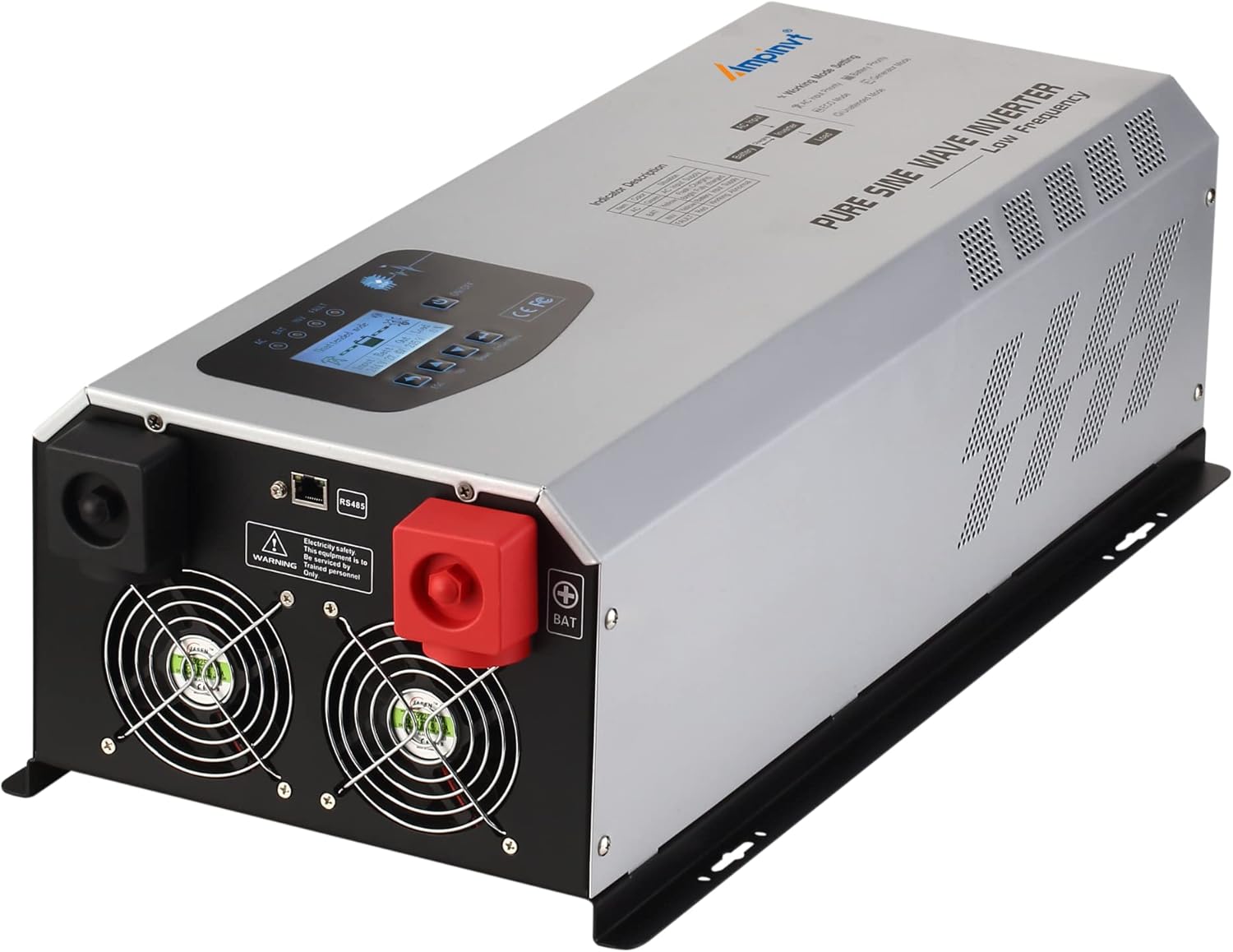
Ffigur 3.4: Ochr view of the inverter, showing the positive and negative battery terminals and cooling fans.
4. Gosod a Gosod
Mae gosod priodol yn hanfodol ar gyfer gweithrediad diogel ac effeithlon eich Ampinvt inverter. Follow these steps carefully.
4.1 Lleoliad Corfforol
- Install the inverter in a dry, well-ventilated area, away from direct sunlight and heat sources.
- Ensure sufficient clearance around the unit for proper airflow, especially around the cooling vents.
- Mount the inverter securely on a stable surface.

Figure 4.1: Product dimensions for installation planning. The inverter measures 650mm (length) x 300mm (width) x 185mm (height) and weighs 30.4kg.
4.2 Gwifro Cysylltiadau
All wiring should be performed by a qualified electrician. Ensure all power sources are disconnected before making any connections.
- Cysylltiad Batri: Connect the DC battery cables to the inverter's battery terminals. Ensure correct polarity (red to positive, black to negative).
- Cysylltiad mewnbwn AC: Connect the AC input power source (e.g., grid or generator) to the AC INPUT terminal block.
- Cysylltiad Allbwn AC: Connect your AC loads to the AC OUTPUT terminal block or directly to the AC output sockets.
- Sylfaen: Connect the inverter to an appropriate earth ground.

Figure 4.2: Detailed wiring diagram illustrating connections for AC input (L, N, G), AC output (HOT1, N, HOT2, GND for 120V/240V split phase), and battery terminals.
4.3 Remote Panel Connection (Optional)
The inverter supports an optional remote panel for convenient monitoring and control.

Figure 4.3: The intelligent remote panel connection port (RS485) on the inverter and an example of the remote screen (purchased separately).
4.4 Canllaw Fideo Gosod
Video 4.1: This video demonstrates the physical overview, battery connection, mains input/output wiring, and basic operation mode settings of the Ampinvt off-grid low frequency inverter with AC charger.
5. Cyfarwyddiadau Gweithredu
The inverter features an LCD display for monitoring and configuration, along with several working modes to suit different power requirements.
5.1 Arddangosfa a Rheolaethau LCD
The LCD provides real-time data and allows adjustment of settings. Use the ESC, Up, Down, and Enter/Menu buttons to navigate and configure the inverter.
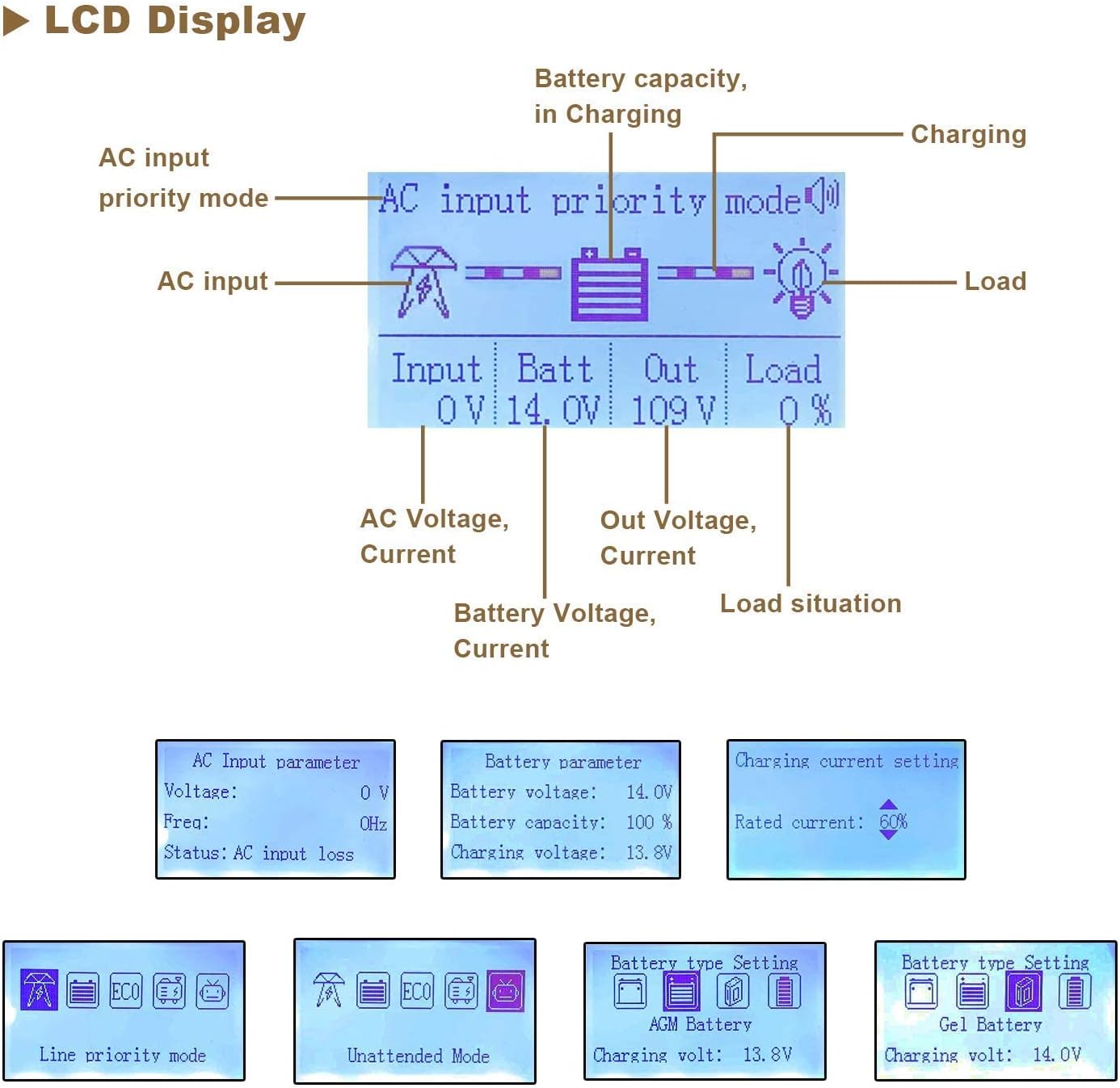
Figure 5.1: The LCD display interface, showing AC input priority mode, battery voltage, allbwn cyftage, load status, and options for setting battery type and charging current.

Figure 5.2: Status indicator lights (AC, Battery, Inverter, Fault) and a description of the LCD display button functions (Return, Up, Down, Confirm, Turn On/Off).
5.2 Modd Gweithio
The inverter offers five distinct working modes, configurable via the LCD display:
- AC Input Priority Mode: Prioritizes utility power (110V AC). If utility power fails, the inverter switches to battery power. When utility power returns, it switches back.
- Modd Blaenoriaeth Batri: Prioritizes battery power. If battery voltage drops below a set threshold, it switches to utility power. Once the battery is sufficiently charged, it reverts to battery power.
- Modd ECO: For energy saving. If the load is less than 10%, the inverter enters sleep mode and stops output. It automatically restarts normal inversion when the load exceeds 10%.
- Generator Mode: Designed for use with unstable AC voltage sources, such as generators. The inverter's AVR regulator stabilizes the output voltage.
- Unattended Mode: Pan fydd batri cyftage is low, the inverter enters a standby (power-saving) state. It automatically restores normal output when the battery voltage recovers (e.g., from solar charging), enabling fully automatic operation without supervision.
5.3 Gosodiad Addasadwy
- AC Codi Tâl Voltage & Cyfredol: Cyf gymwysadwy codi tâltage (13.4-14.9VDC for 12V systems) and current (0-35A) for various battery types.
- Isel Voltage Protection & Recovery: Customizable voltage thresholds for low voltage protection and recovery to prevent battery over-discharge.
- Battery Type Setting: Compatible with Sealed, Gel, AGM, Flooded, and Lithium batteries. Ensure the correct battery type is selected for optimal charging and discharge cycles.
6. cynnal
Mae cynnal a chadw rheolaidd yn sicrhau hirhoedledd a pherfformiad gorau posibl eich gwrthdröydd.
- Glanhau: Periodically clean the exterior of the inverter and ensure cooling vents are free from dust and debris. Use a dry cloth.
- Cysylltiadau: Regularly check all electrical connections (battery, AC input, AC output) for tightness and corrosion. Tighten any loose connections.
- Iechyd Batri: Monitro batri cyftage and health according to battery manufacturer guidelines. Ensure proper charging cycles.
- Amgylchedd: Maintain the operating environment within specified temperature and humidity ranges.
7. Datrys Problemau
This section provides solutions to common issues. For complex problems, contact qualified service personnel.
| Problem | Achos Posibl | Ateb |
|---|---|---|
| Dim Allbwn AC | Cyfrol batri iseltage, overload, short circuit, high temperature. | Check battery charge, reduce load, check for short circuits, allow inverter to cool. |
| Gwrthdröydd ddim yn troi ymlaen | Loose battery connections, blown fuse, battery completely discharged. | Check battery connections, replace fuse, charge battery. |
| AC Input not charging battery | Mewnbwn AC cyftage out of range, AC input priority mode not selected, charger fault. | Gwirio cyfaint mewnbwn ACtage, select AC Input Priority mode, contact support if charger fault persists. |
8. manylebau
| Nodwedd | Manylyn |
|---|---|
| Enw Model | Ampinvt 6000W |
| Grym Parhaus | 6000 Wat |
| Pŵer Brig | 18000 Wat |
| Mewnbwn Batri Cyftage | 48VDC |
| Mewnbwn AC Cyftage Ystod | 85V-135V |
| Allbwn AC Cyftage | 120VAC/240VAC ±3% (battery mode) |
| Ffurflen Ton Allbwn | Ton Sine Pur |
| Effeithlonrwydd Trosi | ≥90% |
| Codi Tâl Cyfredol AC | 0-35A (addasadwy) |
| Nodweddion Gwarchod | Gor-gyfroltage, overload, low-voltage, high-temperature, short-circuit |
| Dimensiynau (L x W x H) | 23.8 x 6.7 x 10.2 modfedd (650 x 300 x 185 mm) |
| Pwysau | 66 pwys (30.4 kg) |
| Tymheredd Gweithredu | -25°C i +75°C |
9. Gwarant a Chefnogaeth
For warranty information, technical support, or service inquiries, please refer to the contact details provided with your product packaging or visit the official AMPINVT websafle. Cadwch eich derbynneb prynu ar gyfer hawliadau gwarant.