
1. Rhagymadrodd
This manual provides comprehensive instructions for the installation, operation, maintenance, and troubleshooting of the IBASE Technology MI953F ITX Motherboard. Designed for industrial and embedded applications, the MI953F supports Intel Core i7/i5 processors with a Socket G interface and features the Intel QM57 PCH. It offers robust connectivity including multiple GbE LAN ports, SATA, COM, and various expansion slots.
2. Gwybodaeth Diogelwch
Please read and follow all safety instructions carefully to prevent damage to the motherboard or injury to yourself. Always disconnect power before handling components. Wear an anti-static wrist strap when installing or removing components to prevent electrostatic discharge (ESD) damage. Do not expose the motherboard to moisture or extreme temperatures. Ensure proper ventilation when the system is in operation.
3. Cynnwys Pecyn
Verify that all items are present in the package. If any item is missing or damaged, contact your vendor immediately.
- IBASE MI953F ITX Motherboard
- Ceblau Data SATA (gall y nifer amrywio)
- Shield I / O
- Driver CD/USB (may not be included with all packages, drivers available online)
- Quick Installation Guide (this document serves as a detailed manual)
4. Cynnyrch Drosview
The IBASE MI953F is a compact Mini-ITX motherboard designed for high-performance embedded applications. It supports Intel Core i7/i5 processors with a Socket G form factor and utilizes the Intel QM57 Platform Controller Hub (PCH). Key features include dual Gigabit Ethernet LAN ports (Intel 82577LM and 82574L), VGA output, four SATA ports, four COM ports, and various expansion options such as PCI, PCI-E(1x), and Mini PCI-E slots.
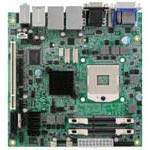
Ffigur 4.1: O'r brig i lawr view of the IBASE MI953F ITX Motherboard, showing various components and connectors.
4.1. Key Components and Connectors
- CPU Socket G: For Intel Core i7/i5 processors.
- Intel QM57 PCH: Provides chipset functionalities.
- DIMM Slots: Two slots for DDR3 SO-DIMM memory modules.
- Porthladdoedd SATA: Four ports for connecting storage devices.
- Porthladdoedd LAN: Two Gigabit Ethernet ports (82577LM and 82574L).
- Porthladd VGA: Ar gyfer allbwn fideo.
- Porthladdoedd COM: Four serial communication ports.
- Slotiau Ehangu: One PCI, one PCI-E(1x), and one Mini PCI-E slot.
- Porthladdoedd USB: Multiple USB 2.0 ports (internal headers and external).
5. Gosod a Gosod
5.1. Gosod y CPU
- Agorwch lifer soced y CPU yn ofalus.
- Align the CPU with the socket, ensuring the notches match. Do not force the CPU into the socket.
- Rhowch y CPU yn ysgafn yn y soced.
- Caewch lifer y soced i sicrhau'r CPU.
- Apply thermal paste to the CPU and install the CPU cooler according to its instructions.
5.2. Gosod Cof (RAM)
- Locate the two DDR3 SO-DIMM slots.
- Agorwch y clipiau ar ddau ben y slot DIMM.
- Aliniwch y rhic ar y modiwl cof gyda'r rhic yn y slot DIMM.
- Mewnosodwch y modiwl yn gadarn yn y slot nes bod y clipiau'n clicio i'w lle.
5.3. Gosod Dyfais Storio
Connect SATA storage devices (HDDs/SSDs) to the SATA ports on the motherboard using SATA data cables. Ensure the power cable from your power supply is also connected to the storage device.
5.4. Cysylltiadau Ymylol
- Pwer: Connect the ATX power connector from your power supply to the motherboard.
- Arddangos: Connect your monitor to the VGA port.
- Rhwydwaith: Connect Ethernet cables to the GbE LAN ports.
- USB: Connect USB devices to the external USB ports or internal headers.
- Cardiau Ehangu: Install PCI, PCI-E, or Mini PCI-E cards into their respective slots if required.
6. Cyfarwyddiadau Gweithredu
6.1. Troi ymlaen yn gychwynnol
After all components are installed and connected, connect the power cord to your power supply and press the power button on your system chassis. The system should initiate the boot process.
6.2. Gosod BIOS/UEFI
I fynd i mewn i'r cyfleustodau gosod BIOS/UEFI, pwyswch y DEL or F2 key repeatedly during the initial boot sequence. The BIOS allows you to configure system settings, boot order, and monitor hardware status. Refer to the IBASE website for detailed BIOS documentation specific to your firmware version.
6.3. Gosod Gyrwyr
After installing your operating system, install the necessary drivers for the motherboard components. These typically include chipset drivers, graphics drivers, LAN drivers, and audio drivers. Drivers can usually be found on the IBASE official website under the MI953F product page.
7. cynnal
7.1. Glanhau
Regularly clean dust from the motherboard and system components using compressed air. Ensure the system is powered off and unplugged before cleaning. Avoid using liquid cleaners directly on components.
7.2. Diweddariadau Firmware
Periodically check the IBASE website for BIOS/UEFI firmware updates. Firmware updates can improve system stability, performance, and compatibility. Follow the update instructions provided by IBASE carefully to avoid damaging the motherboard.
8. Datrys Problemau
| Problem | Achos Posibl | Ateb |
|---|---|---|
| Nid yw'r system yn pweru ymlaen | Cysylltiadau pŵer rhydd, cyflenwad pŵer diffygiol, gwifrau panel blaen anghywir. | Check all power cables. Verify front panel power switch connection. Test with a known good power supply. |
| Dim allbwn arddangos | Monitor not connected, faulty RAM, incorrect display output selected, CPU not seated correctly. | Ensure monitor is connected and powered on. Reseat RAM modules. Check display cable. Reseat CPU. |
| Operating system fails to boot | Incorrect boot order, corrupted OS, faulty storage device. | Check BIOS boot order. Reinstall OS. Test storage device. |
| Problemau cysylltedd rhwydwaith | Loose Ethernet cable, missing LAN drivers, incorrect network settings. | Verify Ethernet cable connection. Install/update LAN drivers. Check OS network settings. |
9. manylebau
- Brand: IBASED
- Model: MI953F
- Math o Chipset: Intel QM57 PCH
- CPU Model Support: Intel Core i7, Core i5 (Socket G)
- Slotiau Cof Ar Gael: 2 (DDR3 SO-DIMM)
- Rhyngwyneb cerdyn graffeg: PCI Express (1x)
- System Bus Standard Supported: SATA 3
- Math o Gysylltydd S/PDIF: Optegol
- LAN: 2x Gigabit Ethernet (Intel 82577LM, 82574L)
- Allbwn Fideo: VGA
- Porthladdoedd SATA: 4
- Porthladdoedd COM: 4
- Slotiau Ehangu: 1x PCI, 1x PCI-E(1x), 1x Mini PCI-E
- Gwneuthurwr: IBASE Technology
- UPC: 091128536106
- ASIN: B08DYCBWB1
10. Gwarant a Chefnogaeth
The IBASE MI953F Motherboard is covered by a manufacturer's warranty. For specific warranty terms and conditions, please refer to the warranty card included with your product or visit the official IBASE Technology website. For technical support, driver downloads, and further assistance, please visit the IBASE Technology support portal or contact their customer service department.
IBASE Technology Official Websafle: www.ibase.com.tw