
AIOMEST AI-570N
AIOMEST Digital AC DC Inrush Current Clamp Multimeter AI-570N User Manual
Model: AI-570N | Brand: AIOMEST
1. Rhagymadrodd
This manual provides detailed instructions for the safe and effective operation of your AIOMEST Digital AC DC Inrush Current Clamp Multimeter (Model AI-570N). Please read this manual thoroughly before use and retain it for future reference. This device is designed for measuring AC/DC voltage, AC/DC current, resistance, capacitance, temperature, frequency, and duty cycle, and includes features like True RMS, auto-ranging, data hold, and inrush current measurement.
1.1 Gwybodaeth Ddiogelwch
Always adhere to safety precautions to prevent electric shock or personal injury. Ensure the device is in good working condition before use. Do not exceed the maximum input values for any function. Disconnect test leads from the circuit before changing functions. Use appropriate personal protective equipment.
2. Gosod
2.1 Gosod Batri
The AI-570N requires 2 AAA 1.5V batteries (or a 9V battery for some models, refer to your specific unit's compartment). To install or replace batteries:
- Lleolwch glawr adran y batri ar gefn y ddyfais.
- Defnyddiwch sgriwdreifer i agor y compartment batri.
- Mewnosodwch y batris, gan arsylwi'r polaredd cywir (+ a -).
- Amnewid y clawr a'i ddiogelu gyda'r sgriw.

Image: AIOMEST AI-570N Clamp Multimeter with included accessories like test leads and battery.
2.2 Cysylltu Gwifrau Prawf
For most measurements (except clamp current and NCV), connect the test leads:
- Insert the red test lead into the "VΩHz" or "INPUT" jack.
- Insert the black test lead into the "COM" jack.
3. Cyfarwyddiadau Gweithredu
3.1 Swyddogaeth Drosview

Delwedd: Drosoddview of the AIOMEST AI-570N's powerful functions and display icons.
3.2 Mesur AC/DC Cyftage
- Turn the rotary switch to the "V~" (AC Voltage) neu "V-" (Cyfrol DCtage) sefyllfa.
- Connect the test leads to the circuit in parallel.
- Darllenwch y cyftage gwerth ar yr arddangosfa LCD.
Video: Demonstrating general multimeter functions, including voltage mesur.
Disgrifiad: Mae'r fideo hwn yn rhoi trosolwg cyffredinolview of a handheld multimeter, demonstrating various functions including voltage measurement, which is applicable to the AIOMEST AI-570N.
3.3 Mesur Cerrynt AC/DC (Clamp)
To measure current without breaking the circuit:
- Turn the rotary switch to the "1000A~" (AC Current) or "1000A-" (DC Current) position.
- Agorwch y clamp genau a clamp around a single conductor. Ensure the conductor is centered within the jaws.
- Darllenwch y gwerth cyfredol ar yr arddangosfa LCD.
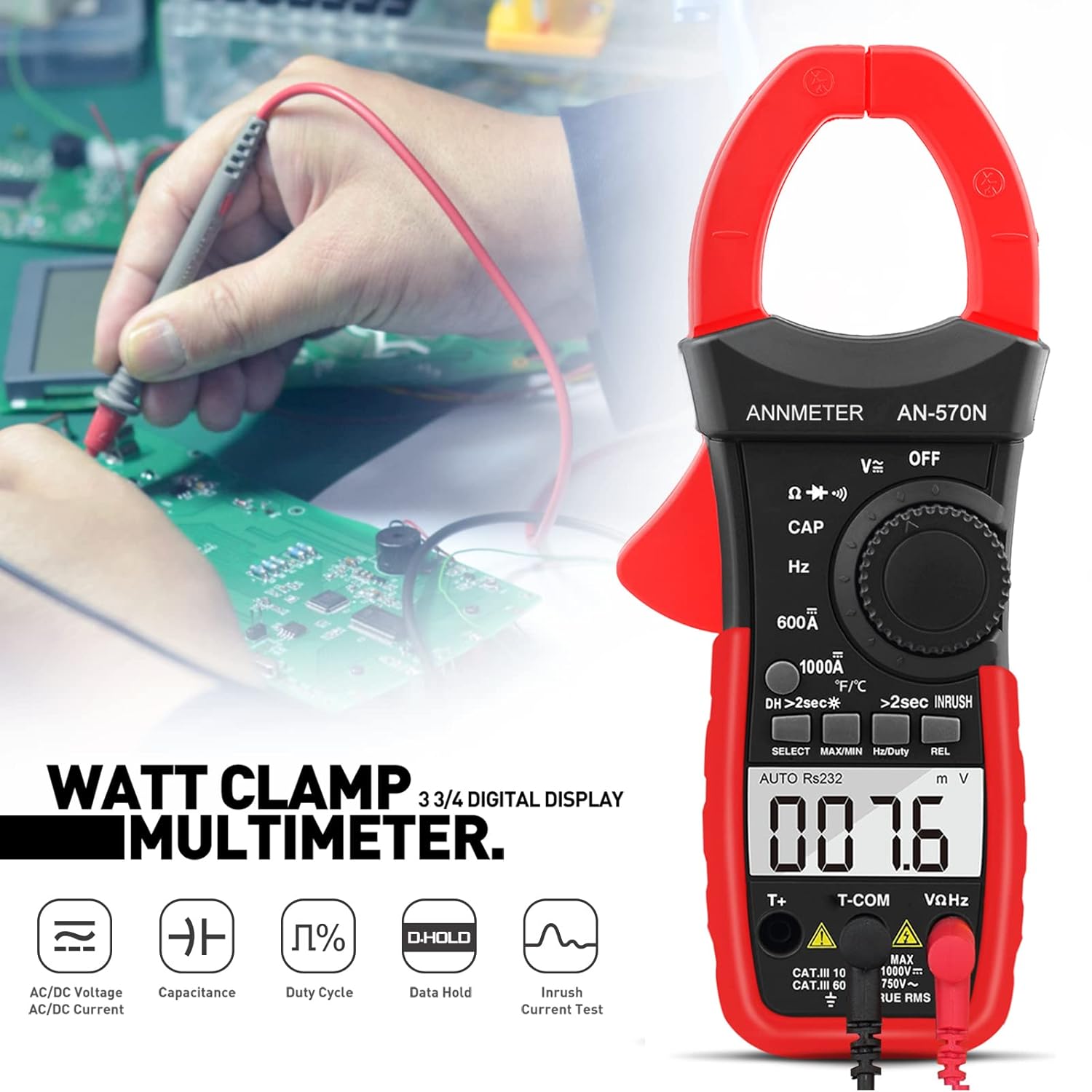
Image: AIOMEST AI-570N Clamp Multimeter in use, measuring current on a circuit.
Video: Demonstrating how to measure DC current using a clamp metr.
Description: This video illustrates the process of measuring DC current with a clamp meter, showing the correct technique for clamping around a single wire.
3.4 Mesur Gwrthsafiad
- Turn the rotary switch to the "Ω" (Resistance) position.
- Cysylltwch y gwifrau prawf ar draws y gydran i'w mesur.
- Darllenwch y gwerth gwrthiant ar yr arddangosfa LCD.
3.5 Mesur Cynhwysedd
- Turn the rotary switch to the "CAP" (Capacitance) position.
- Cysylltwch y gwifrau prawf ar draws y cynhwysydd.
- Darllenwch y gwerth cynhwysedd ar yr arddangosfa LCD.
3.6 Measuring Temperature
- Turn the rotary switch to the "°F/°C" (Temperature) position.
- Connect the temperature probe to the input jacks.
- Place the probe tip on or in the object whose temperature is to be measured.
- Darllenwch y tymheredd ar yr arddangosfa LCD.
3.7 Measuring Frequency and Duty Cycle
- Turn the rotary switch to the "Hz" (Frequency/Duty Cycle) position.
- Cysylltwch y gwifrau prawf â'r gylched.
- Press the "Hz/Duty" button to toggle between frequency and duty cycle measurements.
- Darllenwch y gwerth ar yr arddangosfa LCD.
3.8 Prawf Deuod a Pharhad
- Turn the rotary switch to the "Ω" (Resistance) position and press "SELECT" to cycle to Diode or Continuity mode.
- For Diode Test: Connect the red lead to the anode and the black lead to the cathode of the diode. The forward voltage drop will be displayed. Reverse the leads; "OL" (Overload) indicates a good diode.
- For Continuity Test: Connect the test leads across the circuit. A continuous beep indicates continuity.
3.9 Inrush Current Measurement
Inrush current helps diagnose startup problems in motors or circuits.
- Turn the rotary switch to an AC current range (e.g., "1000A~").
- Press and hold the "REL" key for more than 2 seconds. The instrument enters inrush current measurement mode.
- Clamp the jaws around the conductor of the appliance.
- Turn on the appliance. The meter will capture and display the inrush current.
Video: Demonstrating inrush current measurement using a clamp metr.
Description: This video illustrates how to use a clamp meter to measure inrush current, a critical function for diagnosing electrical equipment startup.
3.10 Cyfrol Di-gyswllttage (NCV) Canfod
The NCV function allows for voltage detection without physical contact.
- Trowch y switsh cylchdro i'r safle "NCV".
- Move the top of the meter close to the conductor.
- Os yw AC cyftage is detected, the NCV indicator will light up and an audible alarm will sound.
4. cynnal
4.1 Gofal Cyffredinol
- Keep the device dry. If it gets wet, wipe it dry immediately.
- Use and store the device in normal temperature environments. Extreme temperatures can shorten the life of electronic devices.
- Handle the device gently and carefully. Dropping it can damage circuit boards and cases.
- Cadwch y ddyfais i ffwrdd o lwch a baw.
- Sychwch y ddyfais gydag hysbysebamp lliain yn achlysurol i'w gadw'n edrych yn newydd. Peidiwch â defnyddio cemegolion llym, toddyddion glanhau, na glanedyddion cryf.
4.2 Batri Newydd
Replace batteries when the low battery indicator appears on the display to ensure accurate measurements.
5. Datrys Problemau
- Dim arddangosfa na darlleniadau afreolaidd: Check battery levels and replace if necessary. Ensure test leads are properly connected.
- "OL" displayed: This indicates an overload or out-of-range measurement. Select a higher range or ensure the measurement is within the device's capabilities.
- Darlleniadau anghywir: Ensure proper connection of test leads and correct function selection. Calibrate if possible (refer to advanced user manual if available).
- Dim bîp parhad: Check if continuity mode is selected. Ensure test leads are making good contact.
6. manylebau
| Paramedr | Gwerth |
|---|---|
| DC Cyftage | 0.1mV ~ 1000V |
| AC Cyftage | 0.1mV ~ 750V |
| DC/AC Cyfredol | 0.1A ~ 1000A |
| Gwrthsafiad | 0.1Ω ~ 60MΩ |
| Cynhwysedd | 1pF ~ 99.99mF |
| Tymheredd | -4 ~ 1832 °F (-20 ~ 1000 °C) |
| Amlder | 0.001Hz ~ 9.999MHz |
| Cylch Dyletswydd | 1% ~ 99% |
| Cyfrif Arddangos | 6000 o Gyfrifon |
| Gwir RMS | Oes |
| Ystod Auto | Oes |
| Agoriad Jaw | Hyd at 42mm (1.65 modfedd) |
| Ffynhonnell Pwer | Wedi'i Bweru â Batri |
| Rhif Model yr Eitem | AI-570N |
7. Gwarant a Chefnogaeth
AIOMEST provides a 12-month product quality warranty and life-time technical support for the AI-570N Digital Clamp Multimeter. For any inquiries or assistance, please contact AIOMEST customer service.
Ask a question about this manual
Ask about setup, troubleshooting, compatibility, parts, safety, or missing instructions. Manuals+ will review the question and use this page’s manual context to help answer it.