1. Rhagymadrodd
The ELECDER D19 True Wireless Earbuds are designed to provide a superior audio experience with advanced features such as Bluetooth 5.0 connectivity, noise cancellation, and IPX7 waterproofing. This manual provides comprehensive instructions for setting up, operating, and maintaining your earbuds to ensure optimal performance and longevity.
Nodweddion Allweddol:
- Bluetooth 5.0: Fast and stable wireless transmission with CVC8.0 noise cancellation for clear calls.
- Premium Hi-Fi Stereo Audio: APTX audio for lossless transmission, delivering immersive sound with crystal clarity and deep bass.
- Dal dŵr IPX7: Resistant to sweat, water, and rain, ideal for workouts and outdoor activities.
- Dyluniad ergonomig: Lightweight (5g per earbud) with flexible silicone ear-fins and S/M/L ear caps for a secure and comfortable fit.
- Quick Pairing Technology: Automatic power-on and pairing upon removal from the charging case.
- USB Quick Charge & Wireless Charging: Up to 4.5 hours of music on a single charge, with an additional 18 hours from the charging case, supporting both USB and wireless charging.
2. Cynnyrch Drosview

Figure 2.1: ELECDER D19 True Wireless Earbuds in their charging case. The earbuds are black, sleek, and designed for in-ear use, while the compact charging case is also black with a smooth finish.
Beth sydd yn y blwch:
- ELECDER D19 True Wireless Earbuds (Left and Right)
- Achos Codi Tâl
- Cebl Codi Tâl USB
- Ear Tips (S/M/L sizes)
- Llawlyfr Defnyddiwr (y ddogfen hon)
3. Canllaw Gosod
3.1 Gwefru'r Clustffonau a'r Cas
Before first use, fully charge the earbuds and the charging case. The charging case supports both USB cable charging and wireless charging.
- Codi tâl USB: Connect the provided USB cable to the charging port on the case and plug the other end into a USB power source (e.g., computer, wall adapter). The indicator light on the case will show charging status.
- Codi Tâl Di-wifr: Place the charging case on a compatible wireless charging pad. The indicator light will flash to confirm charging.

Figure 3.1: The ELECDER D19 charging case being charged wirelessly on a charging pad, also showing the Micro USB port for wired charging. This image highlights the dual charging capabilities of the case.
A full charge for the earbuds provides approximately 4.5 hours of music playback, and the charging case provides an additional 18 hours of battery life.
3.2 Paru â'ch Dyfais
The ELECDER D19 earbuds feature quick pairing technology for seamless connection.
- Cam 1: Open the charging case and take out both earbuds. They will automatically power on and pair with each other.
- Cam 2: Ar eich ffôn clyfar neu ddyfais sydd â Bluetooth, ewch i'r gosodiadau Bluetooth.
- Cam 3: Chwiliwch am available devices and select "Elecder D19" from the list to connect.
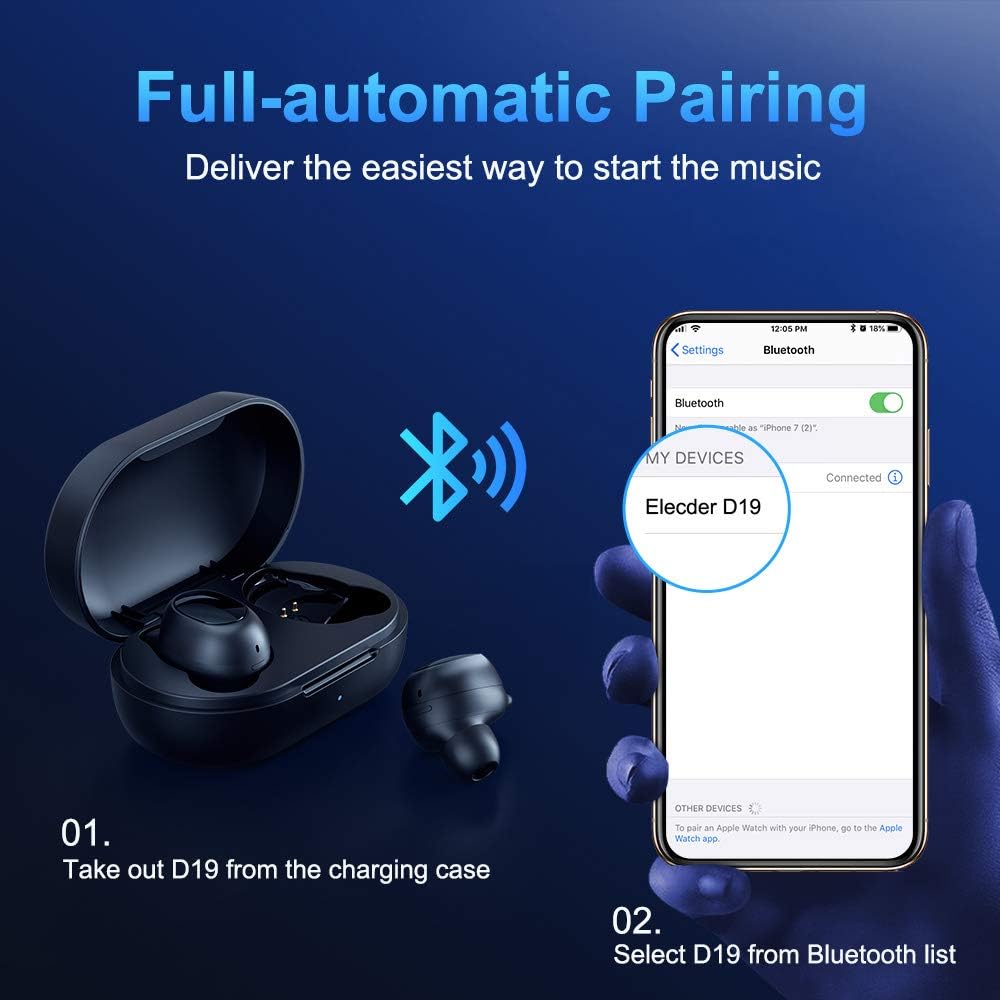
Figure 3.2: A visual guide demonstrating the automatic pairing process. The image shows the earbuds being taken out of the case and then the "Elecder D19" option appearing in a smartphone's Bluetooth settings for connection.
After the initial pairing, the earbuds will automatically connect to the last paired device when taken out of the charging case.

Figure 3.3: An illustration showing the stable Bluetooth connection between the ELECDER D19 earbuds and various smart devices, including smartphones and tablets.
4. Cyfarwyddiadau Gweithredu
4.1 Gwisgo'r Clustffonau
For optimal sound quality and comfort, choose the ear tips that best fit your ears. The earbuds come with S, M, and L sizes. Insert the earbuds into your ears and gently rotate them to find a secure and comfortable fit. The ergonomic ear-fin design helps ensure stability during movement.
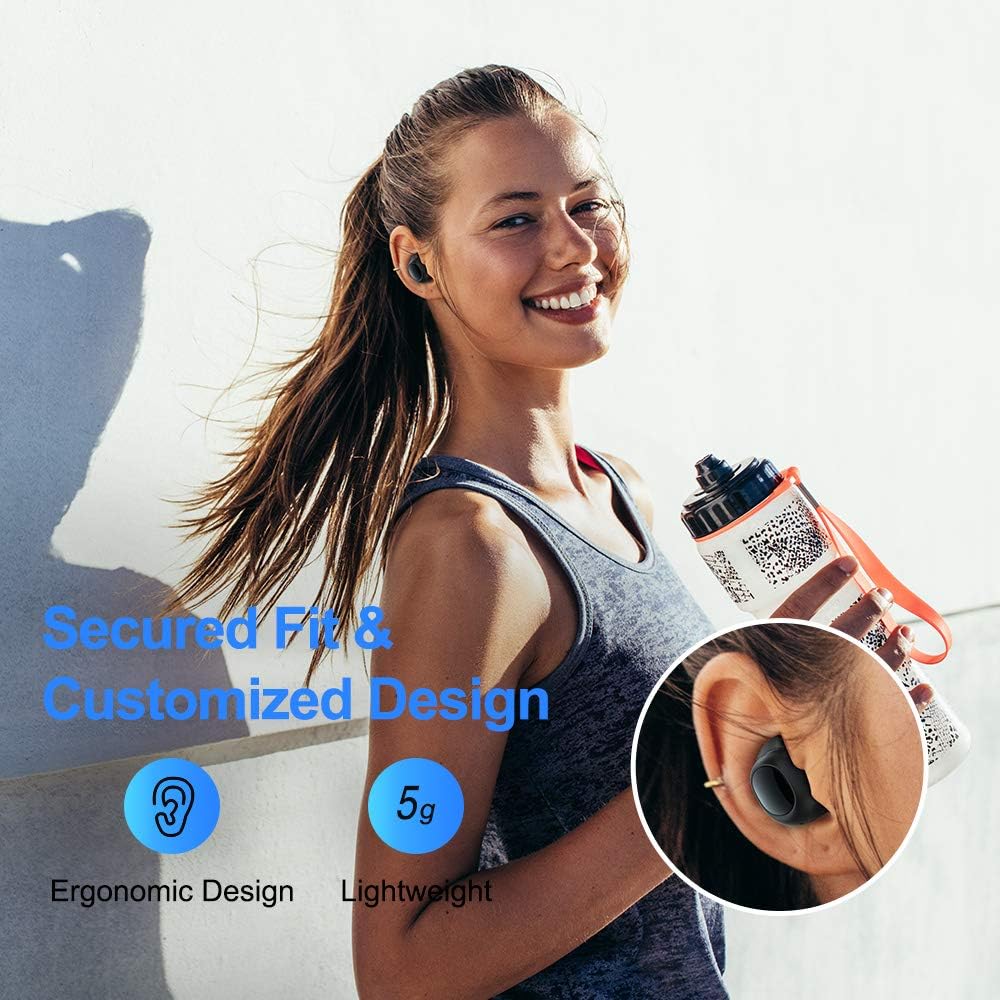
Figure 4.1: A person wearing the ELECDER D19 earbuds during a workout, demonstrating the secure and comfortable fit provided by the ergonomic design and customizable ear tips.
4.2 Media Control
The ELECDER D19 earbuds feature physical buttons for media control. Specific button functions may vary slightly based on the device and operating system, but common controls include:
- Chwarae/Seibiant: Pwyswch unwaith ar y naill glustffon neu'r llall.
- Trac Nesaf: Pwyswch ddwywaith ar y glustffon dde.
- Trac Blaenorol: Pwyswch ddwywaith ar y glustffon chwith.
- Cyfrol i Fyny: Triple press on the right earbud.
- Cyfrol i Lawr: Triple press on the left earbud.
4.3 Rheoli Galwadau
Rheoli eich galwadau'n uniongyrchol o'r clustffonau:
- Ateb / Diwedd Galwad: Pwyswch unwaith ar y naill glustffon neu'r llall.
- Gwrthod Galwad: Pwyswch a daliwch y naill glust neu'r llall am 2 eiliad.
- Ysgogi Cynorthwyydd Llais: Press and hold either earbud for 3 seconds (e.g., Siri, Google Assistant).
5. Cynnal a Chadw a Gofal
Proper maintenance ensures the longevity and optimal performance of your ELECDER D19 earbuds.
5.1 Glanhau
- Glanhewch y clustffonau a'r cas gwefru yn rheolaidd gyda lliain meddal, sych, heb lint.
- Tynnwch flaenau'r clustiau a'u glanhau gyda sebon ysgafn a dŵr, yna sychwch yn drylwyr cyn eu hailgysylltu.
- Defnyddiwch swab cotwm neu frwsh bach i lanhau'r cysylltiadau gwefru ar y clustffonau a'r cas yn ysgafn.
- Osgowch ddefnyddio deunyddiau sgraffiniol, alcohol, neu lanhawyr cemegol.
5.2 Gwrthiant Dŵr (IPX7)
The ELECDER D19 earbuds are IPX7 waterproof, meaning they can withstand submersion in up to 1 meter of water for 30 minutes. This makes them suitable for protection against sweat, rain, and accidental splashes.

Figure 5.1: The ELECDER D19 earbuds shown with water droplets, illustrating their IPX7 waterproof rating, which protects them from sweat, rain, and splashes.
Nodyn: The charging case is not waterproof. Ensure earbuds are dry before placing them back into the charging case.
5.3 Storio
Pan nad ydynt yn cael eu defnyddio, storiwch y clustffonau yn eu cas gwefru i'w hamddiffyn a'u cadw'n wefredig. Storiwch y cas mewn lle oer, sych i ffwrdd o dymheredd eithafol a golau haul uniongyrchol.
6. Datrys Problemau
If you encounter issues with your ELECDER D19 earbuds, refer to the following common solutions:
| Problem | Achos Posibl | Ateb |
|---|---|---|
| Nid yw'r clustffonau'n paru â'r ddyfais. | Bluetooth is off on device; earbuds not in pairing mode; previously paired device interfering. | Ensure Bluetooth is enabled. Place earbuds back in case, then take them out to re-enter pairing mode. Forget "Elecder D19" from your device's Bluetooth list and re-pair. |
| Dim ond un clustffon sy'n gweithio. | Earbuds not paired with each other; low battery on one earbud. | Place both earbuds back into the charging case, close the lid, wait a few seconds, then open and take them out again. Ensure both earbuds are charged. |
| Dim sain na chyfaint isel. | Device volume too low; ear tips not properly sealed; debris in earbud nozzle. | Increase volume on your device. Adjust earbud position or try different sized ear tips for a better seal. Clean earbud nozzles. |
| Nid yw'r cas gwefru yn gwefru. | Faulty cable/charger; improper placement on wireless charger. | Try a different USB cable and power adapter. Ensure the case is correctly aligned on the wireless charging pad. |
| Cysylltiad Bluetooth ansefydlog. | Interference; distance from device; low earbud battery. | Reduce distance between earbuds and device. Avoid environments with strong Wi-Fi or other Bluetooth signals. Ensure earbuds are fully charged. |
7. manylebau
Detailed technical specifications for the ELECDER D19 True Wireless Earbuds:
| Nodwedd | Manylyn |
|---|---|
| Enw Model | ELECDER D19 |
| Technoleg Cysylltedd | Di-wifr (Bluetooth 5.0) |
| Amrediad Bluetooth | 33 Traed |
| Lleoliad Clust | Mewn Clust |
| Ffactor Ffurf | Mewn Clust |
| Rheoli Sŵn | Active Noise Cancellation (CVC8.0) |
| Meicroffon | Yn gynwysedig |
| Lefel Gwrthsefyll Dŵr | IPX7 dal dŵr |
| Bywyd Batri (Clustffonau) | Up to 4.5 hours (music) / 4 hours (calling) |
| Charging Case Additional Playtime | 18 awr |
| Amser Codi Tâl | Tua 2 Awr |
| Rhyngwyneb Codi Tâl | Micro USB, Wireless Charging |
| Pwysau Eitem | 1.92 ounces (total) / 5g (each earbud) |
| Dimensiynau Cynnyrch | 3.89 x 3.89 x 1.65 modfedd |
| Dyfeisiau Cydnaws | iOS and Android Smartphones |
| Deunydd | Silicon (awgrymiadau clust) |
| Lliw | Du |

Figure 7.1: An infographic detailing the battery life of the ELECDER D19 earbuds and charging case, showing 4 hours for calls, 4.5 hours for music, and a total of 18 hours with the 500mAh charging case.
8. Gwarant a Chefnogaeth
ELECDER products are manufactured to high quality standards. For information regarding warranty coverage, technical support, or service inquiries, please refer to the contact information provided with your product packaging or visit the official ELECDER websafle.
Am gymorth pellach, gallwch hefyd gysylltu â'r manwerthwr lle prynoch chi'r cynnyrch.