
SoundPEATS Truengine 3 SE
SoundPEATS Truengine 3 SE Bluetooth Wireless Earbuds User Manual
Model: Truengine 3 SE
Rhagymadrodd
This manual provides detailed instructions for the SoundPEATS Truengine 3 SE Bluetooth Wireless Earbuds. Please read this guide thoroughly before using your earbuds to ensure proper operation and to maximize your listening experience. Keep this manual for future reference.
Cynnwys Pecyn

Image: Contents of the SoundPEATS Truengine 3 SE package, including earbuds, charging case, user manual, USB-C charging cable, and multiple sizes of ear tips.
- SoundPEATS Truengine 3 SE Earbuds Di-wifr
- Achos Codi Tâl
- Cebl Codi Tâl USB-C
- Awgrymiadau Clust (amrywiol feintiau)
- Llawlyfr Defnyddiwr
Cynnyrch Drosview
The SoundPEATS Truengine 3 SE earbuds are designed for high-quality audio and comfortable wear. They feature advanced technology for a superior listening experience.

Delwedd: Blaen view of the SoundPEATS Truengine 3 SE wireless earbuds, showcasing their ergonomic design and the SoundPEATS logo.
Nodweddion Allweddol:
- Qualcomm QCC3020 Chip: Ensures stable connectivity and efficient power consumption.
- Dual Dynamic Drivers: Delivers rich, detailed sound with enhanced bass and clear treble.
- Dual Microphones with CVC Noise Cancellation: Provides clear call quality by reducing ambient noise.
- Rheolaeth Gyffwrdd Sensitif: Manage music, calls, and voice assistant with simple taps.
- Dyluniad ergonomig: Ensures a secure and comfortable fit for extended use.
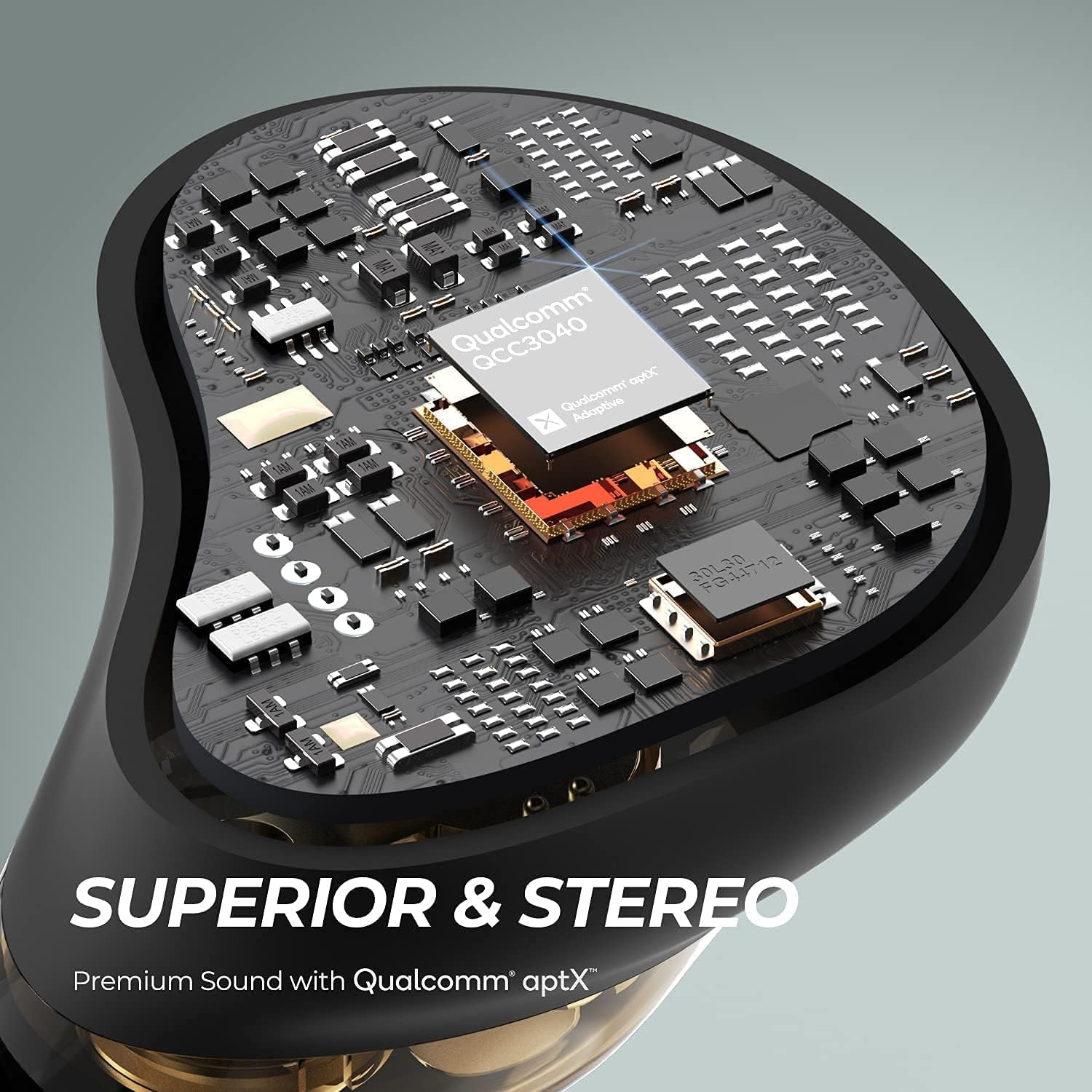
Delwedd: Mewnol view of an earbud highlighting the Qualcomm QCC3040 chip, indicating advanced audio processing and stable connection.

Delwedd: Llun agos view of the dual dynamic drivers within an earbud, illustrating the technology for distinct audio reproduction.

Image: A woman running outdoors while wearing the earbuds, with an inset showing the location of the two outer microphones for CVC noise cancellation.

Image: A man demonstrating the touch control feature on an earbud, with an animated graphic indicating a tap action.
Gosod
1. Charging the Case and Earbuds
Before first use, fully charge both the charging case and the earbuds.
- Place the earbuds into the charging case. Ensure the charging contacts align.
- Cysylltwch y cebl USB-C â'r porthladd gwefru ar y cas ac â ffynhonnell bŵer.
- The indicator lights on the case will show the charging status. A full charge typically takes about 1.5 hours for the earbuds and case.
- The earbuds offer approximately 5.5 hours of playtime per charge, with the charging case providing multiple additional charges for a total of up to 40 hours.

Image: SoundPEATS Truengine 3 SE earbuds and their charging case resting on a surface, illustrating their compact and lightweight design, and highlighting their long battery life.
2. Paru
Follow these steps for initial pairing with your device:
- Open the charging case. The earbuds will automatically enter pairing mode. The indicator light on the right earbud will flash red and white alternately.
- Galluogwch Bluetooth ar eich dyfais (e.e., ffôn clyfar, tabled).
- Chwiliwch am "SOUNDPEATS Truengine 3 SE" in the Bluetooth device list and select it to connect.
- Once connected, the indicator light on the right earbud will turn white.
- If pairing fails, place the earbuds back into the charging case, close the lid, and then reopen it to re-enter pairing mode.

Image: SoundPEATS Truengine 3 SE earbuds displayed next to a smartphone with its Bluetooth settings open, showing the earbuds listed as "SOUNDPEATS" for easy and stable pairing.
Cyfarwyddiadau Gweithredu
The Truengine 3 SE earbuds feature touch controls for various functions:
Swyddogaethau Rheoli Cyffwrdd:
| Swyddogaeth | Gweithred |
|---|---|
| Pŵer Ymlaen | Open the charging case, or press and hold the multifunction touch area for 1.5 seconds. |
| Pŵer i ffwrdd | Place earbuds back into the charging case and close the lid, or press and hold the multifunction touch area for 10 seconds. |
| Chwarae/Saib | Double-tap the multifunction touch area on either earbud. |
| Cyfrol i Fyny | Press and hold the multifunction touch area on the iawn earbud. |
| Cyfrol Lawr | Press and hold the multifunction touch area on the chwith earbud. |
| Trac Nesaf | Triple-tap the multifunction touch area on the iawn earbud. |
| Trac Blaenorol | Triple-tap the multifunction touch area on the chwith earbud. |
| Ateb/Diwedd Galwad | Double-tap the multifunction touch area on either earbud. |
| Gwrthod Galwad | Press and hold the multifunction touch area for 1.5 seconds on either earbud. |
| Actifadu Cynorthwyydd Llais | Single-tap the multifunction touch area on either earbud. |
Modd Mono
Either earbud can be used independently in mono mode. Simply take one earbud out of the case, and it will automatically connect to your device if previously paired. The other earbud can remain in the case or be powered off.
Cynnal a chadw
- Glanhewch y clustffonau a'r cas gwefru yn rheolaidd gyda lliain meddal, sych.
- Ceisiwch osgoi defnyddio cemegau llym neu ddeunyddiau sgraffiniol.
- Keep the charging contacts on the earbuds and case clean to ensure proper charging.
- Storiwch y clustffonau yn eu cas gwefru pan nad ydynt yn cael eu defnyddio i'w hamddiffyn a chadwch wefr arnynt.
- Osgowch amlygu'r clustffonau i dymheredd, lleithder neu hylifau eithafol.
Datrys problemau
Earbuds not connecting or pairing:
- Sicrhewch fod y clustffonau wedi'u gwefru.
- Diffoddwch Bluetooth ar eich dyfais, yna trowch ef yn ôl ymlaen.
- Delete "SOUNDPEATS Truengine 3 SE" from your device's Bluetooth list and attempt to re-pair.
- Place both earbuds back into the charging case, close the lid, wait a few seconds, then open the lid to reactivate pairing mode.
- If issues persist, try resetting the earbuds (refer to the manufacturer's websafle ar gyfer cyfarwyddiadau ailosod penodol os nad ydynt wedi'u manylu yma).
Dim sain o un clustffon:
- Sicrhewch fod y ddau glustffon wedi'u gwefru.
- Try placing both earbuds back into the charging case and taking them out again.
- Perform a reset of the earbuds.
Materion codi tâl:
- Glanhewch y cysylltiadau gwefru ar y clustffonau a'r cas.
- Gwnewch yn siŵr bod y cebl USB-C wedi'i gysylltu'n ddiogel â'r cas a'r ffynhonnell bŵer.
- Rhowch gynnig ar gebl USB-C gwahanol neu addasydd pŵer.
Manylebau
| Nodwedd | Manylyn |
|---|---|
| Brand | SAINPEATS |
| Rhif Model | Trueengine 3 SE |
| Fersiwn Bluetooth | 5.0 |
| Sglodion Bluetooth | QCC3020 |
| Maint Gyrrwr | Ø6 mm x2 (Dual Dynamic Drivers) |
| Amser Gweithio (Clustffonau) | Tua 5.5 awr |
| Amser Codi Tâl (Clustffonau) | Tua 1.5 awr |
| Batri Achos Codi Tâl | 500 mAh |
| Batri Earbud | 55 mAh x 2 |
| Meicroffon | Dual Microphones with CVC Noise Cancellation |
| Technoleg Cysylltedd | Diwifr (Bluetooth) |
| Ffactor Ffurf Clustffonau | Mewn Clust |
| Deunydd | Plastig |
| Pwysau Eitem | 9.07 gram |
Gwarant a Chefnogaeth
Mae cynhyrchion SoundPEATS wedi'u cynnwys o dan warant. Am wybodaeth fanwl am y warant, cofrestru cynnyrch, neu gymorth technegol, ewch i wefan swyddogol SoundPEATS. websafle neu cysylltwch â'u gwasanaeth cwsmeriaid. Cadwch eich derbynneb prynu fel prawf o brynu.
Swyddogol Websafle: www.soundpeatsaudio.com
Ask a question about this manual
Ask about setup, troubleshooting, compatibility, parts, safety, or missing instructions. Manuals+ will review the question and use this page’s manual context to help answer it.