
measy T1
measy T1 Wireless HD Video Transmission System User Manual
Model: T1
Brand: measy
1. Rhagymadrodd
The measy T1 Wireless HD Video Transmission System is designed to transmit high-definition HDMI audio/video signals wirelessly over distances up to 200 meters (656 feet). This system supports resolutions up to 4K@30Hz and utilizes a dual antenna design for enhanced signal stability. It offers a convenient plug-and-play solution for extending video signals without the need for long cables, making it suitable for various applications including home entertainment, conference rooms, and professional video setups.
2. Cynnyrch Drosview
2.1 Nodweddion Allweddol
- Ystod Trosglwyddo Di-wifr: Transmits HD HDMI signals up to 200m (656ft).
- Fideo o Ansawdd Uchel: Supports resolutions up to 4K@30Hz, with H.264 video compression for efficient transfer and smooth playback.
- Dyluniad Antena Deuol: Ensures strong and stable wireless transmission over longer distances.
- Plygiwch a Chwarae: Simple and convenient installation without complex setup or wiring.
- 5GHz Frequency: Utilizes digital 5GHz frequency for high-speed A/V transmission.
- Cau hwyr: Designed for minimal delay in video and audio transmission.
2.2 Cydrannau
The measy T1 system consists of a transmitter unit and a receiver unit, along with necessary accessories.

Figure 2.2.1: measy T1 Wireless HDMI Transmitter and Receiver Units.
This image displays the two main components of the system: the transmitter and the receiver, both equipped with dual antennas for optimal signal performance.

Figure 2.2.2: Dual Antenna Design.
The dual antenna design provides a more robust and reliable wireless link, particularly beneficial in environments where a direct line of sight might be challenging.

Figure 2.2.3: measy Tour T1 System Overview.
This graphic summarizes key performance indicators of the measy T1, including its 200-meter range, low latency, 4K@30Hz support, HDMI connectivity, and 5G wireless technology.
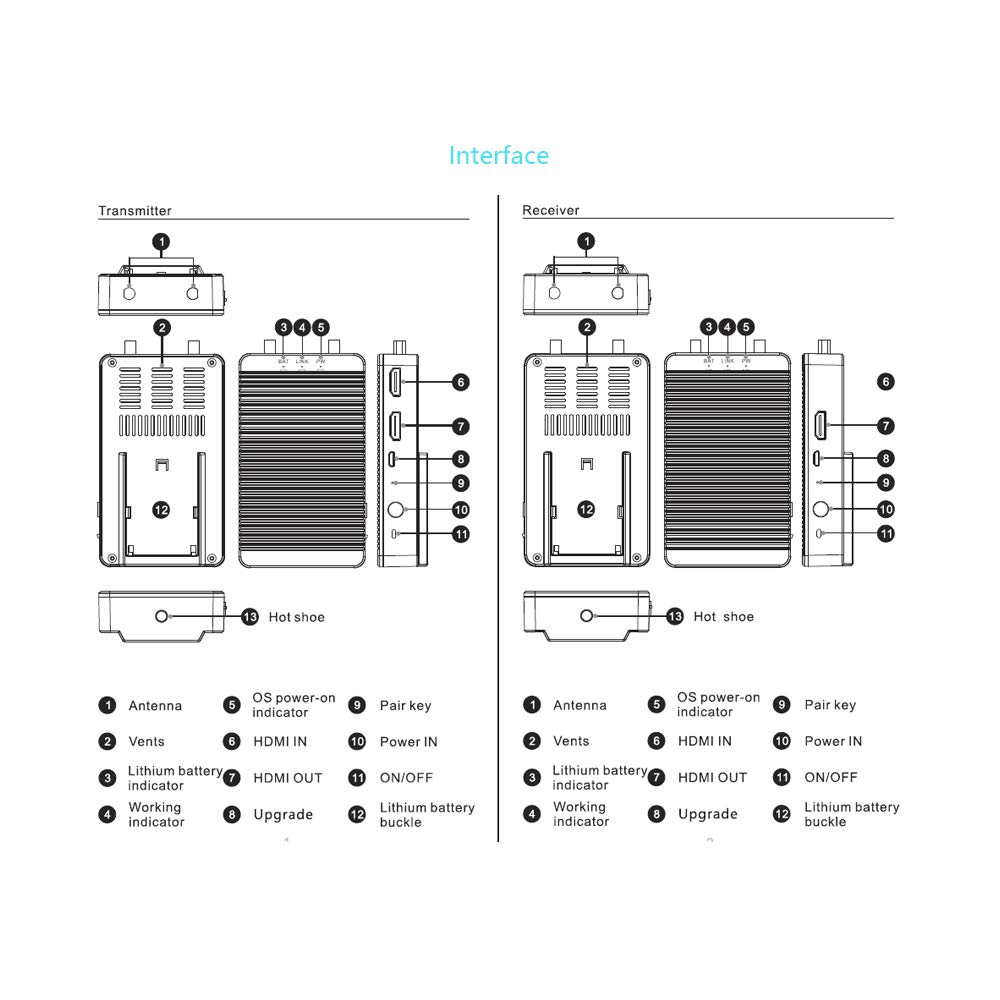
Figure 2.2.4: Transmitter and Receiver Interface Diagram.
Mae'r diagram hwn yn darparu manylion view of the ports and indicators on both the transmitter and receiver units, including antenna connections, power indicators, HDMI input/output, and power buttons. Refer to this diagram for proper connection and operation.

Ffigur 2.2.5: Cynnwys y Pecyn.
The standard package includes one transmitter unit, one receiver unit, and two power adapters for powering both devices.
3. Cyfarwyddiadau Gosod
The measy T1 system is designed for easy plug-and-play setup. Follow these steps to get your system operational:
- Cysylltu Antenâu: Screw the provided antennas firmly onto the antenna ports (1) of both the transmitter and receiver units.
- Cysylltiad Pwer: Connect one power adapter to the "Power IN" port (10) of the transmitter unit and the other power adapter to the "Power IN" port (10) of the receiver unit. Plug both adapters into a power outlet.
- Cysylltu'r Trosglwyddydd: Connect your HDMI source device (e.g., laptop, set-top box, camera) to the "HDMI IN" port (6) on the transmitter unit using an HDMI cable.
- Cysylltu Derbynnydd: Connect your display device (e.g., TV, monitor, projector) to the "HDMI OUT" port (7) on the receiver unit using an HDMI cable.
- Pŵer Ymlaen: Press the "ON/OFF" button (11) on both the transmitter and receiver units to power them on. The "PW" (Power) indicator light should illuminate.
- Paru (Awtomatig): The transmitter and receiver units are typically pre-paired. The "LINK" indicator light should illuminate when a stable wireless connection is established. If not, refer to the troubleshooting section or press the "Pair key" (9) on both units simultaneously to initiate pairing.

Figure 3.1: Basic Connection Diagram.
This diagram illustrates the typical connection flow from an HDMI source to the transmitter, wireless transmission, and then from the receiver to a display.
4. Cyfarwyddiadau Gweithredu
Once the measy T1 system is set up and powered on, it will automatically establish a wireless connection and begin transmitting the HDMI signal.
4.1 Signal Transmission
Ensure both the transmitter and receiver units are within the effective transmission range (up to 200 meters line-of-sight). The system will automatically detect the input resolution and transmit it to the receiver. The "LINK" indicator on both units will confirm an active wireless connection.
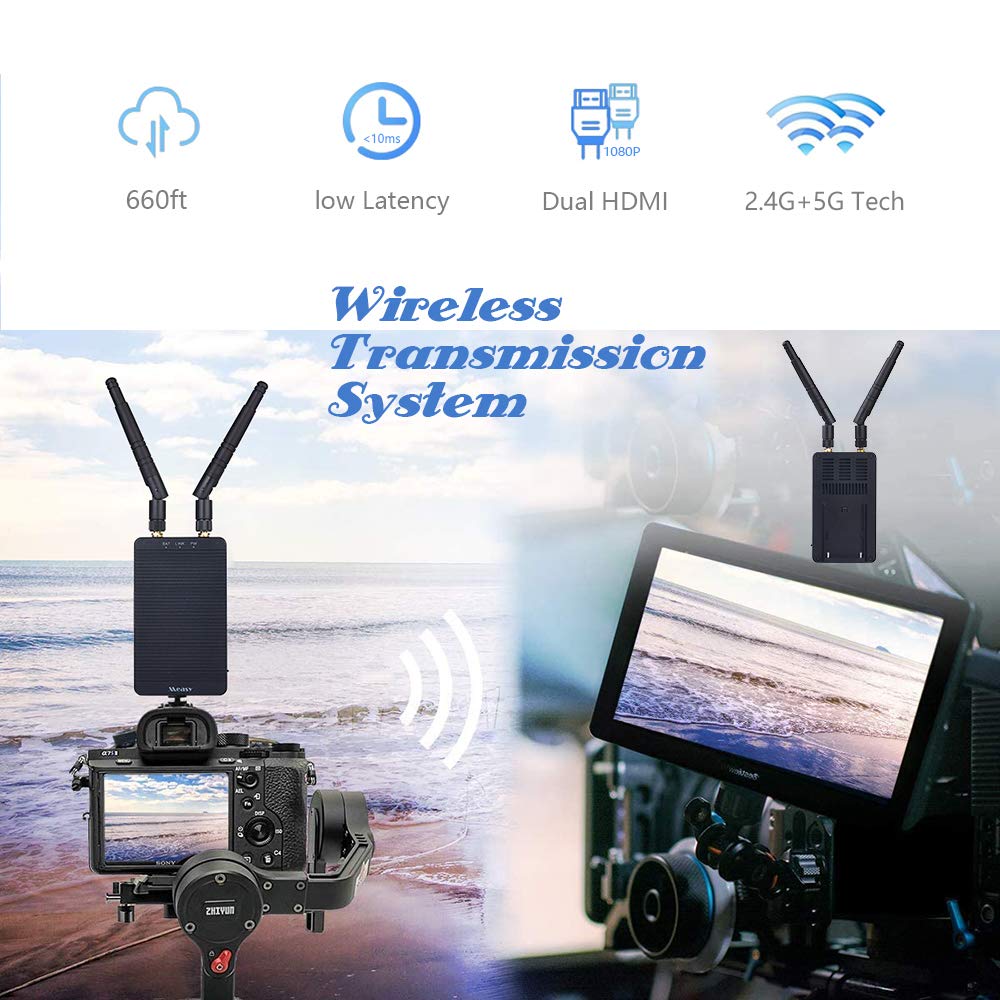
Figure 4.1.1: Wireless Transmission in Use.
This image demonstrates a practical application of the measy T1 system, wirelessly connecting a camera to a remote monitor, suitable for various professional and personal uses.
4.2 Resolution Support
The system supports a wide range of HDMI resolutions, including 1080P and 4K@30Hz. The output resolution on the display will match the input resolution from the source device, provided the display supports it.

Figure 4.2.1: 4K Resolution Support.
The measy T1 system is capable of transmitting video signals up to 4K resolution, ensuring high-quality visual output.
5. cynnal
To ensure the longevity and optimal performance of your measy T1 Wireless HD Video Transmission System, follow these maintenance guidelines:
- Glanhau: Use a soft, dry cloth to clean the exterior of the units. Do not use liquid cleaners or aerosols, as they may damage the components.
- Awyru: Ensure that the ventilation vents (2) on both units are not blocked to prevent overheating.
- Storio: Pan nad ydynt yn cael eu defnyddio am gyfnodau hir, storiwch yr unedau mewn lle oer, sych i ffwrdd o olau haul uniongyrchol a thymheredd eithafol.
- Trin: Trin yr unedau yn ofalus. Osgowch eu gollwng na'u rhoi dan ddylanwad effeithiau cryf.
6. Datrys Problemau
If you encounter issues with your measy T1 system, refer to the following common problems and solutions:
| Problem | Achos Posibl | Ateb |
|---|---|---|
| Dim signal ar yr arddangosfa. |
|
|
| Intermittent signal or poor quality. |
|
|
| Audio/video delay. |
|
|
7. manylebau
| Nodwedd | Manylyn |
|---|---|
| Rhif Model | T1 |
| Brand | bras |
| Technoleg Cysylltedd | HDMI Di-wifr |
| Max. Pellter Trosglwyddo | 200m (656 troedfedd) |
| Penderfyniadau a Gefnogir | Up to 4K@30Hz, 1080P |
| Amgodio Fideo | H.264 (AVI) |
| Modd Allbwn Sain | Stereo |
| Sain Amgylch | 5.1 Ffurfweddiad Sianel |
| Cyfanswm Porthladdoedd HDMI | 3 (1x HDMI IN on TX, 1x HDMI Loop OUT on TX, 1x HDMI OUT on RX) |
| Math o Reolwr | Botwm Gwthio |
| Nodwedd Arbennig | Amlystafell |
| Dyfeisiau Cydnaws | HD Source |
| Dimensiynau Pecyn | 7.48 x 6.1 x 3.31 modfedd |
| Pwysau Eitem | 1.47 Bunt |
8. Gwarant a Chefnogaeth
8.1 Gwybodaeth Gwarant
Specific warranty details for the measy T1 Wireless HD Video Transmission System are typically provided with the product packaging or through the point of purchase. Please retain your proof of purchase for warranty claims.
8.2 User Guide and Support
For further detailed information, you may refer to the official Certificate of Compliance document available online: measy T1 Certificate of Compliance (PDF).
For technical support or inquiries not covered in this manual, please contact measy customer service through their official websafle neu'r manwerthwr y prynwyd y cynnyrch ganddo.
Ask a question about this manual
Ask about setup, troubleshooting, compatibility, parts, safety, or missing instructions. Manuals+ will review the question and use this page’s manual context to help answer it.