
1. Rhagymadrodd
The WinAPEX ET8104 is a portable, auto-ranging digital multimeter designed for accurate measurement of various electrical parameters. It features a clear LCD color screen, True RMS measurement, and a built-in flashlight, making it suitable for both professional and DIY electrical tasks. This manual provides essential information for safe and effective use of your multimeter.
2. Gwybodaeth Diogelwch
Always read and understand all safety warnings and operating instructions before using this instrument.
- Peidiwch â rhagori ar y gwerthoedd mewnbwn uchaf ar gyfer unrhyw swyddogaeth.
- Do not use the meter if it is damaged or if the test leads are damaged.
- Byddwch yn ofalus iawn wrth weithio gyda chyftaguwchlaw 30V AC RMS, 42V brig, neu 60V DC. Mae'r cyfrolau hyntages yn peri perygl sioc.
- Datgysylltwch y pŵer i'r gylched bob amser a rhyddhewch yr holl foltedd ucheltagcynwysyddion e cyn mesur gwrthiant, parhad, deuodau, neu gynhwysedd.
- Ensure the correct function and range are selected before making measurements.
- Keep fingers behind the probe barriers during measurement.
- Amnewidiwch y batri cyn gynted ag y bydd y dangosydd batri isel yn ymddangos i sicrhau darlleniadau cywir.
3. Cynnwys Pecyn
Gwiriwch fod yr holl eitemau a restrir isod wedi'u cynnwys yn eich pecyn:
- 1 x WinAPEX ET8104 Digital Multimeter
- 1 x K-type Thermocouple (TP01)
- 1 x Pâr o Arweinwyr Prawf
- 1 x Llawlyfr Defnyddiwr
4. Cynnyrch Drosview
The WinAPEX ET8104 features a compact design with a clear LCD display and intuitive controls. The protective casing enhances durability and provides dust resistance.
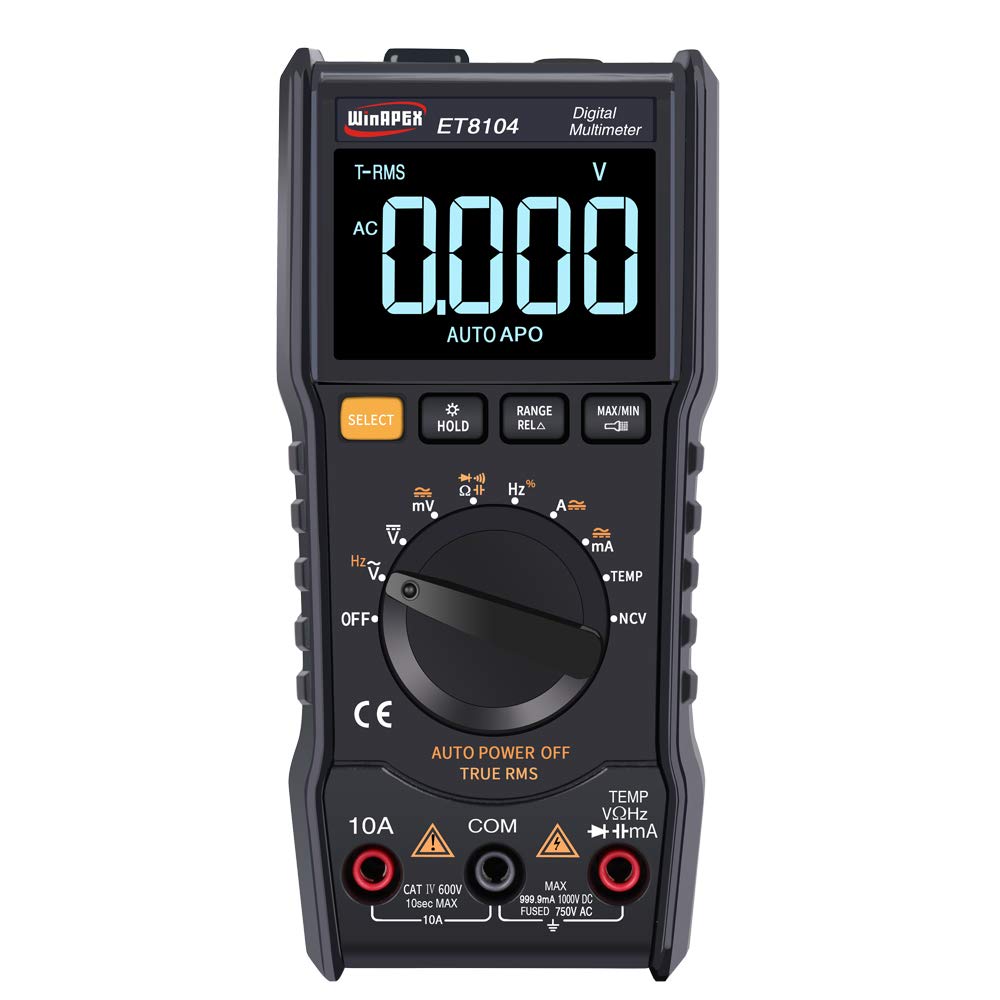
Ffigur 4.1: Blaen view of the WinAPEX ET8104 Digital Multimeter, showing the display, rotary dial, and function buttons.

Ffigur 4.2: Blaen a chefn view of the WinAPEX ET8104 Digital Multimeter, highlighting its robust protective casing.

Figure 4.3: The WinAPEX ET8104 Multimeter displaying a summary of its measurement capabilities.
4.1 Arddangosfa a Rheolyddion
- Arddangosfa LCD: Shows measurement readings, unit symbols, and function indicators. Features a backlight for low-light conditions.
- Deialu Rotari: Used to select the desired measurement function (e.g., V~, V-, Ω, A~, A-, Hz, Temp, NCV, OFF).
- Botwm SELECT: Toggles between AC/DC modes or different sub-functions within a rotary dial setting (e.g., AC Voltage / DC Cyftaga).
- Botwm DAL: Yn rhewi'r darlleniad cyfredol ar yr arddangosfa. Pwyswch eto i'w ryddhau.
- RANGE/RELA Button: Manually selects measurement range or activates relative measurement mode.
- Botwm MAX/MIN: Displays the maximum or minimum measured value.
- Jaciau Mewnbwn: Terminals for connecting test leads (COM, VΩHz, 10A, mA).
- Flashlight: Integrated flashlight for illuminating work areas.
- Synhwyrydd NCV: Cyf. Di-gyswllttage detection area.
5. Gosod
5.1 Gosod Batri
- Gwnewch yn siŵr bod y multimedr wedi'i ddiffodd.
- Lleolwch y compartment batri ar gefn y ddyfais.
- Defnyddiwch sgriwdreifer i agor y clawr batri.
- Mewnosodwch y batris gofynnol (fel arfer AAA neu 9V, cyfeiriwch at label adran y batri) gan arsylwi'r polaredd cywir.
- Amnewid y clawr batri a'i ddiogelu gyda'r sgriw.
5.2 Cysylltu Gwifrau Prawf
Always connect the black test lead to the COM (Common) jack. Connect the red test lead to the appropriate input jack based on the measurement function:
- Am Voltage, Resistance, Capacitance, Frequency, Diode, Continuity, and Temperature measurements: Connect the red lead to the VΩHz jac.
- For Current measurements up to 10A: Connect the red lead to the 10A jac.
- For Current measurements in milliampere range: Connect the red lead to the mA jac.
6. Cyfarwyddiadau Gweithredu
The ET8104 features auto-ranging, simplifying operation by automatically selecting the correct measurement range. For specific functions, use the rotary dial and the SELECT button.
6.1 Mesur AC/DC Cyftage (V~ / V-)
- Trowch y deial cylchdro i V~ or V-. The meter will automatically detect AC or DC voltage.
- Cysylltwch dennyn y prawf du â'r COM jac a'r gwifren brawf goch i'r VΩHz jac.
- Cysylltwch y chwiliedyddion prawf yn gyfochrog â'r gylched neu'r gydran sy'n cael ei phrofi.
- Darllenwch y cyftage gwerth ar yr arddangosfa.
6.2 Mesur Gwrthiant (Ω)
- Trowch y deial cylchdro i Ω.
- Cysylltwch arweinydd y prawf du â COM a'r plwm prawf coch i VΩHz.
- Ensure the circuit is de-energized before connecting the probes across the component.
- Darllenwch y gwerth gwrthiant ar yr arddangosfa.
6.3 Mesur Cynhwysedd
- Turn the rotary dial to the capacitance symbol (typically || or F).
- Cysylltwch arweinydd y prawf du â COM a'r plwm prawf coch i VΩHz.
- Ensure the capacitor is fully discharged before connecting the probes.
- Connect the probes across the capacitor terminals.
- Darllenwch y gwerth cynhwysedd ar yr arddangosfa.
6.4 Cyfrol Di-gyswllttage (NCV) Canfod
Mae'r swyddogaeth NCV yn caniatáu canfod cyfaint ACtage without direct contact with wires.
- Trowch y deial cylchdro i NCV.
- Place the NCV sensor (located at the top of the meter) near the wire or outlet.
- The meter will emit an audible beep and the LED indicator will flash if AC voltagCanfyddir e. Mae amlder y bipiau a'r fflachiadau yn cynyddu gyda chyfaint cryfachtage.

Figure 6.1: Demonstrating the NCV function and integrated flashlight.
6.5 Mesur Tymheredd
- Trowch y deial cylchdro i TEMP.
- Connect the K-type thermocouple to the VΩHz a COM jaciau, arsylwi polaredd.
- Rhowch y stiliwr thermocwl ar neu ger y gwrthrych y mae ei dymheredd i'w fesur.
- Read the temperature value on the display. Use the SELECT button to switch between Celsius (°C) and Fahrenheit (°F).
6.6 Swyddogaethau Eraill
- Flashlight: Press the flashlight button (if available, or a dedicated button) to turn on/off the integrated flashlight.
- Daliad Data: Gwasgwch y DALWCH botwm i rewi'r darlleniad cyfredol ar yr arddangosfa.
- MAX / MIN: Gwasgwch y MAX/MIN button to cycle through maximum, minimum, and current readings.
- Pŵer Auto i ffwrdd: Bydd y mesurydd yn diffodd yn awtomatig ar ôl cyfnod o anweithgarwch er mwyn arbed bywyd batri.
7. cynnal
7.1 Glanhau
Sychwch yr achos gyda hysbysebamp lliain a glanedydd ysgafn. Peidiwch â defnyddio sgraffinyddion na thoddyddion. Cadwch y terfynellau mewnbwn yn rhydd o faw a lleithder.
7.2 Batri Newydd
When the low battery indicator appears on the display, replace the batteries immediately to ensure accurate measurements. Follow the battery installation steps in Section 5.1.
7.3 Amnewid Ffiws
If the current measurement function stops working, the fuse may need replacement. Refer to the specifications for the correct fuse type and rating. Fuse replacement should only be performed by qualified personnel.
8. Datrys Problemau
| Problem | Achos Posibl | Ateb |
|---|---|---|
| Nid yw'r mesurydd yn troi ymlaen | Batris marw neu osod batri anghywir | Gwiriwch bolaredd y batri neu ailosodwch fatris. |
| Dim darlleniad na 'OL' yn cael ei arddangos | Incorrect function/range selected, open circuit, or over-range input | Verify function selection, check circuit connections, or ensure input is within range. |
| Darlleniadau anghywir | Batri isel, gwifrau prawf wedi'u difrodi, neu ymyrraeth allanol | Replace batteries, check/replace test leads, move away from strong electromagnetic fields. |
| Mesuriad cerrynt ddim yn gweithio | Ffiws wedi'i chwythu | Rhowch y ffiws newydd yn lle’r un (cyfeiriwch at Adran 7.3). |
9. manylebau
| Paramedr | Gwerth |
|---|---|
| Brand | WinAPEX |
| Model | ET8104 |
| Cyfrif Arddangos | 9999 |
| Ffynhonnell Pwer | Batri yn gweithredu |
| Lliw | Du |
| Dull Mesur | Trosi A/D annatod dwbl |
| SampCyfradd ling | Tua. 3 gwaith/eiliad |
| Over-range Display | "0L" |
| Amgylchedd Gwaith | 0~40°C, Relative humidity <80% |
| Maint LCD | 49 x 32 mm (1.9 x 1.3 fodfedd) |
| Maint Cynnyrch | 142 x 70 mm (5.6 x 2.8 fodfedd) |
| Pwysau Pecyn | 305g (10.8 owns) |
| DC Cyftage Cywirdeb | ±(1.2%+10) |
| AC Cyftage Cywirdeb | ±(1.2%+10) |
| DC Ystod Gyfredol | 60mA/600mA/10A |
| DC Cywirdeb Cyfredol | ±(2.0%+30) for 10A, Resolution: 0.01A |
| AC Ystod Gyfredol | 60mA/600mA/10A |
| AC Cywirdeb Cyfredol | ±(2.0%+30) for 10A, Resolution: 0.01A |
| Ystod Gwrthsefyll | 1000Ω / 10kΩ / 100kΩ / 1MΩ / 10MΩ / 100MΩ |
| Cywirdeb Gwrthsafiad | 1000Ω: ±(0.8%+5); 10kΩ-10MΩ: ±(0.8%+3); 100MΩ: ±(2.5%+3) |
| Ystod Cynhwysedd | 100nF/1000nF/10µF/100µF/1000µF/100mF |
| Cywirdeb Capasiti | 100nF-1000µF: ±(3.5%+20); 100mF: ±(5%+3) |
| Amrediad Amrediad | 10Hz/100Hz/1KHz/10KHz/100KHz/1MHz/10MHz |
| Amlder Cywirdeb | ±(0.1%+3) |
| Amrediad Tymheredd | (-20-1000)°C / (0-1832)°F |
| Cywirdeb Tymheredd | °C: ±(1.0%+5) <400°C, ±(1.5%+15) ≥400°C; °F: ±(0.75%+5) <750°F, ±(1.5%+15) ≥750°F |
| NCV | Oes |
| Gwir RMS | Oes |
| Auto Power Off | Oes |
| Dal Data | Oes |
| Golau cefn | Oes |
| Flashlight | Oes |
10. Gwarant a Chefnogaeth
WinAPEX products are designed for reliability and performance. For warranty information or technical support, please refer to the warranty card included with your product or contact your local distributor. Keep your purchase receipt as proof of purchase.


