
1. Cynnyrch Drosview
The SILENT KNIGHT SK-Monitor Input Monitor Module is an addressable device designed for integration with Honeywell Silent Knight Series fire alarm control panels. This module operates on intelligent two-wire SLC (Signaling Line Circuit) loops. Its unique address is configured using integrated rotary switches, ensuring precise identification within the fire alarm system.
The module supports both Class A and Class B supervised wiring configurations, enabling reliable monitoring of connected load devices. It can also supervise conventional four-wire smoke detectors, providing feedback on both alarm and trouble conditions to the control panel.
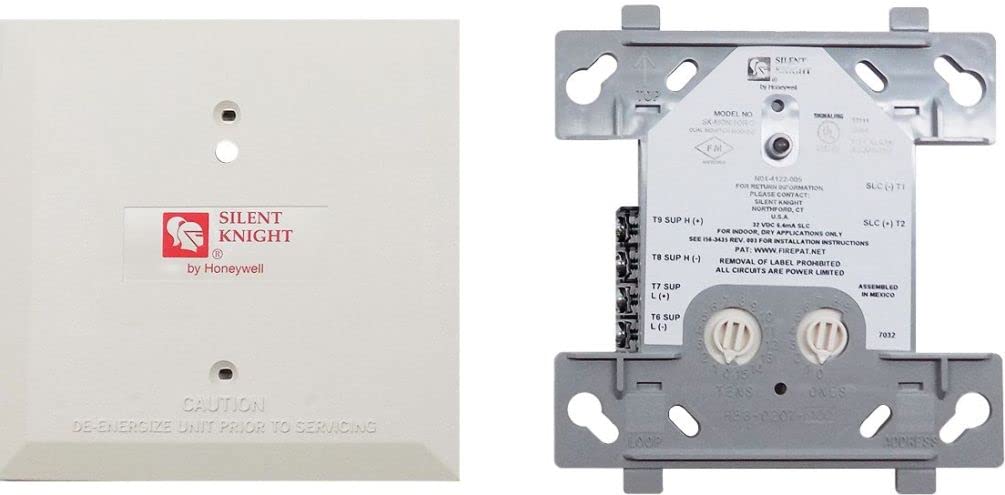
Figure 1: SILENT KNIGHT SK-Monitor Input Monitor Module. This image displays the compact design of the module, highlighting its terminals and rotary switches for addressing.
2. Nodweddion Allweddol
- Single-input contact monitoring: Efficiently monitors a single input contact.
- Class A and Class B compatibility: Supports both supervised wiring configurations for versatile installation.
- Fully supervised operation: Ensures continuous reliability and system integrity.
- Status controlled by fire alarm panel: Direct communication and control from the main fire alarm panel.
- Dangosydd LED: Provides visual status feedback; flashes green for normal operation, solid red during an alarm condition.
- SEMS screws: Facilitates simplified and secure wiring connections.
- Rotary addressing: Allows for quick and straightforward address setup in the field.
3. Gosod a Gosod
3.1 Addressing the Module
- Locate the integrated rotary switches on the module.
- Using a small screwdriver, set the desired unique address for the module. Refer to your fire alarm control panel's documentation for available address ranges and assignment procedures.
- Ensure the address is correctly set and matches the system's programming.
3.2 Gwifro Cysylltiadau
The SK-Monitor module utilizes SEMS screws for wiring connections. Ensure all power to the fire alarm control panel and SLC loop is disconnected before making any connections.
- SLC Loop Connection: Connect the two-wire SLC loop to the designated terminals on the module. Observe polarity.
- Cysylltiad Dyfais Mewnbwn: Connect the supervised input device (e.g., contact closure, four-wire smoke detector) to the module's input terminals.
- Class A vs. Class B: For Class A wiring, ensure the SLC loop returns to the control panel. For Class B, the loop terminates at the last device. Consult local codes and system requirements for proper configuration.
- Four-Wire Smoke Detectors: When supervising four-wire smoke detectors, ensure the detector's power supply is correctly wired and that its alarm and trouble outputs are connected to the module's input.
After all connections are made, secure the module within its intended enclosure. Restore power to the fire alarm control panel and verify module operation.
4. Cyfarwyddiadau Gweithredu
Once installed and powered, the SK-Monitor module operates under the control of the fire alarm control panel. Its primary function is to monitor the status of the connected input device and report changes to the panel.
4.1 Statws Dangosydd LED
- LED Gwyrdd sy'n fflachio: Indicates normal operation. The module is communicating correctly with the fire alarm control panel, and the monitored input is in its normal state.
- LED coch solet: Indicates an alarm condition. The monitored input device has activated (e.g., smoke detector in alarm, contact closure activated), and the module has reported this to the control panel.
Any other LED behavior or lack of illumination may indicate a fault or wiring issue.
5. cynnal
The SK-Monitor module is designed for reliable, low-maintenance operation. Regular maintenance should focus on the overall fire alarm system and the connected input devices.
- Profi System: Conduct periodic tests of the entire fire alarm system, including the SK-Monitor module and its connected devices, as per local codes and manufacturer recommendations.
- Archwiliad gweledol: Periodically inspect the module for any visible damage, loose connections, or environmental factors that could affect its performance.
- Glanhau: If necessary, gently clean the module's exterior with a soft, dry cloth. Do not use abrasive cleaners or solvents.
- Diweddariadau Cadarnwedd: Any firmware updates for the fire alarm control panel may require verification of module compatibility. Consult your system integrator or SILENT KNIGHT technical support.
6. Datrys Problemau
If the SK-Monitor module is not functioning as expected, consider the following troubleshooting steps:
| Symptomau | Achos Posibl | Gweithred |
|---|---|---|
| Module LED is off | No power from SLC loop; wiring error; module fault | Check SLC loop wiring and power; verify module address; replace module if faulty. |
| Module LED is solid green (not flashing) | Module not communicating with panel; address conflict | Verify module address is unique; check SLC loop integrity; consult panel manual. |
| Panel reports trouble for module | Wiring fault on input device; device fault; module fault | Inspect input device wiring; test input device; replace module if necessary. |
| Module LED is solid red, but no alarm | Input device stuck in alarm; wiring short on input | Check input device status; inspect input wiring for shorts; reset panel. |
For persistent issues, contact qualified fire alarm technicians or SILENT KNIGHT technical support.
7. manylebau
- Brand: MARWOL DAW
- Model: SK-Monitor
- ASIN: B0892X73FD
- GTIN/UPC: 767571884377
- Cydnawsedd: Honeywell Silent Knight Series fire alarm control panels
- Cyfluniadau Gwifrau: Class A and Class B supervised
- Input Monitoring: Single-input contact monitoring, conventional four-wire smoke detectors
- Cyfeiriad: Switsys Rotari
- Dangosydd: LED (Flashing Green: Normal, Solid Red: Alarm)
- Gwneuthurwr: MARWOL DAW
8. Gwarant a Chefnogaeth
For specific warranty information regarding the SILENT KNIGHT SK-Monitor Input Monitor Module, please refer to the documentation provided with your purchase or contact your authorized SILENT KNIGHT distributor.
SILENT KNIGHT is committed to providing quality products and support. For technical assistance, product inquiries, or customer service, please reach out to your local SILENT KNIGHT representative or visit the official SILENT KNIGHT websafle ar gyfer gwybodaeth cyswllt.


