
1. Rhagymadrodd
Diolch am brynuasing the SOWO Q16 Bluetooth 5.0 Portable Speaker. This manual provides essential information for setting up, operating, and maintaining your device. Please read it thoroughly before use to ensure optimal performance and longevity of your speaker.
2. Cynnwys Pecyn
Gwiriwch fod yr holl eitemau a restrir isod wedi'u cynnwys yn eich pecyn:
- SOWO Q16 Portable Bluetooth Speaker
- Cebl Codi Tâl Micro USB
- Cebl Sain AUX
- Llawlyfr Defnyddiwr (y ddogfen hon)
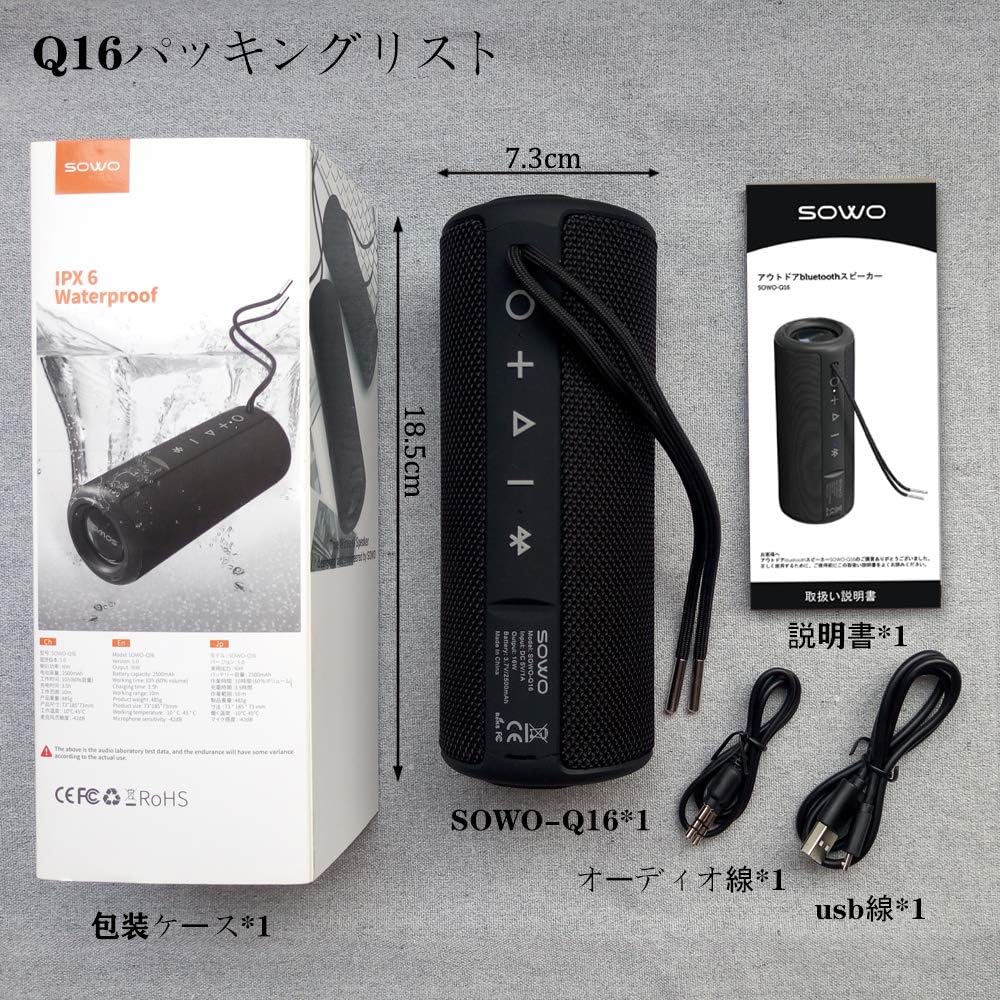
3. Cynnyrch Drosview
The SOWO Q16 is a versatile portable speaker designed for various audio needs. It features Bluetooth 5.0 connectivity, FM radio, MP3 playback via microSD card, and AUX input. The speaker is also IPX6 waterproof, making it suitable for outdoor use.
Nodweddion Allweddol:
- Bluetooth 5.0 ar gyfer cysylltiad diwifr sefydlog
- Enhanced bass and clear sound output
- IPX6 Waterproof, dustproof, and shock-resistant design
- FM Radio (87.5MHz - 108MHz)
- MicroSD (TF Card) slot for MP3 playback
- Mewnbwn AUX ar gyfer cysylltiadau gwifrau
- Meicroffon adeiledig ar gyfer galwadau di-dwylo
- Swyddogaeth Stereo Di-wifr Gwir (TWS) ar gyfer paru dau siaradwr
- Hyd at 16 awr o chwarae parhaus


4. Gosod
4.1 Gwefru'r Siaradwr
Before first use, fully charge the speaker. Connect the Micro USB charging cable to the speaker's charging port and the other end to a USB power adapter (not included) or a computer's USB port. The charging indicator light will illuminate during charging and turn off when fully charged.
4.2 Pŵer Ymlaen/Diffodd
- Pŵer Ymlaen: Press and hold the Power button for approximately 3 seconds. You will hear an audible prompt.
- Pwer i ffwrdd: Press and hold the Power button for approximately 3 seconds. You will hear an audible prompt.
4.3 Pâr Bluetooth
- Gwnewch yn siŵr bod y siaradwr wedi'i bweru ymlaen ac yn y modd paru Bluetooth (a nodir gan LED sy'n fflachio).
- Ar eich dyfais (ffôn clyfar, tabled, gliniadur), galluogwch Bluetooth a chwiliwch am ddyfeisiau sydd ar gael.
- Select "SOWO Q16" from the list of devices.
- Ar ôl paru, bydd y siaradwr yn allyrru cadarnhad clywadwy, a bydd y dangosydd LED yn rhoi'r gorau i fflachio.
5. Cyfarwyddiadau Gweithredu
5.1 Swyddogaethau Botwm
The speaker features several control buttons. Refer to the product diagram for exact locations.
- Botwm Pŵer: Press and hold to power on/off. Short press to switch modes (Bluetooth, FM, MicroSD, AUX).
- Botwm Chwarae/Seibiant: Short press to play or pause music. In call mode, short press to answer/end a call. Press and hold to reject a call.
- Cyfrol i Fyny (+): Short press to increase volume. Press and hold for next track (in music modes) or next station (in FM mode).
- Cyfrol i Lawr (-): Short press to decrease volume. Press and hold for previous track (in music modes) or previous station (in FM mode).
5.2 Modd Bluetooth
After successful pairing, your speaker will automatically connect to the last paired device when powered on. Play music from your connected device, and control playback using the speaker's buttons or your device.
Modd Radio 5.3 FM
- Short press the Power button to switch to FM Radio mode.
- Press the Play/Pause button to automatically scan and save available FM stations.
- Defnyddiwch y botymau Cyfaint i Fyny (+) a Cyfaint i Lawr (-) (pwyswch yn hir) i lywio rhwng gorsafoedd sydd wedi'u cadw.

5.4 MicroSD (TF Card) Mode
Mewnosodwch gerdyn MicroSD (TF) gyda sain MP3 files into the designated slot. The speaker will automatically switch to MicroSD mode and begin playing music. Use the Play/Pause and Volume buttons to control playback.
5.5 Modd AUX
Connect one end of the AUX audio cable to the speaker's AUX input port and the other end to the audio output of your device (e.g., laptop, MP3 player). The speaker will automatically switch to AUX mode. Control playback from your connected device.
5.6 Swyddogaeth Galwadau
When connected via Bluetooth to a smartphone, the speaker can be used for hands-free calls:
- Ateb Galwad: Pwyswch y botwm Chwarae/Saib yn fyr.
- Galwad Diwedd: Pwyswch y botwm Chwarae/Saib yn fyr.
- Gwrthod Galwad: Pwyswch a dal y botwm Chwarae/Saib.
Paru Stereo Di-wifr Gwirioneddol 5.7 (TWS)
To achieve a stereo sound experience, you can pair two SOWO Q16 speakers together:
- Ensure both speakers are powered off and not connected to any Bluetooth device.
- Power on both speakers. They will enter Bluetooth pairing mode.
- On one of the speakers, double-press the Power button. The speakers will attempt to pair with each other.
- Once successfully paired, you will hear an audible confirmation. The LED indicator on one speaker will flash (master), and the other will be solid (slave).
- Now, connect your device to the master speaker via Bluetooth as described in section 4.3. Both speakers will play audio in stereo.


6. cynnal
- Glanhau: Defnyddiwch frethyn meddal, sych i lanhau wyneb y siaradwr. Peidiwch â defnyddio glanhawyr sgraffiniol na thoddyddion.
- Amlygiad Dŵr: While the speaker is IPX6 waterproof, avoid prolonged submersion. Ensure charging port covers are securely closed before exposing to water.
- Storio: Storiwch y siaradwr mewn lle oer, sych i ffwrdd o olau haul uniongyrchol a thymheredd eithafol.
- Gofal Batri: I ymestyn oes y batri, gwefrwch y siaradwr yn rheolaidd, hyd yn oed os nad yw'n cael ei ddefnyddio'n aml. Osgowch ollwng y batri'n llwyr am gyfnodau hir.
7. Datrys Problemau
| Problem | Achos Posibl | Ateb |
|---|---|---|
| Nid yw'r siaradwr yn troi ymlaen. | Batri isel. | Codi tâl ar y siaradwr gan ddefnyddio'r cebl USB a ddarperir. |
| Methu paru drwy Bluetooth. | Speaker is not in pairing mode or already connected to another device. Device's Bluetooth is off. | Ensure speaker is in pairing mode. Disconnect from other devices. Enable Bluetooth on your device. |
| Dim sain. | Volume too low. Incorrect mode selected. Device not playing audio. | Increase speaker and device volume. Ensure correct mode (Bluetooth, AUX, MicroSD) is selected. Check audio playback on your device. |
| Mae derbyniad radio FM yn wael. | Signal gwan. | Move the speaker to a location with better signal reception. |
| Ni adnabyddir cerdyn microSD. | Card inserted incorrectly. Unsupported file format. Corrupted card. | Ail-osodwch y cerdyn. Gwnewch yn siŵr files are in MP3 format. Try a different MicroSD card. |
8. manylebau
| Nodwedd | Manylyn |
|---|---|
| Brand | SOWO |
| Rhif Model | C16 |
| Technoleg Cysylltedd | Bluetooth 5.0, AUX, MicroSD (TF Card), USB (for charging) |
| Math Mowntio | Mynydd Pen bwrdd |
| Deunydd | Plastig |
| Math o Siaradwr | Awyr Agored, Cludadwy |
| Defnyddiau a Argymhellir | Computer, TV, Mobile Devices |
| Lliw | Du |
| Graddfa dal dwr | IPX6 |
| Dull Rheoli | Botymau |
| Diamedr Gyrrwr | 40 mm |
| Bywyd Batri (Cyfartaledd) | Hyd at 16 awr |
| Dyfeisiau Cydnaws | iPhone, iPad, MP3 Players, Laptops, Android devices |
| Ffynhonnell Pwer | Batri (Wefru USB) |
| Math Batri | 1 Lithium Ion Battery (Included) |
| Pwysau Cynnyrch | 540 gram |
9. Gwarant a Chefnogaeth
SOWO products are designed and manufactured to the highest quality standards. For warranty information or technical support, please refer to the contact details provided with your purchase documentation or visit the official SOWO websafle. Cadwch eich prawf prynu ar gyfer hawliadau gwarant.