
1. Rhagymadrodd
This manual provides detailed instructions for the installation, operation, and maintenance of your Axis Communications M3064-V Mini Dome Camera. This camera is designed for indoor surveillance, offering HDTV 720p video quality, dust resistance, and IK08 impact protection. Please read this manual thoroughly before using the product to ensure proper functionality and safety.
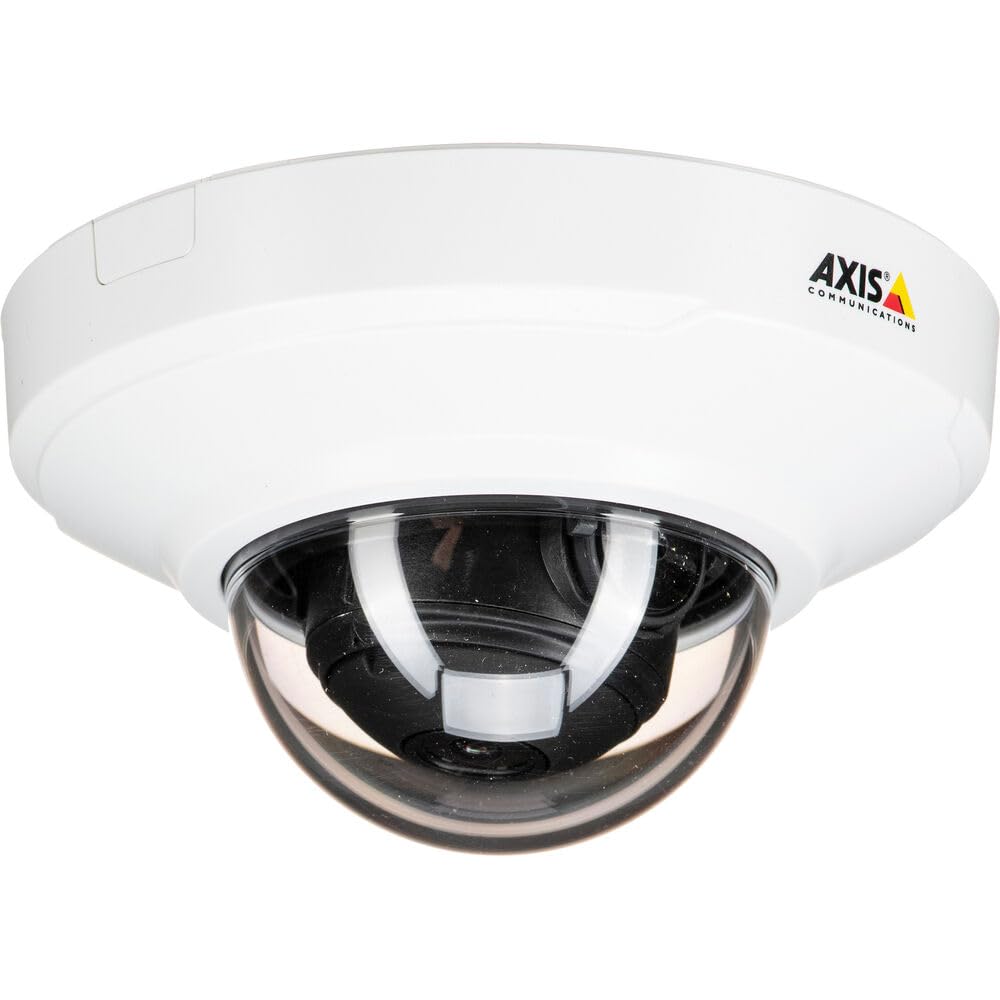
Ffigur 1: Blaen view of the Axis M3064-V Mini Dome Camera. This image shows the compact dome design suitable for discreet indoor surveillance.
2. Gwybodaeth Diogelwch
- Cyflenwad Pŵer: Use only the specified power supply (AC/DC, 220 Volts, 1.6 Watts) to prevent damage or fire.
- Gosod: Installation should be performed by qualified personnel and comply with all local electrical codes. Ensure the mounting surface can support the camera's weight.
- Amgylchedd: This camera is designed for indoor use. While dust-resistant and IK08 rated, avoid exposing it to extreme temperatures, direct water spray, or corrosive substances.
- Glanhau: Datgysylltwch y pŵer cyn glanhau. Defnyddiwch frethyn meddal, sych. Peidiwch â defnyddio glanhawyr hylif na glanhawyr aerosol.
- Gwasanaethu: Peidiwch â cheisio gwasanaethu'r cynnyrch hwn eich hun. Cyfeiriwch yr holl wasanaethu at bersonél gwasanaeth cymwys.
3. Cynnwys Pecyn
Verify that all items are present in the package. If any items are missing or damaged, contact your supplier.
- Axis M3064-V Mini Dome Camera (1 unit)
- Canllaw Gosod
- Braced Mowntio
- Sgriwiau Mowntio a Phlygiau Wal
- Resistorx L-key
4. Gosod a Gosod
4.1 Mowntio'r Camera
The Axis M3064-V camera can be mounted on a ceiling or wall. Ensure the mounting surface is stable and can support the camera's weight.
- Paratoi'r Arwyneb: Choose a suitable location. Use the mounting bracket as a template to mark drill holes.
- Tyllau Dril: Drill pilot holes for the mounting screws. Insert wall plugs if necessary.
- Atodwch y braced: Secure the mounting bracket to the surface using the provided screws.
- Ceblau Cyswllt: Route the network cable (wired connectivity) through the bracket and connect it to the camera's Ethernet port.
- Atodwch y Camera: Secure the camera body to the mounting bracket. Ensure it clicks into place or is fastened according to the specific bracket design.

Figure 2: Illustrative diagram of the camera mounting process on a ceiling. This shows the steps from marking holes to securing the camera.
4.2 Powering On and Network Connection
- Cysylltiad â gwifrau: Connect an Ethernet cable from your network switch or router to the camera's Ethernet port. The camera supports Power over Ethernet (PoE), simplifying power delivery.
- Cysylltiad Wi-Fi: The camera supports Wi-Fi connectivity. After initial wired setup, you can configure wireless settings via the camera's web rhyngwyneb.
- Cyflenwad Pŵer: If not using PoE, connect a compatible AC/DC power adapter (220V, 1.6W) to the camera's power input.
- Mynediad Cychwynnol: Once powered, the camera will obtain an IP address from your network (DHCP). Use an Axis IP Utility tool or your network router's client list to find the camera's IP address.
5. Cyfarwyddiadau Gweithredu
5.1 Accessing the Camera Interface
Agor a web browser (e.g., Chrome, Firefox) and enter the camera's IP address in the address bar. You will be prompted to create a new password for the root user upon first access. Follow the on-screen instructions.
5.2 Byw View and Video Settings
- Byw View: The main interface provides a live video feed. You can adjust the viewing angle remotely if the camera supports pan/tilt/zoom (PTZ) functions, though this model features a fixed dome with 3x optical zoom.
- Penderfyniad: The camera supports HDTV 720p video capture resolution. You can configure streaming profiles for different quality and frame rate needs.
- Gweledigaeth Nos: The camera includes Night Color functionality, providing enhanced visibility in low-light conditions. This feature can be configured in the image settings.
- Chwyddo Optegol: Utilize the 3x optical zoom feature through the web interface to focus on specific areas within the 83-degree viewongl ing.
5.3 Cofnodi a Storio
The camera supports various recording options:
- Edge Storage: The camera has 128 GB of flash memory installed for local recording. Insert a compatible microSD card (not included) for additional storage.
- Recordydd Fideo Rhwydwaith (NVR): Integrate the camera with an NVR or video management system (VMS) for centralized recording and management.
- Recordio yn Seiliedig ar Ddigwyddiadau: Configure motion detection or other event triggers to start recording, saving storage space.
6. cynnal
6.1 Glanhau'r Camera
Regular cleaning helps maintain optimal image quality.
- Pwer i ffwrdd: Always disconnect the camera from its power source before cleaning.
- Lens: Gently wipe the lens cover with a soft, lint-free cloth. For stubborn dirt, slightly dampen the cloth with water or a mild lens cleaning solution. Avoid abrasive materials.
- Tai: Wipe the camera housing with a soft, dry cloth. Do not use strong detergents or solvents.
6.2 Diweddariadau Firmware
Periodically check the Axis Communications website for firmware updates. Keeping your camera's firmware up-to-date ensures optimal performance, security, and access to new features. Follow the instructions provided with the firmware update package.
7. Datrys Problemau
| Problem | Achos Posibl | Ateb |
|---|---|---|
| Camera ddim yn pweru ymlaen | No power supply; Faulty PoE switch/injector; Damaged cable. | Check power connection. Verify PoE functionality. Test with a different Ethernet cable or power adapter. |
| Dim porthiant fideo | Network connectivity issue; Incorrect IP address; Firewall blocking access; Camera not configured. | Verify network connection. Confirm camera's IP address. Check firewall settings. Ensure camera is properly configured via its web rhyngwyneb. |
| Ansawdd delwedd wael | Lens budr; Ffocws anghywir; Amodau golau isel; Problemau lled band rhwydwaith. | Clean the lens. Adjust focus settings in the web interface. Ensure adequate lighting or verify Night Color settings. Check network bandwidth. |
| Methu cyrchu web rhyngwyneb | Incorrect IP address; Network issue; Browser compatibility. | Confirm IP address. Ping the camera's IP. Try a different web porwr. Clirio storfa'r porwr. |
8. manylebau
| Nodwedd | Manylyn |
|---|---|
| Enw Model | M3064-V |
| Rhif Model | 01716-001 |
| Brand | Cyfathrebu Echel |
| Ffactor Ffurf | Cromen |
| Technoleg Cysylltedd | Gwifrau, Wi-Fi |
| Datrysiad Dal Fideo | 720p (HDTV) |
| Datrysiad llonydd effeithiol | 64 MP (Note: This might refer to sensor resolution, actual video output is 720p) |
| Datrysiad Synhwyrydd Ffotograffau | 5 AS |
| Viewongl ing | 83 Gradd |
| Chwyddo Optegol | 3x |
| Gweledigaeth y Nos | Lliw Nos |
| Graddfa dal dwr | IP42 (Dust-resistant) |
| Diogelu Effaith | IK08 |
| Ffynhonnell Pwer | AC/DC, PoE |
| Cyftage | 220 folt |
| Wattage | 1.6 Wat |
| Cof Flash Wedi'i Gosod Maint | 128 GB |
| Dimensiynau Eitem (LxWxH) | 3.98 x 3.98 x 2.2 modfedd |
| Pwysau Eitem | 150 gram |
| Lliw | Du/Gwyn |
9. Gwarant a Chefnogaeth
9.1 Gwarant Cynnyrch
Axis Communications products typically come with a limited manufacturer's warranty. Please refer to the warranty card included with your product or visit the official Axis Communications website for detailed warranty terms and conditions specific to the M3064-V model. Keep your proof of purchase for warranty claims.
9.2 Cefnogaeth Dechnegol
For technical assistance, troubleshooting beyond this manual, or service inquiries, please contact Axis Communications customer support. You can find contact information, FAQs, and additional resources on the official Axis Communications support website. When contacting support, please have your product model number (M3064-V or 01716-001) and serial number ready.
Adnoddau Ar-lein: www.axis.com/support