
1. Rhagymadrodd
Thank you for choosing the SUNSHINE P-1503T Analog Power Supply. This manual provides essential information for the safe and efficient operation, setup, maintenance, and troubleshooting of your device. Please read this manual thoroughly before using the product and keep it for future reference.
The SUNSHINE P-1503T is a versatile 15-volt, 3-amp analog power supply designed primarily for mobile phone maintenance. It features touch-sensitive controls and includes two USB ports for convenient mobile testing and charging.
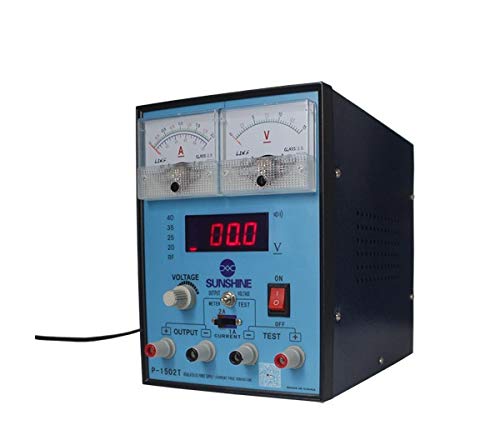
Ffigur 1: Blaen view of the SUNSHINE P-1503T Analog Power Supply. This image shows the device's display, control knobs, and output terminals, including the two USB ports.
2. Gwybodaeth Diogelwch
RHYBUDD: Gall methu â dilyn y cyfarwyddiadau diogelwch hyn arwain at sioc drydanol, tân neu anaf difrifol.
- Cysylltwch y cyflenwad pŵer â soced drydanol wedi'i seilio bob amser.
- Peidiwch â gweithredu'r ddyfais mewn gwlyb neu damp amodau.
- Sicrhewch awyru priodol i atal gorboethi. Peidiwch â rhwystro agoriadau awyru.
- Peidiwch ag agor y casing of the power supply. There are no user-serviceable parts inside. Refer all servicing to qualified personnel.
- Avoid touching output terminals when the device is powered on.
- Disconnect the power cord from the outlet before cleaning or if the device will not be used for an extended period.
- Use only the specified input voltage (15 Volts) as indicated on the device.
3. Gosod
3.1 Dadbacio
- Carefully remove the power supply from its packaging.
- Inspect the device for any signs of damage during transit. If damaged, do not use and contact your supplier.
- Ensure all accessories are present (e.g., power cord, test leads if included).
3.2 Cysylltu â Phwer
- Place the power supply on a stable, level surface with adequate ventilation.
- Connect the provided power cord to the power input socket on the rear of the device.
- Plygiwch ben arall y llinyn pŵer i mewn i soced drydanol wedi'i seilio addas.
4. Cyfarwyddiadau Gweithredu
4.1 Pweru Ymlaen/Diffodd
- To power on the device, press the power switch located on the front panel. The display will illuminate.
- To power off, press the power switch again.
4.2 Adjusting Output
The P-1503T is an analog power supply, typically meaning voltage and current are set via rotary knobs.
- Defnyddiwch y Cyftage Blynn Addasiad to set the desired output voltage. Monitor the voltage arddangos.
- Defnyddiwch y Knob Addasiad Presennol to set the desired current limit. Monitor the current display.
- The device emits a sound upon touch, indicating interaction with its controls.
4.3 Defnyddio Porthladdoedd USB
The power supply features two USB ports on the front panel:
- USB Port 1 (Mobile Testing): Connect a mobile device here for diagnostic purposes. This port is designed to provide stable power for testing mobile phone circuits.
- USB Port 2 (Mobile Charging): Connect a mobile device here for charging. This port delivers power suitable for recharging mobile phone batteries.
Note: Always ensure the output voltage and current settings are appropriate for the device being connected to prevent damage.
5. cynnal
5.1 Glanhau
- Ensure the power supply is turned off and disconnected from the main power outlet before cleaning.
- Defnyddiwch lliain meddal, sych i sychu tu allan y ddyfais.
- Do not use liquid cleaners, aerosols, or solvents, as these may damage the casing neu gydrannau mewnol.
- Keep ventilation openings clear of dust and debris.
5.2 Storio
Pan nad yw'n cael ei ddefnyddio, storiwch y cyflenwad pŵer mewn lle oer, sych, i ffwrdd o olau haul uniongyrchol a thymheredd eithafol.
6. Datrys Problemau
| Problem | Achos Posibl | Ateb |
|---|---|---|
| Nid yw'r ddyfais yn pweru ymlaen. |
|
|
| Dim allbwn cyftage / cyfredol. |
|
|
| USB ports not working. |
|
|
7. manylebau
| Nodwedd | Manylyn |
|---|---|
| Brand | HAUL |
| Model | P-1503T |
| Dyfeisiau Cydnaws | Ffôn Symudol |
| Math o Gysylltydd | ATX |
| Ffactor Ffurf | ATX |
| Dull Oeri | Awyr |
| Uchafswm Mewnbwn Voltage | 15 folt |
| Isafswm Mewnbwn Cyftage | 15 folt |
| Gwneuthurwr | HAUL |
| System Bus Connector Type | Cysylltydd 2 |
| Ffynhonnell Pwer | Allanol |
| ASIN | B0847QS2FX |
8. Gwarant a Chefnogaeth
This product is covered by a standard manufacturer's warranty. Please refer to the warranty card included with your purchase for specific terms and conditions. For technical support, service, or warranty claims, please contact your retailer or the manufacturer directly.
For the latest information and support, please visit the official SUNSHINE websafle (os yw ar gael).