
1. Rhagymadrodd
The Aerocool LUXPRO550 is a 550W power supply unit designed for desktop computers, offering reliable and efficient power delivery. This unit is 80 Plus 230V EU Bronze certified, ensuring over 88% efficiency. It features high-quality 105°C Japanese capacitors and a 14cm FDB fan for enhanced durability and optimized thermal performance. This manual provides essential information for the safe and correct installation, operation, and maintenance of your LUXPRO550 power supply.

Image 1.1: The Aerocool LUXPRO550 Power Supply Unit, highlighting its high efficiency and 80 Plus Bronze certification.
2. Rhagofalon Diogelwch
- Always disconnect the power cord from the wall outlet before installing or removing the power supply.
- Peidiwch ag agor y cyflenwad pŵer casing. Cyfaint ucheltagmae yna bethau y tu mewn, a all achosi sioc drydanol.
- Sicrhewch sylfaen gywir i atal peryglon trydanol.
- Gosodwch y cyflenwad pŵer mewn ardal sydd wedi'i hawyru'n dda, i ffwrdd o ffynonellau gwres a lleithder.
- Defnyddiwch y ceblau a ddarperir gyda'r cyflenwad pŵer yn unig.
- Mae'r cynnyrch hwn wedi'i gynllunio i'w ddefnyddio mewn systemau cyfrifiadurol yn unig. Peidiwch â'i ddefnyddio at unrhyw ddiben arall.
3. Canllaw Gosod
The LUXPRO550 power supply supports all Intel ATX12V formats and features flat, black cables for optimized internal airflow and ease of installation.
3.1. Paratoi ar gyfer Gosod
- Turn off your computer and disconnect the power cord from the wall outlet.
- Open your computer case. Refer to your computer case manual for specific instructions.
- Os ydych chi'n disodli cyflenwad pŵer presennol, datgysylltwch yr holl geblau o'r hen PSU a'i dynnu o'r cas.
3.2. Gosod y Cyflenwad Pwer
- Carefully place the LUXPRO550 into the power supply bay of your computer case.
- Secure the power supply to the case using the provided screws.
- Connect the 20+4 pin ATX motherboard power connector to your motherboard.
- Connect the 4+4 pin CPU power connector to your motherboard.
- Connect SATA power connectors to your storage drives (HDDs, SSDs) and optical drives.
- Connect PCIe 6+2 pin connectors to your graphics card(s) if required.
- Connect any other peripheral connectors (e.g., Molex) as needed for case fans or other components.
- Ensure all connections are secure. Use cable ties to manage cables for better airflow.
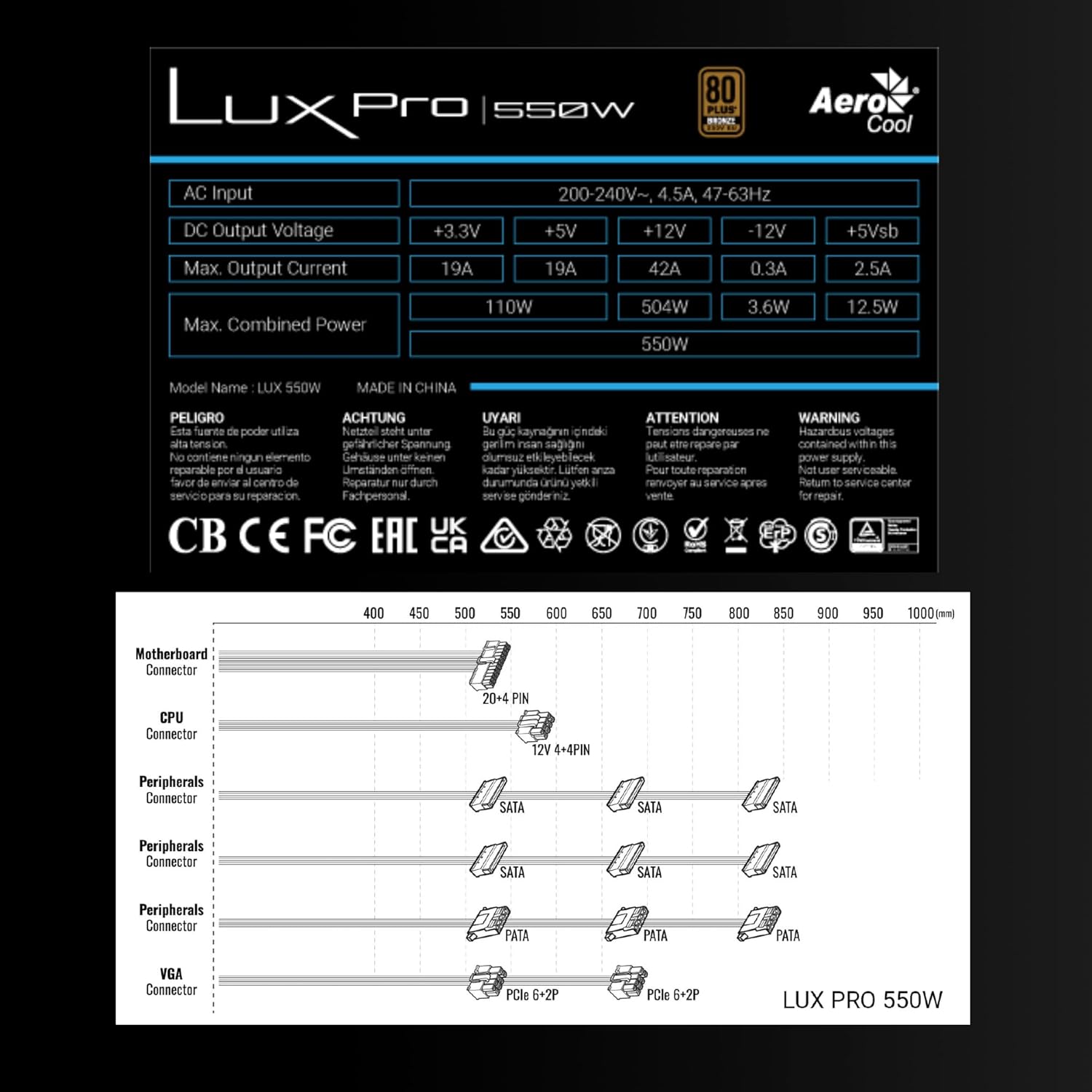
Image 3.1: Connector types and lengths for the LUXPRO550 power supply. This diagram illustrates the available connectors including Motherboard (20+4 PIN), CPU (12V 4+4 PIN), Peripherals (SATA, PATA), and VGA (PCIe 6+2 PIN).
3.3. Camau Terfynol
- Caewch eich achos cyfrifiadur.
- Cysylltwch y llinyn pŵer AC â'r cyflenwad pŵer ac yna i allfa wal.
- Trowch y switsh pŵer ar gefn y PSU i'r safle 'ON'.
- Pŵer ar eich cyfrifiadur.
4. Cyfarwyddiadau Gweithredu
The Aerocool LUXPRO550 is designed for continuous and stable operation once correctly installed. Its 80 Plus Bronze certification ensures high energy efficiency, reducing power consumption and heat generation.
4.1. Active PFC Technology
The integrated Active Power Factor Correction (APFC) technology ensures efficient and reliable power distribution, contributing to overall system stability and energy savings.
4.2. Gweithrediad y Ffan
The 14cm FDB (Fluid Dynamic Bearing) fan features optimized thermal speed control. It operates silently, starting at less than 700 RPM, and only increases speed as the load approaches 40% at ambient temperatures of 25°C, ensuring quiet operation under typical loads.

Image 4.1: The 14cm FDB fan of the LUXPRO550, illustrating its optimized thermal speed control for efficient cooling.
5. cynnal
The LUXPRO550 is built with high-quality components, including 105°C Japanese capacitors, designed for maximum reliability and a long operational lifespan with minimal maintenance.

Image 5.1: High-quality 105°C Japanese capacitors, contributing to the power supply's reliability and extended lifespan.
5.1. Gofal Cyffredinol
- Keep the power supply and computer case free from dust. Dust accumulation can hinder cooling and reduce efficiency.
- Use compressed air to gently clean the fan and ventilation grilles periodically. Ensure the computer is powered off and unplugged before cleaning.
- Do not obstruct the airflow around the power supply.
No user-serviceable parts are inside. Do not attempt to open or repair the unit yourself.
6. Datrys Problemau
If you encounter issues with your LUXPRO550 power supply, please follow these basic troubleshooting steps:
- Dim pŵer:
- Gwnewch yn siŵr bod y llinyn pŵer AC wedi'i gysylltu'n ddiogel â'r cyflenwad pŵer a'r soced wal.
- Gwiriwch fod y switsh pŵer ar gefn y PSU yn y safle 'ON'.
- Gwiriwch fod y soced wal yn gweithio drwy blygio dyfais arall i mewn.
- System Ddim yn Cychwyn:
- Double-check all power connections to the motherboard, CPU, graphics card, and storage devices.
- Ensure all components are properly seated in their slots.
- If possible, test the power supply with another known working system or test another power supply with your system to isolate the issue.
- Sŵn Anarferol:
- A slight hum is normal. If you hear grinding or loud fan noises, ensure the fan is not obstructed by cables or dust.
- If the noise persists, contact customer support.
If these steps do not resolve the issue, please contact Aerocool customer support or your retailer for further assistance. Do not attempt to repair the unit yourself.
7. manylebau
| Nodwedd | Manyleb |
|---|---|
| Enw Model | LUXPRO550 |
| Brand | AeroCool |
| Wattage | 550 Wat |
| Ardystiad Effeithlonrwydd | 80 Plus Bronze 230V EU (over 88% efficiency) |
| Ffactor Ffurf | ATX |
| Cynwysorau | Japanese 105°C |
| Math o Fan | 14cm FDB (Fluid Dynamic Bearing) with thermal speed control |
| PFC | PFC Gweithredol |
| Dimensiynau (LxWxH) | 16 x 15 x 8.5 cm |
| Pwysau | 1.4 kg |
| Dyfeisiau Cydnaws | PC |
7.1. DC Allbwn Voltage Tabl
The following table details the DC output voltages and maximum currents for the LUXPRO550:
| Allbwn DC Voltage | +3.3V | +5V | +12V | -12V | +5Vsb |
|---|---|---|---|---|---|
| Max. Allbwn Cyfredol | 19A | 19A | 42A | 0.3A | 2.5A |
| Max. Pwer Cyfun | 110W | 504W | 3.6W | 12.5W | |
| Total Combined Power | 550W | ||||
8. Gwarant a Chefnogaeth
8.1. Gwybodaeth Gwarant
The Aerocool LUXPRO550 power supply comes with an extended Gwarant 5 mlynedd, reflecting its high reliability and the quality of its components, such as the 105°C Japanese capacitors.
Cadwch eich prawf prynu ar gyfer hawliadau gwarant.
8.2. Cefnogaeth i Gwsmeriaid
For technical assistance, warranty claims, or any questions regarding your Aerocool LUXPRO550 power supply, please contact Aerocool customer support through their official website or your local retailer.
Do not attempt to open or repair the power supply unit, as this will void the warranty.