
Ancel X6
Ancel X6 Car Diagnostic Tool User Manual
Model: X6 | Brand: Ancel
1. Rhagymadrodd
The Ancel X6 is a professional-grade car diagnostic and inspection device designed to help automotive technicians and enthusiasts accurately identify and resolve vehicle issues. This comprehensive tool combines advanced diagnostic capabilities with a user-friendly interface, running on an Android 7.0 tablet system. It offers extensive vehicle compatibility, supporting a wide range of American, European, Asian, Australian, and Chinese car brands.
Key features include a vibrant 10.1-inch display, a long-lasting 6000 mAh Lithium Polymer battery, and versatile connectivity options such as Bluetooth and Wi-Fi. The Ancel X6 provides multi-language support for its diagnostic program, including English and Arabic, ensuring a fast and responsive user experience. It also boasts free and permanent software updates, accessible via a convenient one-click online update feature, keeping your device up-to-date with the latest vehicle data and diagnostic functions.
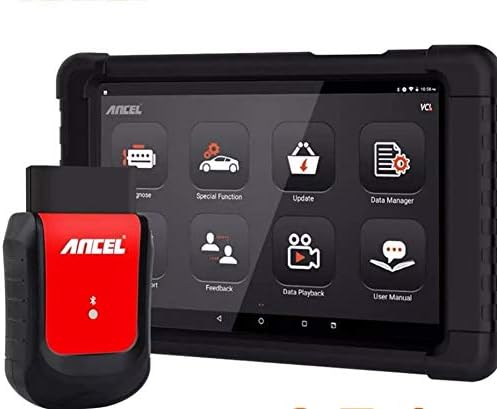
Figure 1: Ancel X6 Car Diagnostic Tool. The image displays the Ancel X6 car diagnostic tool, consisting of a black tablet with a 10.1-inch screen and a red and black OBD2 connector. The tablet screen shows various application icons including Diagnose, Special Function, Update, Data Manager, Feedback, Data Playback, and User Manual. The OBD2 connector has the 'ANCEL' logo prominently displayed.
2. Gosod a Defnydd Cychwynnol
2.1 Dadbacio ac Archwilio
Carefully unpack all components from the packaging. Verify that all items listed in the packing list are present and undamaged. If any items are missing or damaged, contact customer support immediately.
2.2 Codi Tâl ar y Dyfais
Before first use, fully charge the Ancel X6 tablet. Connect the provided power adapter to the charging port on the tablet and plug it into a standard electrical outlet. The charging indicator will illuminate. A full charge typically takes approximately 4-6 hours.
2.3 Pweru Ymlaen/Diffodd
To power on the tablet, press and hold the power button located on the side of the device until the Ancel logo appears on the screen. To power off, press and hold the power button, then select "Power Off" from the options that appear.
2.4 Cysylltu â'r Cerbyd
- Lleolwch borthladd OBD2 y cerbyd, a geir fel arfer o dan y dangosfwrdd ar ochr y gyrrwr.
- Plug the Ancel OBD2 connector firmly into the vehicle's OBD2 port.
- Ensure the Ancel X6 tablet's Bluetooth is enabled. The tablet will automatically attempt to connect to the OBD2 connector. A successful connection is indicated by a solid blue light on the connector and a Bluetooth icon on the tablet's status bar.
2.5 Ffurfweddu Wi-Fi
For software updates and online support, connect the tablet to a Wi-Fi network. Go to Gosodiadau > Rhwydwaith a Rhyngrwyd > Wi-Fi, select your desired network, and enter the password if prompted.
3. Gweithredu'r Dyfais
3.1 Prif Ryngwyneb Drosoddview
Upon powering on, the main interface displays various application icons. These include:
- Diagnosis: For performing vehicle diagnostics, reading/clearing fault codes, and viewing live data.
- Swyddogaeth Arbennig: Accessing various reset and service functions.
- Diweddariad: For downloading and installing the latest software updates.
- Rheolwr Data: Managing saved diagnostic reports, data streams, and screenshots.
- Adborth: Submitting feedback or issues to Ancel support.
- Chwarae Data: Reviewing previously recorded live data streams.
- Llawlyfr Defnyddiwr: Accessing the digital user manual.
3.2 Perfformio Diagnosteg
- From the main interface, tap the Diagnosis eicon.
- Select the vehicle manufacturer, model, and year as prompted.
- Choose the desired diagnostic function (e.g., Read Fault Codes, Clear Fault Codes, Live Data Stream, ECU Information).
- Follow the on-screen instructions to complete the diagnostic process.
3.3 Special Functions (10 Reset Systems)
The Ancel X6 supports 10 common reset and service functions. To access these, tap the Swyddogaeth Arbennig icon. Available functions include, but are not limited to:
- Ailosodiad Olew: Yn ailosod yr atgoffa oes olew ar ôl newid olew.
- Ailosodiad EPB (Brêc Parcio Electronig): Deactivates and reactivates the brake control system for brake pad replacement.
- Ailosod TPMS (System Monitro Pwysedd Teiars): Resets tire pressure sensor IDs.
- Ailosod BMS (System Rheoli Batri): Registers new battery replacement.
- Gwaedu ABS: Performs brake bleeding to restore ABS brake sensitivity.
- Adfywio DPF (Hidlydd Gronynnau Diesel): Yn clirio gronynnau o'r hidlydd DPF.
- Codio Chwistrellwr: Yn codio rhifau chwistrellwyr newydd i'r ECU.
- Calibradiad SAS (Synhwyrydd Ongl Llywio): Yn calibradu'r synhwyrydd ongl llywio.
- Addasiad y Throttle: Yn cychwyn yr actiwadyddion sbardun i'r cyflwr diofyn.
- IMMO (Immobilizer) Key Programming: Programs new keys or remote controls.
Always refer to the specific vehicle's service manual for detailed procedures before performing any special functions.
4. cynnal
4.1 Glanhau'r Dyfais
Defnyddiwch feddal, damp cloth to clean the tablet screen and body. Avoid using abrasive cleaners or solvents that may damage the device. Keep the OBD2 connector free from dirt and debris.
4.2 Diweddariadau Meddalwedd
The Ancel X6 offers free and permanent software updates. To update the software:
- Ensure the tablet is connected to a stable Wi-Fi network.
- Tap y Diweddariad eicon ar y prif ryngwyneb.
- The system will check for available updates. Select the desired updates and tap Lawrlwythwch ac yna Gosod.
- Peidiwch â diffodd y ddyfais yn ystod y broses ddiweddaru.
4.3 Gofal Batri
To prolong battery life, avoid exposing the device to extreme temperatures. Charge the device regularly, even if not in frequent use, to prevent deep discharge. Store the device in a cool, dry place.
5. Datrys Problemau
| Problem | Achos Posibl | Ateb |
|---|---|---|
| Nid yw'r ddyfais yn pweru ymlaen. | Batri isel; Botwm pŵer heb ei wasgu'n ddigon hir. | Gwefrwch y ddyfais; Pwyswch a daliwch y botwm pŵer am 3-5 eiliad. |
| Cannot connect to vehicle. | OBD2 connector not fully inserted; Bluetooth not enabled; Vehicle ignition off. | Ensure connector is firmly seated; Enable Bluetooth on tablet; Turn vehicle ignition to ON position. |
| Methodd diweddariad meddalwedd. | Unstable Wi-Fi connection; Insufficient storage space. | Ensure strong Wi-Fi signal; Clear unnecessary files from device storage. |
| Nid yw'r sgrin yn ymateb. | Gwall meddalwedd dros dro. | Perfformiwch ailgychwyn gorfodol trwy ddal y botwm pŵer am 10 eiliad. |
6. manylebau
| Nodwedd | Manylyn |
|---|---|
| Model | X6 |
| System Weithredu | Android 7.0 |
| Maint Sgrin | 10.1 modfedd |
| Batri | Polymer Lithiwm 6000 mAh |
| Cysylltedd | Bluetooth, WiFi |
| Swyddogaethau â Chymorth | Full System Diagnostics, 10 Reset Functions (Oil, EPB, TPMS, BMS, ABS, DPF, Injector, SAS, Throttle, IMMO) |
| Diweddariadau Meddalwedd | Free and Permanent Online Updates |
| Dimensiynau (tua) | 146.9 x 146.65 x 146.39 mm |
| Pwysau (tua) | 2.5 kg |
| Rhif Rhan Gwneuthurwr | 706370621 |
7. Gwarant a Chefnogaeth
Ancel provides free and permanent software updates for the X6 diagnostic tool, ensuring your device remains compatible with the latest vehicle models and diagnostic protocols. For technical assistance, troubleshooting, or any inquiries, please utilize the Adborth function within the device's main interface to contact Ancel support directly. You can also visit the official Ancel websafle ar gyfer adnoddau ychwanegol a gwybodaeth gyswllt.
For warranty details, please refer to the warranty card included with your product or visit the official Ancel websafle. Cadwch eich derbynneb prynu fel prawf o brynu ar gyfer hawliadau gwarant.
Ask a question about this manual
Ask about setup, troubleshooting, compatibility, parts, safety, or missing instructions. Manuals+ will review the question and use this page’s manual context to help answer it.