
Hyperkin M07399-bk
Hyperkin Armor3 NuWave Controller User Manual
Model: M07399-bk
Rhagymadrodd
The Hyperkin Armor3 NuWave Controller is designed to provide accurate and fluid motion control for your Nintendo Wii U and Wii consoles. Featuring built-in Nu+ technology, this controller enhances your gaming experience by offering a wider range of motion in compatible titles. This manual provides essential information on setting up, operating, maintaining, and troubleshooting your NuWave Controller.
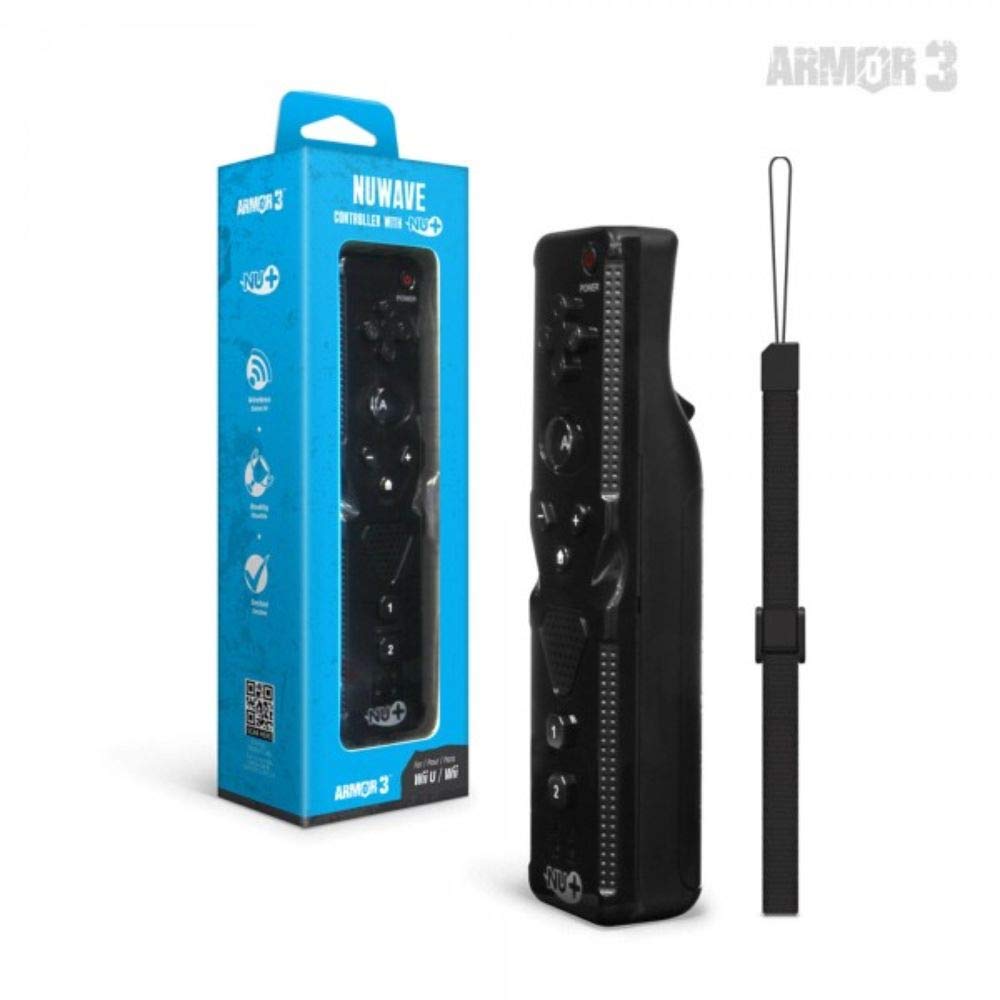
Ffigur 1: Hyperkin Armor3 NuWave Controller and its packaging. The controller is black with a wrist strap, and the packaging highlights its Nu+ technology and compatibility with Wii U and Wii.
Cynnyrch Drosview
The Armor3 NuWave Controller is a motion-sensing controller compatible with both Wii U and Wii systems. It integrates advanced Nu+ technology for enhanced motion detection and precision in supported games.
Nodweddion Allweddol:
- Cydnawsedd: Fully compatible with Nintendo Wii U and Nintendo Wii consoles.
- Nu+ Technology: Built-in technology for a wider range of motion and improved accuracy in compatible titles.
- Dyluniad ergonomig: Designed for comfortable grip and extended gameplay sessions.
- Ffynhonnell Pwer: Angen 2 batris AA (heb eu cynnwys).
Gosod
1. Gosod Batri
- Lleolwch yr adran batri ar gefn y rheolydd.
- Llithrwch glawr y batri i lawr i'w agor.
- Mewnosodwch ddau (2) fatri AA, gan sicrhau'r polaredd cywir (+/-) fel y nodir y tu mewn i'r adran.
- Rhowch glawr y batri yn ôl trwy ei lithro i fyny nes ei fod yn clicio i'w le.
2. Connecting to Your Console
To connect the NuWave Controller to your Wii U or Wii console, follow these steps:
- Ensure your console is powered on.
- On your Wii U or Wii console, press the SYNC button (usually located near the SD card slot or battery compartment).
- On the NuWave Controller, open the battery cover and locate the small red SYNC button inside the battery compartment.
- Press and release the SYNC button on the controller.
- The player indicator lights on the bottom of the controller will flash. Once a single light remains lit, the controller is successfully connected.
- If connection fails, repeat steps 2-5. Ensure the controller is within range of the console.
Cyfarwyddiadau Gweithredu
Rheolaethau Sylfaenol:
- Pad Cyfeiriadol (D-Pad): Used for menu navigation and character movement.
- Botwm: Primary action button, often used for selection or interaction.
- B Button (Trigger): Located on the underside, typically used for grabbing or firing.
- 1 & 2 Buttons: Auxiliary action buttons, functions vary by game.
- Botwm Cartref: Returns to the console's Home Menu.
- Plus (+) & Minus (-) Buttons: Often used for zooming, adjusting settings, or specific in-game actions.
- Botwm Pŵer: Turns the controller on/off.
Motion Sensing with Nu+ Technology:
The built-in Nu+ technology provides enhanced motion tracking. For games that support it, you will experience more precise and responsive movements. Hold the controller firmly and ensure clear line of sight to the sensor bar for optimal performance.
- graddnodi: Some games may require initial calibration. Follow on-screen prompts.
- Strap arddwrn: Always use the included wrist strap to prevent accidental drops during active gameplay.
Cynnal a chadw
Glanhau:
- Wipe the controller with a soft, dry cloth.
- Ar gyfer baw ystyfnig, ychydig yn dampgolchwch y brethyn gyda dŵr. Peidiwch â defnyddio cemegau llym na glanhawyr sgraffiniol.
- Ensure no liquid enters the controller's openings.
Storio:
- Storiwch y rheolydd mewn lle oer, sych i ffwrdd o olau haul uniongyrchol a thymheredd eithafol.
- Os ydych chi'n storio am gyfnod hir, tynnwch y batris i atal gollyngiadau.
Gofal Batri:
- Always use new, high-quality AA batteries.
- Peidiwch â chymysgu batris hen a newydd, na gwahanol fathau o fatris.
- Gwaredwch fatris ail-law yn gyfrifol yn unol â rheoliadau lleol.
Datrys problemau
| Problem | Achos Posibl | Ateb |
|---|---|---|
| Nid yw'r rheolydd yn troi ymlaen. | Batris marw neu wedi'u mewnosod yn anghywir. | Amnewidiwch y batris gyda batris AA newydd, gan sicrhau'r polaredd cywir. |
| Controller does not sync with console. | Incorrect syncing procedure; out of range; console interference. | Ensure console is on. Repeat syncing steps (press SYNC on console, then on controller). Move closer to console. Check for other wireless device interference. |
| Buttons are unresponsive or delayed. | Low battery; connection issue; physical obstruction. | Replace batteries. Re-sync the controller. Ensure buttons are not stuck. |
| Motion control is inaccurate. | Sensor bar obstruction; improper calibration; environmental factors. | Ensure clear line of sight to the sensor bar. Re-calibrate in-game if prompted. Avoid strong light sources directly facing the sensor bar. |
Manylebau
- Model: M07399-bk
- Brand: Hyperkin
- Cydnawsedd: Nintendo Wii U, Nintendo Wii
- Ffynhonnell Pwer: 2 x Batri AA (heb eu cynnwys)
- Dimensiynau: 2.8 x 1.8 x 8 modfedd (bras)
- Pwysau: 3.88 owns (tua, heb fatris)
- Technoleg: Built-in Nu+ motion technology
- Lliw: Du
Gwarant a Chefnogaeth
For specific warranty information and terms, please refer to the documentation included with your purchase or visit the official Hyperkin website. Hyperkin provides customer support for their products.
Cymorth Ar-lein: Visit the official Hyperkin websafle ar gyfer Cwestiynau Cyffredin, canllawiau datrys problemau, a gwybodaeth gyswllt. www.hyperkin.com
Cyswllt: Refer to the Hyperkin website for the most current customer service contact methods (phone, email, etc.).
Ask a question about this manual
Ask about setup, troubleshooting, compatibility, parts, safety, or missing instructions. Manuals+ will review the question and use this page’s manual context to help answer it.