
1. Rhagymadrodd
Diolch am brynuasing y Moukey MAMP1 220W Bluetooth Dual Channel Power Amplifier. Hyn amplifier is designed to provide powerful and versatile audio amplification for various applications, including karaoke, home theater systems, and general audio playback. It features multiple input options, Bluetooth 5.0 connectivity, and intuitive controls for an enhanced audio experience. Please read this manual thoroughly before use to ensure proper operation and to maximize the product's performance.
2. Cyfarwyddiadau Diogelwch
Er mwyn atal sioc drydanol, tân, neu ddifrod i'r uned, dilynwch y rhagofalon diogelwch canlynol:
- Peidiwch â gwneud yr uned hon yn agored i law neu leithder.
- Peidiwch ag agor y casing. Nid oes unrhyw rannau y gall y defnyddiwr eu gwasanaethu y tu mewn. Cyfeiriwch yr holl waith cynnal a chadw at bersonél cymwys.
- Sicrhewch y cyflenwad pŵer cyftagmae e yn cyd-fynd â'r gofynion a bennir ar yr uned.
- Place the unit on a stable, flat surface with adequate ventilation. Do not block ventilation openings.
- Keep the unit away from heat sources, direct sunlight, and excessive dust.
- Disconnect the power plug from the outlet if the unit will not be used for an extended period.
- Peidiwch â gweithredu'r uned â dwylo gwlyb.
3. Cynnwys Pecyn
Gwiriwch fod yr holl eitemau yn bresennol yn y pecyn:
- Moukey MAMP1 Grym AmpUned lififier
- Rheolaeth Anghysbell
- Antena FM
- Llawlyfr Defnyddiwr (Y ddogfen hon)
4. Cynnyrch Drosview
4.1 Front Panel Controls and Functions
The front panel provides access to all primary controls and input ports for easy operation.

Image: Detailed diagram of the Moukey MAMP1 front panel, highlighting each control and port with corresponding numbers.
- Newid Pwer: Yn troi'r uned ymlaen neu i ffwrdd.
- USB / SD Slot: Ar gyfer chwarae sain files from USB drives (max 32GB) or SD cards (max 16GB).
- Botwm Modd: Yn cylchdroi trwy ddulliau mewnbwn (Bluetooth, USB, SD, AUX, FM).
- Botwm BT: Directly switches to Bluetooth mode.
- Prev Button: Yn neidio i'r trac/orsaf flaenorol.
- Botwm Chwarae / Saib: Yn chwarae neu'n oedi chwarae sain.
- Botwm Nesaf: Yn neidio i'r trac/orsaf nesaf.
- Arddangosfa LED: Shows current mode, track information, or frequency.
- Folder / Track: Navigates through folders or tracks on USB/SD.
- Prif Gylchyn Cyfrol: Yn addasu'r gyfrol allbwn gyffredinol.
- Jack Clustffon: 3.5mm output for monitor headphones.
- Microphone 1 Input: 6.35mm jack for microphone connection.
- Microphone 2 Input: 6.35mm jack for a second microphone connection.
- Knob Cyfaint Meicroffon: Yn addasu cyfaint y meicroffonau cysylltiedig.
- Adlais Knob: Yn rheoli'r effaith adlais ar gyfer meicroffonau.
- Knob Bas: Yn addasu'r allbwn sain amledd isel.
- Knob Trebl: Yn addasu'r allbwn sain amledd uchel.
- Knob Balans: Yn addasu cydbwysedd y sianel chwith/dde.
- Jack Mewnbwn AUX: Mewnbwn 3.5mm ar gyfer dyfeisiau sain allanol.
- Dewisydd Mewnbwn: Rotary switch to select between CD, AUX, DVD, and MP3/W inputs.
4.2 Cysylltiadau Panel Cefn
The rear panel houses the main audio input and output connections.

Delwedd: Cefn view o'r Moukey MAMP1 amplifier, showing all input and output ports.

Image: Detailed diagram of the Moukey MAMP1 rear panel, highlighting each connection point.
- Audio Input for DVD (RCA): Connect DVD players or other audio sources.
- Audio Input for CD (RCA): Connect CD players or other audio sources.
- Line Out Jack (RCA): For connecting to another ampdyfais codi neu recordio.
- FM Antenna Jack: Cysylltwch yr antena FM sydd wedi'i chynnwys ar gyfer derbyniad radio.
- Speaker Output Jacks: Connect passive speakers (4-16 Ohm impedance).
- Mewnbwn Cable Pwer: Cysylltwch y llinyn pŵer AC.
5. Gosod
5.1 Lleoliad
Gosodwch y amplifier on a flat, stable surface. Ensure there is sufficient space around the unit for proper ventilation to prevent overheating.
5.2 Cysylltiad Pwer
Connect the power cable to the Power Cable Input on the rear panel of the amplifier, then plug the other end into a suitable AC power outlet (115V AC).
5.3 Cysylltiad Llefarydd
Mae'r MAMP1 amplifier supports two sets of passive speakers with an impedance of 4-16 Ohms. Use appropriate speaker wire to connect your speakers to the Speaker Output Jacks on the rear panel.

Image: Diagram illustrating how to connect speakers to the amplifier's binding posts.
- Rotate and loosen the speaker knob on the binding post.
- Insert the bare wire (remove approximately 10mm of insulation) into the hole. Ensure correct polarity (+ to + and - to -).
- Tighten the knobs to secure the wires firmly.
5.4 Input Device Connection
Connect your audio sources (CD player, DVD player, tuner, etc.) to the corresponding RCA Audio Input jacks on the rear panel. For microphones, use the 6.35mm jacks on the front panel. For 3.5mm AUX devices, use the front panel AUX Input Jack.
6. Cyfarwyddiadau Gweithredu
6.1 Pŵer Ymlaen/Diffodd
Gwasgwch y Switch Power ar y panel blaen i droi'r ampy pŵer ymlaen neu i ffwrdd. Bydd yr arddangosfa LED yn goleuo pan fydd yr uned wedi'i throi ymlaen.
6.2 Dewis Mewnbwn
Defnyddiwch y Botwm Modd on the front panel or the remote control to cycle through available input sources (Bluetooth, USB, SD, AUX, FM). Alternatively, use the Dewisydd Mewnbwn knob on the front panel for RCA inputs (CD, AUX, DVD, MP3/W).
6.3 Rheoli Cyfaint
- Prif Gyfrol: Cylchdroi y Knob Cyfrol Meistr to adjust the overall output level of the ampllewywr.
- Cyfaint meicroffon: Defnyddiwch y Knob Cyfrol Meicroffon to control the volume of connected microphones independently.
6.4 Rheoli Tôn
Adjust the audio characteristics using the Knob Bas a Knob Trebl to suit your preference. The Knob Balans allows adjustment of the left and right channel output levels.

Image: Close-up of the Moukey MAMP1 showing the Bass and Treble adjustment knobs.
6.5 Rheoli Adlais
Trowch y Adlais Knob to add or reduce the echo effect on the microphone inputs, suitable for karaoke applications.
6.6 Pâr Bluetooth
I gysylltu dyfais Bluetooth:
- Gwasgwch y Botwm BT or cycle through modes until "BLUE" appears on the LED display.
- Galluogwch Bluetooth ar eich ffôn clyfar, tabled, neu gyfrifiadur.
- Chwiliwch am "Moukey MAMP1" in your device's Bluetooth settings and select it to pair.
- Once paired, you can stream audio wirelessly. Playback will temporarily pause during phone calls to protect privacy.
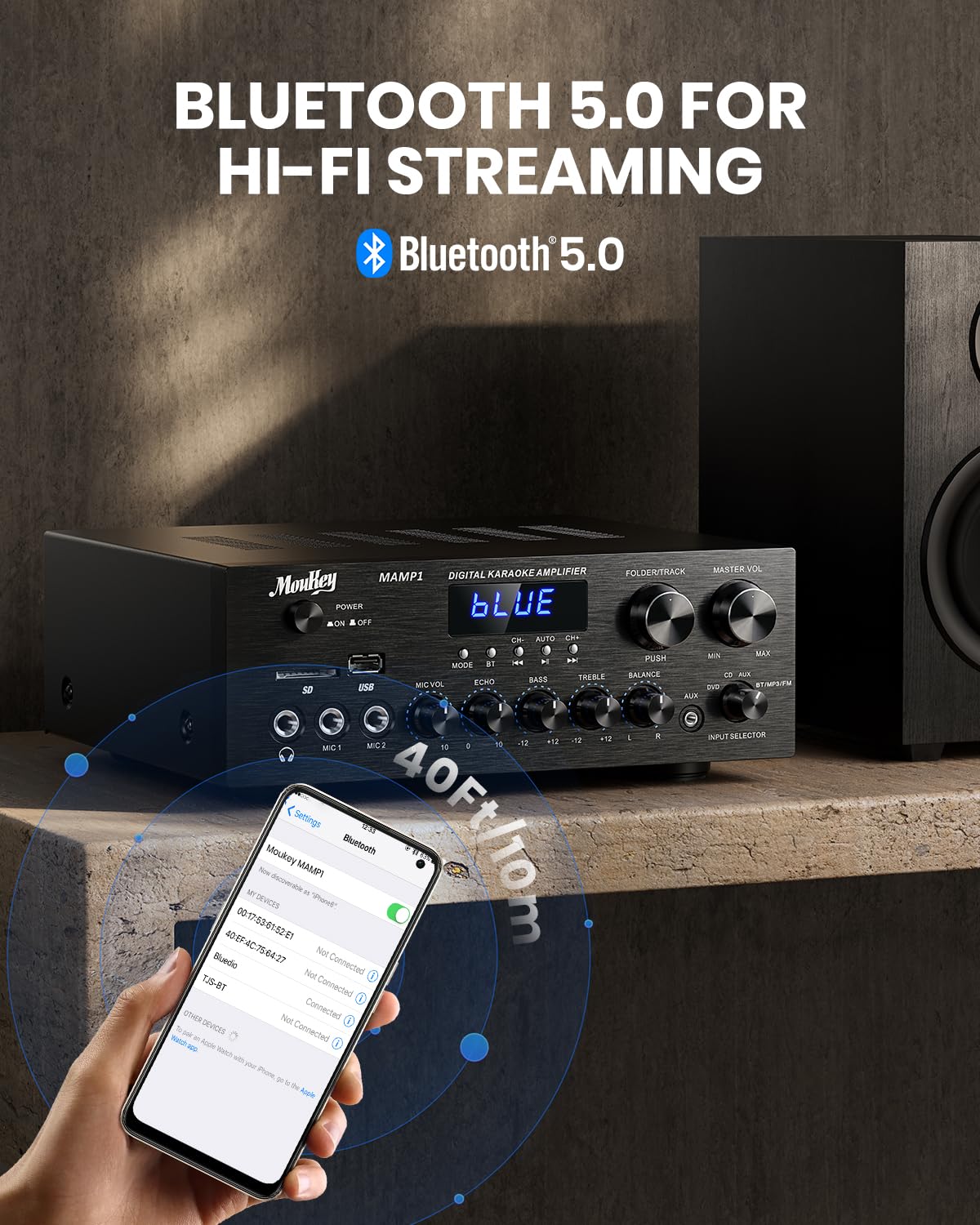
Delwedd: Y Moukey MAMP1 amplifier displaying "BLUE" on its screen, indicating Bluetooth mode, with a smartphone showing pairing options.
6.7 Chwarae USB/SD
Insert a USB drive (max 32GB) or SD card (max 16GB) into the respective slot on the front panel. The amplifier will automatically switch to USB/SD mode and begin playback. Use the Cynt, Chwarae/Saib, Nesaf, a Folder/Track botymau i reoli chwarae.
Radio 6.8 FM
Ensure the FM antenna is connected to the rear panel. Select FM mode using the Botwm Modd. Defnyddiwch y Cynt a Nesaf buttons to tune to radio stations. The LED display will show the current frequency.
7. cynnal
To maintain the performance and appearance of your ampllewywr:
- Glanhau: Use a soft, dry cloth to wipe the exterior of the unit. Do not use liquid cleaners or abrasive chemicals.
- Awyru: Gwnewch yn siŵr bod agoriadau awyru yn glir o lwch a malurion.
- Storio: Os ydych chi'n storio'r uned am gyfnod hir, datgysylltwch hi o'r pŵer a'i storio mewn lle oer, sych.
8. Datrys Problemau
Os byddwch chi'n dod ar draws problemau gyda'ch Moukey MAMP1 amplifier, refer to the following table for common problems and solutions:
| Problem | Achos Posibl | Ateb |
|---|---|---|
| Dim pŵer | Cebl pŵer heb ei gysylltu; Allfa bŵer yn ddiffygiol; Diffoddwr pŵer. | Ensure power cable is securely connected. Try a different power outlet. Press the power switch to ON. |
| Dim allbwn sain | Incorrect input selected; Volume too low; Speakers not connected; Speaker wires loose; Mute function active. | Select the correct input source. Increase Master Volume. Check speaker connections and polarity. Ensure mute is off. |
| Bluetooth ddim yn cysylltu | Amplifier not in Bluetooth mode; Device too far; Device already paired to another unit. | Sicrhau amplifier is in Bluetooth mode ("BLUE" on display). Move device closer to amplifier. Disconnect from other devices. |
| Meicroffon ddim yn gweithio | Microphone not connected; Mic volume too low; Echo knob set to minimum. | Connect microphone securely. Increase Microphone Volume. Adjust Echo knob. |
| Problemau chwarae USB/SD | Heb ei gefnogi file format; USB drive/SD card corrupted; Capacity exceeded. | Sicrhau sain files are in supported formats (e.g., MP3). Try a different USB drive/SD card. Check capacity limits (USB max 32G, SD max 16G). |
Os yw'r broblem yn parhau ar ôl rhoi cynnig ar yr atebion hyn, cysylltwch â chymorth cwsmeriaid.
9. manylebau
| Nodwedd | Manyleb |
|---|---|
| Brand | Moukey |
| Model | MAMP1 |
| Pŵer Allbwn | 220 Wat |
| Sianeli | 2 |
| Cyftage | 115 folt (AC) |
| Impedance Siaradwr | 4-16 Ohms |
| Fersiwn Bluetooth | 5.0 |
| Amrediad Bluetooth | Dros 12 fetr (40 troedfedd) |
| Cymorth Cerdyn USB/SD | USB: Max 32GB, SD: Max 16GB |
| Dimensiynau (L x W x H) | 25cm x 21.3cm x 9.5cm (tua 10 modfedd x 8 modfedd x 4 modfedd) |
| UPC | 715802779039 |
| Gwlad Tarddiad | Tsieina |

Delwedd: Y Moukey MAMP1 amplifier with its dimensions labeled.
10. Gwarant a Chefnogaeth
This Moukey MAMP1 Grym Ampdaw lifier ag a Gwarant 1 mlynedd o ddyddiad y pryniant. Mae'r warant hon yn cwmpasu diffygion gweithgynhyrchu a chrefftwaith o dan ddefnydd arferol.
Nid yw'r warant yn cwmpasu:
- Damage caused by accident, abuse, misuse, flood, fire, or other natural causes.
- Damage caused by unauthorized modification or repair.
- Damage caused by improper installation or connection.
- Cosmetic damage, such as scratches, dents, and broken plastic on ports.
For warranty claims or technical support, please contact the retailer where you purchased the product or visit the official Moukey website for contact information. Please have your purchase receipt and product model number (MAMP1) ready when contacting support.