
FUJIFILM FinePix XP90
FUJIFILM FinePix XP90 Digital Camera User Manual
Model: FinePix XP90
Brand: FUJIFILM
1. Rhagymadrodd
This manual provides essential instructions for the safe and effective use of your FUJIFILM FinePix XP90 Digital Camera. The FinePix XP90 is a rugged, compact point-and-shoot camera designed to withstand various challenging conditions, including water, shock, freezing temperatures, and dust. It features a 16.4MP CMOS sensor, a Fujinon 5x optical zoom lens, and built-in Wi-Fi for easy image transfer and remote control.

Ffigur 1.1: Blaen view of the FUJIFILM FinePix XP90 Digital Camera, showcasing its blue and black rugged design.
2. Beth sydd yn y Bocs
Please ensure all the following items are present in your product package:
- FUJIFILM FinePix XP90 Digital Camera (Blue)
- NP-45S Rechargeable Lithium-Ion Battery
- AC Power Adapter AC-5VT
- Cebl USB
- Strap Llaw
- 32GB SanDisk Ultra SDHC Memory Card
3. Gosod
3.1 Gosod a Gwefru Batri
- Open the battery/memory card compartment cover located on the side of the camera. Ensure the camera is powered off before opening.
- Insert the NP-45S Lithium-Ion Battery into the compartment with the contacts facing the correct direction, as indicated by the diagram inside the compartment.
- Caewch glawr yr adran yn ddiogel nes ei fod yn clicio i'w le.
- Connect the camera to the AC Power Adapter using the supplied USB cable. Plug the adapter into a power outlet to begin charging the battery. The charging indicator will illuminate.
- Charging is complete when the indicator light turns off. A full charge typically takes approximately 2.5 hours.

Ffigur 3.1: Ochr view of the camera, indicating the location of the battery and memory card compartment.
3.2 Mewnosod Cerdyn Cof
- With the battery compartment cover open, locate the memory card slot.
- Insert the 32GB SanDisk Ultra SDHC Memory Card into the slot with the label facing the front of the camera, pushing gently until it clicks into place.
- Caewch orchudd yr adran yn ddiogel.
3.3 Pŵer Cychwynnol Ymlaen
Pwyswch a dal y YMLAEN / I FFWRDD button located on the top of the camera until the LCD monitor illuminates. Follow any on-screen prompts for initial setup, such as setting the date and time.
4. Gweithredu'r Camera
4.1 Ffotograffiaeth Sylfaenol
To capture still images:
- Trowch y camera ymlaen.
- Frame your shot using the 3.0" 920k-Dot LCD Monitor. The monitor features an anti-reflective coating for improved visibility.
- Use the zoom lever (W/T buttons) to adjust the 5x optical zoom.
- Pwyswch y botwm caead hanner ffordd i lawr i ffocysu. Bydd y ffrâm ffocws yn troi'n wyrdd pan gyrhaeddir ffocws.
- Pwyswch y botwm caead i lawr yn llwyr i dynnu'r llun.
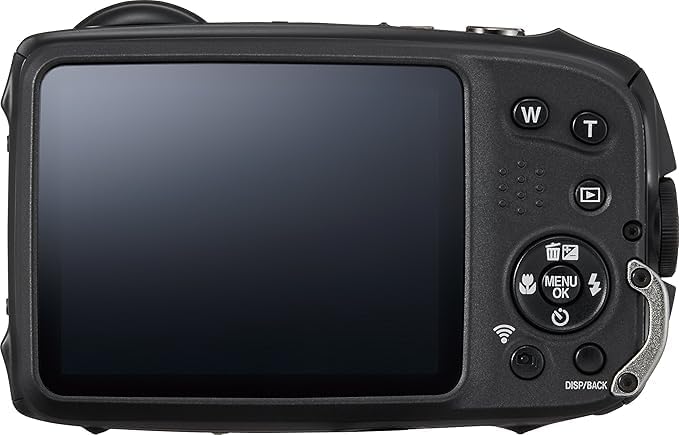
Ffigur 4.1: Cefn view of the camera, highlighting the LCD monitor and control buttons for navigation and settings.
4.2 Recordio Fideo
The FinePix XP90 supports Full HD 1080p video recording at 60 frames per second.
- Press the dedicated video recording button (usually marked with a red dot) to start recording.
- Pwyswch y botwm eto i roi'r gorau i recordio.
4.3 Cysylltedd Wi-Fi
The camera features built-in Wi-Fi for seamless connectivity:
- Trosglwyddo Delwedd: Transfer photos and videos directly to a linked mobile device using the FUJIFILM Camera Remote app.
- Remote Shooting: Control the camera wirelessly from your smartphone or tablet, allowing for remote shutter release and adjustment of certain settings.
Refer to the camera's on-screen menu for detailed Wi-Fi setup instructions and pairing with your mobile device.
4.4 Nodweddion Arbennig
The FinePix XP90 offers several specialized modes:
- Action Camera Mode: Optimized for capturing dynamic scenes.
- Motion Panorama: Create stunning panoramic images by simply sweeping the camera.
- Dyluniad garw: Water, shock, freeze, and dustproof construction ensures durability in challenging environments. It is waterproof to 20m/65ft and shockproof to 1.75m/5.8ft.
- Sefydlogi Delwedd Synhwyrydd-Shift: Helps reduce blur caused by camera shake.
- Saethu Cyflymder Uchel: Capable of 10 frames per second continuous shooting.
5. cynnal
- Glanhau Corff y Camera: Wipe the camera body with a soft, dry cloth. For stubborn dirt, use a cloth lightly dampened with water, then dry thoroughly. Do not use organic solvents.
- Cleaning the Lens and LCD Monitor: Use a blower brush to remove dust, then gently wipe with a lens cleaning cloth. Avoid touching the lens or monitor with your fingers.
- Gofal Batri: Storiwch y batri mewn lle oer, sych pan nad yw'n cael ei ddefnyddio. Osgowch ollwng y batri'n llwyr am gyfnodau hir.
- Storio: When storing the camera for long periods, remove the battery and memory card. Store in a cool, dry, well-ventilated area away from direct sunlight and high humidity.
- Sêl gwrth-ddŵr: Regularly check the rubber seals around the battery/memory card compartment for any dirt or damage. Clean them gently if necessary to maintain waterproof performance.
6. Datrys Problemau
| Problem | Ateb |
|---|---|
| Nid yw'r camera yn troi ymlaen. | Gwnewch yn siŵr bod y batri wedi'i wefru'n llawn ac wedi'i fewnosod yn gywir. Rhowch gynnig ar wefru'r batri eto. |
| Methu tynnu lluniau. | Check if the memory card is inserted correctly and has sufficient free space. Ensure the lens cap (if any) is removed. |
| Mae'r delweddau'n aneglur. | Ensure the lens is clean. Check lighting conditions. Use Sensor-Shift Image Stabilization. Hold the camera steady. |
| Mae'r cysylltiad Wi-Fi yn methu. | Ensure the FUJIFILM Camera Remote app is installed on your mobile device. Restart both the camera and the mobile device. Check Wi-Fi settings on both devices. |
| Nid yw'r camera yn ymateb. | Remove the battery, wait a few seconds, then reinsert it and try turning the camera on again. |
7. manylebau
| Nodwedd | Manylyn |
|---|---|
| Enw Model | FinePix XP90 |
| Synhwyrydd Delwedd | 16.4MP 1/2.3" CMOS Sensor |
| Lens | Fujinon 5x Optical Zoom Lens (28-140mm equivalent) |
| Arddangos | 3.0" 920k-Dot LCD Monitor |
| Recordio Fideo | HD llawn 1080p ar 60 fps |
| Gwydnwch | Waterproof to 20m/65ft, Shockproof to 1.75m/5.8ft, Freezeproof, Dustproof |
| Cysylltedd | Built-In Wi-Fi, USB |
| Sefydlogi Delwedd | Sensor-Shift Image Stabilization |
| Sensitifrwydd ISO | Up to ISO 6400 (Expanded ISO Maximum 51200) |
| Saethu Parhaus | 10 fps |
| Cefnogaeth Cerdyn Cof | SDHC (32GB included) |
| Math Batri | NP-45S Lithium-Ion |
8. Gwarant a Chefnogaeth
For information regarding product warranty, technical support, or service, please refer to the warranty card included with your product or visit the official FUJIFILM websafle. Cadwch eich prawf prynu ar gyfer hawliadau gwarant.
Am gymorth pellach, gallwch hefyd gysylltu â'r manwerthwr lle prynwyd y cynnyrch.
Ask a question about this manual
Ask about setup, troubleshooting, compatibility, parts, safety, or missing instructions. Manuals+ will review the question and use this page’s manual context to help answer it.