
Tracer TRAJOY46524
Llawlyfr Defnyddiwr Olwyn Lywio Tracer Roadster 4 mewn 1
Model: TRAJOY46524
Rhagymadrodd
Thank you for choosing the Tracer Roadster 4 in 1 Steering Wheel. This manual provides detailed instructions for setting up, operating, maintaining, and troubleshooting your new racing wheel. Please read this manual thoroughly before use to ensure optimal performance and longevity of your device.
The Tracer Roadster 4 in 1 Steering Wheel is designed for an immersive gaming experience, compatible with various platforms including PlayStation 4 and Windows PC. It features a responsive steering wheel, integrated shifter, and a pedal set for realistic control.
Cynnwys Pecyn
- Tracer Roadster 4 in 1 Steering Wheel
- Set Pedal
- Llawlyfr Defnyddiwr (y ddogfen hon)
Canllaw Gosod
Connecting to PlayStation 4 (PS4)
- Connect the steering wheel's USB cable to an available USB port on your PS4 console.
- Power on your PS4 console. The red LED on the steering wheel will illuminate, indicating power.
- Connect the steering wheel to your PS4 controller using a microUSB cable (not included). This step is crucial for authentication.
- Gwasgwch y CARTREF button on the steering wheel. The green LED will illuminate, indicating successful connection and readiness for use.
Cysylltu â chyfrifiadur personol (Windows)
- Connect the steering wheel's USB cable to an available USB port on your Windows PC.
- The system should automatically detect and install the necessary drivers. If not, please refer to the manufacturer's websafle ar gyfer lawrlwytho gyrwyr.
- Once drivers are installed, the steering wheel will be ready for use with compatible PC racing games.

Figure 1: The Tracer Roadster 4 in 1 Steering Wheel, including the main wheel unit, integrated shifter, and separate pedal set. This image shows the complete setup ready for connection.
Cyfarwyddiadau Gweithredu
Llywio Rheolaethau Olwyn
The steering wheel features a full range of motion for precise control in racing games. It includes various buttons and a D-pad for in-game navigation and actions, mimicking a standard game controller layout.
- Pad Cyfeiriadol (D-Pad): Ar gyfer llywio dewislen a rheolyddion penodol yn y gêm.
- Action Buttons (X, Circle, Square, Triangle / A, B, X, Y): Standard gaming action buttons.
- L1/R1, L2/R2 Buttons: Shoulder buttons, often used for shifting gears or other actions.
- Botwm CARTREF: PS4 system menu access.
- Botwm PROG: For programming specific functions (refer to game-specific instructions).
- Touchpad: Integrated touchpad for additional control options, especially on PS4.
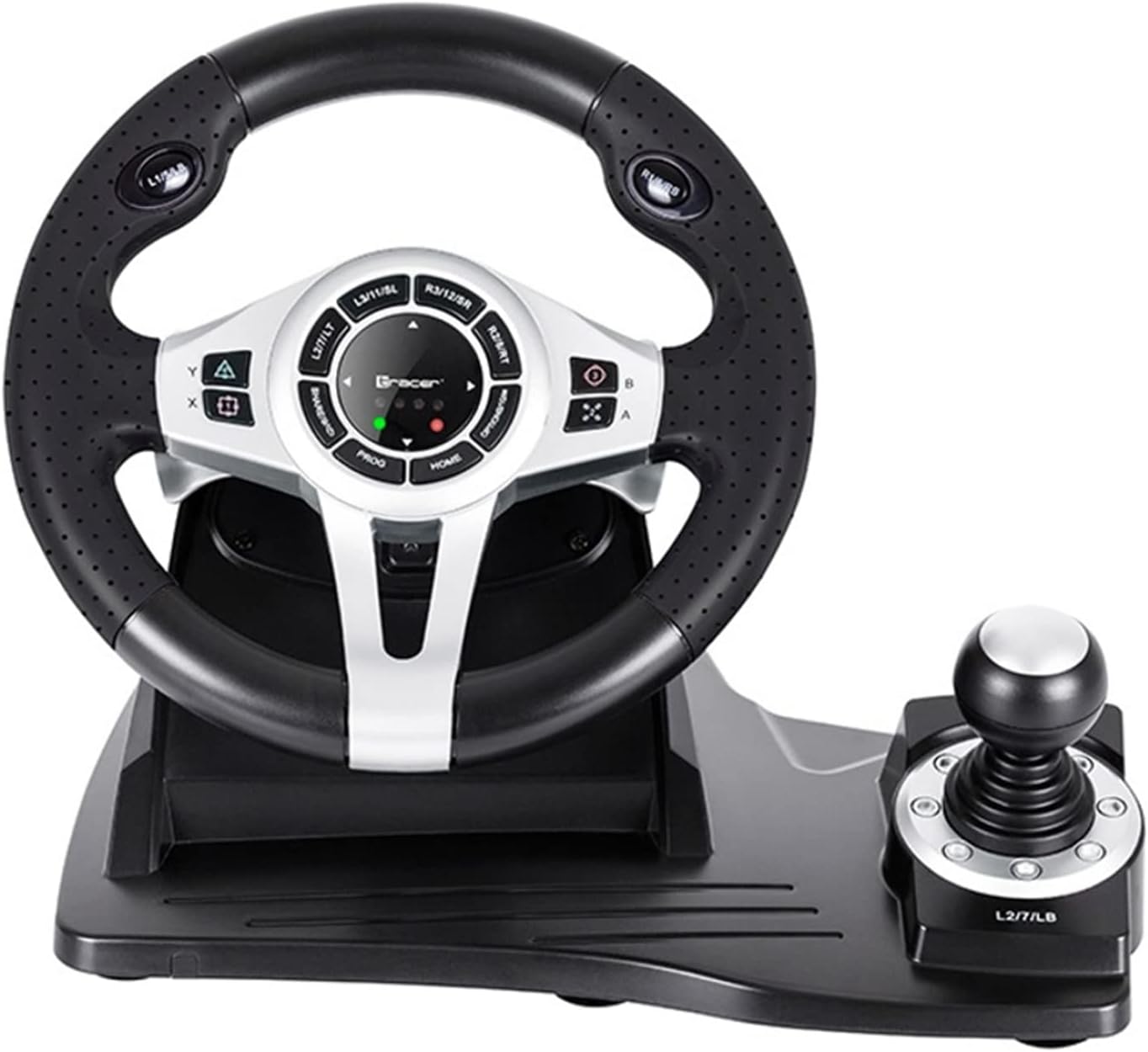
Ffigur 2: Manylion manwl view of the central control panel on the steering wheel, showing the various buttons, D-pad, and indicator lights. The integrated shifter is visible to the right.
Set Pedal
The separate pedal set includes an accelerator and brake pedal for realistic driving simulation. Ensure the pedal set is placed on a stable surface to prevent slipping during intense gameplay.

Figure 3: The standalone pedal unit, featuring both accelerator and brake pedals. The textured base provides grip to prevent movement during use.
Cynnal a Chadw a Gofal
- Glanhau: Use a soft, dry cloth to clean the surface of the steering wheel and pedals. For stubborn dirt, a slightly damp gellir defnyddio brethyn, ond gwnewch yn siŵr nad oes lleithder yn mynd i mewn i'r cydrannau mewnol.
- Storio: Pan na chaiff ei ddefnyddio, storiwch y ddyfais mewn lle oer, sych i ffwrdd o olau haul uniongyrchol a thymheredd eithafol.
- Osgoi hylifau: Peidiwch â datgelu'r ddyfais i ddŵr neu hylifau eraill.
- Ymdrin â Gofal: Osgoi gollwng neu orfodi'r ddyfais i effeithiau cryf.
Datrys problemau
| Problem | Achos Posibl | Ateb |
|---|---|---|
| Steering wheel not recognized by PS4. | Incorrect connection or authentication issue. | Ensure the steering wheel's USB cable is securely connected to the PS4. Verify the microUSB cable connection between the steering wheel and the PS4 controller. Press the CARTREF botwm ar yr olwyn lywio. |
| No response from steering wheel on PC. | Drivers not installed or USB port issue. | Try a different USB port. Check Device Manager for driver status. Reinstall drivers if necessary from the manufacturer's websafle. |
| LED indicators not lighting up. | No power or connection issue. | Ensure the USB cable is firmly connected to the console/PC. Check if the console/PC is powered on. |
| Pedalau ddim yn ymateb. | Loose connection to the steering wheel. | Verify that the pedal unit's cable is securely plugged into the steering wheel base. |
Manylebau
| Nodwedd | Manylyn |
|---|---|
| Brand | Tracer |
| Enw Model | Roadster 4 in 1 |
| Rhif Model | TRAJOY46524 |
| Technoleg Cysylltedd | USB |
| Dyfeisiau Cydnaws | PlayStation 4, Windows PC |
| Math o Reolwr | Olwyn llywio |
| Lliw | Du |
| Nodwedd Arbennig | pad cyffwrdd |
| Nifer y Botymau | 8 (excluding D-pad and shifter controls) |
| Pwysau Eitem | 2 Cilogram |
| Dimensiynau Cynnyrch (L x W x H) | 2.8 x 24.6 x 16.5 cm |
Gwarant a Chefnogaeth
Am wybodaeth am warant a chymorth technegol, cyfeiriwch at y Tracer swyddogol websafle neu cysylltwch â'ch manwerthwr. Cadwch eich prawf prynu ar gyfer unrhyw hawliadau gwarant.
Am gymorth pellach, gallwch ymweld â'r product page on Amazon.com.be.
Ask a question about this manual
Ask about setup, troubleshooting, compatibility, parts, safety, or missing instructions. Manuals+ will review the question and use this page’s manual context to help answer it.