
1. Rhagymadrodd
This manual provides essential information for the installation, operation, maintenance, and troubleshooting of your Chieftec Polaris 650W 80Plus Certified Power Supply Unit (PSU). Please read this manual thoroughly before installing and using the product to ensure proper function and safety. The Chieftec Polaris 650W PSU is designed to provide stable and efficient power to your personal computer system.
2. Gwybodaeth Diogelwch
Dilynwch y rhagofalon diogelwch canlynol bob amser i atal anaf neu ddifrod i'ch offer:
- Peidiwch open the PSU casing. Cyfaint ucheltages inside can cause electric shock. There are no user-serviceable parts inside.
- Peidiwch insert any objects into the PSU's ventilation openings.
- Peidiwch expose the PSU to water, moisture, or high humidity.
- Ensure the PSU is installed in a well-ventilated area, free from obstructions to airflow.
- Datgysylltwch y llinyn pŵer AC o'r soced wal bob amser cyn gosod, tynnu neu lanhau'r PSU.
- Use only the modular cables provided with your Chieftec Polaris 650W PSU. Using incompatible cables may damage the PSU or connected components.
- Ensure all cable connections are secure before powering on the system.
3. Cynnwys Pecyn
Gwiriwch fod yr holl eitemau yn bresennol yn eich pecyn:
- Chieftec Polaris 650W Power Supply Unit
- Modular Cable Set (e.g., 24-pin ATX, 8-pin EPS/CPU, PCIe, SATA, Molex)
- Cord pŵer AC
- Sgriwiau Mowntio
- Llawlyfr Defnyddiwr (y ddogfen hon)
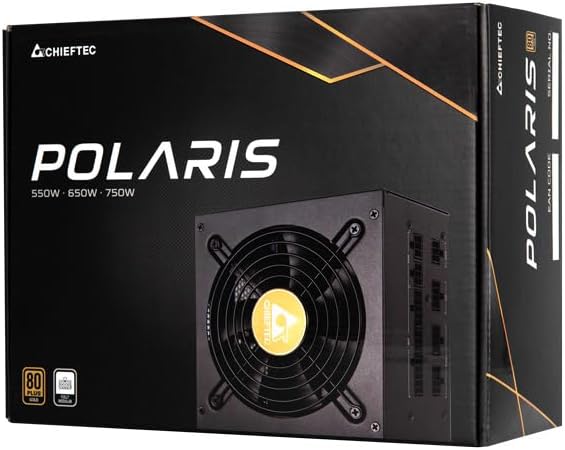
Image: The Chieftec Polaris 650W Power Supply Unit and its retail packaging.
4. Gosod a Gosod
Follow these steps to install your Chieftec Polaris 650W PSU into your personal computer system:
- Paratowch Eich System: Gwnewch yn siŵr bod eich cyfrifiadur wedi'i ddiffodd yn llwyr ac wedi'i ddatgysylltu o'r soced wal. Agorwch gas eich cyfrifiadur i gael mynediad at ardal mowntio'r PSU.
- Tynnwch yr Hen PSU (os yn berthnasol): If replacing an existing PSU, disconnect all cables from the components and motherboard, then unscrew and remove the old PSU.
- Gosodwch y PSU Newydd: Carefully slide the Chieftec Polaris 650W PSU into the designated PSU bay in your computer case. Ensure the fan faces the correct direction (typically downwards for bottom-mounted PSUs, or as per case design for optimal airflow). Secure the PSU with the provided mounting screws.
- Cysylltu Ceblau Modiwlaidd: Identify the necessary modular cables for your system components (motherboard, CPU, graphics card, storage drives). Connect these cables to the corresponding ports on the back of the PSU. Refer to the image below for connector identification.
- Cysylltu â Chydrannau: Connect the other end of the modular cables to your motherboard (24-pin ATX and 8-pin EPS/CPU), graphics card(s) (PCIe), and storage devices (SATA/Molex). Ensure all connections are firm and fully seated.
- Rheoli Ceblau: Llwybrwch geblau'n daclus i wella llif aer ac estheteg yn eich cas.
- Gwiriadau Terfynol: Double-check all connections. Ensure no loose cables are obstructing fans. Close your computer case.
- Cysylltwch AC Power: Plug the AC power cord into the PSU's power inlet and then into a wall outlet.

Delwedd: Cefn view of the Chieftec Polaris 650W PSU showing modular cable connection ports for M/B, SATA, PCIe, and CPU.

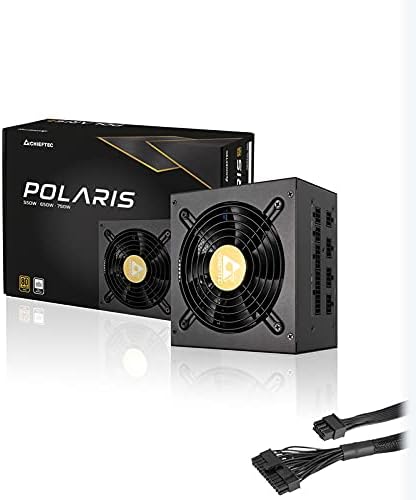
Image: The Chieftec Polaris 650W Power Supply Unit with its modular cables connected, ready for installation.
5. Cyfarwyddiadau Gweithredu
Once the Chieftec Polaris 650W PSU is correctly installed and all connections are secure:
- Pŵer Ymlaen: Locate the power switch on the back of the PSU (next to the AC power inlet). Ensure it is in the 'I' (On) position.
- Cychwyn System: Press the power button on your computer case. The system should power on, and the PSU fan will begin to spin, indicating normal operation.
- Gweithrediad Fan: The PSU features an air cooling method. The fan will operate to dissipate heat generated by the power supply components. Its speed may vary depending on the load and temperature to maintain optimal cooling and noise levels.
- Pwer i ffwrdd: To shut down your system, use the operating system's shutdown procedure. For a complete power cut, switch the PSU's power switch to the 'O' (Off) position and unplug the AC power cord.
Delwedd: O'r brig i lawr view of the Chieftec Polaris 650W Power Supply, highlighting the cooling fan and protective grille.
6. cynnal
Proper maintenance ensures the longevity and optimal performance of your PSU:
- Glanhau Llwch: Periodically (e.g., every 3-6 months), power off your computer, unplug the AC cord, and open the case. Use compressed air to gently blow dust out of the PSU's fan and ventilation grilles. Peidiwch use a vacuum cleaner directly on the PSU as it can generate static electricity.
- Amodau Amgylcheddol: Ensure the computer operates in a clean, dry, and well-ventilated environment. Avoid extreme temperatures and direct sunlight.
- Uniondeb Cebl: Occasionally check that all modular cables are securely connected and not frayed or damaged.
7. Datrys Problemau
If you encounter issues with your Chieftec Polaris 650W PSU, consider the following troubleshooting steps:
- Dim pŵer:
- Gwnewch yn siŵr bod y cebl pŵer AC wedi'i blygio'n ddiogel i'r PSU a'r soced wal.
- Check that the PSU's power switch on the back is in the 'I' (On) position.
- Gwiriwch fod y soced wal yn gweithio drwy blygio dyfais arall i mewn.
- Confirm all internal power cables (24-pin ATX, 8-pin EPS/CPU) are firmly connected to the motherboard.
- Ansefydlogrwydd System/Cau i Lawr ar Hap:
- Ensure the PSU is adequately ventilated and not overheating.
- Check all power connections to components (graphics card, storage) for looseness.
- If possible, test the PSU with a different set of components or in another system to rule out other hardware issues.
- Sŵn Anarferol:
- A rattling or grinding noise may indicate a fan issue. Power off the system and inspect the PSU fan for obstructions (e.g., loose cables).
- If the noise persists and is not due to an obstruction, contact support.
If these steps do not resolve the issue, please refer to the Warranty and Support section.
8. manylebau
| Nodwedd | Manyleb |
|---|---|
| Brand | Priftec |
| Enw Model | Polaris |
| Rhif Model yr Eitem | IN-ACT-ZDLCHFOBU0087 |
| Allbwn Wattage | 650 Wat |
| Ffactor Ffurf | ATX |
| Dull Oeri | Awyr |
| Math o Gysylltydd | ATX |
| Dyfeisiau Cydnaws | Cyfrifiadur Personol |
| Dimensiynau Cynnyrch (L x W x H) | 8.66 x 3.15 x 1.18 modfedd (22 x 8 x 3 cm) |
| Pwysau Eitem | 4.4 pwys (2 cilogram) |
| Ardystiad | 80Plus Ardystiedig |
9. Gwarant a Chefnogaeth
Chieftec products are manufactured to high-quality standards. For specific warranty terms and conditions, please refer to the warranty card included with your product or visit the official Chieftec website. Warranty periods and coverage may vary by region and product.
For technical support, product inquiries, or warranty claims, please contact Chieftec customer service through their official website or the contact information provided in your product documentation. When contacting support, please have your product model number (IN-ACT-ZDLCHFOBU0087) and proof of purchase readily available.