
Rhagymadrodd
This manual provides comprehensive instructions for the setup, operation, and maintenance of your waveshare 7-inch Capacitive Touch LCD Display Kit for Raspberry Pi 4 Model B. Please read this manual thoroughly before use to ensure proper functionality and to maximize your product experience.
Cynnwys Pecyn
Gwiriwch fod yr holl eitemau a restrir isod wedi'u cynnwys yn eich pecyn:
- 7-inch Capacitive Touch LCD Display
- Raspberry Pi 4 Model B (4GB RAM version)
- MicroSD Card (pre-loaded with system, typically 16GB)
- Addasydd Pwer USB
- USB-A to USB-C Cable (for power)
- HDMI Cable (Micro HDMI to Standard HDMI)
- USB-A to Micro USB Cable (for touch functionality)
- Acrylic Case components (top, bottom, side panels, stand)
- Caledwedd gosod (sgriwiau, standoffs)
- Darllenydd Cerdyn MicroSD

Image: All components included in the waveshare 7-inch Display Kit, including the LCD, Raspberry Pi 4, cables, power adapter, acrylic case parts, and a microSD card with reader.
Cyfarwyddiadau Gosod
Follow these steps to assemble and set up your display kit:
- Prepare the Raspberry Pi: Insert the provided MicroSD card into the Raspberry Pi 4 Model B.
- Mount the Raspberry Pi: Secure the Raspberry Pi 4 to the back of the 7-inch LCD display using the provided standoffs and screws. Ensure proper alignment with the display's connectors.
- Connect Display Cables:
- Connect one end of the Micro HDMI cable to the Raspberry Pi's Micro HDMI port and the other end to the display's HDMI input.
- Connect the USB-A to Micro USB cable from a USB 2.0 port on the Raspberry Pi to the Micro USB port on the display. This provides power for the display's backlight and enables touch functionality.
- Cydosod y Cas Acrylig: Carefully attach the acrylic case components around the assembled display and Raspberry Pi. Refer to the case assembly diagram for correct orientation.
- Pwer Cysylltu: Plug the USB power adapter into a wall outlet and connect the USB-A to USB-C cable to the Raspberry Pi's USB-C power input.
- Cychwyn Cychwynnol: The system should power on automatically. The display will show the boot sequence.

Image: The fully assembled waveshare 7-inch Display Kit, showing the Raspberry Pi 4 mounted behind the screen, connected with cables, and powered by an adapter.
Gweithrediad
Once the display kit is powered on, the pre-installed operating system (typically Raspbian) will boot. You can interact with the system using the capacitive touch screen.
- Ymarferoldeb Cyffwrdd: The 7-inch display supports up to five-point capacitive touch when running Raspbian. For other supported operating systems like Ubuntu, Kali, or WIN10 IoT, it typically supports single-point touch.
- Cysylltu Perifferolion: Use the USB ports on the Raspberry Pi to connect a keyboard, mouse, or other USB devices as needed.
- Cysylltedd Rhwydwaith: The Raspberry Pi 4 supports Gigabit Ethernet and 2.4/5GHz Wi-Fi for internet access.
- Allbwn sain: Audio can be output via the 3.5mm audio jack or HDMI.
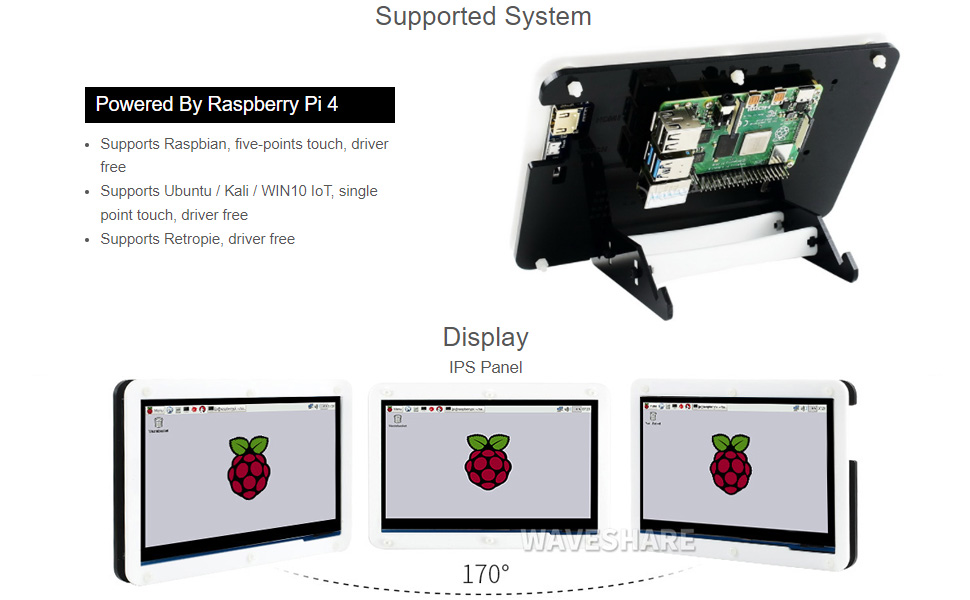
Image: A hand interacting with the capacitive touch screen, demonstrating its functionality with a graphical user interface.
Systemau Gweithredu â Chymorth
The waveshare 7-inch Display Kit is compatible with various operating systems for the Raspberry Pi 4 Model B:
- Mafon: Supports five-point touch, driver-free.
- Ubuntu / Kali / WIN10 IoT: Supports single-point touch, driver-free.
- Retropie: Driver-free support.

Image: Visual representation of the display showing different viewing angles and indicating support for various operating systems like Raspbian, Ubuntu, Kali, and Windows 10 IoT.
Nodweddion Allweddol
- Arddangosfa IPS 7 modfedd: Eang viewing angle with 1024x600 resolution.
- Capacitive Touch: Supports 5-point touch (with Raspbian) for intuitive interaction.
- Integrated Raspberry Pi 4: Powered by Broadcom BCM2711B0 Quad-core 64-bit SoC.
- Cof: 4GB o RAM LPDDR4.
- Cysylltedd: Dual-band 2.4/5GHz Wi-Fi, Bluetooth 5.0, Gigabit Ethernet.
- Porthladdoedd: 2x USB 3.0, 2x USB 2.0, 2x Micro HDMI (up to 4Kp60), 4-pole stereo audio, 2-lane MIPI DSI display port, 2-lane MIPI CSI camera port, 40-pin GPIO header.
- Mewnbwn pŵer: USB-C 5V/3A.
- Storio: Slot cerdyn micro SD.

Image: Detailed diagram of the Raspberry Pi 4 Model B board, highlighting its processor, RAM, various ports (USB, HDMI, Ethernet, GPIO), and wireless capabilities.
Cynnal a chadw
- Glanhau: Use a soft, dry cloth to clean the display and case. For stubborn smudges on the screen, a slightly damp, lint-free cloth can be used. Avoid abrasive cleaners or solvents.
- Diweddariadau Meddalwedd: Regularly update the operating system and installed software on your Raspberry Pi to ensure optimal performance and security.
- Amodau Amgylcheddol: Operate the device in a clean, dry environment. Avoid extreme temperatures, direct sunlight, and high humidity.
- Rheoli Pwer: Always shut down the Raspberry Pi gracefully through the operating system before disconnecting power to prevent data corruption.
Datrys problemau
- Dim allbwn arddangos:
- Ensure the Micro HDMI cable is securely connected to both the Raspberry Pi and the display.
- Verify the Raspberry Pi is receiving power (check the power LED on the Pi).
- Confirm the MicroSD card is properly inserted and contains a valid operating system image.
- Touch screen not responding:
- Check that the USB-A to Micro USB cable is connected from the Raspberry Pi to the display.
- Ensure the operating system supports touch functionality and that necessary drivers (if any, though typically driver-free for supported OS) are loaded.
- Restart the Raspberry Pi.
- System not booting:
- Confirm the power supply is adequate (5V/3A recommended for Raspberry Pi 4).
- Re-flash the operating system image onto the MicroSD card.
- Gwiriwch am unrhyw gysylltiadau rhydd neu gydrannau sydd wedi'u difrodi.
Manylebau Technegol
| Maint Arddangos | 7 modfedd |
| Datrysiad | 1024 x 600 |
| Math o Banel | IPS |
| Math Cyffwrdd | Capacitive (5-point with Raspbian, 1-point with others) |
| Prosesydd | Broadcom BCM2711B0, Quad-core 64-bit SoC |
| HWRDD | 4 GB LPDDR4 |
| Storio | 16 GB MicroSD Card (included) |
| Cysylltedd Di-wifr | 2.4/5GHz Wi-Fi, Bluetooth 5.0 |
| Cysylltedd Wired | Gigabit Ethernet |
| Allbwn Fideo | 2x Micro HDMI (up to 4Kp60) |
| Allbwn Sain | 4-pole stereo audio jack |
| Porthladdoedd USB | 2x USB 3.0, 2x USB 2.0 |
| Mewnbwn Pwer | USB-C 5V/3A |
| Dimensiynau (pecyn) | 9.06 x 6.69 x 2.76 modfedd |
| Pwysau Eitem | 1.43 pwys |

Image: Technical drawing showing the dimensions of the 7-inch display in millimeters and illustrating the two available stand angles (45° and 60°) for the acrylic case.
Gwarant a Chefnogaeth
For warranty information and technical support, please refer to the official waveshare websafle neu cysylltwch â'u gwasanaeth cwsmeriaid yn uniongyrchol. Cadwch eich derbynneb prynu fel prawf o brynu ar gyfer unrhyw hawliadau gwarant.
Adnoddau Ar-lein: For additional documentation, tutorials, and community support, visit the waveshare official websafle.