
Rhagymadrodd
Thank you for choosing the Zelotes F-35 2.4GHz Vertical Wireless Rechargeable Gaming Mouse. This ergonomic mouse is designed to provide a comfortable and efficient user experience, reducing wrist strain during extended use. Featuring multiple connectivity options and customizable buttons, it is ideal for both productivity and gaming on various devices.
Nodweddion Cynnyrch
- Dyluniad Fertigol Ergonomig: Positions the hand in a natural handshake posture to minimize wrist and forearm strain.
- Cysylltedd Aml-Fodd: Supports 2.4GHz wireless via USB dongle, Bluetooth 1, and Bluetooth 2 for versatile device pairing.
- Batri y gellir ei ailwefru: Built-in rechargeable battery for convenience.
- DPI addasadwy: Up to 2400 DPI for precise cursor control, suitable for various tasks and gaming.
- 6 Botwm Rhaglenadwy: Includes left/right click, scroll wheel, DPI button, and forward/backward buttons for enhanced functionality.
- Synhwyrydd Optegol: Reliable and accurate tracking on most surfaces.
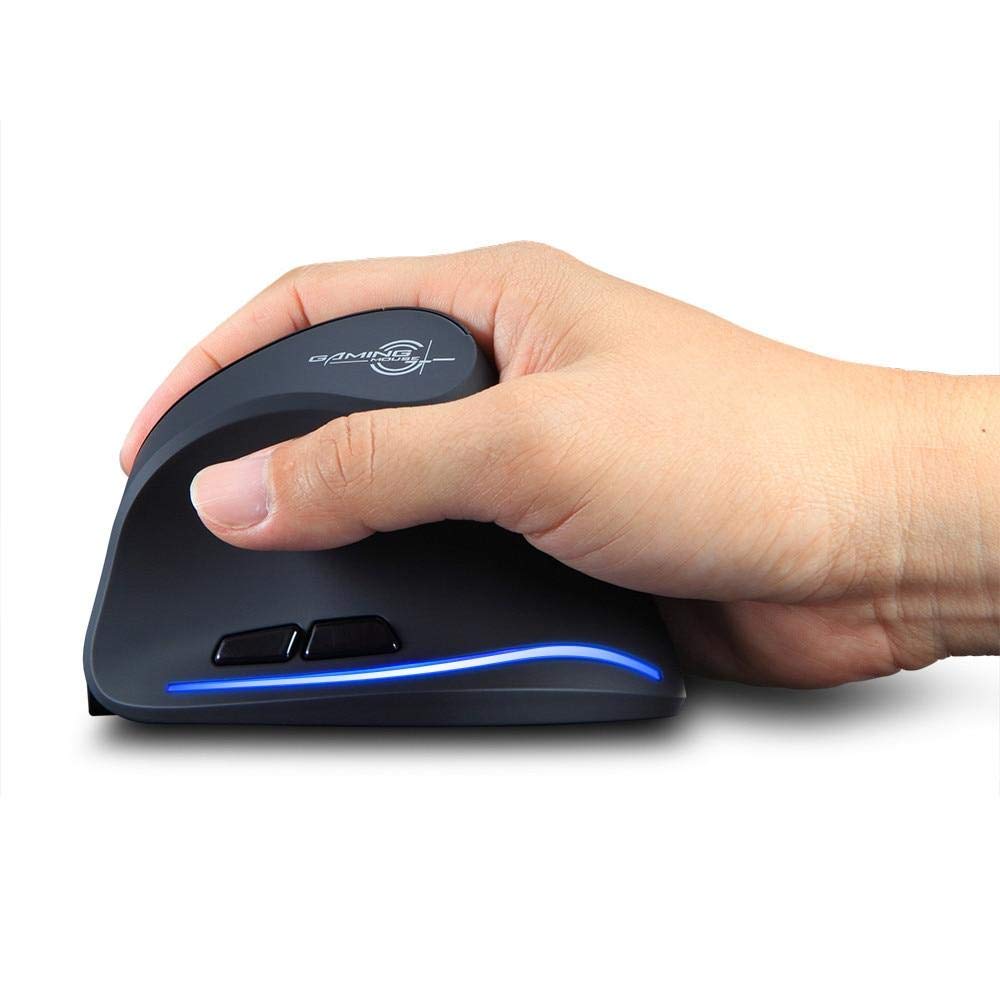
Image: The Zelotes F-35 Vertical Wireless Gaming Mouse, showcasing its unique ergonomic shape and illuminated accents.

Image: A visual comparison illustrating the natural hand position with a vertical mouse versus the twisted wrist position with a traditional horizontal mouse, highlighting the ergonomic benefits.
Cyfarwyddiadau Gosod
- Pŵer Ymlaen: Locate the ON/OFF switch on the bottom of the mouse and slide it to the 'ON' position.
- Select Connection Mode: The mouse supports three connection modes: 2.4GHz wireless (via USB dongle), Bluetooth 1, and Bluetooth 2. Use the 'Mode Switch' button on the bottom of the mouse to cycle through these options. The corresponding indicator light will illuminate.
- Cysylltiad Diwifr 2.4GHz:
- Remove the USB receiver dongle from its storage slot on the bottom of the mouse.
- Plygiwch y derbynnydd USB i mewn i borth USB sydd ar gael ar eich cyfrifiadur neu liniadur.
- Dylai'r llygoden gysylltu'n awtomatig.
- Bluetooth Connection (BT1/BT2):
- Switch the mouse to either Bluetooth 1 or Bluetooth 2 mode using the 'Mode Switch'.
- On your computer or laptop, go to Bluetooth settings and search for new devices.
- Select 'Zelotes F-35' from the list of available devices to pair.

Image: The underside of the Zelotes F-35 mouse, highlighting the ON/OFF switch, mode switch, and the integrated storage slot for the 2.4GHz USB receiver dongle.
Cyfarwyddiadau Gweithredu
The Zelotes F-35 mouse features 6 buttons designed for intuitive control and enhanced productivity:
- Botwm Clic Chwith: Swyddogaeth clicio sylfaenol safonol.
- Botwm Clic Dde: Swyddogaeth clicio eilaidd safonol.
- Olwyn Sgroliwch: Scroll up or down for navigation. Can also be pressed for a middle-click function.
- Botwm Addasu DPI: Located near the scroll wheel, press to cycle through different DPI settings (e.g., 800/1200/1600/2400) to adjust cursor sensitivity.
- Botwm Ymlaen: Located on the thumb rest, typically navigates forward in web porwyr neu file fforwyr.
- Botwm Yn ôl: Located on the thumb rest, typically navigates backward in web porwyr neu file fforwyr.
Codi Tâl a Batri
The Zelotes F-35 mouse is equipped with a rechargeable battery for continuous use.
- Porth Codi Tâl: The mouse features a USB-C charging port, typically located at the front base of the mouse.
- Codi tâl: Connect the provided USB-C cable to the mouse and the other end to a USB power source (e.g., computer USB port, wall adapter).
- Dangosydd Batri: The mouse may have an indicator light to show charging status or low battery. Refer to the product packaging for specific indicator behavior.
- Bywyd batri: The average battery life is approximately 12 months, depending on usage.
Cynnal a chadw
- Glanhau: Defnyddiwch frethyn meddal, sych i lanhau wyneb y llygoden. Ar gyfer baw ystyfnig, defnyddiwch frethyn ychydig yn sych.amp cloth can be used, ensuring no moisture enters the internal components.
- Gofal Synhwyrydd: Cadwch y synhwyrydd optegol ar waelod y llygoden yn lân ac yn rhydd o lwch neu falurion i sicrhau olrhain cywir.
- Storio: When not in use for extended periods, turn off the mouse to conserve battery life. Store the USB receiver in its designated slot to prevent loss.
Datrys problemau
- Llygoden Ddim yn Ymateb:
- Gwnewch yn siŵr bod y llygoden wedi'i throi YMLAEN.
- Gwiriwch lefel y batri a gwefrwch os oes angen.
- For 2.4GHz connection, ensure the USB receiver is securely plugged into the computer.
- For Bluetooth connection, ensure Bluetooth is enabled on your device and the mouse is correctly paired. Try re-pairing if issues persist.
- Olrhain Anghywir:
- Glanhewch y synhwyrydd optegol ar waelod y llygoden.
- Ensure you are using the mouse on a suitable surface (non-reflective, non-glass).
- Adjust the DPI setting to a comfortable level.
- Gostyngiadau Cysylltedd:
- Ensure the mouse is within the effective range of your device (typically up to 10 meters for wireless).
- Lleihau ymyrraeth gan ddyfeisiau diwifr eraill.
Manylebau
| Nodwedd | Manylyn |
|---|---|
| Brand | Zelotes |
| Model | F- 35 |
| Math | Di-wifr 2.4GHz, Bluetooth |
| Modd Gweithredu | Opto-electronig |
| Nifer y Botymau | 6 |
| Nifer y Rholeri | 1 |
| Cyfeiriadedd Llaw | Iawn |
| Math Rhyngwyneb | USB |
| DPI | 2400 |
| Nodwedd Arbennig | Rechargeable, Wireless |
| Canfod Symudiadau | Optegol |
| Dyfeisiau Cydnaws | Gliniadur, Cyfrifiadur Personol |
| System Weithredu | Linux, Windows 7 (and newer) |
| Bywyd Cyfartalog Batri | 12 mis |
| Ffynhonnell Pwer | Wedi'i Bweru â Batri |
| Lliw | Du |
| Gwlad Tarddiad | Tsieina |
Gwarant a Chefnogaeth
For warranty information and technical support, please refer to the documentation included with your product or visit the official Zelotes websafle. Gallwch hefyd gysylltu â'r manwerthwr lle prynoch chi'r cynnyrch i gael cymorth.