
1. Rhagymadrodd
Diolch am brynuasing the Bewinner Portable Remote Control. This device is designed to provide convenient control over your PC or laptop's media functions, allowing you to navigate applications, play media, and execute custom shortcuts from a distance. This manual provides detailed instructions for setup, operation, maintenance, and troubleshooting to ensure optimal performance.

The Bewinner Portable Remote Control is designed for ease of use and portability, allowing you to control your PC media from a comfortable distance.
2. Gwybodaeth Diogelwch
Darllenwch a dilynwch y canllawiau diogelwch hyn i atal difrod i'r cynnyrch neu anaf i chi'ch hun:
- Do not expose the remote control or USB receiver to water or excessive moisture.
- Osgoi gollwng y ddyfais neu ei darostwng i effeithiau cryf.
- Do not attempt to disassemble or modify the remote control. This will void the warranty.
- Cadwch fatris allan o gyrraedd plant. Os caiff ei lyncu, ceisiwch sylw meddygol ar unwaith.
- Gwaredwch batris ail-law yn unol â rheoliadau lleol.
- Ensure proper battery polarity when installing.
3. Cynnwys Pecyn
Gwiriwch fod yr holl eitemau yn bresennol yn eich pecyn:
- 1 x Bewinner Portable Remote Control
- 1 x USB Infrared Receiver
- Note: 2 x AAA batteries are NOT included and must be purchased separately.
4. Cynnyrch Drosview
The Bewinner Portable Remote Control features a slim design with various buttons for comprehensive PC control.

Blaen view of the remote control, highlighting its button layout.
Swyddogaethau botwm:
- Botwm Pŵer: Turns the computer on or off (requires system configuration).
- Botwm Llygoden: Activates/deactivates mouse mode for cursor control using directional keys.
- Directional Keys (Up, Down, Left, Right): Navigation in menus, web pages, or mouse cursor movement.
- Botwm Mewnosod: Yn cadarnhau dewisiadau.
- Cyfrol i fyny/i lawr: Yn addasu cyfaint y system.
- Tewi: Yn tewi/dad-dewi sain.
- Play/Pause, Stop, Previous/Next Track: Rheolyddion chwarae cyfryngau.
- Sgrin Llawn: Toggles full-screen mode for media players.
- My PC: Opens 'This PC' or 'My Computer'.
- Gofod cefn: Performs a backspace action.
- Tudalen Fyny/I lawr: tudalennau sgrolio.
- Tab: Performs a tab action.
- Esc: Escapes current action or closes menus.
- Desktop: Minimizes all windows to show the desktop.
- Numlock: Toggles numeric keypad functionality.
- Allweddi Rhifol (0-9): Rhifau mewnbwn.
- Custom Shortcut Keys (A, B, C, D): Programmable keys for launching applications.

Manwl view of the top section of the remote, including power and custom shortcut buttons.

Manwl view of the bottom section of the remote, showing numeric and function keys.
5. Gosod
5.1. Gosod Batri
- Lleolwch y compartment batri ar gefn y teclyn rheoli o bell.
- Llithrwch glawr y batri i lawr i'w agor.
- Mewnosodwch ddau fatri AAA, gan sicrhau'r polaredd cywir (+ a -).
- Replace the battery cover by sliding it back into position until it clicks.
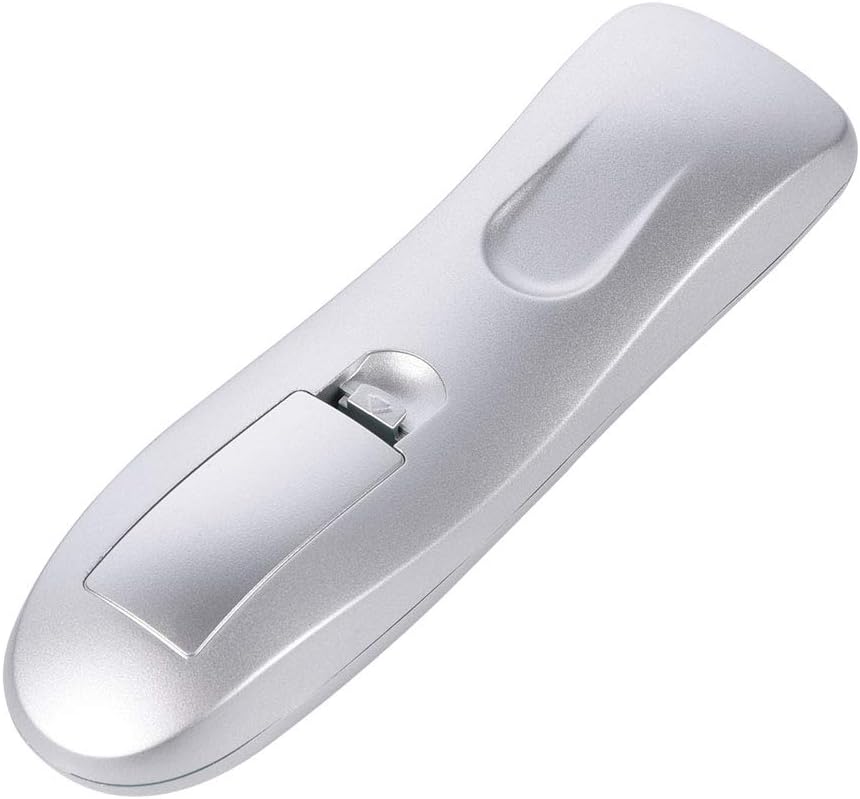
Agorwch yr adran batri i fewnosod batris.

Sicrhewch fod y clawr batri wedi'i gau'n ddiogel ar ôl ei osod.
5.2. Connecting the USB IR Receiver
- Dewch o hyd i borthladd USB sydd ar gael ar eich cyfrifiadur neu liniadur.
- Plug the USB Infrared Receiver into the USB port.
- The operating system (Windows 98/ME/XP/MCE/Vista/2000 and later) will automatically detect and install the necessary drivers. No manual driver installation is required.
- Once the drivers are installed, the remote control is ready for use.

The remote control and its accompanying USB Infrared Receiver.
6. Cyfarwyddiadau Gweithredu
6.1. Basic Control
- Rheolaeth Uniongyrchol: Most buttons (e.g., volume, media playback, page navigation) function directly without additional setup.
- Modd Llygoden: Gwasgwch y Llygoden button to activate cursor control. Use the directional keys to move the cursor. Press the Llygoden button again to exit mouse mode.
- Pellter Trosglwyddo: The remote operates effectively up to 10 meters (approximately 33 feet) from the USB IR receiver. Ensure a clear line of sight between the remote and the receiver for optimal performance.

The remote control offers a transmission distance of up to 10 meters.
6.2. Customizing Shortcut Keys (A, B, C, D)
The remote features four customizable shortcut keys (A, B, C, D) that can be programmed to launch specific applications. Each shortcut key can be configured to start up to three programs.
To customize these keys, you will typically need to use a third-party software or the operating system's built-in shortcut management features. Refer to your operating system's documentation for detailed instructions on assigning custom shortcuts to applications.
6.3. Cydweddoldeb
The remote control is compatible with the following operating systems:
- Windows 98
- Windows ME
- Windows XP
- Windows MCE
- Ffenestri Vista
- Windows 2000
- Later versions of Windows
It supports most common playback software, including but not limited to: WinDvd, RealPlayer, Winamp, MediaPlayer, PowerDvd, and web browsers like IE.
7. cynnal
7.1. Glanhau
To clean the remote control, use a soft, dry cloth. Do not use liquid cleaners, aerosols, or solvents, as these may damage the device.
7.2. Amnewid Batri
If the remote control's performance degrades or it stops responding, replace the AAA batteries. Refer to section 5.1 for battery installation instructions.
8. Datrys Problemau
| Problem | Achos Posibl | Ateb |
|---|---|---|
| Nid yw'r teclyn rheoli o bell yn ymatebol. | Low or dead batteries. Incorrect battery polarity. USB receiver not properly connected. No line of sight. | Replace batteries. Check battery polarity. Ensure USB receiver is firmly plugged in. Ensure clear path between remote and receiver. |
| Mouse cursor movement is erratic or slow. | Weak signal. Obstruction between remote and receiver. | Move closer to the receiver. Remove any obstructions. Ensure direct line of sight. |
| Custom shortcut keys do not work. | Keys not programmed. Incorrect programming. | Refer to your operating system's documentation for programming custom shortcuts. Ensure the correct application path is set. |
| Mae'r pellter o bell yn gweithio'n ysbeidiol. | Interference. Low battery. | Ensure no other IR devices are causing interference. Replace batteries. |
9. manylebau
- Brand: Bewinner
- Enw'r Model: Bewinnerrygza79bs3
- Technoleg Cysylltedd: Isgoch
- Dyfeisiau Cydnaws: Gliniadur, PC
- Ystod Uchaf: 10 o Fesurau
- Math o batri: 2 x AAA (heb ei gynnwys)
- Button Quantity: 10 (including numeric and function keys)
- Nodwedd arbennig: Universal control for PC media
- Systemau Gweithredu â Chymorth: WIN98, WINME, WINXP, Windows MCE, Vista, WIN2000, and later Windows versions.
10. Gwarant a Chefnogaeth
Bewinner products are manufactured with quality and performance in mind. If you encounter any issues with your Portable Remote Control, please contact our customer service team.
For product support, technical assistance, or warranty inquiries, please reach out to the seller or manufacturer through the platform where the product was purchased. Our professional customer service team is available to assist you with any questions or concerns.